
1. Introduzione
This manual provides comprehensive instructions for the installation, operation, and maintenance of your NINETOM Android 13 Car Radio. This 12.3-inch touchscreen unit is designed to upgrade the infotainment system in compatible Mercedes Benz vehicles, retaining original functions while introducing advanced Android capabilities.
Compatibilità Nota: This unit is specifically compatible with Mercedes Benz GLA, CLA, and A Class models (X156, C117) from 2016 to 2018, equipped with NTG5.0, NTG5.1, or NTG5.2 systems. It is not compatible with NTG 4.0, 4.5, or 4.7 systems.
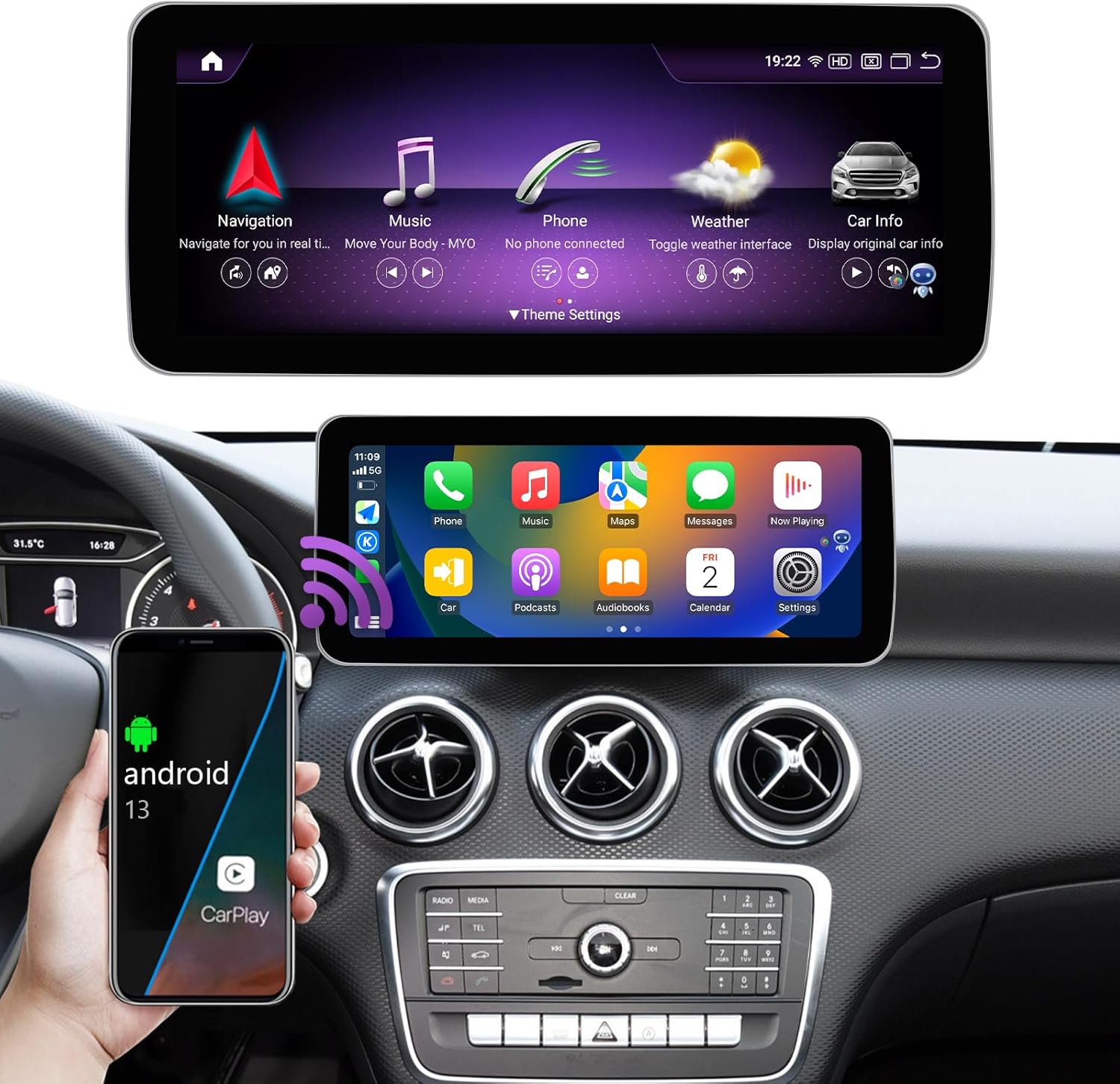
Figure 1.1: NINETOM Android 13 Car Radio main interface.
2. Verifica della compatibilità
Before proceeding with installation, it is crucial to verify your vehicle's compatibility. This unit supports Mercedes Benz models with NTG 5.0, 5.1, or 5.2 systems. Please refer to the following information to confirm your car's system type.

Figure 2.1: Compatible Model List.
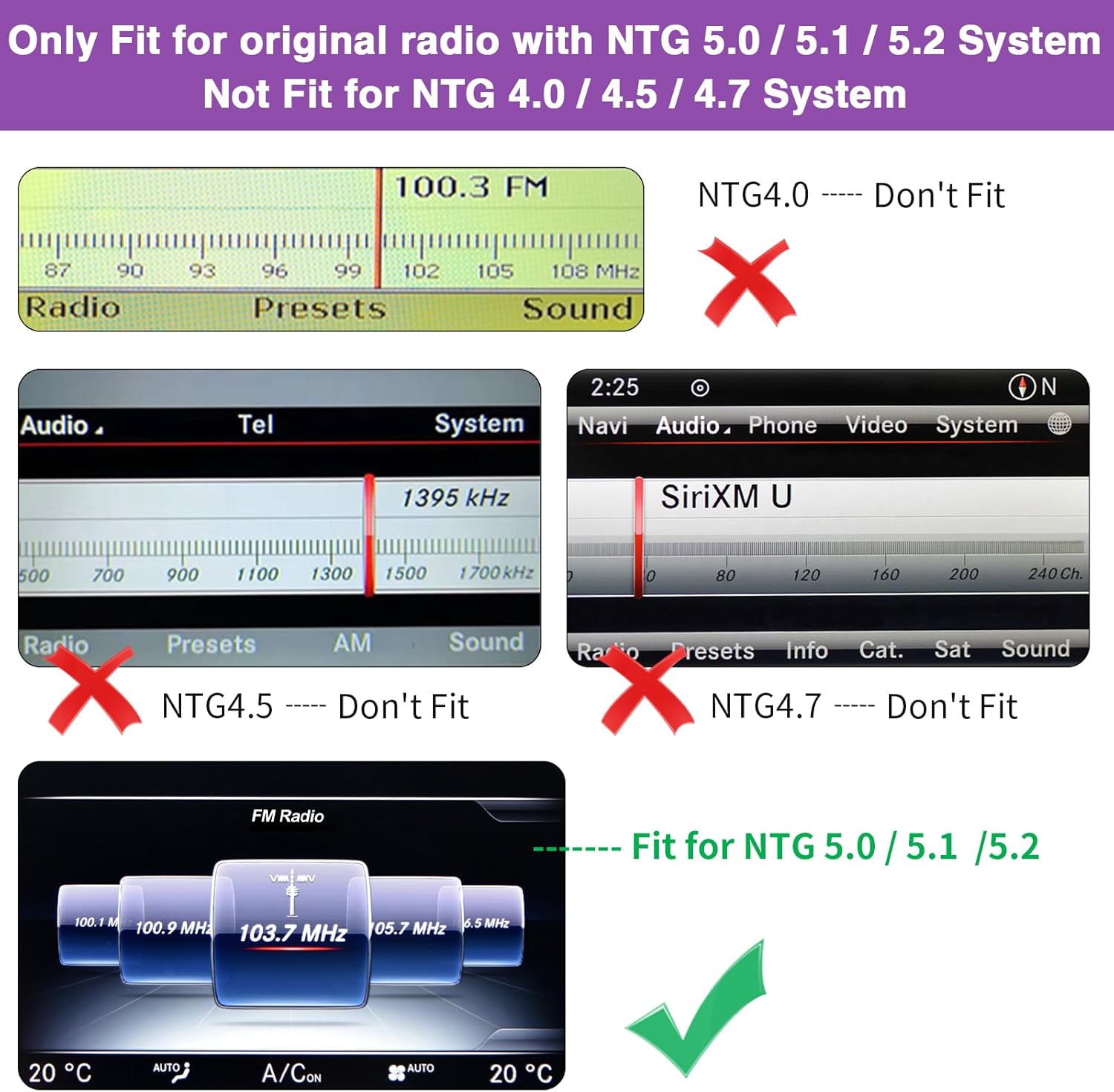
Figure 2.2: Visual identification of compatible and incompatible NTG systems.

Figure 2.3: Identifying your car's original radio system.
3. Configurazione e installazione
3.1. Cosa c'è nella scatola
Prima di iniziare l'installazione, assicurarsi che tutti i componenti siano presenti:
- 12.3" Touchscreen Unit
- Cavo di alimentazione
- LVDS Cable
- Antenna GPS
- Trumpet (Speaker)
- Microfono
- Antenna WiFi
- Scatola audio USB
- Modulo WiFi
- Porta USB
- Porta della scheda SIM

Figure 3.1: Product Information and Included Components.
3.2. Installazione finitaview
Installation of the NINETOM Android 13 Car Radio involves replacing the original screen and connecting the new unit to the vehicle's existing wiring harness. It is designed to integrate seamlessly without damaging original car wiring or affecting your factory car warranty.
Importante: If you are not confident in performing the installation yourself, it is highly recommended to seek assistance from a qualified professional. Do not finalize the installation until you have thoroughly tested every function on your vehicle to ensure correct operation.
For detailed wiring diagrams and specific installation steps, please refer to the supplementary installation guide provided with your product or contact customer support.
4. Istruzioni per l'uso
4.1. Powering On and System Switching
The unit powers on automatically with the vehicle's ignition. You can easily switch between the factory car system and the Android 13 system by tapping the 'Car Info' button on the Android home screen menu.
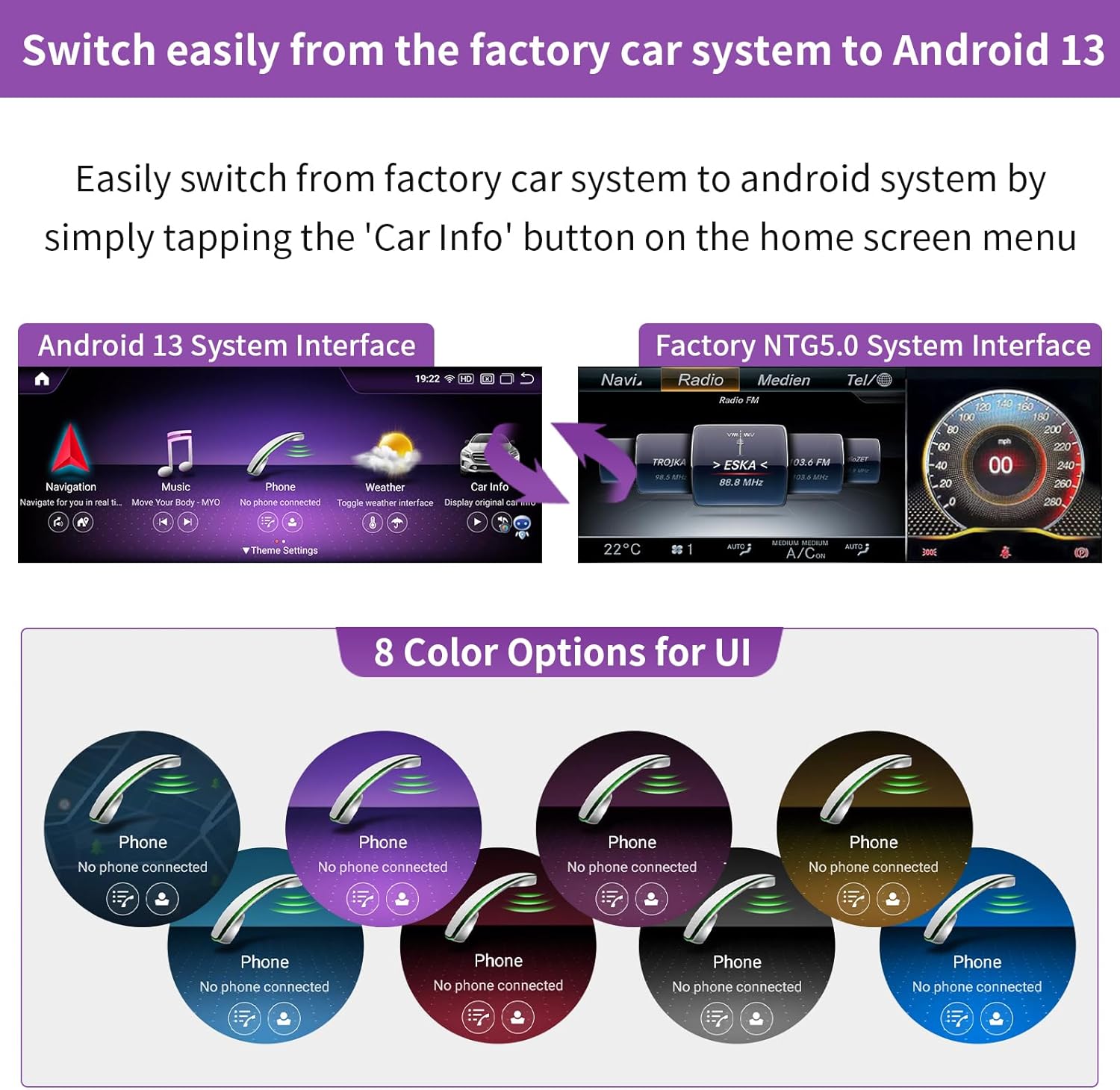
Figure 4.1: Switching between Android and Factory Systems, and UI color options.
4.2. Funzionalità del sistema Android 13
The unit runs on Android 13 and supports a wide range of functions:
- Apple CarPlay e Android Auto wireless/cablati: Connect your smartphone for navigation, music, calls, and messaging.
- Funzione di collegamento specchio: AirPlay for iPhone and AutoLink for Android devices.
- Bluetooth: Per lo streaming musicale e le chiamate in vivavoce.
- Wifi: Built-in WiFi for internet access and app downloads.
- USB & SIM Card Ports: For expanded connectivity and data.
- Multilingual Settings: Customize the system language.
- Navigatore: Access the internet directly from the unit.

Figure 4.2: CarPlay, Android Auto, and Mirror Link in action.

Figure 4.3: Connectivity, Weather, Camera, and Navigation features.
4.3. Funzioni originali mantenute
The NINETOM Android 13 Car Radio is designed to seamlessly integrate with your vehicle's existing systems, retaining all original functions:
- Autoradio originale e ampfunzioni lifier.
- Controllo joystick di fabbrica.
- Original reversing camera and parking radar.
- Steering wheel controls.
- Original Comand Knob and Touch Mouse.

Figure 4.4: Original car functions supported by the unit.
5. Manutenzione
5.1. Pulizia dello schermo
Per pulire il touchscreen, strofinarlo delicatamente con un panno morbido e privo di lanugine. Per le macchie ostinate, strofinare leggermenteampImmergere il panno in acqua o in una soluzione detergente adatta allo schermo. Evitare l'uso di prodotti chimici aggressivi, materiali abrasivi o umidità eccessiva, poiché potrebbero danneggiare lo schermo.
5.2. Aggiornamenti software
Periodically check for software updates to ensure optimal performance and access to the latest features. Updates can typically be performed via the unit's settings menu when connected to Wi-Fi. Follow the on-screen instructions carefully during any update process.
6. Risoluzione Dei Problemi
If you encounter any issues with your NINETOM Android 13 Car Radio, please refer to the following common troubleshooting steps:
- Nessun potere:
- Controllare tutti i collegamenti elettrici per accertarsi che siano saldamente fissati.
- Verify the vehicle's fuse related to the radio/infotainment system.
- Nessun suono:
- Assicurarsi che il volume non sia disattivato o impostato su un livello troppo basso.
- Controllare i collegamenti degli altoparlanti.
- Verificare che sia selezionata la sorgente audio corretta.
- Touchscreen non reattivo:
- Try restarting the unit (if a reset button is available, use a thin object to press it).
- Assicurarsi che lo schermo sia pulito e privo di detriti.
- CarPlay/Android Auto non si connette:
- Assicurati che il Bluetooth e il Wi-Fi del tuo telefono siano abilitati.
- Try reconnecting the phone.
- Verifica che il sistema operativo del tuo telefono sia aggiornato.
- Problemi con il segnale GPS:
- Assicurarsi che l'antenna GPS sia installata correttamente e abbia una visuale libera view del cielo.
- Controllare le impostazioni GPS nel sistema Android.
If these steps do not resolve the issue, please contact NINETOM customer support for further assistance.
7. Specifiche
| Caratteristica | Dettaglio |
|---|---|
| Sistema operativo | Androide 13 |
| Dimensioni dello schermo | 12.3 pollici |
| Risoluzione | 1920*720 pixels (Ultra high resolution) |
| Memoria (RAM) | 8 GB |
| Memoria (ROM) | 256 GB |
| Connettività | Bluetooth, WiFi, USB, SIM Card Support |
| Caratteristiche speciali | Touchscreen, Wireless CarPlay, Android Auto, Mirror Link, GPS Navigation, Support for original/aftermarket cameras |
| Tipo di servizio del veicolo | Car (Mercedes Benz GLA, CLA, A Class X156 C117, 2016-2018 with NTG5.0/5.1/5.2) |
| Peso dell'articolo | 5.99 libbre |
| Dimensioni del pacco | 15.43 x 7.17 x 6.81 pollici |

Figure 7.1: Screen Resolution Comparison.

Figure 7.2: Screen Size Comparison (12.3 inch model).
8. Garanzia e supporto
8.1. Garanzia del prodotto
The NINETOM Android 13 Car Radio comes with a Garanzia di 1 anno dalla data di acquisto. La presente garanzia copre difetti di fabbricazione e malfunzionamenti in condizioni di normale utilizzo. Si prega di conservare la prova d'acquisto per eventuali reclami in garanzia.
8.2. Assistenza clienti
For any issues, questions, or installation assistance, please do not hesitate to reach out to NINETOM customer support. Our team is available to provide expert guidance and support.
Informazioni sui contatti: Please refer to the contact details provided with your product packaging or visit the official NINETOM websito per opzioni di supporto.