
1. Introduzione
This manual provides instructions for the use and maintenance of your new replacement remote control for various Hitachi Smart TV models. This remote is designed to function as a direct replacement for your original remote, offering essential control over your television.
Please note that as a replacement unit, some advanced or specific functions present on your original remote might not be fully supported. It is recommended to verify compatibility with your specific TV model.
2. Prodotto finitoview
The replacement remote control features a standard layout for easy navigation and control of your Hitachi Smart TV. It is typically supplied in either black or white color, chosen at random.
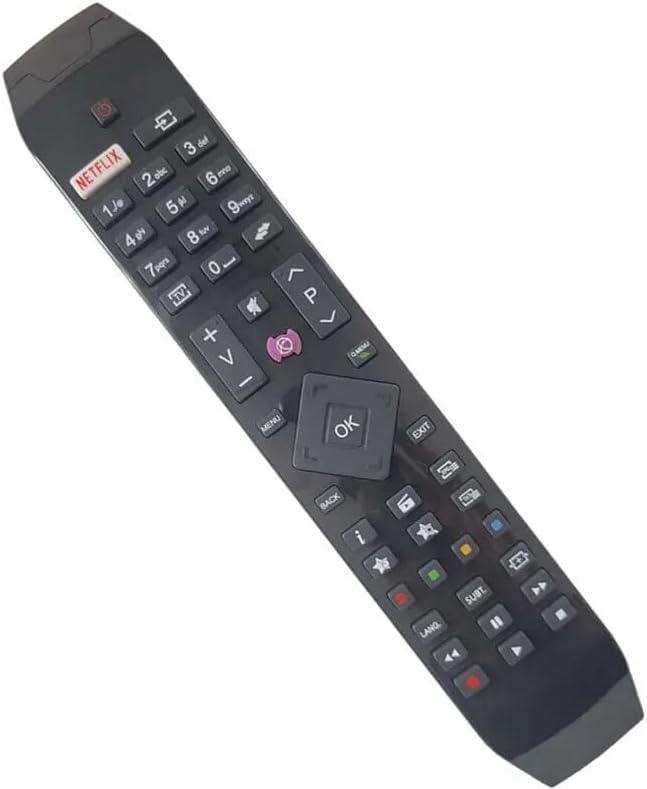
Figura 2.1: Angolato view of the replacement remote control, highlighting its ergonomic design and button layout.

Figura 2.2: Frontale view of the replacement remote control, detailing the arrangement of function buttons.
The remote includes dedicated buttons for common functions such as Power, Volume Up/Down, Channel Up/Down, Mute, and a central navigation pad with an OK button. It also features quick access buttons for streaming services like Netflix and other smart TV functionalities.
3. Impostazione
3.1 Installazione della batteria
- Individuare il vano batterie sul retro del telecomando.
- Far scorrere per aprire il coperchio della batteria.
- Inserire due batterie AAA (non incluse), assicurandosi che i terminali positivo (+) e negativo (-) siano allineati correttamente con le marcature all'interno del vano.
- Chiudere bene il coperchio della batteria.
3.2 Uso iniziale
Once batteries are installed, the remote control is ready for use. Point the remote directly at your Hitachi Smart TV and press the Power button to turn on the television. No pairing or programming is typically required for this replacement remote.
4. Istruzioni per l'uso
This remote control provides standard functionality for your Hitachi Smart TV. Below are common operations:
- Pulsante di accensione: Accende o spegne la TV.
- Pulsanti del volume (+/-): Aumenta o diminuisce il volume della TV.
- Channel Buttons (P+/-): Cambia il canale TV in su o in giù.
- Tasto muto: Disattiva o riattiva l'audio della TV.
- Tastierino di navigazione (Su/Giù/Sinistra/Destra/OK): Utilizzato per navigare nei menu e confermare le selezioni sullo schermo del televisore.
- Pulsante Netflix: Direct access to the Netflix application (if supported by your TV model).
- Pulsante Menu/Home: Accesses the TV's main menu or smart home screen.
- Pulsante Indietro/Esci: Ritorna alla schermata precedente o esce da un menu.
- Tasti numerici (0-9): For direct channel input or other numerical selections.
For specific advanced functions or smart TV features, refer to your Hitachi TV's original user manual.
5. Compatibilità
This replacement remote control is compatible with various Hitachi Smart TV models. Known compatible models include, but are not limited to:
- 43HL15W69
- 43HL5W69
- 48HB6W62A
- 49HB5W62
- 49HB6W62H
- 32HB6T41A
- 43HB5T62
- 43HK4W64
- 43HK5W64
If your specific TV model is not listed, it is recommended to compare your original remote with the images provided or contact the seller for confirmation of compatibility.
6. Manutenzione
6.1 Sostituzione della batteria
Sostituisci le batterie quando la risposta del telecomando diventa lenta o smette di funzionare. Sostituisci sempre entrambe le batterie contemporaneamente con batterie nuove dello stesso tipo (AAA). Non mischiare batterie vecchie e nuove o tipi diversi di batterie.
6.2 Pulizia
Per pulire il telecomando, strofinarlo delicatamente con un panno morbido e asciutto. Per lo sporco ostinato, un panno leggermenteamp È possibile utilizzare un panno, ma assicurarsi che non penetri umidità nel telecomando. Non utilizzare detergenti abrasivi o solventi.
6.3 Conservazione
Conservare il telecomando in un luogo fresco e asciutto, lontano dalla luce solare diretta e da temperature estreme. Se il telecomando non viene utilizzato per un periodo prolungato, si consiglia di rimuovere le batterie per evitare perdite.
7. Risoluzione Dei Problemi
- Il telecomando non risponde:
- Controllare che le batterie siano inserite correttamente, rispettando la polarità corretta.
- Sostituisci le batterie con batterie nuove.
- Assicurarsi che non vi siano ostacoli tra il telecomando e il sensore a infrarossi del televisore.
- Puntare il telecomando direttamente verso la TV.
- Alcune funzioni non funzionano:
- As a replacement remote, certain advanced or specific functions of your original TV remote may not be supported. This is normal.
- Verify that the function you are trying to use is standard for a TV remote.
- Il telecomando funziona a intermittenza:
- Le batterie potrebbero essere scariche; sostituirle.
- Assicurarsi che i contatti della batteria siano puliti e privi di corrosione.
Se i problemi persistono dopo aver seguito questi passaggi, contatta il venditore per ulteriore assistenza.
8. Specifiche
| Marca | Generico |
| Produttore | Generico |
| Dispositivi compatibili | Hitachi Smart TVs (e.g., 43HL15W69, 43HL5W69, 48HB6W62A, 49HB5W62, 49HB6W62H, 32HB6T41A, 43HB5T62, 43HK4W64, 43HK5W64) |
| Caratteristica speciale | Ergonomic |
| Colore | Black/White (randomly sent) |
| Numero massimo di dispositivi supportati | 5 (as a universal remote, though this is a replacement for specific TVs) |
| Fonte di alimentazione | 2 x batterie AAA (non incluse) |
| Materiale | Plastica ABS |
9. Garanzia e supporto
Specific warranty information for this replacement remote control is not provided in the product details. For any warranty claims, technical support, or further inquiries, please contact the seller directly through your purchase platform.
It is recommended to retain your purchase receipt as proof of purchase for any support requests.