
1. Introduzione e oltreview
The Epson PowerLite 97H is a versatile XGA conference room projector designed for clear and vibrant presentations. Utilizing 3LCD technology, it delivers bright, true-to-life images with excellent color brightness and a wide color gamut. This projector offers a native resolution of 1024x768 (XGA) and a brightness of 2,700 ANSI Lumens, making it suitable for various environments.
Le caratteristiche principali includono:
- Luminosità: 2,700 ANSI Lumen
- Risoluzione: 1024x768 (XGA)
- Proporzioni: 4:3
- Contrasto: 10,000:1
- Tecnologia di visualizzazione: 3LCD for vibrant colors
- Connettività: Multiple options including HDMI, USB, LAN, VGA, S-Video, Composite, and Audio inputs/outputs.
2. Informazioni sulla sicurezza
Please read all safety instructions before using the projector to ensure safe operation and to prevent damage to the unit. Keep this manual for future reference.
- Avviso di calore: Il proiettore lamp and surrounding areas can become extremely hot during operation and immediately after shutdown. Avoid touching these areas.
- Ventilazione: Ensure adequate ventilation around the projector. Do not block ventilation openings, as this can lead to overheating and potential damage.
- Lamp Sostituzione: Always turn off the projector and allow the lamp to cool completely before attempting to replace it. Refer to the lamp replacement instructions in the Maintenance section.
- Fonte di energia: Use only the specified power supply and cable. Do not overload power outlets.
- Liquido e umidità: Do not expose the projector to rain, moisture, or excessive humidity. Do not place objects filled with liquids on or near the projector.
- Pulizia: Scollegare il cavo di alimentazione prima della pulizia. Utilizzare un panno morbido e asciutto. Non utilizzare detergenti liquidi o spray.
3. Contenuto della confezione
Verifica che tutti gli articoli siano presenti nel tuo pacco:
- Epson PowerLite 97H Projector
- Telecomando
- Cavo di alimentazione
- Cavo HDMI
4. Impostazione
4.1 Posizionamento fisico
Place the projector on a stable, flat surface. Ensure there is sufficient space around the projector for proper ventilation. Avoid placing it in direct sunlight or near heat sources. The projector is designed to be portable and can be used for tabletop projection.
4.2 Collegamento dei dispositivi
The PowerLite 97H offers a wide range of connectivity options. Refer to the image below for port identification.

Figure 1: Rear panel of the Epson PowerLite 97H Projector showing various input and output ports.
- USB-A: Connect USB storage devices or a document camera.
- USB-B: Connect to a computer for USB display or control.
- LAN (RJ-45): Connect to a network for control and monitoring.
- HDMI 1 & HDMI 2/MHL: Connect to devices with HDMI output (e.g., laptops, Blu-ray players, gaming consoles). HDMI 2 also supports MHL for compatible mobile devices.
- Computer1 (VGA) & Computer2 (VGA): Connect to computers using a VGA cable.
- Audio1 (Mini Jack) & Audio2 (Mini Jack): Connect audio from computers or other devices.
- Video S: Connect to devices with S-Video output.
- Video (RCA): Connect to devices with composite video output.
- Audio In (RCA R/L): Connect stereo audio from devices with RCA audio output.
- Mic: Collega un microfono.
- RS-232C: Per il controllo seriale del proiettore.
- Uscita monitor (VGA): Connect an external monitor to display the projector's input signal.
- Audio Out (Mini Jack): Connect external speakers or an audio system.
4.3 Accensione
- Collegare il cavo di alimentazione alla presa CA del proiettore e poi a una presa di corrente.
- Premere il tasto Energia button on the projector's control panel or the remote control. The power light will illuminate, and the projector will begin its startup sequence.
5. Operativo
5.1 Controlli di base
The projector can be operated using the control panel on the top of the unit or the included remote control. The top panel provides essential functions.

Figure 2: Top control panel of the Epson PowerLite 97H Projector.
- Pulsante di accensione: Accende o spegne il proiettore.
- Ricerca della fonte: Scorre le sorgenti di input disponibili.
- Menu: Apre il menu OSD (On-Screen Display).
- H/V (Horizontal/Vertical Keystone): Adjusts image shape to correct trapezoidal distortion.
- Esc: Esce dal menu o dalla funzione corrente.
- Inserisci: Conferma una selezione nel menu.
- Pulsanti freccia: Naviga tra le opzioni del menu e regola le impostazioni.
- Pulsanti del volume: Regola il livello di uscita audio.
- Aiuto: Fornisce assistenza sullo schermo.
- Spia di stato: Indicates projector status (e.g., power on, standby, error).
- Lamp Temp Light: Indicates lamp temperature status.
5.2 Regolazione dell'immagine
To achieve a clear and properly sized image:
- Anello di messa a fuoco: Rotate the focus ring located near the lens to sharpen the image.
- Leva dello zoom: Use the zoom lever (if present, typically near the lens) to adjust the image size without moving the projector.
- Correzione trapezoidale: If the image appears trapezoidal, use the H/V keystone buttons on the control panel or remote to correct the shape.

Figura 3: Fronte/lato view showing the projector lens and ventilation.
5.3 Selezione dell'ingresso
Premere il tasto Ricerca fonte button on the control panel or remote control to cycle through the connected input sources (e.g., HDMI 1, Computer1, USB-A). The projector will automatically detect and display the active input.
6. Manutenzione
Una manutenzione regolare garantisce prestazioni ottimali e prolunga la durata del proiettore.
6.1 Lamp Sostituzione
Il proiettore lamp ha una durata di vita limitata. Quando lamp giunge al termine della sua vita, la Lamp Temp indicator may light up, or the image brightness may decrease significantly. Always use genuine Epson replacement lamps.

Figura 4: lato view of the projector, showing a caution label regarding hot surfaces.
WARNING: Turn off the projector and wait until the lamp has cooled down completely before attempting replacement. Failure to do so can result in severe burns or damage to the projector. Refer to the specific lamp replacement instructions provided in the full Epson service manual for your model.
6.2 Pulizia/sostituzione del filtro dell'aria
The air filter prevents dust from entering the projector and affecting performance. Clean the air filter regularly (e.g., every 100 hours of use) or when prompted by the projector. If the filter is damaged or excessively dirty, replace it.
- Turn off the projector and disconnect the power cable.
- Locate the air filter cover (refer to your full service manual for exact location).
- Remove the cover and carefully extract the filter.
- Use a small vacuum cleaner or soft brush to remove dust from the filter. If replacing, insert a new filter.
- Richiudere saldamente il coperchio del filtro.
6.3 Cura generale
- Pulizia delle lenti: Gently wipe the lens with a soft, non-abrasive lens cleaning cloth. Do not use harsh chemicals.
- Pulizia esterna: Pulire l'esterno del proiettore con un panno morbido e asciutto. Per lo sporco ostinato, utilizzare un panno leggermenteamp panno e un detergente delicato, quindi asciugare.
- Magazzinaggio: Quando non viene utilizzato per lunghi periodi, conservare il proiettore in un luogo fresco e asciutto, idealmente nella confezione originale o in una custodia protettiva.
7. Risoluzione Dei Problemi
If you encounter issues with your projector, try the following solutions:
- Nessuna immagine:
- Assicurarsi che il proiettore sia acceso e che la spia di alimentazione sia accesa fissa.
- Check all cable connections (HDMI, VGA, etc.) are secure at both the projector and the source device.
- Premere il tasto Ricerca fonte button to cycle through inputs.
- Verificare che il dispositivo sorgente sia acceso e che emetta un segnale.
- Adjust the focus and zoom.
- Nessun suono:
- Increase the projector's volume using the volume buttons.
- Check audio cable connections (if using separate audio cables).
- Ensure the audio output on your source device is enabled and turned up.
- Il telecomando non funziona:
- Ensure there are no obstructions between the remote and the projector's remote sensor.
- Sostituire le batterie del telecomando.
- Avviso di surriscaldamento:
- Assicurarsi che tutte le aperture di ventilazione siano libere e non ostruite.
- Pulire il filtro dell'aria come descritto nella sezione Manutenzione.
- Utilizzare il proiettore in un'area ben ventilata.
8. Specifiche
| Caratteristica | Specificazione |
|---|---|
| Produttore | Epson |
| Modello | PowerLite97H |
| Tipo di visualizzazione | 3LCD |
| Risoluzione nativa | Risoluzione: 1024 x 768 (XGA) |
| Luminosità | 2700 ANSI Lumen |
| Rapporto di contrasto | 10000:1 |
| Proporzioni | 4:3 |
| Tecnologia di connettività | HDMI, USB, LAN, VGA, S-Video, Composite |
| Ingressi audio | Mini Jack x 2, RCA (L/R), Mic |
| Uscita audio | Mini-Cric |
| Porta di controllo | RS-232C |
| Usi consigliati | Attività commerciale |
| Caratteristica speciale | Portatile |
| Peso dell'articolo | 6 libbre |
9. Informazioni sulla garanzia
For specific warranty details regarding your Epson PowerLite 97H projector, please refer to the warranty card included with your product or contact the seller/manufacturer directly. Warranty terms typically cover manufacturing defects for a specified period from the date of purchase.
10. Supporto
For technical support, service, or additional assistance with your Epson PowerLite 97H projector, please use the contact information below:
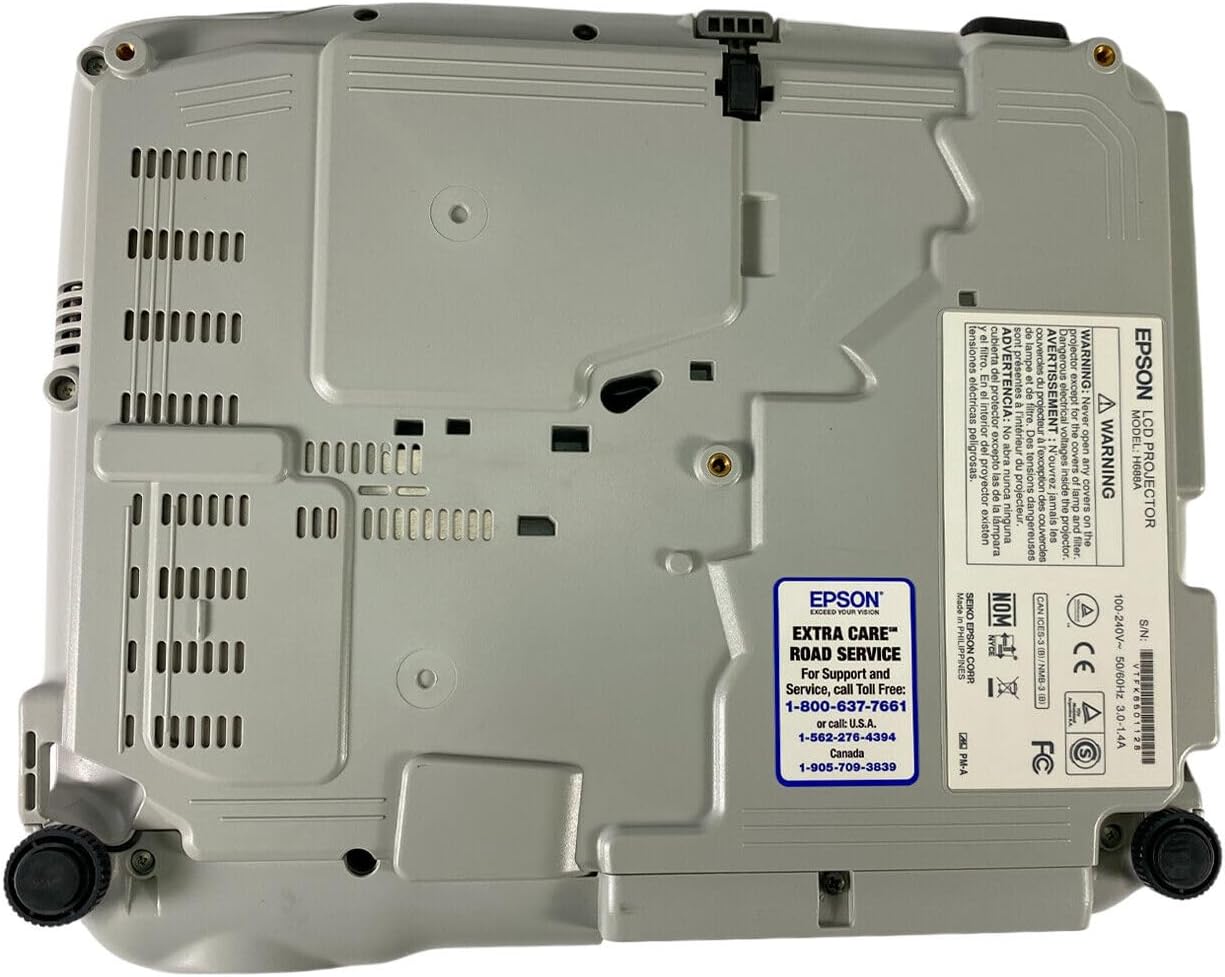
Figure 5: Bottom panel of the projector showing support contact details.
Epson Extra Care Road Service
- For support and service, call:
- U.S.A: Numero di parte 1-800-637-7661
- U.S.A: Numero di parte 1-866-276-4394
- Canada: Numero di parte 1-905-709-3839