
1. Introduzione
Thank you for choosing the OMMO OM-LL14 16 Lines Green Laser Level. This precision tool is designed to provide accurate and reliable leveling for a wide range of applications, from home renovation to professional construction projects. Featuring 4x360° green laser lines, self-leveling capabilities, and a durable design, the OM-LL14 enhances efficiency and accuracy in your work. Please read this manual thoroughly before use to ensure safe and optimal operation.

Figure 1: OMMO OM-LL14 16 Lines Green Laser Level
2. Informazioni sulla sicurezza
AVVERTIMENTO: Questo è un prodotto laser di Classe II. Evitare l'esposizione diretta degli occhi al raggio laser. Non fissare il raggio o view directly with optical instruments. Always operate the device in a safe manner.
- Non smontare la livella laser. Le riparazioni devono essere eseguite solo da personale di assistenza autorizzato.
- Tenere il dispositivo fuori dalla portata dei bambini.
- Utilizzare solo le batterie e il caricabatterie specificati.
- Assicurarsi che l'area di lavoro sia libera da ostacoli e potenziali pericoli.
3. Contenuto della confezione
Verifica che tutti gli articoli elencati di seguito siano inclusi nel tuo pacchetto:
- 1 x OMMO OM-LL14 16 Lines Green Laser Level
- 1 x supporto magnetico da parete
- 2 x 3600mAh Rechargeable Li-ion Batteries
- 1 x Adjustable Lifting Base
- 1 x Manuale utente
- 1 x Borsa per il trasporto
- 1 x adattatore di alimentazione (caricabatterie)
- 1 x telecomando
- 1 x Hang Up Converter (for tripod mounting)
- 1 x 1/4" Thread Adapter (for tripod mounting)
- 1 x Bracket Patch (Wall Mounting Plate)

Figure 2: OMMO Laser Level and included accessories.
4. Prodotto finitoview
The OMMO OM-LL14 features a robust design with intuitive controls for various leveling tasks.
4.1 Caratteristiche principali
- Linee laser verdi 4x360°: Provides two horizontal and two vertical 360-degree laser planes for comprehensive coverage.
- Rotatable Laser Window: Each laser window can be rotated 360° to avoid blocked lines and vignetting, ensuring continuous laser projection.
- Modalità autolivellante: Automatically levels within a tilt angle of ±3°. An alarm sounds if the tilt exceeds this range.
- Modalità manuale/inclinazione: Allows projection of inclined lines at any angle by locking the pendulum.
- Luminosità regolabile: Three brightness levels to suit different working conditions.
- Design durevole: Shockproof, waterproof, and dustproof for reliable performance in various environments.
- Batteria ricaricabile: Equipped with two 3600mAh Lithium-ion batteries for extended operation.
- Telecomando: Conveniently switch between laser lines and adjust brightness from a distance.
4.2 Controlli e Indicatori
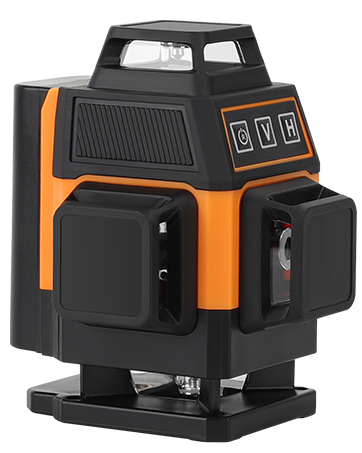
Figura 3: Fronte view of the OMMO OM-LL14 showing control panel.
- Indicatore della batteria: Displays remaining battery life (4 bars = full, 1 bar = low).
- 'V' Button (Vertical Line): Attiva/disattiva le linee laser verticali.
- 'H' Button (Horizontal Line): Attiva/disattiva le linee laser orizzontali.
- Power Button (Brightness Adjustment): Cycles through three brightness modes.
- Mode Switch (Side Slider): Toggles between Self-leveling (unlocked pendulum) and Manual/Tilt (locked pendulum) modes.
- Power On/Off Button (Bottom): Interruttore di alimentazione principale del dispositivo.
Video 1: This video demonstrates the OMMO 16 Lines Laser Level's features, including its rotatable laser windows, self-leveling and manual modes, brightness adjustment, and various mounting options. It also shows the remote control functionality and charging process.
5. Impostazione
5.1 Installazione e ricarica della batteria
- Individuare il vano batteria sul lato del livello laser.
- Insert a fully charged 3600mAh Li-ion battery into the compartment, ensuring correct polarity. Slide it in until it clicks securely.
- To charge the battery, connect the power adapter to the charging port on the laser level or directly to the battery. The indicator light on the charger will show charging status (e.g., red for charging, green for fully charged).
- The battery indicator on the device's control panel will also show the current charge level.
5.2 Opzioni di montaggio
The OMMO OM-LL14 offers versatile mounting options for different applications:
- Adjustable Lifting Base: For precise height adjustments on flat surfaces. The base can raise the laser from 1 inch to 3 inches.

Figure 4: The laser level mounted on its adjustable lifting base.
- Supporto magnetico da parete: Attach the bracket to any magnetic surface (e.g., steel beams, refrigerator) for flexible positioning. It features adjustable knobs for fine-tuning horizontal and vertical angles.

Figure 5: The laser level attached to a magnetic wall bracket.
- Piastra di montaggio a parete: If a magnetic surface is unavailable, screw the metal plate into a wall, then attach the magnetic bracket to the plate.
- Montaggio del treppiede: Use the 1/4" thread adapter or hang up converter to mount the laser level onto a standard tripod (not included) for elevated or specialized setups.
6. Istruzioni per l'uso
6.1 Accensione/spegnimento
- To power on, slide the main power switch (located on the side/bottom) to the 'ON' position.
- To power off, slide the main power switch to the 'OFF' position.
6.2 Switching Modes (Self-leveling / Manual)
- Modalità autolivellante: Slide the mode switch to the unlocked pendulum icon. The device will automatically level itself. If the tilt angle exceeds ±3°, the laser lines will flash and an alarm will sound.
- Modalità manuale/inclinazione: Slide the mode switch to the locked pendulum icon. The self-leveling function is deactivated, allowing you to project inclined lines at any desired angle without an alarm.

Figure 6: Illustration of Self-leveling Mode and Manual/Tilt Mode.
6.3 Activating Laser Lines
Use the 'V' and 'H' buttons on the control panel or remote control to activate specific laser lines:
- Press 'V' to cycle through vertical laser lines (one vertical, two vertical, off).
- Press 'H' to cycle through horizontal laser lines (one horizontal, two horizontal, off).
- You can combine vertical and horizontal lines as needed.

Figure 7: Various combinations of 360° vertical and horizontal laser lines.
6.4 Regolazione della luminosità
Press the Power button (brightness adjustment) on the control panel or the corresponding button on the remote control to cycle through three different brightness levels for the laser lines.
6.5 Utilizzo del telecomando
The included remote control allows for convenient operation from a distance. It has dedicated buttons for vertical lines, horizontal lines, and brightness adjustment, mirroring the functions on the device's control panel.
7. Manutenzione
- Pulizia: Pulire regolarmente le finestre laser e il corpo del dispositivo con un panno morbido e asciutto. Non utilizzare detergenti abrasivi o solventi.
- Magazzinaggio: When not in use, store the laser level in its carry bag in a cool, dry place, away from direct sunlight and extreme temperatures. Ensure the pendulum is locked (Manual/Tilt mode) during storage and transport to prevent damage.
- Cura della batteria: Charge batteries fully before long-term storage. If storing for extended periods, recharge every 3-6 months to maintain battery health.
- Calibrazione: If you suspect the laser level is out of calibration, consult a professional or contact OMMO customer support.
8. Risoluzione Dei Problemi
| Problema | Possibile causa | Soluzione |
|---|---|---|
| Laser not turning on. | La batteria è scarica o non è installata correttamente. | Charge the battery or ensure it is properly inserted. Check the main power switch. |
| Laser lines flashing and beeping in Self-leveling mode. | Device is tilted beyond its self-leveling range (±3°). | Place the device on a flatter surface or adjust the lifting base until it is within the self-leveling range. |
| Il telecomando non risponde. | La batteria del telecomando è scarica o fuori portata. | Replace the remote control battery. Ensure you are within the remote's operating range. |
| Le linee laser sono deboli. | L'impostazione della luminosità è bassa. | Press the brightness adjustment button to cycle to a brighter setting. |
9. Specifiche
| Caratteristica | Dettaglio |
|---|---|
| Marca | OMMO |
| Numero di modello | OM-LL14 |
| Linee laser | 16 Lines (4x360° Green Laser) |
| Gamma di autolivellamento | ±3° |
| Modalità di funzionamento | Automatic (Self-leveling) / Manual |
| Tipo di batteria | 2 x Lithium Ion (3600mAh each) |
| Fonte di alimentazione | Alimentato a batteria |
| Materiale | Acrilonitrile-butadiene-stirene |
| Caratteristiche speciali | Green-line, Self-leveling, Waterproof, Dustproof, Shockproof |
| Peso dell'articolo | 2.51 libbre |
| Dimensioni del pacco | 8.86 x 8.15 x 3.82 pollici |
| Data prima disponibilità | 30 agosto 2023 |
10. Garanzia e supporto
For warranty information, technical support, or any questions regarding your OMMO OM-LL14 laser level, please refer to the official OMMO brand store or contact their customer service directly.
Visit the OMMO Store: OMMO Official Store