1. Introduzione
Thank you for choosing the National Geographic BaroTemp HZ Weather Station. This device is designed to provide accurate indoor and outdoor temperature and humidity readings, atmospheric pressure trends, and weather forecasts. It also includes a radio-controlled clock with alarm functions, moon phase display, and sunrise/sunset times.
Please read this manual carefully before operating the device to ensure proper setup and functionality. Keep this manual for future reference.
2. Prodotto finitoview
The BaroTemp HZ Weather Station consists of a main display unit and a wireless outdoor sensor. The main unit displays various environmental data, time, and forecast information. The outdoor sensor transmits temperature and humidity data wirelessly to the main unit.

Figure 1: Main Display Unit and Wireless Outdoor Sensor
Caratteristiche principali:
- Misurazione della temperatura e dell'umidità interna/esterna
- Atmospheric Pressure History and Graphical Weather Forecast
- Radio-Controlled Clock (DCF signal) with Automatic Time Adjustment
- Doppia sveglia con funzione snooze
- Visualizzazione delle fasi lunari
- Alba e tramonto
- Informazioni sulla marea
- Indicatore di comfort interno
- Wireless Outdoor Sensor with its own display (up to 80m range)
3. Contenuto della confezione
- National Geographic BaroTemp HZ Main Display Unit
- Sensore esterno wireless
- Manuale di istruzioni
Nota: Batteries are not included. The main unit requires 3x AAA batteries, and the outdoor sensor requires 2x AAA batteries.
4. Impostazione
4.1 Installazione della batteria
- Sensore esterno: Open the battery compartment cover on the back of the outdoor sensor. Insert 2x AAA batteries, observing the correct polarity (+/-). Close the cover.
- Unità di visualizzazione principale: Open the battery compartment cover on the back of the main unit. Insert 3x AAA batteries, observing the correct polarity (+/-). Close the cover.

Figure 2: Wireless Outdoor Sensor

Figure 3: Back of Main Display Unit
4.2 Accoppiamento dei sensori
After inserting batteries into both units, the main unit will automatically search for the outdoor sensor. The outdoor temperature and humidity should appear on the main unit's display within a few minutes. If the data does not appear, press and hold the 'CHANNEL' button on the main unit to initiate a manual search.
4.3 Configurazione iniziale
Upon initial power-up, the main unit will attempt to receive the DCF radio signal for automatic time setting. This process may take several minutes or up to 24 hours depending on your location and signal strength. During this time, you can manually set the time, date, and other preferences.
- Fuso orario: Adjust the time zone if necessary.
- Unità: Select preferred units for temperature (°C/°F) and atmospheric pressure (hPa/inHg).
- City Setting: Set your city for accurate sunrise/sunset and tide information.

Figure 4: Main Display Unit Interface
5. Funzionamento
5.1 Fine displayview
The main display is divided into several sections showing:
- Sezione superiore: Time, date, weather forecast icons.
- Sezione centrale: Indoor temperature and humidity, outdoor temperature and humidity (from sensor).
- Sezione inferiore: Atmospheric pressure, moon phase, sunrise/sunset times, tide information, comfort indicator.

Figure 5: Weather Station in a Home Environment
5.2 Funzioni dei pulsanti
The main unit features several buttons on the side for navigation and settings:
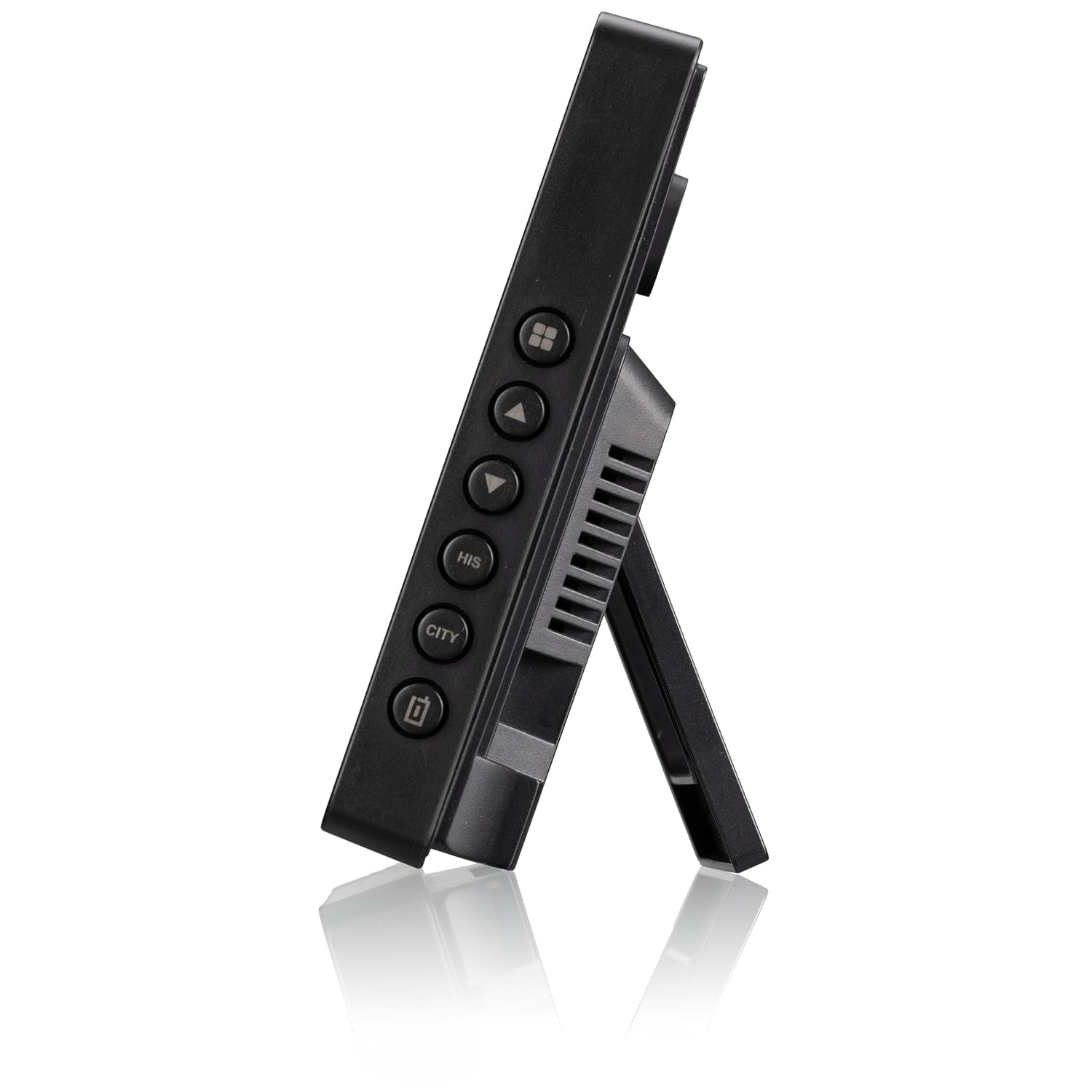
Figure 6: Side Buttons of the Main Unit
- DIREZIONI: Passa da una modalità di visualizzazione all'altra, accede alla modalità di impostazione.
- UP/DOWN (▲/▼): Adjusts values in setting mode, cycles through channels.
- ALLARME: Sets and activates/deactivates alarms.
- HISTORY (HIS): Displays historical atmospheric pressure data.
- CITTÀ: Sets city for sunrise/sunset and tide information.
- SNOOZE/LUCE: Activates snooze function during an alarm, adjusts backlight brightness.
5.3 Impostazione di data e ora
- Premere e tenere premuto il tasto MODALITÀ pulsante per accedere alla modalità di impostazione dell'ora.
- Utilizzare il SU/GIÙ pulsanti per regolare il valore lampeggiante (ad esempio, ora, minuto, anno, mese, giorno).
- Premere MODALITÀ di nuovo per confermare e passare all'impostazione successiva.
- Uscire dalla modalità di impostazione premendo MODALITÀ after the last setting or waiting for automatic exit.
5.4 Impostazione degli allarmi
- Premere il tasto ALLARME pulsante per view Sveglia 1. Premere di nuovo per la Sveglia 2.
- Premere e tenere premuto il tasto ALLARME pulsante per accedere alla modalità di impostazione della sveglia.
- Utilizzo SU/GIÙ pulsanti per impostare l'ora della sveglia.
- Premere ALLARME per confermare e passare all'impostazione successiva.
- Per attivare/disattivare un allarme, premere il tasto ALLARME ripetutamente il pulsante finché non appare/scompare l'icona dell'allarme.
6. Manutenzione
6.1 Pulizia
Pulire il dispositivo con un panno morbido, damp panno. Non utilizzare detergenti abrasivi o solventi. Assicurarsi che nessun liquido penetri nel dispositivo.
6.2 Sostituzione della batteria
Quando sul display compare l'indicatore di batteria scarica, sostituire le batterie nell'unità corrispondente (unità principale o sensore esterno). Sostituire sempre tutte le batterie di un'unità contemporaneamente con batterie nuove dello stesso tipo.
7. Risoluzione Dei Problemi
- Nessun dato esterno visualizzato: Ensure the outdoor sensor is within range (max 80m) and has fresh batteries. Press and hold the 'CHANNEL' button on the main unit to re-establish connection.
- Ora errata: Check if the DCF signal icon is displayed. If not, try moving the main unit to a location with better reception, away from electronic interference. You can also set the time manually.
- Letture imprecise: Ensure both units are placed in appropriate locations (main unit indoors, sensor outdoors but protected from direct sunlight and rain). Allow some time for readings to stabilize after setup.
- Il display è scuro o vuoto: Sostituire le batterie nell'unità principale.
8. Specifiche
- Numero modello: 9070110
- Dimensioni (unità principale): Dimensioni: 15.7 x 11 x 2.7 cm
- Peso: 499 grammi
- Fonte di alimentazione (unità principale): 3 batterie AAA (non incluse)
- Fonte di alimentazione (sensore esterno): 2 batterie AAA (non incluse)
- Frequenza wireless: Radiofrequenza (RF)
- Portata wireless: Fino a 80 metri (spazio aperto)
- Materiale: Plastica
- Caratteristiche speciali: Weather forecast, moon phase, sunrise/sunset, tide, room climate indicator, alarm, snooze, historical data storage.
9. Garanzia e supporto
This product is covered by a manufacturer's warranty. Please refer to the warranty card included in your package or contact your retailer for specific warranty terms and conditions.
For technical support or inquiries, please contact National Geographic customer service through their official websito o le informazioni di contatto fornite con l'acquisto.