
1. Introduzione
Thank you for choosing the CHROX G96max Android 12.0 TV Box. This manual provides essential information for setting up, operating, and maintaining your device. The G96max TV Box is designed to deliver a high-performance multimedia experience with its Android 12.0 operating system, RK3318 Quad-Core processor, 4K/6K video support, dual-band Wi-Fi, and Bluetooth 5.0 connectivity.
Please read this manual thoroughly before using the product to ensure proper operation and to maximize your viewesperienza di acquisizione.
2. Contenuto della confezione
Verifica che tutti gli articoli elencati di seguito siano inclusi nel tuo pacchetto:
- 1 x G96 MAX Android 12.0 TV Box
- 1 x adattatore di alimentazione
- 1 cavo HDMI
- 1 x IR Telecomando
- 1 x Manuale utente
- 1 x Wireless Mini Keyboard (may vary by package)

Image: The CHROX G96max Android 12.0 TV Box with its included accessories, such as the remote control, power adapter, and cables.
3. Prodotto finitoview
The CHROX G96max TV Box features a compact design with various ports for connectivity. Understanding these interfaces is crucial for proper setup and usage.
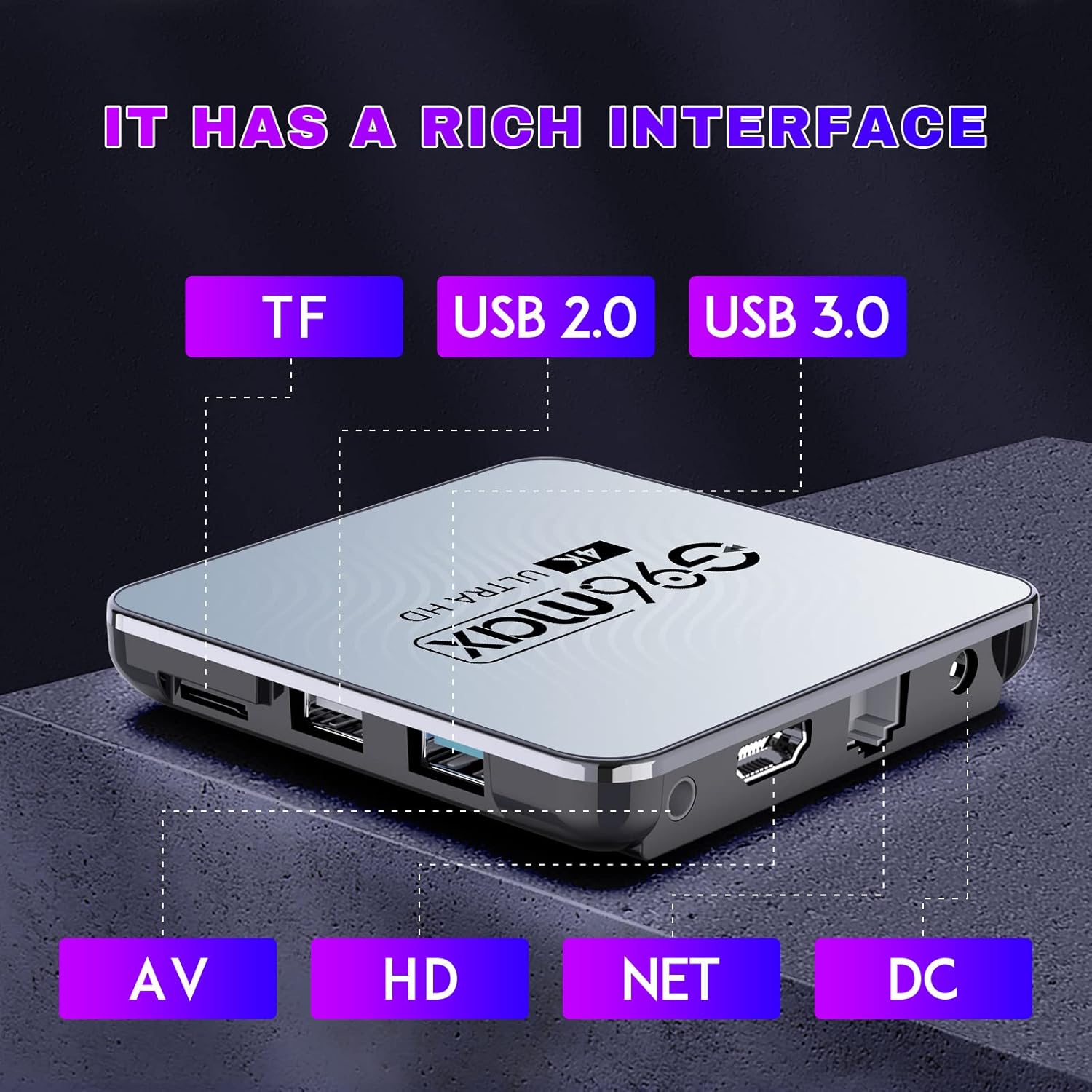
Immagine: Un dettaglio view of the CHROX G96max TV Box, highlighting its various input/output ports including TF card slot, USB 2.0, USB 3.0, AV, HDMI, Ethernet (NET), and DC power input.
Descrizioni delle porte:
- Slot per schede TF: For inserting a MicroSD/TF memory card to expand storage.
- Porta USB 2.0: For connecting USB devices such as flash drives, external hard drives, or a mouse.
- Porta USB 3.0: Offers faster data transfer speeds for compatible USB devices.
- Porta AV: For connecting to older televisions using an AV cable (composite video and stereo audio).
- Porta HDMI: For connecting to an HDTV or monitor using the provided HDMI cable for high-definition video and audio.
- Porta NET (Ethernet): Per una connessione Internet cablata.
- Ingresso alimentazione CC: Per collegare l'adattatore di alimentazione.

Image: The CHROX G96max TV Box displaying its wireless capabilities, including 2.4GHz and 5.8GHz Wi-Fi, built-in Bluetooth 4.0 (note: product description states BT5.0), and a USB 3.0 port.
4. Guida all'installazione
Follow these steps to set up your CHROX G96max TV Box:
- Collegamento alla TV: Connect one end of the HDMI cable to the HDMI port on the TV Box and the other end to an available HDMI input on your television. If using an older TV, connect an AV cable to the AV port.
- Connetti alimentazione: Plug the power adapter into the DC power input port on the TV Box, then plug the adapter into a wall outlet. The device should power on automatically, or you may need to press the power button on the remote control.
- Seleziona ingresso: Turn on your television and use its remote control to select the correct HDMI or AV input source that corresponds to where you connected the TV Box.
- Procedura guidata di configurazione iniziale: Upon first boot, the TV Box will guide you through an initial setup wizard. This typically includes language selection, screen adjustment, and network connection.
- Connessione di rete:
- Wifi: Select your Wi-Fi network from the list, enter the password, and connect. The device supports dual-band 2.4G/5.8G Wi-Fi.
- Collegamento Ethernet: If you prefer a wired connection, connect an Ethernet cable from your router to the NET port on the TV Box.
- Account Google: Sign in with your Google account to access the Google Play Store and other Google services. If you don't have one, you can create one.
- Mini tastiera wireless: If included, connect the USB dongle for the wireless mini keyboard to an available USB port on the TV Box. The keyboard should be automatically recognized.
5. Istruzioni per l'uso
5.1 Navigazione nell'interfaccia
Use the provided IR remote control or the wireless mini keyboard to navigate the Android 12.0 interface. The remote typically includes directional buttons, an 'OK' button for selection, 'Back' button, 'Home' button, and volume controls.

Image: An illustration showing the progression of Android versions, highlighting Android 12.0 as the latest upgrade for the G96max TV Box.
5.2 Installazione delle applicazioni
The CHROX G96max TV Box comes with the Google Play Store pre-installed, allowing access to thousands of applications.

Image: A visual representation of the Google Play Store interface, surrounded by numerous popular application icons, indicating the wide range of apps available for download.
- From the home screen, select the Negozio Google Play icona.
- Cercare your desired application using the search bar.
- Seleziona l'app e clicca Installare.
- Una volta installata, l'app apparirà nella schermata iniziale o nel cassetto delle app.
5.3 Riproduzione multimediale
The TV Box supports Ultra HD 4K/6K video playback, HLG Mode, and HDR10+ for enhanced visual quality.

Image: A visual comparison demonstrating the clarity and detail difference between 720p, 1080p, and 4K video resolutions, emphasizing the TV Box's 4K decoding capability.
- Use pre-installed media players or download preferred ones from the Google Play Store.
- Access local media fileda unità USB o schede TF collegate.
- Stream content from various online services through their respective applications.
6. Manutenzione
- Pulizia: Utilizzare un panno morbido e asciutto per pulire il dispositivo. Evitare detergenti liquidi o materiali abrasivi.
- Aggiornamenti software: Controllare periodicamente la presenza di aggiornamenti di sistema nelle impostazioni del dispositivo per garantire prestazioni e sicurezza ottimali.
- Gestione della memoria: Regularly clear cache and uninstall unused applications to free up storage space and maintain system speed.
- Ciclo di alimentazione: Se il dispositivo non risponde, scollegare l'adattatore di alimentazione per alcuni secondi e poi ricollegarlo per eseguire un ciclo di accensione.
7. Risoluzione Dei Problemi
If you encounter issues with your CHROX G96max TV Box, refer to the following common problems and solutions:
| Problema | Soluzione |
|---|---|
| Nessuna alimentazione/Il dispositivo non si accende |
|
| Nessun segnale sullo schermo TV |
|
| Problemi di connessione Wi-Fi |
|
| Il telecomando non funziona |
|
| Applicazioni che si bloccano o si bloccano |
|
8. Specifiche
Key technical specifications of the CHROX G96max Android 12.0 TV Box:

Immagine: un primo piano view of the Rockchip RK3318 processor, highlighting its role as a high-performance chip within the TV Box.
- Sistema operativo: Androide 12.0
- PROCESSORE: RK3318 Quad-Core 64 bit Cortex-A53
- Scheda grafica: Mali-450 MP2
- Memoria RAM: 4GB (as per current model)
- Memoria flash: 64GB (as per current model)
- Wifi: 2.4G/5G Dual Band, IEEE 802.11 a/b/g/n/ac/ax
- Bluetooth: BT5.0 è un'auto a motore.
- Porte USB: 1 x Type-A USB 3.0, 1 x Type-A USB 2.0
- LAN: Ethernet 10/100M standard RJ-45
- Video Decoder Support: H.264/H.265/VP9 up to 8K@30fps, H.264/AVC BP/MP/HP profile @ level 5.1, H.265/HEVC Main/Main10 profile @ level 5.1 High-tier, VP9 P2 4KX2K @60fps, AVS2 4KX2K @60fps, MPEG-1, MPEG-2, MPEG-4
- Supporto formato multimediale: Avi / Ts / VOB / Mkv / Mov / ISO / wmv / asf / flv / dat / mpg / mpeg
- Supporto formati musicali: MP3/WMA/AAC/WAV/OGG/DDP/HD/FLAC/APE
- Photo Format Support: JPEG / BMP / GIF / PNG / TIFF
- Risoluzione: Supports 1080p FW, 4k, 720p (up to 6K decoding)
- Caratteristiche speciali: Support Dual WiFi, HDR10+, HLG Mode, 3D Effect
- Dispositivi compatibili: Televisione
9. Garanzia e supporto
CHROX provides 24-hour after-sales service for this product. If you have any questions, concerns, or require technical assistance, please contact our customer support. Your satisfaction is important to us.
Please refer to your purchase documentation or the seller's information for specific contact details and warranty terms.