
ULANZI ST-06S
Manuale di istruzioni per supporto per treppiede per telefono ULANZI ST-06S
Model: ST-06S | Brand: ULANZI
Introduzione
The ULANZI ST-06S Phone Tripod Mount is a versatile accessory designed to securely hold your smartphone for various photography and videography needs. It features a robust metal construction, adjustable angles, and multiple mounting options for external accessories.
Caratteristiche principali:
- Dual Cold Shoe Mounts & 1/4" Screw: Attach microphones, LED lights, and other accessories.
- Adjustable Z-axis Angle: Fine-tune your pitch angle without needing a separate ball head.
- Sicuro Clamp Progetto: Features a push-and-lock mechanism with thick non-slip silicone pads for phone protection.
- Rotazione 360°: Easily switch between portrait and landscape modes for optimal shooting angles.
- Ampia compatibilità: Accommodates smartphones from 2.36 inches to 3.54 inches wide, even with cases.
- Leggero e durevole: Constructed from aircraft-grade aluminum alloy, weighing only 1.8 ounces.
Prodotto finitoview
Familiarize yourself with the components of your ULANZI ST-06S Phone Tripod Mount.

Figura 1: Dettagliato view of the ULANZI ST-06S Phone Tripod Mount, highlighting its key features including the 1/4" screw, cold shoe mounts, lock button, Z-axis design, and 360° rotating design.
- Telefono Clamp: Securely holds your smartphone. Features non-slip silicone pads.
- Pulsante di blocco: Engages the push-and-lock mechanism for the phone clamp.
- Meccanismo di rotazione a 360°: Allows seamless switching between portrait and landscape orientations.
- Regolazione dell'asse Z: Enables tilting the phone mount forward or backward.
- Foro per vite da 1/4": Located at the base for mounting onto tripods, monopods, or selfie sticks.
- Supporti Cold Shoe: Two standard cold shoe mounts on the sides for attaching external accessories like microphones or LED lights.
Istruzioni di installazione
1. Attaching Your Smartphone:
- Press the red lock button on the side of the phone clamp to release the locking mechanism.
- Gently pull the top jaw of the clamp verso l'alto per aprirlo.
- Inserisci il tuo smartphone nel clamp, ensuring it sits securely against the non-slip silicone pads.
- Push the top jaw downwards until it firmly grips your phone. The ratchet mechanism will click into place, securing the phone.
- Verify that the phone is held firmly and does not wobble.

Figura 2: Sicuro clamping a smartphone into the mount using the push-and-lock mechanism and non-slip pads.
2. Mounting to a Tripod/Accessory:
- Locate the 1/4" screw hole at the bottom of the ULANZI ST-06S mount.
- Align this hole with the 1/4" screw on your tripod, monopod, or selfie stick.
- Rotate the ULANZI ST-06S mount clockwise onto the screw until it is firmly attached.
- Alternatively, if your tripod uses an Arca-Swiss quick release plate, the base of the ST-06S is compatible with this system. Slide the mount directly into the Arca-Swiss clamp e metterlo al sicuro.

Figura 3: The 1/4" screw hole at the base of the mount for tripod attachment, alongside the dual cold shoe mounts.
Istruzioni per l'uso
1. Adjusting Phone Orientation (360° Rotation):
- To switch between portrait (vertical) and landscape (horizontal) modes, simply rotate the phone clamp sezione.
- The 360° rotating design allows for smooth transitions to achieve your desired shooting angle.
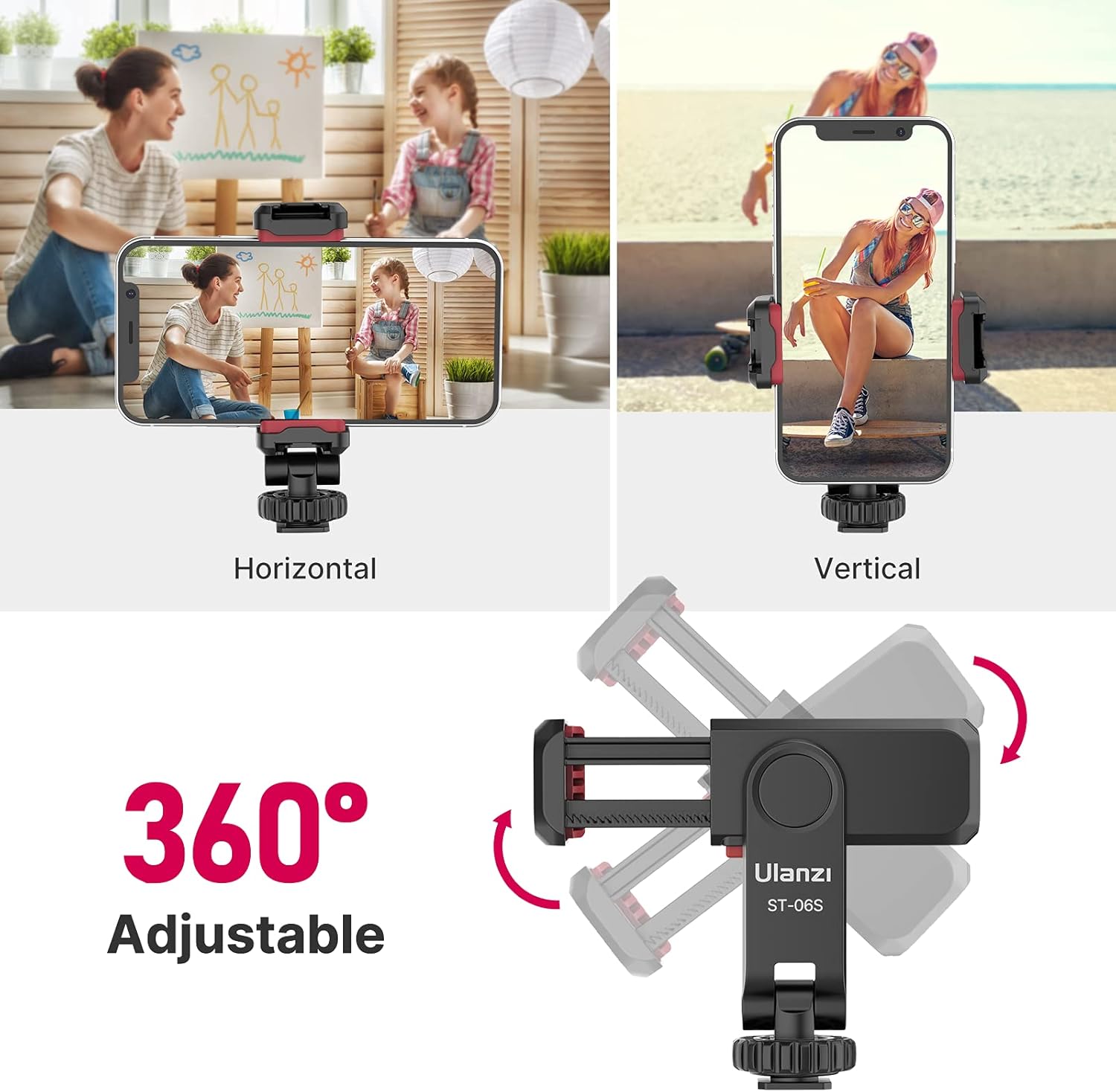
Figura 4: Visual representation of the 360° rotation capability and adjustable Z-axis angle for flexible phone positioning.
2. Adjusting Z-axis Angle:
- The mount features an adjustable Z-axis design, allowing you to tilt your phone forward or backward.
- This eliminates the need for a separate ball head for pitch adjustments.
- Gently adjust the angle to achieve the desired tilt for your shot. The mechanism is designed to hold its position firmly.
3. Using Cold Shoe Mounts:
- The ULANZI ST-06S has two standard cold shoe mounts located on its sides.
- Slide compatible accessories, such as external microphones, LED video lights, or other cold shoe-compatible gear, into these mounts.
- Ensure accessories are securely seated in the cold shoe slots.

Figura 5: Example setup for vlogging, showing a smartphone mounted with an external microphone and LED light using the cold shoe mounts.
Manutenzione
- Pulizia: Pulisci il supporto con un panno morbido e asciutto per rimuovere polvere e detriti. Evitare l'uso di prodotti chimici aggressivi o materiali abrasivi.
- Magazzinaggio: Store the mount in a dry, cool place away from direct sunlight when not in use.
- Ispezione: Controllare periodicamente tutte le viti e le parti mobili per accertarsi che siano ben salde e funzionino correttamente.
Risoluzione dei problemi
- Telefono non sicuro: Ensure the red lock button is fully engaged and the clamp jaws are tightened sufficiently around the phone. Check that the non-slip silicone pads are clean and intact.
- Rotation is stiff: If the 360° rotation feels stiff, gently rotate it back and forth a few times. Avoid excessive force.
- Mount wobbles on tripod: Ensure the 1/4" screw connection to the tripod is tightened securely.
Specifiche
| Numero di modello | ST-06S (US2-2575-FBA) |
| Materiale | Lega di alluminio di qualità aeronautica |
| Dimensioni del prodotto | 1.97 x 4.72 x 1.57 pollici |
| Peso dell'articolo | 1.8 once |
| Telefono Clamp Larghezza | Da 2.36 pollici a 3.54 pollici |
| Opzioni di montaggio | 1/4" Screw Hole, Arca-Swiss Compatible Base |
| Supporti per accessori | 2 Standard Cold Shoe Mounts |
| Caratteristiche speciali | Adjustable Z-axis, 360° Rotation, Non-slip Silicone Pads |
| Colore | Nero |
Garanzia e supporto
For warranty information, technical support, or any inquiries regarding your ULANZI ST-06S Phone Tripod Mount, please contact ULANZI customer service through their official websito o rivenditore presso cui è stato acquistato il prodotto.
Documenti correlati - ST-06S
 |
Adattatore per smartphone Oben SPA-03 Cold Shoe - Guida utente e specifiche Informazioni dettagliate sull'Oben SPA-03, un resistente adattatore per smartphone con attacco a slitta in alluminio. Le caratteristiche includono un cl a mollaamp, rotazione a 360°, supporti per accessori multipli e garanzia limitata di 5 anni. Scopri di più su compatibilità, specifiche e precauzioni. |
 |
Oben SPA-50 Cold Shoe Phone Adapter: User Manual, Specifications & Features Comprehensive user manual for the Oben SPA-50 Cold Shoe Phone Adapter. Details product features, technical specifications, usage precautions, and warranty information. Learn how to securely mount smartphones and accessories to camera shoe mounts and tripods. |
 |
Adattatore SmallRig Mini Cold Shoe per vite da 1/4"-20 3577 - Istruzioni per l'uso Istruzioni operative dettagliate e informazioni sul prodotto per l'adattatore SmallRig Mini Cold Shoe per vite da 1/4"-20 3577. Scopri le sue caratteristiche, le linee guida di sicurezza, la compatibilità e le specifiche per espandere le configurazioni della telecamera con luci di riempimento e accessori. |
 |
Manuale utente dell'adattatore per treppiede multifunzione per telefono ATUMTEK Manuale utente per l'adattatore multifunzione per treppiede per telefono ATUMTEK. Scopri come installare e utilizzare l'adattatore per montare telefoni e altri dispositivi su treppiedi e supporti a slitta. Include dettagli sul prodotto, passaggi di installazione e informazioni sulla garanzia. |
 |
Manuale utente del kit treppiede per smartphone Ulanzi MT-30 Manuale utente completo per il kit treppiede per smartphone Ulanzi MT-30, che illustra la configurazione, le caratteristiche e le specifiche tecniche per i creatori di contenuti mobili. |
 |
Foldable Tripod User Manual and Safety Guide Comprehensive user manual and safety guide for the Foldable Tripod, detailing setup, usage, safety precautions, and maintenance for photography and videography. |
Ask a question about this manual
Ask about setup, troubleshooting, compatibility, parts, safety, or missing instructions. Manuals+ will review the question and use this page’s manual context to help answer it.