
Introduzione
Thank you for choosing the Falowy Open Ear Wireless Headphones. These headphones are designed to provide a comfortable and secure audio experience, utilizing air conduction technology for clear sound while maintaining awareness of your surroundings. With Bluetooth 5.3 connectivity, a built-in microphone, and a waterproof design, they are suitable for various activities including sports, cycling, and daily workouts. This manual provides detailed instructions for setup, operation, maintenance, and troubleshooting to ensure optimal performance and longevity of your device.
Prodotto finitoview
The Falowy Open Ear Wireless Headphones (Model 1) come with the following components:
- Falowy Open Ear Wireless Headphones (Left and Right)
- Custodia di ricarica
- USB Charging Cable (not explicitly listed but implied for charging case)

Figure 1: Falowy Open Ear Wireless Headphones and Charging Case. The image displays the two black open-ear headphones and their accompanying black charging case, which is open to show the earbud compartments.
These headphones feature an open-ear design that rests comfortably on your ear without blocking the ear canal, allowing you to hear ambient sounds. They incorporate advanced air conduction technology for stereo balanced sound, providing a rich listening experience.

Figure 2: Excellent Stereo Sound Quality. This graphic shows a stylized earbud against a yellow circle with sound waves, emphasizing the rich listening experience provided by the air bone conduction design.

Figure 3: Acoustic Directional Transmission. A transparent view of an earbud revealing its internal circuitry, illustrating how stereo balanced sound is delivered through air conduction for an immersive experience.
Impostare
Carica iniziale
Before first use, ensure both the headphones and the charging case are fully charged. Place the headphones into the charging case. Connect the charging case to a power source using the provided USB cable. The LED power display on the case will indicate the charging status.
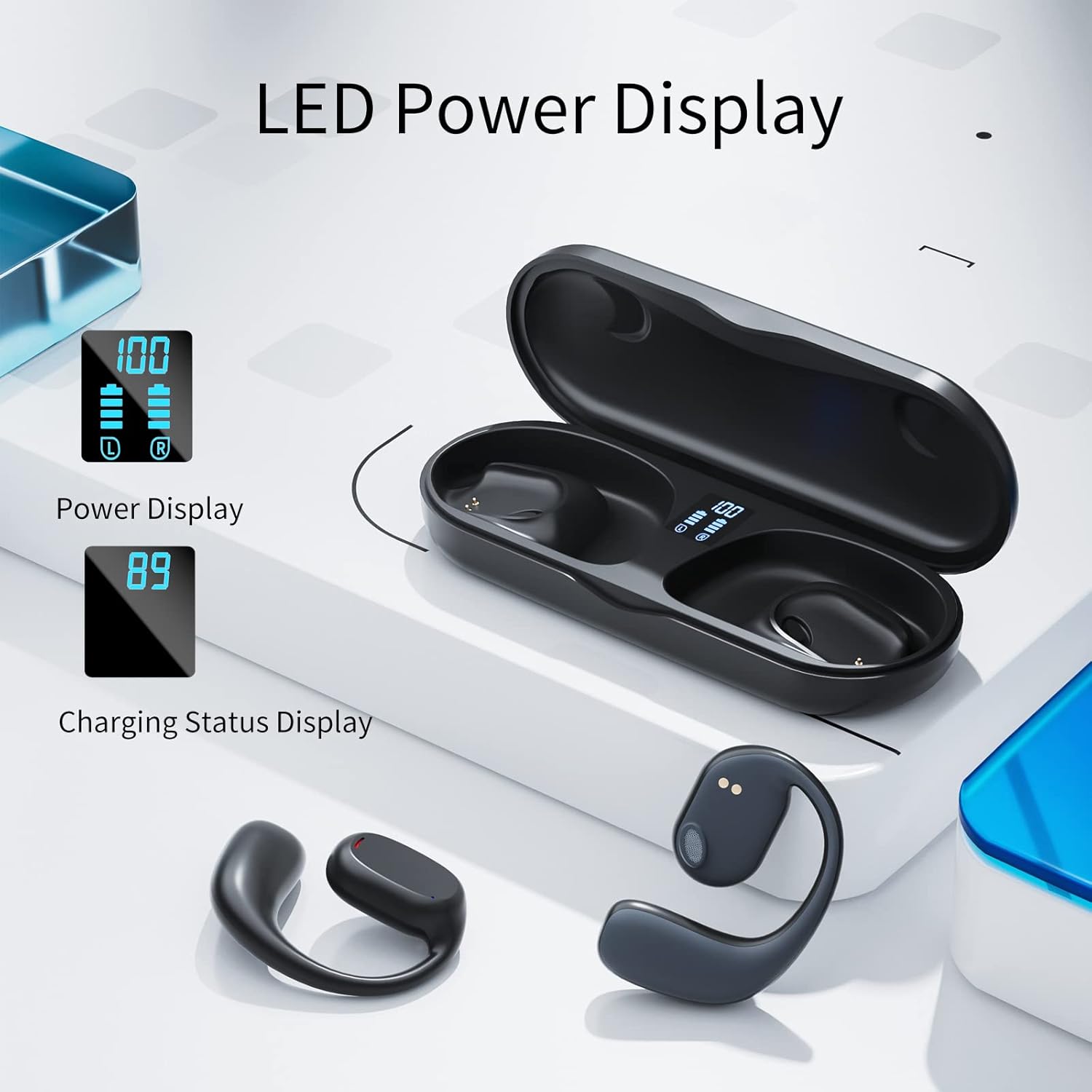
Figure 4: LED Power Display. This image shows the charging case with earbuds inside, displaying digital battery percentagsia per la custodia che per i singoli auricolari.

Figure 5: Dual Digital Power Display. A graphic illustrating the charging case's display, indicating approximately 4 hours of use per single earbud charge and 4 hours of charging time for the earbuds.
Associazione con il tuo dispositivo
The Falowy Open Ear Headphones feature one-step pairing for convenience.
- Togli le cuffie dalla custodia di ricarica. Entreranno automaticamente in modalità di associazione.
- Sul tuo telefono cellulare o dispositivo abilitato Bluetooth, vai alle impostazioni Bluetooth.
- Attiva il Bluetooth e cerca i dispositivi disponibili.
- Select "GT27" from the list of devices to connect.
- Once connected, you will hear an audible confirmation, and the headphones are ready for use.
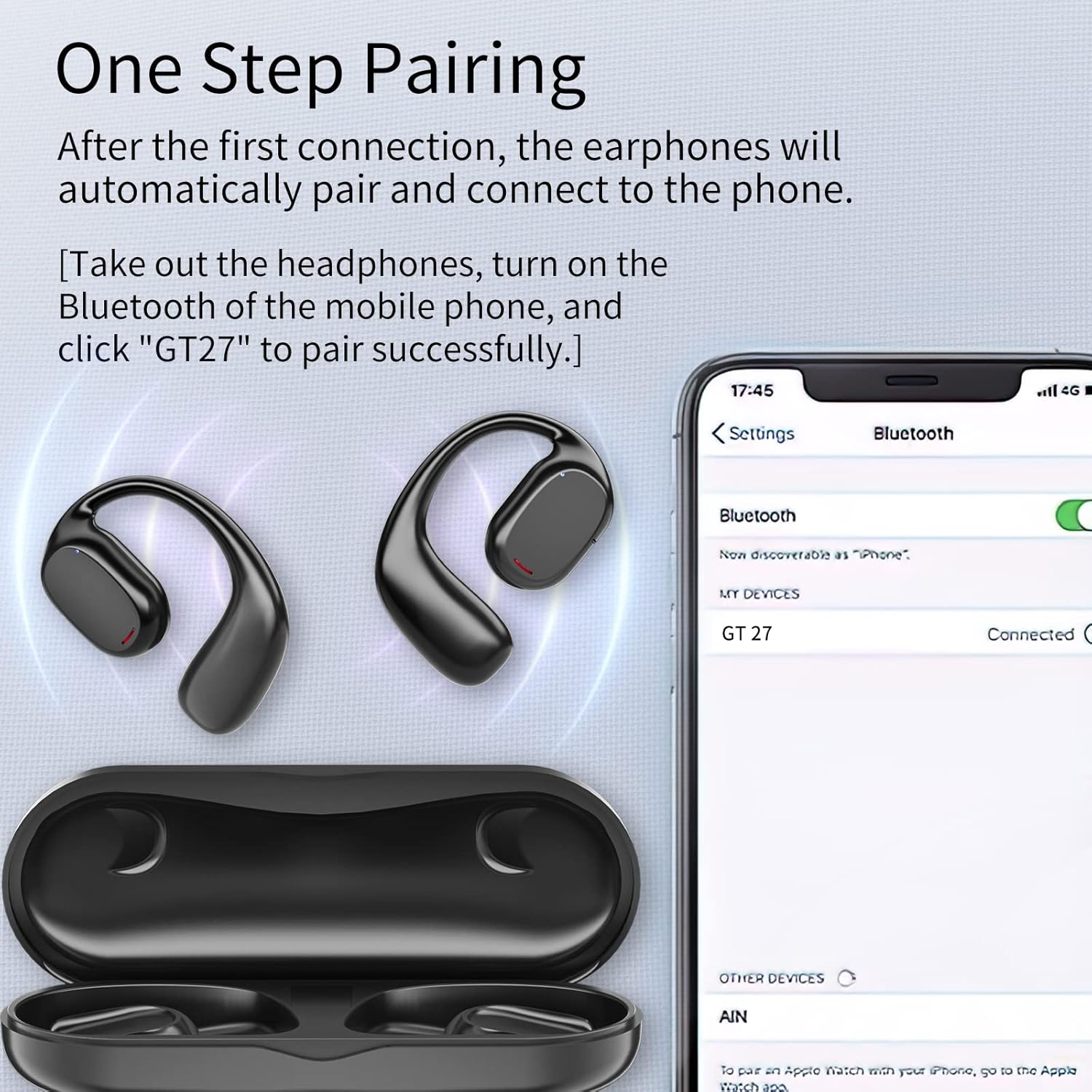
Figure 6: One Step Pairing. This image shows the Falowy headphones and charging case next to a smartphone screen displaying Bluetooth settings, with "GT 27" listed as a connected device.
Istruzioni per l'uso
Indossare le cuffie
The headphones are designed for a secure and comfortable fit. Gently place the ear hook over your ear, ensuring the speaker portion is positioned near your ear canal without entering it. The wraparound frame keeps the headphones stable during movement.

Figure 7: Secure Fit. A diagram showing how the earbud wraps around the ear, emphasizing that it stays stable and is not inserted into the ear.

Figure 8: Comfortable & Secure Fit. A woman is shown running outdoors while wearing the Falowy Open Ear Headphones, demonstrating their ergonomic design for stability and comfort during physical activity.
Controlli touch
The headphones feature intuitive touch controls for media playback and call management. Specific functions include:
- Riproduci/Pausa: Un solo tocco su uno degli auricolari.
- Traccia successiva: Tocca due volte l'auricolare destro.
- Traccia precedente: Tocca due volte l'auricolare sinistro.
- Rispondi/Termina chiamata: Un solo tocco su uno degli auricolari.
- Rifiuta chiamata: Tieni premuto uno dei due auricolari.
- Attiva l'assistente vocale: Tocca tre volte uno degli auricolari.

Figure 9: Open Ear Headphone Features. A woman wearing the headphones while drinking, with icons highlighting smart touch control, Bluetooth 5.3, premium sound quality, up to 4 hours of use, lightweight design, and reduced hearing loss.
Ricarica delle cuffie e della custodia
To charge the headphones, place them back into the charging case. The case will automatically begin charging them. To charge the case itself, connect it to a USB power adapter using the USB cable. The LED display on the case will show the battery level of both the case and the individual earbuds.
Manutenzione
To ensure the longevity and optimal performance of your Falowy Open Ear Wireless Headphones, follow these maintenance guidelines:
- Pulizia: Utilizzare un panno morbido, asciutto e privo di lanugine per pulire le cuffie e la custodia di ricarica. Non utilizzare detergenti abrasivi, alcol o solventi chimici.
- Magazzinaggio: Quando non vengono utilizzate, conservare le cuffie nella custodia di ricarica per proteggerle da polvere e danni. Conservare in un luogo fresco e asciutto, al riparo da temperature estreme.
- Resistenza all'acqua: The headphones are waterproof, but avoid prolonged submersion in water. Dry them thoroughly before placing them back in the charging case to prevent damage to the charging contacts.
- Cura della batteria: To preserve battery life, avoid fully discharging the headphones and charging case frequently. Charge them regularly, even if not used for extended periods.
Risoluzione dei problemi
If you encounter issues with your Falowy Open Ear Wireless Headphones, refer to the following common solutions:
| Problema | Possibile causa | Soluzione |
|---|---|---|
| Le cuffie non si accendono. | Batteria scarica. | Inserire le cuffie nella custodia di ricarica e assicurarsi che la custodia sia carica. |
| Impossibile associare il dispositivo. | Il Bluetooth è disattivato; le cuffie non sono in modalità di associazione; il dispositivo è troppo lontano. | Ensure Bluetooth is enabled on your device. Take headphones out of case to enter pairing mode. Keep headphones within 10 meters of your device. |
| Nessun suono o volume basso. | Volume too low on device; headphones not connected; media paused. | Increase volume on your connected device. Verify headphones are connected. Check if media is paused. |
| Intermittent connection or sound. | Interferenza; distanza dal dispositivo; batteria scarica. | Move closer to your device. Avoid environments with strong Wi-Fi or other Bluetooth signals. Ensure headphones are charged. |
| La custodia di ricarica non si carica. | Cavo o adattatore di alimentazione difettoso. | Prova un cavo USB e un adattatore di alimentazione diversi. Assicurati che i collegamenti siano saldi. |
Se il problema persiste dopo aver provato questi passaggi, contatta l'assistenza clienti per ulteriore assistenza.
Specifiche
| Caratteristica | Specificazione |
|---|---|
| Nome del modello | 1 |
| Tecnologia di connettività | Senza fili (Bluetooth 5.3) |
| Posizionamento dell'orecchio | Orecchio aperto |
| Tipo di controllo | Controllo touch (controllo multimediale) |
| Livello di resistenza all'acqua | Impermeabile |
| Durata della batteria (cuffie) | Fino a 5 ore |
| Portata Bluetooth | 10 metri |
| Componenti inclusi | Custodia di ricarica |
| Materiale | Plastica |
| Peso dell'articolo | 0.12 chilogrammi (circa 4.2 once) |
| Produttore | KESIEME |
Garanzia e supporto
Per informazioni sulla garanzia e sull'assistenza clienti, consultare la documentazione di acquisto o contattare direttamente il venditore. Conservare la prova d'acquisto per eventuali reclami in garanzia.
For additional assistance, you may visit the KESIEME Store online: KESIEME Store