
1. Introduzione
This manual provides detailed instructions for the setup, operation, maintenance, and troubleshooting of your Xprinter XP-233B Thermal Barcode Printer. The XP-233B is designed for efficient thermal printing of barcodes and labels, utilizing heat-sensitive paper without the need for ink or ribbons.
2. Istruzioni di sicurezza
- Assicurarsi che la stampante sia collegata a una fonte di alimentazione con il volume correttotage come specificato sull'adattatore di alimentazione.
- Non esporre la stampante all'acqua o a umidità eccessiva.
- Evitare di posizionare la stampante alla luce diretta del sole o vicino a fonti di calore.
- Tenere la stampante lontana da polvere e detriti per evitare danni ai componenti interni.
- Non tentare di smontare o riparare la stampante da soli. Contattare personale di assistenza qualificato per assistenza.
- Use only recommended thermal label rolls to ensure optimal print quality and printer longevity.
3. Contenuto della confezione
Verificare che tutti gli articoli siano presenti nel pacco:
- Xprinter XP-233B Thermal Barcode Printer
- Adattatore di alimentazione
- Cavo USB
- Guida rapida (se inclusa)
- Driver CD (if included, drivers can also be downloaded online)
4. Prodotto finitoview
Familiarize yourself with the main components of the XP-233B printer.

Figura 4.1: Fronte view of the Xprinter XP-233B, showing the power switch, control panel, and label output slot.

Figura 4.2: Posteriore view of the Xprinter XP-233B, highlighting the USB, Ethernet, and power input ports.
Funzioni del pannello di controllo:
- Pulsante ALIMENTAZIONE: Press to feed a blank label. Hold to perform a self-test print.
- Pulsante PAUSA: Mette in pausa o riprende la stampa.
- Pulsante ANNULLA: Annulla il lavoro di stampa corrente.
- Indicatori LED: Display printer status (e.g., Power, Error, Paper Out). Refer to troubleshooting for specific light patterns.
5. Impostazione
5.1 Collegamento della stampante
- Connect the power adapter to the printer's power input port and then plug it into a wall outlet.
- Connect the USB cable from the printer to your computer. For Ethernet connectivity, connect an Ethernet cable from the printer to your network router or switch.
- Accendere la stampante utilizzando l'interruttore di alimentazione situato sul lato.
5.2 Caricamento delle etichette
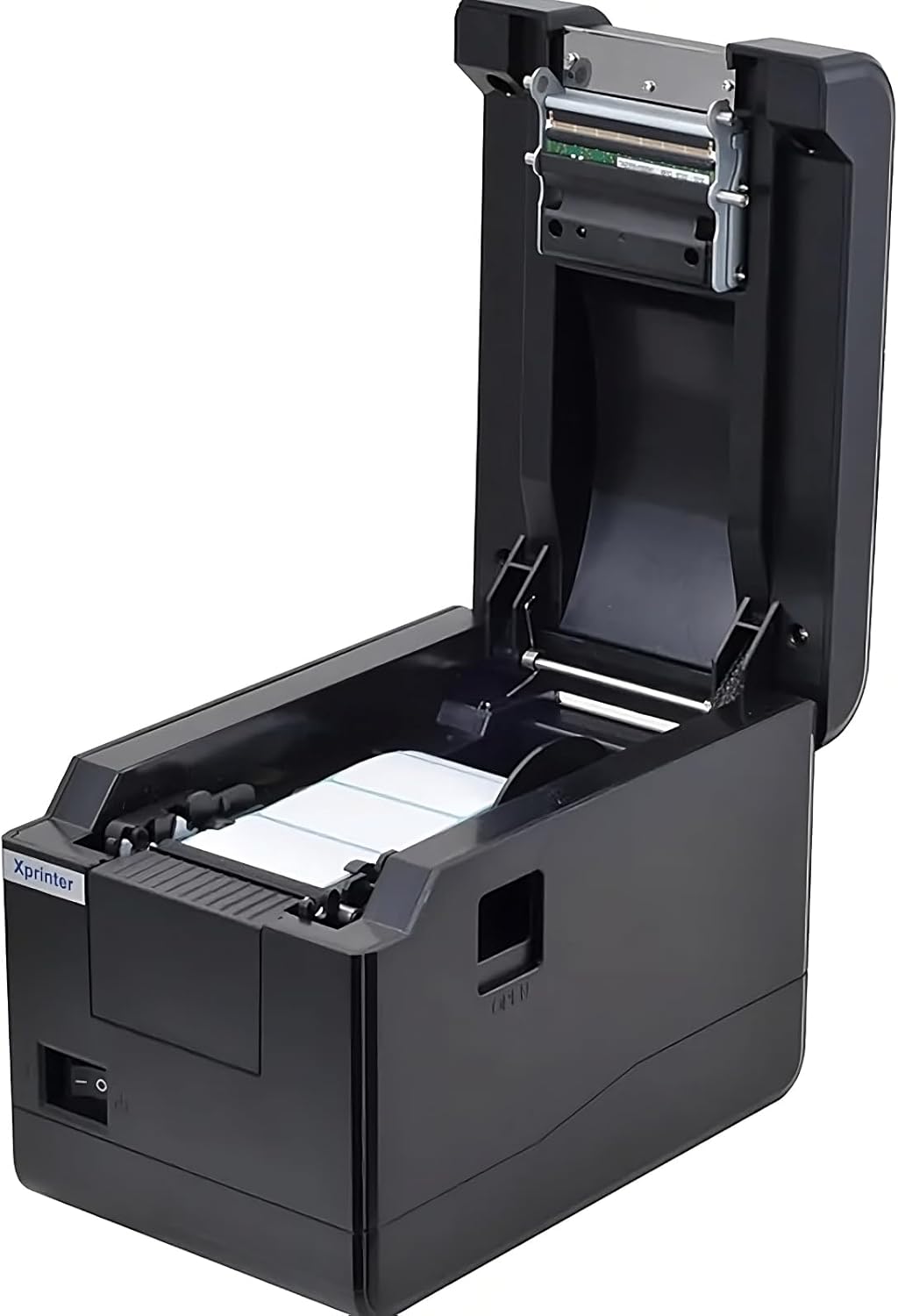
Figura 5.1: Top-down view of the Xprinter XP-233B with the cover open, illustrating the label loading area.
- Premere il pulsante "OPEN" sul lato della stampante per aprire il coperchio superiore.
- Place the thermal label roll into the label compartment, ensuring the labels feed from the bottom of the roll and the printable side faces upwards.
- Adjust the movable label guides to fit the width of your label roll snugly, without pinching the labels.
- Pull a few labels past the print head and out through the front slot.
- Chiudere saldamente il coperchio superiore finché non scatta in posizione.
- The printer will automatically calibrate and feed a few labels to detect the label gap.
5.3 Installazione del driver
Install the printer drivers on your computer. Drivers can typically be found on the included CD or downloaded from the official Xprinter websito. Seguire le istruzioni sullo schermo per l'installazione.
6. Utilizzo della stampante
6.1 Stampa di base
Once the printer is set up and drivers are installed, you can print labels from your application (e.g., label design software, shipping software). Ensure the correct printer model (Xprinter XP-233B) is selected in your application's print settings.
6.2 Stampa di autotest
To perform a self-test print:
- Assicurarsi che la stampante sia accesa e che le etichette siano caricate.
- Premere e tenere premuto il tasto FORAGGIO button for approximately 3-5 seconds until the printer starts printing.
- The self-test print will display printer information and a test pattern, confirming basic functionality.
7. Manutenzione
7.1 Pulizia della testina di stampa
Regular cleaning of the print head ensures optimal print quality and extends the printer's lifespan. Clean the print head when print quality degrades or after every few rolls of labels.
- Spegnere la stampante e scollegare il cavo di alimentazione.
- Aprire il coperchio superiore.
- Pulire delicatamente la superficie della testina di stampa con un batuffolo di cotone leggermenteampened with isopropyl alcohol (70% or higher).
- Allow the print head to dry completely (approximately 2-3 minutes) before closing the cover and turning on the printer.
7.2 Pulizia dell'esterno
Pulire l'esterno della stampante con un panno morbido eamp stoffa. Non utilizzare prodotti chimici aggressivi o detergenti abrasivi.
8. Risoluzione Dei Problemi
| Problema | Possibile causa | Soluzione |
|---|---|---|
| La stampante non si accende | Power cord loose; power outlet faulty; power adapter damaged. | Check power connections; try a different outlet; replace power adapter if necessary. |
| No labels feeding | Labels incorrectly loaded; paper out; label guides too tight. | Reload labels correctly; replace label roll; adjust label guides. |
| Scarsa qualità di stampa (sbiadita, linee) | Print head dirty; low-quality labels; print head damaged. | Clean print head (refer to Section 7.1); use recommended thermal labels; contact support if print head is damaged. |
| La stampante non risponde ai comandi di stampa | Incorrect driver installed; USB/Ethernet cable loose; printer paused. | Reinstall drivers; check cable connections; press PAUSA pulsante per riprendere. |
| Etichette saltate o disallineate | Incorrect label sensor calibration; label guides not set correctly. | Perform a self-test print to recalibrate; adjust label guides. |
9. Specifiche
| Caratteristica | Specificazione |
|---|---|
| Nome del modello | Xprinter - Thermal barcode printer |
| Numero modello articolo | XP-233B |
| Tecnologia della stampante | Termico |
| Tecnologia di connettività | Ethernet, USB |
| Uscita della stampante | Monocromo |
| Stampa Media | Etichette |
| Capacità massima del foglio | 100 (typical for roll capacity, actual sheet capacity depends on label size) |
| Dimensioni del prodotto (P x L x A) | Dimensioni: 26.8 x 18 x 17.2 cm |
| Peso dell'articolo | 1.2 kg |
| Colore | Nero |
10. Informazioni sulla garanzia
Xprinter products typically come with a limited manufacturer's warranty. Please refer to the warranty card included with your product or visit the official Xprinter website for specific warranty terms and conditions, including coverage duration and service procedures. Keep your purchase receipt as proof of purchase for warranty claims.
11. Assistenza clienti
For technical assistance, driver downloads, or further inquiries regarding your Xprinter XP-233B, please visit the official Xprinter support website or contact their customer service department. Contact information can usually be found on the Xprinter websito o nella documentazione fornita con la stampante.