
Music Sound BTMSTWSSWAGR
Manuale utente degli auricolari wireless Music Sound SWAG
Model: BTMSTWSSWAGR | Brand: Music Sound
Prodotto finitoview
The Music Sound SWAG Wireless Earbuds are designed to provide a balanced sound and optimal comfort. These Bluetooth earbuds offer up to 20 hours of music playback, ensuring an uninterrupted listening experience. They feature intuitive touch controls for managing music and calls, and automatic pairing for seamless connection to your devices.

Image: The Music Sound SWAG Wireless Earbuds in red, shown with their compact charging case.
Cosa c'è nella scatola
Si prega di controllare il contenuto della confezione per assicurarsi che siano presenti tutti gli articoli:
- Auricolari wireless Music Sound SWAG (sinistro e destro)
- Custodia di ricarica
- Cavo di ricarica USB-C
- Manuale d'uso

Image: A clear layout of the package contents: two earbuds, the charging case, a USB-C charging cable, and the user guide.
Impostare
1. Ricarica degli auricolari e della custodia
Before first use, fully charge the earbuds and the charging case. Place the earbuds into the charging case. Connect the provided USB-C cable to the charging port on the case and the other end to a USB power source (e.g., computer, wall adapter). The LED indicator on the earbuds will show charging status.
Image: The USB-C charging cable connected to the charging case, illustrating the charging setup.
2. Abbinamento iniziale
- Assicurarsi che gli auricolari siano carichi.
- Aprire la custodia di ricarica. Gli auricolari entreranno automaticamente in modalità di associazione.
- Sul tuo dispositivo (smartphone, tablet, laptop), attiva il Bluetooth.
- Cercare "SWAG" or "Music Sound SWAG" in the list of available Bluetooth devices.
- Select "SWAG" to connect. Once connected, a voice prompt will confirm the pairing.
The earbuds feature automatic pairing, meaning they will automatically connect to the last paired device when removed from the case, if Bluetooth is enabled on the device.
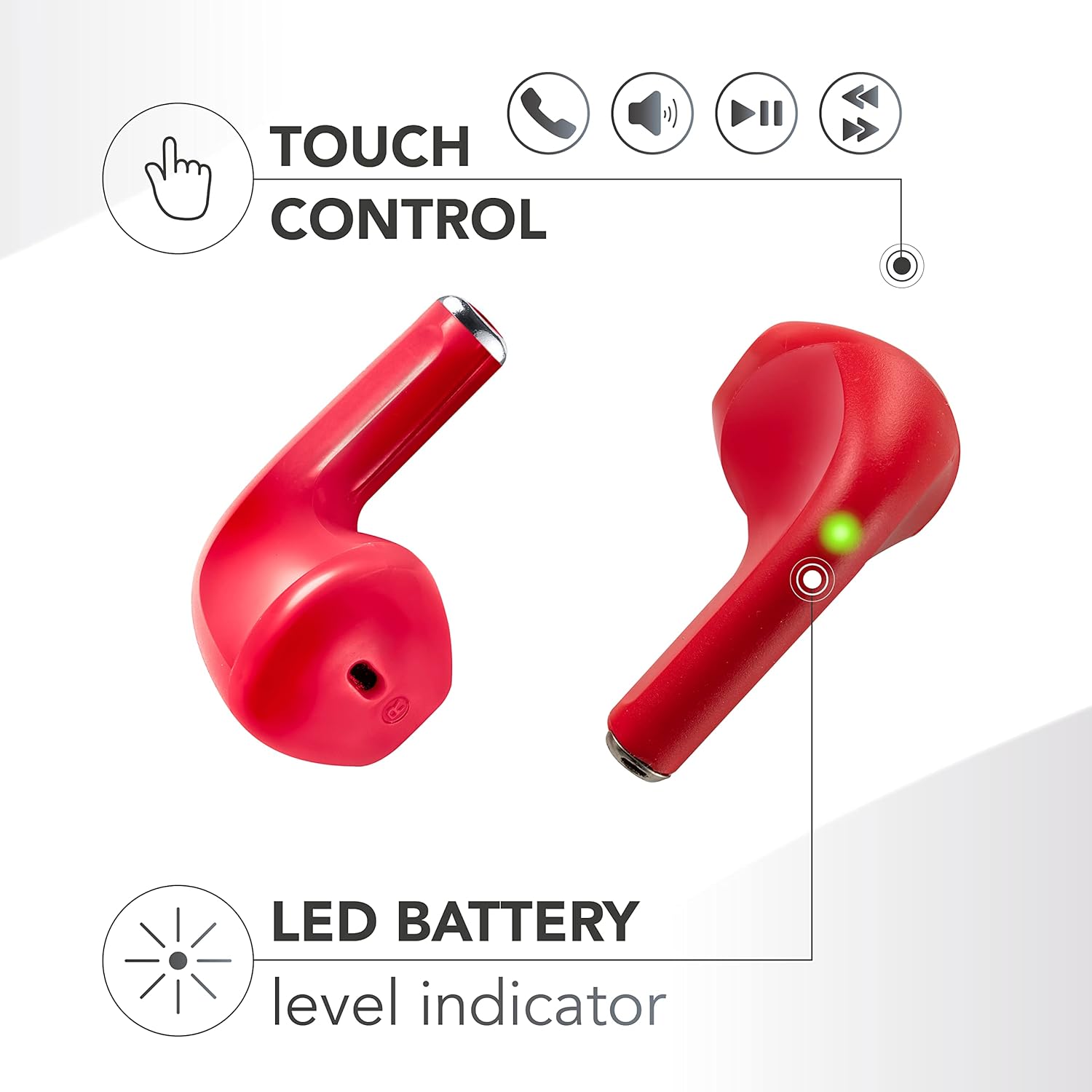
Image: A close-up of an earbud highlighting the LED battery level indicator, which helps confirm power status during pairing and use.
Istruzioni per l'uso
Indossare gli auricolari
Gently insert the earbuds into your ears. The capsule design is engineered for a comfortable and secure fit, ensuring optimal sound delivery and passive noise isolation.

Image: A woman wearing a Music Sound SWAG earbud, illustrating how the earbuds fit comfortably in the ear.
Controlli touch
The SWAG earbuds feature touch-sensitive areas on each earbud for easy control of music playback and calls. Specific functions may vary slightly, but common controls include:
- Riproduci/Pausa: Un solo tocco su uno degli auricolari.
- Traccia successiva: Tocca due volte l'auricolare destro.
- Traccia precedente: Tocca due volte l'auricolare sinistro.
- Rispondi/Termina chiamata: Un singolo tocco su uno degli auricolari durante una chiamata in arrivo.
- Rifiuta chiamata: Durante una chiamata in arrivo, tenere premuto uno dei due auricolari.
- Attiva l'assistente vocale: Tocca tre volte uno degli auricolari (se supportato dal tuo dispositivo).
Image: A visual representation of the touch control functions available on the earbuds, including icons for call management, volume, and music playback.
Durata della batteria
The Music Sound SWAG earbuds provide up to 20 hours of total playtime with the charging case. A single charge of the earbuds offers approximately 4 hours of continuous playback. The charging case extends the listening time by providing multiple recharges on the go.

Image: The earbuds inside their charging case, with an overlay indicating up to 15 hours of total playtime with the case and 4 hours on a single charge. (Note: Product description states 20 hours total playtime.)
Manutenzione
- Pulizia: Utilizzare un panno morbido, asciutto e privo di lanugine per pulire gli auricolari e la custodia di ricarica. Non utilizzare prodotti chimici aggressivi o materiali abrasivi.
- Magazzinaggio: Quando non li usi, riponi gli auricolari nella custodia di ricarica per proteggerli e mantenerli carichi.
- Evitare l'acqua: Gli auricolari non sono impermeabili. Evitare l'esposizione ad acqua, umidità o temperature estreme.
- Cura della batteria: Per prolungare la durata della batteria, evitare di scaricare completamente gli auricolari e la custodia frequentemente. Ricaricarli regolarmente.
Risoluzione dei problemi
| Problema | Possibile soluzione |
|---|---|
| Gli auricolari non si accoppiano |
|
| Nessun suono da un auricolare |
|
| La custodia di ricarica non si ricarica |
|
| I controlli touch non rispondono |
|
Specifiche
| Caratteristica | Dettaglio |
|---|---|
| Nome del modello | BTSWAGR |
| Marca | Suono musicale |
| Tecnologia di connettività | Wireless (Bluetooth) |
| Tecnologia di comunicazione wireless | Bluetooth |
| Dispositivi compatibili | Telefoni cellulari, computer portatili, tablet |
| Posizionamento dell'orecchio | In-ear |
| Fattore di forma | Vero wireless |
| Risposta in frequenza | 20 Hz - 20,000 Hz |
| Durata della batteria (tempo di riproduzione totale) | Fino a 20 ore (con custodia di ricarica) |
| Tipo di batteria | 2 batterie agli ioni di litio (incluse) |
| Composizione delle celle della batteria | Polimero di litio |
| Dimensioni del prodotto | Dimensioni: 2.7 x 14.1 x 7.5 cm |
| Peso dell'articolo | 60 grammi |
| Caratteristiche aggiuntive | Controllo del volume |
| Colore | Rosso |
Note on Noise Control: The specification mentions "Controllo del rumore: Cancellazione attiva del rumore". Given the product's features and typical price point for this type of earbud, this likely refers to passive noise isolation provided by the in-ear design rather than active noise cancellation (ANC) technology.
Garanzia e supporto
For warranty information and technical support, please refer to the official Music Sound webo contattare direttamente il servizio clienti. Conservare la prova d'acquisto per eventuali reclami in garanzia.
Puoi visitare il Negozio di musica e suoni su Amazon per maggiori informazioni sul prodotto e risorse di supporto.
Ask a question about this manual
Ask about setup, troubleshooting, compatibility, parts, safety, or missing instructions. Manuals+ will review the question and use this page’s manual context to help answer it.