
1. Introduzione
The VIVOSUN AeroLab THB1 is a wireless Bluetooth hygrometer and thermometer designed for accurate indoor environmental monitoring. It provides real-time temperature, humidity, and VPD (Vapor Pressure Deficit) readings, allowing users to maintain optimal conditions in various indoor spaces such as grow tents, greenhouses, basements, or baby rooms. This device features a clear LCD display, smart app connectivity for remote monitoring and alerts, and data storage capabilities.
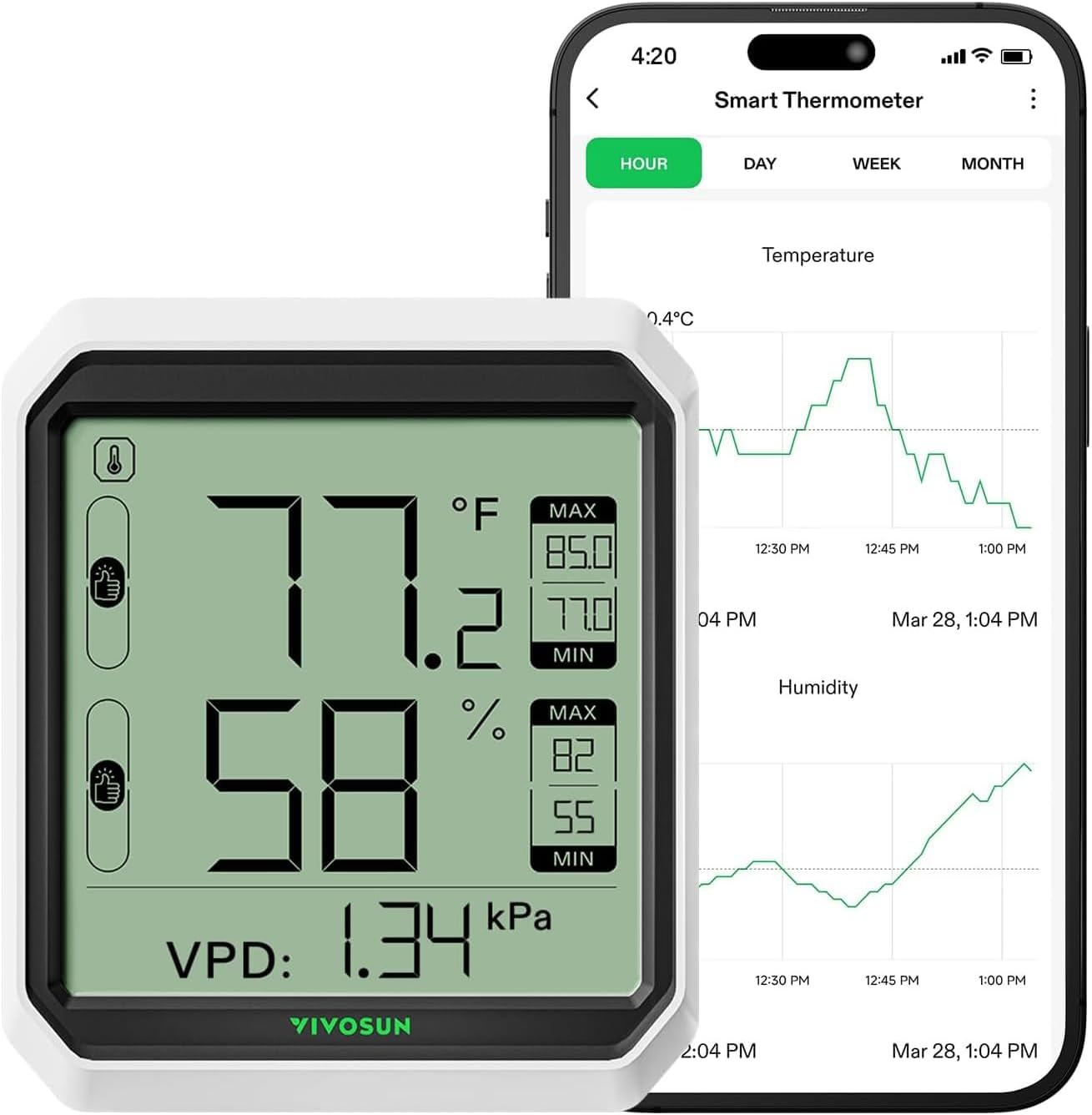
Image: The VIVOSUN AeroLab THB1 device and its accompanying mobile application interface, demonstrating real-time data display and historical graphing.
2. Caratteristiche principali
- High Accuracy & Dual Channels: Utilizes a built-in smart Swiss sensor for rapid, real-time, and highly accurate temperature and humidity readings (±0.9℉/±5%RH). Supports an optional external sensor probe for dual-channel monitoring.
- Design intuitivo: Features a large, clear LCD screen with visualized VPD design, highest and lowest temperature and humidity records, and indicators for three comfort ranges.
- Remote Control & Smart App Alerts: Connects to the VIVOSUN App via Bluetooth for remote monitoring of temperature, humidity, and VPD data. Provides instant notifications when levels exceed user-defined settings.
- 2-Year Free Data Storage: Offers a 2-year free data storage service, allowing analysis of historical data and export at any time.
- Compatibilità versatile: Can be integrated with GrowHub E42/E42A/E25 as an additional sensor, with GrowHub acting as a WiFi gateway. Works with AeroZesh, AeroLight, and other VIVOSUN SGS devices.

Immagine: dettagliata view of the VIVOSUN AeroLab THB1's internal sensor and its specified accuracy ranges for temperature and humidity.
3. Contenuto della confezione
Si prega di verificare che tutti gli articoli siano presenti e in buone condizioni all'apertura del pacco:
- VIVOSUN AeroLab THB1 Hygrometer Thermometer Unit
- Batterie AAA (x3)
- Manuale dell'utente (questo documento)
- Optional: External Sensor Probe (if purchased with this variant)
4. Guida all'installazione
4.1 Installazione della batteria
- Individuare il vano batteria sul retro del dispositivo.
- Aprire il coperchio del vano batterie.
- Inserire tre (3) batterie AAA, assicurandosi della corretta polarità (+/-).
- Close the battery compartment cover securely. The device LCD screen should power on.
4.2 Opzioni di posizionamento
The AeroLab THB1 offers multiple installation methods:
- Cavalletto: Use the integrated kick-stand on the back of the unit to place it upright on any flat surface.
- Wall Mount: Utilize the mounting hole on the back of the unit to hang it on a wall using a screw (not included).
- Sospeso: The unit can also be hung using a lanyard or hook through the designated loop.

Image: Physical specifications of the VIVOSUN AeroLab THB1, including dimensions, kick-stand, and battery type.
4.3 App Installation & Bluetooth Pairing
- Download the VIVOSUN App from your device's app store (iOS or Android).
- Assicurati che il Bluetooth sia abilitato sul tuo smartphone.
- Open the VIVOSUN App and follow the on-screen instructions to add a new device.
- The app will detect the AeroLab THB1 via Bluetooth. Select the device to pair.
- Once paired, the device's data will be displayed in the app. The Bluetooth connection range is up to 164 ft (50 m) without obstructions.
5. Istruzioni per l'uso
5.1 Comprensione del display
Il display LCD fornisce le seguenti informazioni:
- Temperatura attuale: Cifre grandi in alto.
- Umidità attuale: Large digits in the middle.
- VPD (Vapor Pressure Deficit): Displayed at the bottom.
- Record MAX/MIN: Shows the highest and lowest recorded temperature and humidity values.
- Comfort Indicators: Visual icons indicating comfort levels based on temperature and humidity.

Image: Detailed breakdown of the VIVOSUN AeroLab THB1's LCD display elements and their functions.
5.2 Commutazione delle unità di temperatura (°C/°F)
You can switch between Celsius and Fahrenheit directly on the unit or through the VIVOSUN App:
- On the Unit: Press the 'C/F' button located on the top of the device to toggle between temperature units.
- Tramite App: In the VIVOSUN App, navigate to the 'Manage Garden' menu, select your device, and adjust the temperature unit setting.
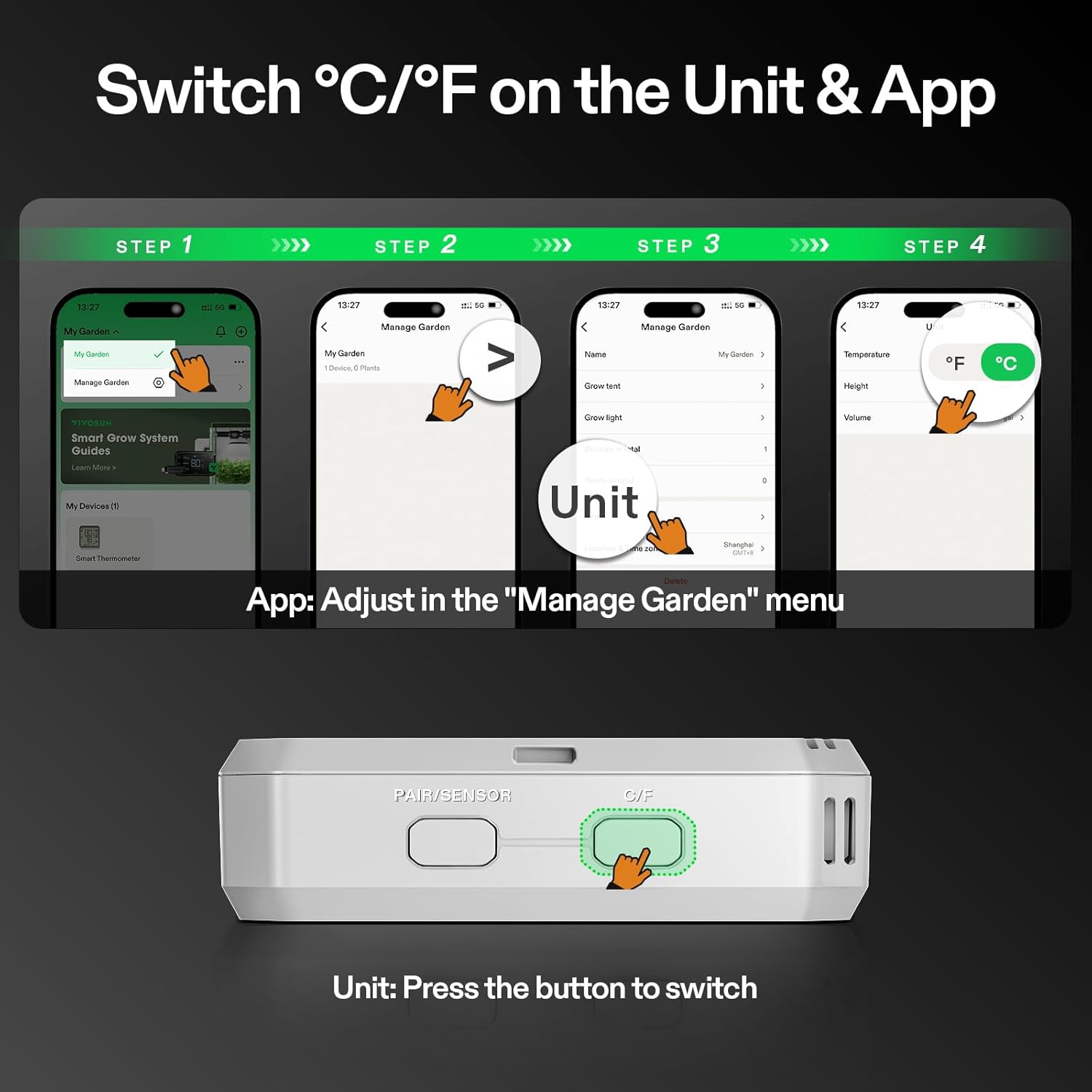
Image: Visual guide for changing temperature units on both the device and within the VIVOSUN mobile application.
5.3 Remote Monitoring & Smart App Alerts
The VIVOSUN App allows you to monitor your environment remotely and receive alerts:
- Dati in tempo reale: View live temperature, humidity, and VPD readings from anywhere within Bluetooth range.
- Avvisi personalizzati: Set custom high and low thresholds for temperature and humidity. The app will send instant notifications to your smartphone if readings fall outside these ranges.

Image: Demonstration of the VIVOSUN app's smart alert functionality for temperature and humidity.
5.4 Archiviazione ed esportazione dei dati
The AeroLab THB1 stores up to 2 years of historical data, accessible via the VIVOSUN App:
- Grafici storici: View temperature and humidity trends over hours, days, weeks, or months.
- Esportazione dati: Export historical data in a convenient format for further analysis or record-keeping.
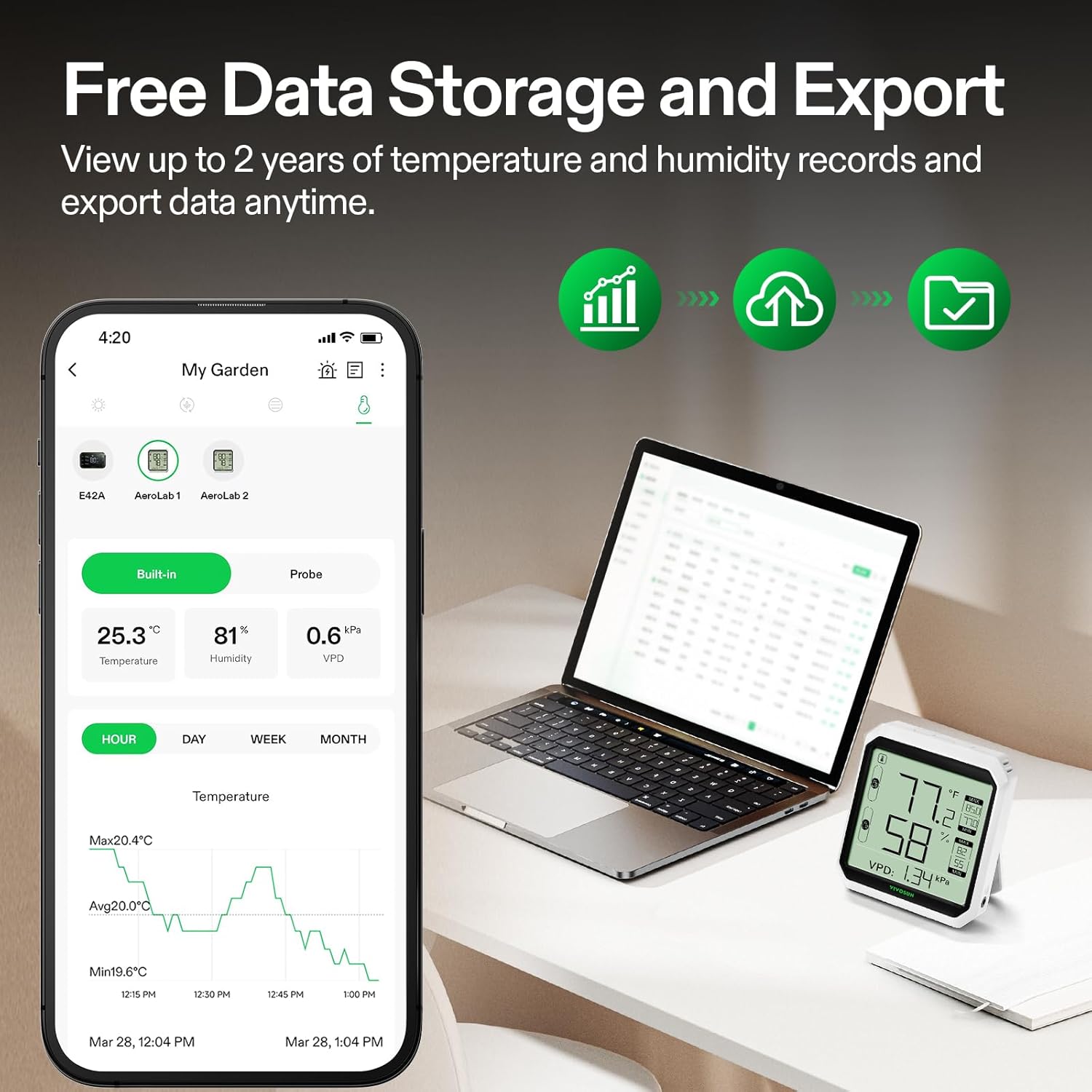
Image: Illustration of the device's data storage capabilities and the option to export data for analysis.
5.5 Dual-Channel Monitoring (with External Probe)
If you have the variant with an external sensor probe, you can monitor two distinct areas:
- Sensore incorporato: Monitors the environment where the main unit is placed.
- Sensore esterno: Connect the external probe to the designated port on the unit. Place the probe in a second area you wish to monitor. The app will display data from both channels.
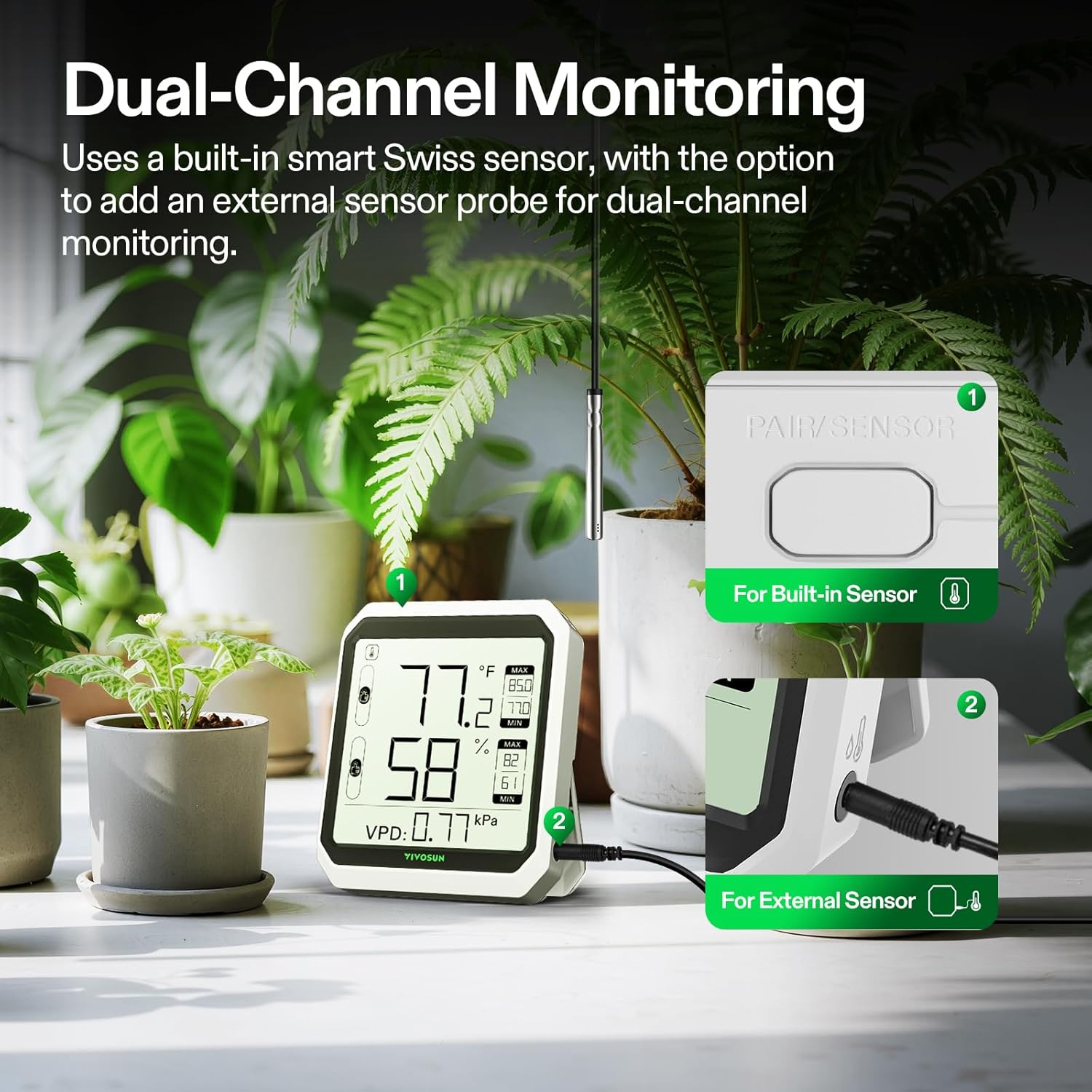
Image: Diagram illustrating the dual-channel monitoring feature, allowing for simultaneous readings from the built-in sensor and an external probe.
6. Manutenzione
- Pulizia: Pulire il dispositivo con un panno morbido e asciutto. Non utilizzare detergenti abrasivi né immergere il dispositivo in acqua.
- Sostituzione della batteria: Replace batteries when the low battery indicator appears on the display or in the app. Ensure to use new AAA alkaline batteries.
- Magazzinaggio: Se si conserva il dispositivo per un periodo prolungato, rimuovere le batterie per evitare perdite. Conservare in un luogo fresco e asciutto.
7. Risoluzione Dei Problemi
| Problema | Possibile causa | Soluzione |
|---|---|---|
| Il dispositivo non si accende | Le batterie sono scariche o installate in modo errato. | Controllare la polarità delle batterie. Sostituirle con nuove batterie AAA. |
| No data in app / Cannot connect via Bluetooth | Bluetooth is off on phone; device is out of range; app not properly paired. | Ensure phone Bluetooth is on. Move closer to the device. Re-pair the device in the VIVOSUN App. |
| Letture imprecise | Sensor obstructed or exposed to extreme conditions; device needs calibration (not user-serviceable). | Ensure sensors are clear. Avoid placing in direct sunlight or near heat/cold sources. If issues persist, contact VIVOSUN support. |
| LCD display partially visible or corrupted | Physical damage; internal component issue. | Handle the device with care. If physically damaged, replacement may be necessary. Contact VIVOSUN support. |
| External probe not working | Probe not securely connected; probe is faulty. | Ensure the external probe is fully inserted into its port. If still not working, the probe may need replacement. |
8. Specifiche
| Specificazione | Valore |
|---|---|
| Marca | VIVOSUN |
| Numero di modello | VS-THB1 |
| Connettività | Bluetooth 5.0 |
| Intervallo di temperatura di lavoro | Da -4°C a 149°C (da -20°F a 65°F) |
| Precisione della temperatura | ± 0.9 ° F (± 0.5 ° C) |
| Gamma di umidità di lavoro | 0% al 100% di umidità relativa |
| Precisione dell'umidità | ±5% UR |
| Velocità di aggiornamento dei dati | 2 secondi |
| Portata Bluetooth | Up to 164 ft (50 m) (no obstructions) |
| Tipo di visualizzazione | LCD |
| Fonte di alimentazione | 3 batterie alcaline AAA |
| Peso dell'articolo | 0.14 chilogrammi (4.9 once) |
| Dimensioni del pacco | 5.51 x 3.58 x 1.14 pollici |
9. Compatibilità
The VIVOSUN AeroLab THB1 can be integrated into a larger VIVOSUN Smart Grow System:
- It functions as an additional sensor when connected with a GrowHub E42, E42A, or E25.
- The GrowHub can serve as a WiFi gateway, extending the monitoring capabilities beyond Bluetooth range.
- It works seamlessly with other VIVOSUN SGS devices like AeroZesh and AeroLight, providing comprehensive visual temperature, humidity, and VPD data within your grow environment.

Image: The AeroLab THB1's integration with VIVOSUN GrowHub controllers for enhanced system monitoring.
10. Garanzia e supporto
VIVOSUN products are designed for reliability and performance. For warranty information, technical support, or service inquiries, please refer to the official VIVOSUN webo contattare direttamente il servizio clienti. Conservare la ricevuta d'acquisto come prova d'acquisto per eventuali reclami in garanzia.
VIVOSUN Customer Service: Per favore visita www.vivosun.com per informazioni di contatto e risorse di supporto.