
FORTINET 108F-FPOE
Manuale utente Fortinet FortiSwitch 108F-FPOE
Model: 108F-FPOE | Brand: FORTINET
Introduzione
The FortiSwitch Secure Access Family delivers outstanding security, performance, and manageability. Secure, simple, and scalable, FortiSwitch is the right choice for threat-conscious businesses of all sizes. Tightly integrated into the Fortinet Security Fabric via FortiLink, FortiSwitch can be managed directly from the familiar FortiGate interface. This single-pane-of-glass management provides complete visibility and control of users and devices on the network regardless of how they connect. This makes the FortiSwitch ideal for SD-Branch and campus deployments with applications that range from desktop to data center aggregation, enabling businesses to converge their security and network access.
Caratteristiche principali
- Optimal for converged network environments; enabling voice, data, and wireless traffic to be delivered across a single network.
- Supports non-FortiLink deployments through onboard GUI, API, or command line configuration.
- Centralized security and access management from FortiGate interfaces with FortiLink.
- Zero-Touch Provisioning: Auto-discovery and configuration of Ethernet ports and security policies.
- Entry level switch with 8 GE ports, PoE+ capable, suitable for desktop to wiring closet deployments. Includes 2 GE SFP uplink ports and 4x 10GE SFP+ uplink ports.
Impostare
Contenuto della confezione
Verificare che tutti i componenti siano presenti nella confezione:
- FortiSwitch 108F-FPOE Unit
- Cavo di alimentazione
- Kit di montaggio su rack (se applicabile)
- Documentazione (Guida rapida, Informazioni sulla sicurezza)
Installazione fisica
The FortiSwitch 108F-FPOE is designed for desktop or rackmount installation. Ensure adequate ventilation around the unit.

Figura 1: Pannello frontale sopraview
This image displays the front panel of the FortiSwitch 108F-FPOE, showing the console port, 8 GE PoE+ ports (ports 1-8), and 2 SFP uplink ports (ports 9-10). LED indicators for Power, Alarm, and PoE Max are also visible.
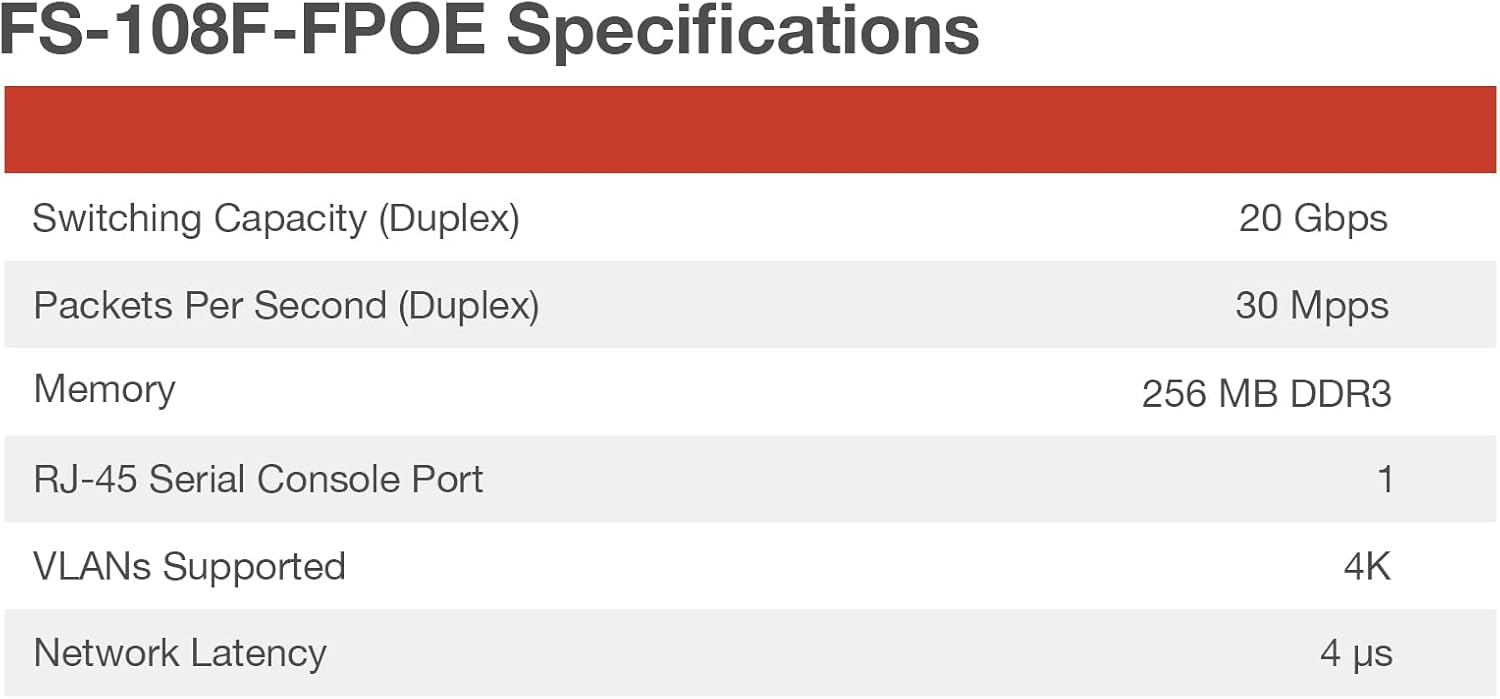
Figura 2: Pannello posteriore sopraview
This image shows the rear panel of the FortiSwitch 108F-FPOE, highlighting the AC power input connector and grounding screw. The serial number and model information label are also visible.
Collegamento dell'alimentazione
Connect the provided power cord to the AC power input on the rear panel of the FortiSwitch and then to a suitable power outlet. The device will power on automatically.
Connessioni di rete
- Data Ports (1-8): Connect your network devices (e.g., computers, IP phones, wireless access points) to these RJ45 ports. These ports support Power over Ethernet (PoE+) for compatible devices.
- Porte di uplink (9-10): Use these SFP ports to connect the FortiSwitch to your core network or other switches using appropriate SFP transceivers and fiber optic cables.
- Porta della console: For initial configuration or troubleshooting, connect a console cable from your management workstation to the RJ45 console port.
Operating the FortiSwitch
The FortiSwitch 108F-FPOE can be managed in several ways:
- FortiLink Integration: For seamless management and centralized security, integrate the FortiSwitch with a FortiGate firewall using FortiLink. This provides a single-pane-of-glass management interface.
- Onboard GUI: Accedi al web-based graphical user interface (GUI) by connecting a computer to a data port and navigating to the default IP address of the switch (refer to the Quick Start Guide for default IP).
- Interfaccia della riga di comando (CLI): For advanced configuration and scripting, use the CLI via the console port or SSH/Telnet (once configured).
- API: The switch supports API for programmatic control and automation.
Refer to the FortiSwitch Administration Guide for detailed configuration instructions for each management method.
Manutenzione
To ensure optimal performance and longevity of your FortiSwitch 108F-FPOE, follow these maintenance guidelines:
- Ventilazione: Ensure that the ventilation openings are not blocked. Maintain adequate airflow around the unit to prevent overheating.
- Pulizia: Periodically clean the exterior of the unit with a soft, dry cloth. Do not use liquid or aerosol cleaners.
- Aggiornamenti del firmware: Regularly check the Fortinet support websito per gli ultimi aggiornamenti del firmware. Mantenere il firmware aggiornato garantisce l'accesso a nuove funzionalità, miglioramenti delle prestazioni e patch di sicurezza.
- Condizioni ambientali: Per evitare danni, utilizzare l'interruttore entro gli intervalli di temperatura e umidità specificati.
Risoluzione dei problemi
This section provides solutions to common issues you might encounter with your FortiSwitch 108F-FPOE.
Nessun potere
- Controllare il cavo di alimentazione: Assicurarsi che il cavo di alimentazione sia collegato saldamente sia all'interruttore che alla presa di corrente.
- Verifica presa: Provare la presa di corrente con un altro dispositivo per confermare che funzioni.
- LED di potenza: Check if the Power LED on the front panel is illuminated. If not, contact Fortinet support.
Nessuna connettività di rete
- Connessioni via cavo: Ensure all Ethernet and SFP cables are properly connected to the correct ports on the switch and connected devices.
- LED Link/Act: Check the Link/Act LEDs on the front panel for the connected ports. A solid green or blinking light indicates a valid link and activity.
- Configurazione IP: Verify the IP address configuration of the switch and connected devices. Ensure they are on the same subnet or have proper routing configured.
- FortiLink Status: If using FortiLink, check the status on the FortiGate to ensure the switch is authorized and connected.
PoE Not Working
- LED PoE massimo: Check the PoE Max LED. If it's illuminated, the switch may be exceeding its PoE power budget. Disconnect some PoE devices or use external power for them.
- Compatibilità del dispositivo: Ensure the connected device is PoE or PoE+ compatible.
- Qualità del cavo: Use high-quality Ethernet cables (Cat5e or higher) for PoE connections.
For more complex issues, consult the FortiSwitch troubleshooting guide or contact Fortinet technical support.
Specifiche
The following table provides detailed technical specifications for the FortiSwitch 108F-FPOE.

Figure 3: FortiSwitch 108F-FPOE Key Specifications
This image presents a table detailing key performance specifications such as Switching Capacity (Duplex), Packets Per Second (Duplex), Memory, RJ-45 Serial Console Port count, VLANs Supported, and Network Latency.

Figure 4: FortiSwitch 108F-FPOE Detailed Hardware Specifications
This image shows a comprehensive table of hardware specifications, including Total Network Interfaces, Dedicated Management Port, Form Factor, Power over Ethernet (PoE) Ports, PoE Power Budget, Mean Time Between Failures, System Specifications, Dimensions, Weight, Power Requirements, Operating Temperature, Humidity, and Air-Flow Direction.
| Attributo | Valore |
|---|---|
| Marca | FORTINET |
| Modello | 108F-FPOE |
| Tipo di interruttore | Gestito a livello 2 |
| Numero di porte | 8 GE PoE+ ports, 2 SFP uplink ports |
| Velocità di trasferimento dati | 8 Gigabit al secondo (per porta) |
| Tipo di interfaccia | PoE, SFP |
| Dimensioni del prodotto | 8 x 5 x 2 pollici (circa) |
| Peso dell'articolo | 4.05 libbre (1.84 chilogrammi) |
| Materiale della cassa | Metallo |
| Voltage | 44 Volt (in funzione) |
| Potenza massima | 130 Watts (PoE Power Budget) |
| Valutazione della temperatura superiore | 40 gradi Celsius |
| Produttore | Fortinet |
| Codice UPC | 195875035247 |
| Data prima disponibilità | 26 febbraio 2023 |
Garanzia e supporto
Garanzia del prodotto
The FortiSwitch 108F-FPOE comes with a limited lifetime warranty. For specific details regarding the warranty policy, please refer to the official Fortinet websito o la documentazione inclusa nel prodotto.
Potrebbero essere disponibili anche piani di protezione estesa da acquistare:
- Piano di protezione biennale
- Piano di protezione biennale
- Complete Protect (abbonamento mensile)
Supporto tecnico
For technical assistance, product registration, or to download the latest firmware and documentation, please visit the official Fortinet support portal. Ensure you have your product's serial number ready when contacting support.
Ask a question about this manual
Ask about setup, troubleshooting, compatibility, parts, safety, or missing instructions. Manuals+ will review the question and use this page’s manual context to help answer it.