
Casio AP-270 CELVIANO
Manuale utente del pianoforte digitale Casio AP-270 CELVIANO
Model: AP-270 CELVIANO
Introduzione
This manual provides essential information for the setup, operation, and maintenance of your Casio AP-270 CELVIANO Digital Piano. Designed to offer a natural playing feel and rich, authentic tones, this instrument combines advanced technology with elegant design. Please read this manual thoroughly to ensure proper use and to maximize your musical experience.
Cosa è incluso
Your Casio AP-270 CELVIANO Digital Piano package includes the following components:
- Casio AP-270 CELVIANO Digital Piano (Brown)
- Furniture Bench
- Cuffie
- Adattatore CA
- DVD didattico Austin Bazaar
- Panno per lucidatura
- Manuale dell'utente (questo documento)

Image: The complete Casio AP-270 CELVIANO Digital Piano bundle, showcasing the brown digital piano, matching bench, headphones, and various instructional materials.
Caratteristiche principali
- Multi-dimensional Morphing AiR Sound Source: This advanced sound source meticulously reproduces the rich, resonating tones inherent to a grand piano, with expanded memory for longer sampling duration and enhanced waveform data quality.
- Tri-sensor Scaled Hammer Action Keyboard II: Experience a natural playing feel that closely mimics a grand piano. The three-sensor system accurately detects key touches, replicating the unique sounding timing of an acoustic instrument.
- Simulated Ebony and Ivory Keys: The keys provide a luxurious feel and texture, along with a smooth touch. The detailed crimp surface finish helps prevent finger slippage during extended play.
- Two Legendary Grand Piano Sounds: Select between two distinct world-renowned grand piano sounds to suit various musical genres and performance environments. One offers powerful, richly reverberating performances, ideal for classical pieces, while the other provides crisp, straightforward sound, suitable for jazz and pop.
- Damper Resonance: A stereo resonance simulator on all 88 keys naturally reproduces the deep, beautiful resonance created by using a damper pedal, including the resonance from the lifting of the dampERS.
- Concerto: Features high-quality audio data recordings of 10 live orchestra performances, allowing pianists to play along and experience a magnificent performance.
- Connettività: Class-compliant USB connects to the Casio Music Space iOS/Android app for lessons, score viewing, and more. Includes headphone outputs for quiet practice.
Impostare
Per configurare il tuo pianoforte digitale, segui questi passaggi:
- Disimballaggio: Carefully remove all components from the packaging. Ensure all items listed in the "What's Included" section are present.
- Montaggio: Assemble the digital piano cabinet and attach the keyboard unit according to the separate assembly guide provided in the box. Ensure all screws are tightened securely.
- Assemblaggio della panca: Assemble the furniture bench as per its instructions.
- Collegamento elettrico: Connect the supplied AC adapter to the DC IN terminal on the piano and then plug it into a standard wall outlet.
- Cuffie: For private practice, plug your headphones into one of the 3.5mm headphone jacks located on the front of the piano.
- Connessione USB (facoltativa): To connect to a computer or smart device for use with the Casio Music Space app, use a standard USB cable (not included) to connect the piano's USB port to your device.
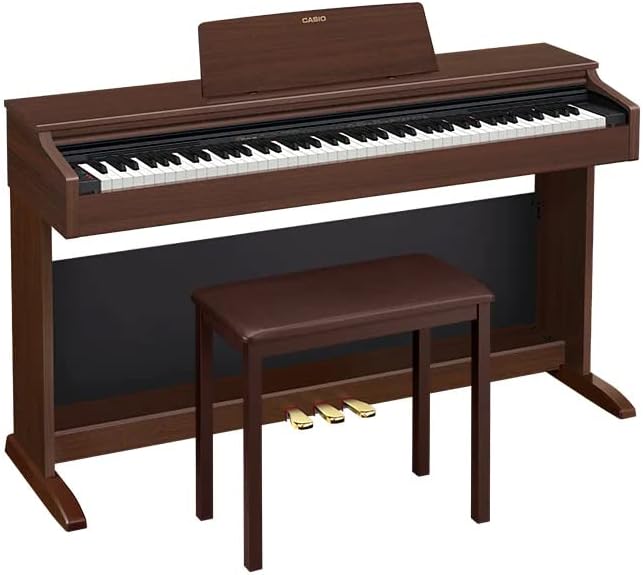
Image: A side perspective of the Casio AP-270 CELVIANO Digital Piano, highlighting its cabinet design and the accompanying bench.
Istruzioni per l'uso
Accensione/spegnimento
- Per accendere: premere il tasto ENERGIA pulsante.
- Per spegnere: tenere premuto il tasto ENERGIA pulsante finché il display non si spegne.
Regolazione del volume
Utilizzare il VOLUME knob located on the front panel to adjust the overall sound output level.
Selezione dei toni
Your piano features a variety of tones, including two distinct grand piano sounds. Refer to the detailed tone list in the full user manual for specific tone selection procedures. Generally, tones are selected using dedicated buttons or a combination of function and key presses.
Using Pedals
The Casio AP-270 includes three pedals: Damper (Sustain), Soft, and Sostenuto. These function similarly to an acoustic grand piano, allowing for expressive control over your sound.
- Damper Pedal (Right): Sustains notes. The piano features advanced Damper Resonance for realistic sound.
- Pedale del piano (sinistro): Softens the sound.
- Pedale sostenuto (centrale): Sostiene solo le note tenute premute nel momento in cui si preme il pedale.
Concerto
Engage the Concert Play feature to play along with pre-recorded orchestral performances. Detailed instructions for selecting and playing along with Concert Play tracks are available in the comprehensive manual.
Casio Music Space App
Enhance your learning and playing experience by connecting your piano to the Casio Music Space app via USB. The app offers interactive lessons, score viewing, and additional features. Download the app from your device's app store and follow the in-app instructions for connection.
Manutenzione
- Pulizia: Use the provided polishing cloth or a soft, dry cloth to wipe the piano's surface. For stubborn dirt, slightly dampImmergere il panno in acqua e strofinare delicatamente, quindi asciugare immediatamente. Evitare detergenti abrasivi, cere o solventi.
- Cura delle chiavi: Wipe the keys with a soft, dry cloth. Do not use chemical cleaners on the keys as they may damage the simulated ebony and ivory finish.
- Magazzinaggio: When not in use for extended periods, cover the piano to protect it from dust. Store in a stable environment, away from direct sunlight, extreme temperatures, and high humidity.
- Spegni: Always turn off the piano and unplug the AC adapter when not in use or during electrical storms.
Risoluzione dei problemi
| Problema | Possibile causa | Soluzione |
|---|---|---|
| Nessun suono dagli altoparlanti/cuffie. | Volume too low; AC adapter not connected; headphones not fully inserted. | Aumento VOLUME knob; ensure AC adapter is securely connected; re-insert headphones firmly. |
| I tasti sembrano non rispondere o bloccarsi. | Dust or debris under keys; environmental factors (humidity). | Gently clean around keys with a soft brush; ensure piano is in a stable environment. If problem persists, contact support. |
| Il pianoforte non si accende. | AC adapter not connected or faulty; power outlet issue. | Check AC adapter connection to piano and wall outlet; try a different power outlet. |
| Il suono è distorto o rumoroso. | Volume too high; external interference; faulty cable. | Lower volume; move piano away from other electronic devices; check headphone/audio cables. |
For issues not listed here, please refer to the comprehensive troubleshooting section in the full user manual or contact Casio customer support.
Specifiche
- Nome modello: CELVIANO
- Numero modello articolo: CAS-AP270BN-COMBO-PRO
- Numero di chiavi: 88
- Tipo di tastiera: Tri-sensor Scaled Hammer Action Keyboard II
- Sorgente sonora: Sorgente sonora AiR con morphing multidimensionale
- Colore: Marrone
- Dimensioni del prodotto: 60 x 17 x 23 pollici
- Fonte di energia: Adattatore CA
- Jack per cuffie: Presa da 3.5 mm
- Tecnologia di connettività: Ausiliario, USB
- Software supportato: Casio Music Space
- Livello di abilità: Principiante
- Fascia d'età: Adulto
Garanzia e supporto
Per informazioni dettagliate sulla garanzia, fare riferimento alla scheda di garanzia inclusa con il prodotto o visitare il sito ufficiale Casio website. Casio provides comprehensive support for its products.
- Lezioni online: Register on the Casio website to unlock one free month of access to Playground Sessions, offering step-by-step lessons for learning your favorite songs.
- Applicazione Casio Music Space: Utilize the Casio Music Space app for additional learning resources and interactive features.
- Assistenza clienti: For technical assistance or service inquiries, please contact Casio customer support through their official websito o le informazioni di contatto fornite nella documentazione del prodotto.
Always ensure you are using official Casio resources for support and information.
Ask a question about this manual
Ask about setup, troubleshooting, compatibility, parts, safety, or missing instructions. Manuals+ will review the question and use this page’s manual context to help answer it.