
1. Introduzione
The Wallbox Pulsar Max 7.4kW is an advanced electric vehicle (EV) charger designed for efficient and convenient home charging. This manual provides essential information for safe installation, operation, and maintenance of your charger. It is compatible with all electric and plug-in hybrid vehicles equipped with a Type 2 connector.
The Pulsar Max offers fast charging capabilities, up to 8 times faster than a standard outlet, and includes smart features like scheduled charging to optimize energy costs and usage.
2. Informazioni sulla sicurezza
Before installing or using the Wallbox Pulsar Max, please read and understand all safety instructions. Failure to follow these instructions may result in electric shock, fire, or serious injury.
- Installation must be performed by a qualified electrician in accordance with local regulations and standards.
- Non tentare di aprire, smontare o modificare il caricabatterie.
- Assicurarsi che il cavo di ricarica non sia danneggiato prima di ogni utilizzo. Non utilizzare se il cavo o il connettore sono sfilacciati, rotti o esposti.
- Tenere bambini e animali domestici lontani dall'area di ricarica durante il funzionamento.
- Avoid exposing the charger to extreme temperatures or direct water spray beyond its IP55 rating.
3. Contenuto della confezione
Verificare che tutti gli articoli siano presenti nella scatola:
- Wallbox Pulsar Max Charger Unit
- Socket Holder
- Charging Cable (5 meters, Type 2)
- Opening Card (for activation/access)
- Hardware di montaggio (viti, tasselli)
- Guida all'installazione

Image: Contents of the Wallbox Pulsar Max package.
4. Prodotto finitoview e Caratteristiche
4.1 Caratteristiche principali
- Fast and Powerful Charging: Up to 7.4kW (32A) for quick charging of EVs and PHEVs.
- Gestione intelligente dell'energia: Schedule charging sessions via the myWallbox app to utilize off-peak electricity rates and integrate with solar power.
- Installazione semplice: Simple wall-mount design with integrated PEN fault protection, eliminating the need for an additional earthing rod.
- Design durevole: Weather and dust resistant (IP55 and IK10 rated) for indoor or outdoor installation, featuring a scratch-resistant matte finish.
- Connettività: Built-in WiFi and Bluetooth for seamless app control and updates.
4.2 Dimensioni
The Wallbox Pulsar Max has compact dimensions suitable for various installation locations.

Image: Wallbox Pulsar Max dimensions (198mm W x 201mm H x 99mm D) and 5m cable length.
4.3 Stati degli indicatori LED
The LED indicator on the charger provides visual feedback on its operational status.
| Colore LED | Stato |
|---|---|
| Verde | Pronto per la carica |
| Blu | Collegato al veicolo |
| Azzurro chiaro | Ricarica in corso |
| Giallo | Locked (charger or cable) |
| Rosso | Errore |
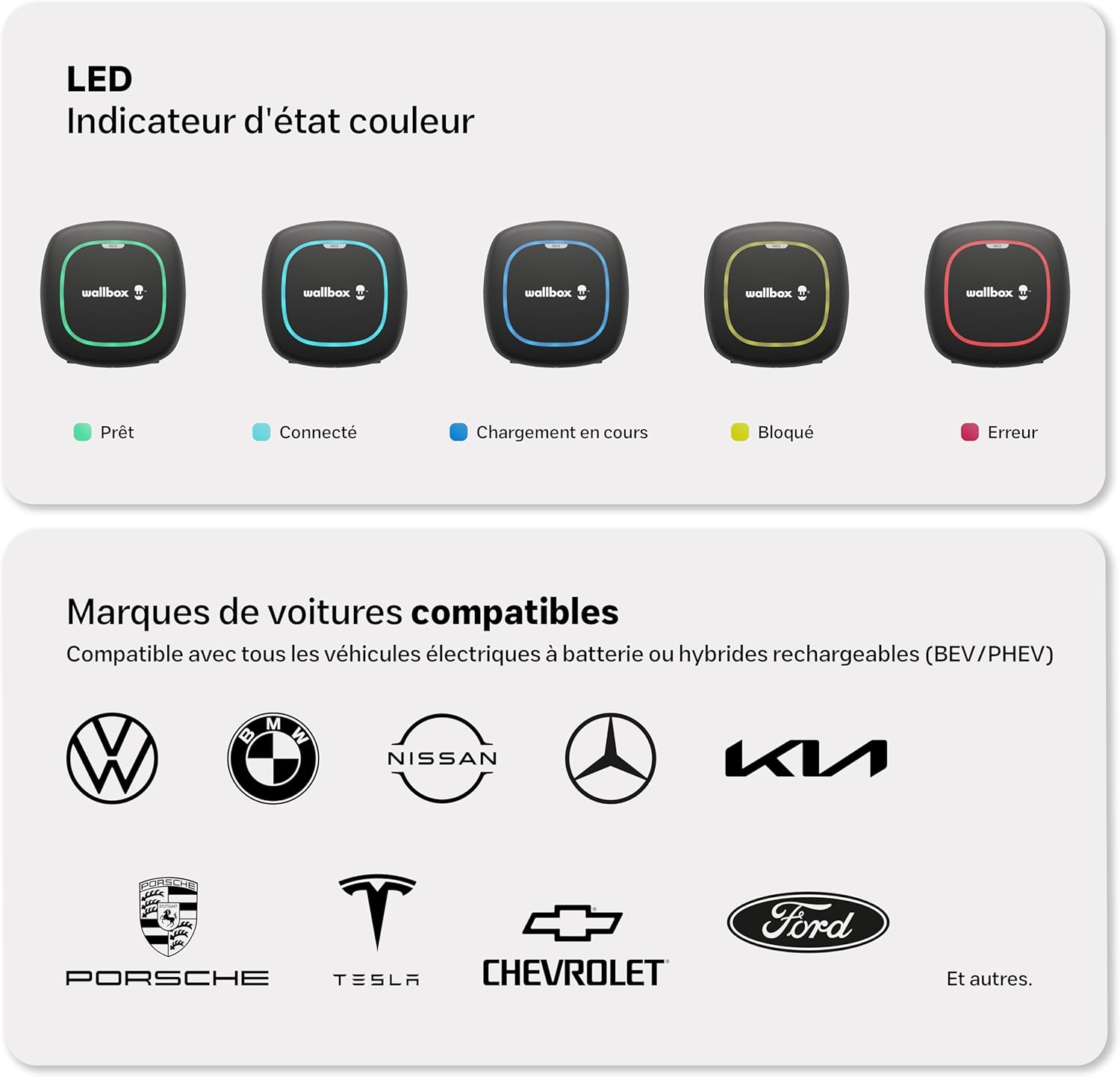
Image: Visual representation of LED indicator states and compatible vehicle brands.
5. Configurazione e installazione
The Wallbox Pulsar Max is designed for straightforward installation. It features a simple wall-mounting process and integrated PEN fault protection, which simplifies electrical requirements by eliminating the need for a separate earthing rod.
Importante: Installation must be carried out by a certified electrician to ensure compliance with all local electrical codes and safety standards. Refer to the detailed Guida all'installazione included in your package for step-by-step instructions.

Image: A technician performing the installation of the Wallbox Pulsar Max.
6. Istruzioni per l'uso
Once installed and configured, operating your Wallbox Pulsar Max is simple:
- Ensure your vehicle is parked within reach of the 5-meter charging cable.
- Take the Type 2 connector from the socket holder.
- Plug the Type 2 connector into your vehicle's charging port. The charger's LED will change to blue, indicating a successful connection.
- Charging will begin automatically if no schedule is set, or according to your programmed schedule. The LED will turn light blue during active charging.
- To stop charging, unlock your vehicle (if necessary) and disconnect the cable from the car, then from the charger. Return the connector to its holder.

Image: Wallbox Pulsar Max in operation, charging an electric vehicle.
7. Wallbox App Integration
The myWallbox app allows you to fully control and monitor your charging experience. Connect your charger via WiFi or Bluetooth to access a range of smart features:
- Informazioni in tempo reale: View live charging status and energy consumption.
- Telecomando: Start, pause, or stop charging sessions from anywhere.
- Session Management: Imposta programmi di ricarica per sfruttare al megliotage delle tariffe elettriche fuori stagione.
- Charging Statistics: Track your charging history and energy usage.
- Financial and Energy Savings: Optimize charging times to reduce costs.
- Regolazione dell'intensità: Control the charging current to manage power consumption.

Image: The myWallbox application interface on a smartphone.
8. Manutenzione
Regular maintenance ensures the longevity and optimal performance of your Wallbox Pulsar Max charger.
- Pulizia: Pulire periodicamente l'esterno del caricabatterie con un panno morbido e asciutto.amp panno. Non usare detergenti abrasivi o solventi.
- Ispezione dei cavi: Regularly inspect the charging cable and connector for any signs of wear, damage, or corrosion. If any damage is found, discontinue use and contact support.
- Aggiornamenti del firmware: Ensure your charger's firmware is up to date via the myWallbox app to benefit from the latest features and improvements.
9. Risoluzione Dei Problemi
If you encounter issues with your Wallbox Pulsar Max, refer to the LED indicator states (Section 4.3) for initial diagnosis. Here are some common troubleshooting steps:
- Charger Not Responding (No LED): Check the circuit breaker for the charger. Ensure power is supplied to the unit.
- Red LED (Error): This indicates a fault. Try disconnecting and reconnecting the charger from the power supply. If the error persists, consult the myWallbox app for specific error codes or contact Wallbox support.
- Yellow LED (Locked): The charger or cable might be locked. Ensure the charging session is not paused or scheduled for a later time in the app.
- La carica non si avvia: Verify the cable is securely connected to both the charger and the vehicle. Check the myWallbox app for any active schedules or paused sessions. Ensure your vehicle is ready to accept a charge.
- Problemi di connettività dell'app: Ensure your charger is within WiFi or Bluetooth range. Restart the app and try reconnecting.
10. Specifiche
| Specificazione | Valore |
|---|---|
| Marca | Scatola da muro |
| Numero di modello | PLP2-0-2-2-9-002 |
| Colore | Nero |
| Volume di uscitatage | 230 Volt |
| Ingresso volumetage | 230 Volt |
| Valutazione attuale | 32 A |
| Tipo di connettore | Tipo 2 |
| Lunghezza del cavo | 5 metri |
| Dispositivi compatibili | All electric and hybrid vehicles with Type 2 connector |
| Numero di porte | 1 |
| Grado di protezione | IP55, IC10 |
| Temperatura di esercizio | -25 a 50 °C |
| Connettività | Wi-Fi, Bluetooth |

Image: Wallbox Pulsar Max highlighting its durability and warranty.
11. Garanzia e supporto
The Wallbox Pulsar Max charger comes with a Garanzia di 3 anno, che copre difetti di fabbricazione e malfunzionamenti in condizioni di normale utilizzo. Si prega di conservare la prova d'acquisto per eventuali reclami in garanzia.
For technical support, warranty claims, or further assistance, please contact Wallbox customer service through their official website or the contact information provided in your product documentation. Ensure you have your model number (PLP2-0-2-2-9-002) and purchase details ready.
You can also find additional resources, FAQs, and community support on the official Wallbox websito: wallbox.com