
1. Introduzione e oltreview
Thank you for choosing the COO 506K Stylus Pen. This active stylus is designed to enhance your interaction with iOS and Android touchscreen devices, providing a precise and smooth experience for various tasks such as drawing, writing, note-taking, and general navigation. Its fine tip and responsive design make it an ideal tool for both creative and productivity applications.

Image: The COO 506K Stylus Pen in black, accompanied by its charging cable and replacement tips, set against a colorful background.
Caratteristiche principali:
- Ampia compatibilità: Compatible with iOS and Android touchscreens, including various tablets (Lenovo, Samsung, Huawei, Vivo, Mi) and smartphones (iPhone, Samsung, Google Pixel, Harmony OS). Note: Not compatible with iPad, Microsoft tablets, or Windows systems.
- No Bluetooth Pairing Required: Simply turn on the stylus, and it will connect automatically to your device.
- 1.5mm Fine Tip: Provides precise and smooth input with no lagging, skips, or scratches.
- Ricarica rapida e lunga durata in standby: Offers up to 12 hours of continuous use on a 1.5-hour charge, with a standby time of 180 days.
- Interruttore Smart Touch: Easy power on/off functionality.
2. Impostazione
2.1 Unboxing e componenti
Dopo aver aperto la confezione, assicurarsi che siano presenti tutti i componenti:
- COO 506K Stylus Pen
- Cavo di ricarica USB di tipo C.
- Replacement Tips (typically 2-3)

Image: The COO 506K Stylus Pen, its USB-C charging cable, and two spare pen tips, laid out on a white surface.
2.2 Ricarica della penna stilo
Before first use, it is recommended to fully charge the stylus pen.
- Individuare la porta di ricarica Type-C sul lato della penna stilo.
- Connect the provided USB Type-C cable to the stylus charging port.
- Collegare l'altra estremità del cavo USB a un adattatore di alimentazione USB standard (ad esempio, un caricabatterie per telefono, una porta USB del computer, un power bank).
- The indicator light will illuminate during charging. It typically takes about 1.5 hours for a full charge.
- The indicator light will change color or turn off once fully charged.

Image: The stylus pen connected to a laptop via its USB-C charging cable, illustrating the charging process. Text indicates 1.5 hours charging for 12 hours continuous use and 180 days standby.
2.3 Accensione e connessione iniziale
The COO 506K Stylus Pen features a smart touch switch for easy operation.
- To turn on the stylus, gently double-tap the top end of the pen. The indicator light will turn blue, signifying it is active.
- No Bluetooth pairing or app installation is required. The stylus will automatically connect to your iOS or Android touchscreen device.
- You can freely switch between different compatible devices without re-pairing.

Image: A hand using the stylus pen on a tablet screen, with text stating "NO NEED TO SET BLUETOOTH. Just turn on the stylus pen, it will auto-connect with your devices."
3. Istruzioni per l'uso
3.1 Utilizzo di base
Once powered on, the stylus is ready for immediate use on your compatible touchscreen device.
- Navigazione: Use the stylus to tap, swipe, and scroll through menus and applications just as you would with your finger.
- Scrittura e disegno: The 1.5mm fine tip provides a precise point for detailed writing, sketching, and drawing. Apply light pressure for optimal results.
- Compatibilità dell'app: The stylus supports a wide range of applications, including GoodNotes, Notability, Noteshelf, Notepad+, Procreate, ArtFlow, Painter, Design, and many others.

Immagine: un primo piano view of the stylus tip on a screen, illustrating its 1.5mm fine tip and highlighting features like "No Lag," "No Slip," and "Continues Line" for a smooth writing experience.
3.2 Applicazioni multiple
The versatility of the COO 506K Stylus Pen allows for various uses across different activities:
- Disegno: Create digital art and illustrations with precision.
- Prendere appunti: Jot down notes, annotate documents, and highlight text with ease.
- Gioco: Enhance your gaming experience on touch-based games.
- Web Navigazione: Navigare websites and interact with content more accurately.
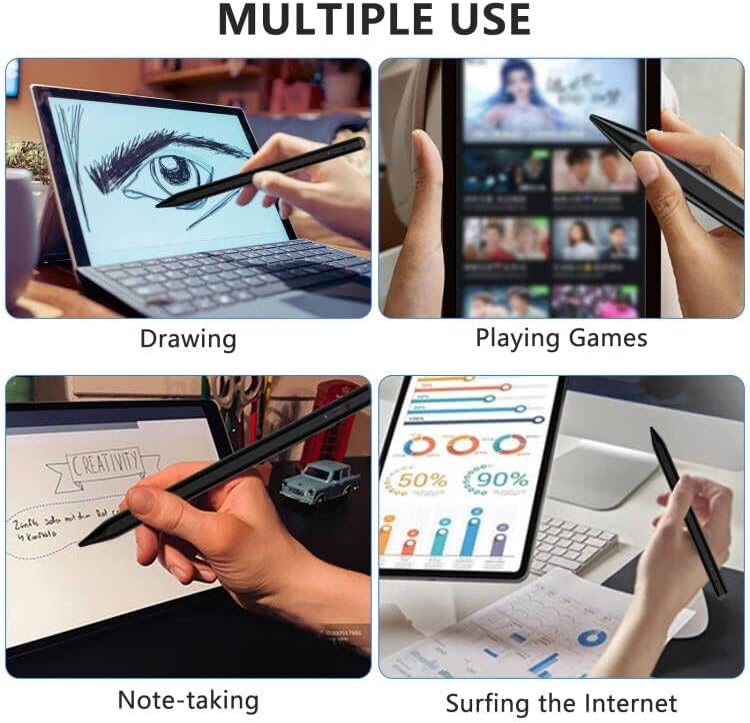
Image: A collage of four images demonstrating the stylus pen's multiple uses: drawing on a laptop, playing games on a tablet, taking notes, and surfing the internet.
3.3 Funzione di risparmio energetico
To conserve battery life, the stylus pen will automatically enter sleep mode after 5 minutes of inactivity. To reactivate, simply double-tap the top end of the pen again.
4. Manutenzione
4.1 Pulizia dello stilo
To maintain optimal performance and appearance, clean the stylus regularly:
- Wipe the body of the stylus with a soft, dry, lint-free cloth.
- For the tip, use a slightly damp cloth if necessary, ensuring no moisture enters the pen's internal components.
- Evitare l'uso di prodotti chimici aggressivi o materiali abrasivi.
4.2 Sostituzione della punta della penna
The 1.5mm fine tip is durable, but may require replacement over time due to wear. Replacement tips are included with your purchase.
- Gently twist the existing tip counter-clockwise to unscrew it from the stylus body.
- Align a new replacement tip with the threaded opening.
- Carefully twist the new tip clockwise until it is securely fastened. Do not overtighten.

Image: A detailed diagram of the stylus pen, highlighting its ON/OFF button, Type-C charging port, indicator light, 1.5mm fine tip, and illustrating the process for replacing the tips.
5. Risoluzione Dei Problemi
| Problema | Possibile causa | Soluzione |
|---|---|---|
| Lo stilo non si accende. | Low battery; Incorrect power-on method. | Charge the stylus for 1.5 hours. Ensure you double-tap the top end of the pen to turn it on. |
| Stylus does not respond on screen. | Stylus is off; Device incompatibility; Screen protector interference. | Ensure the stylus is turned on (blue indicator light). Verify your device is compatible (iOS/Android touchscreens, not iPad/Microsoft/Windows). Try removing thick screen protectors. |
| Lagging or inaccurate input. | Low battery; Worn tip; Device performance issues. | Recharge the stylus. Replace the pen tip if it appears worn. Restart your device. |
| Stylus turns off unexpectedly. | Low battery; Automatic sleep mode. | Charge the stylus. The stylus enters sleep mode after 5 minutes of inactivity; double-tap to reactivate. |
6. Specifiche
| Caratteristica | Dettaglio |
|---|---|
| Numero di modello | 506K Stylus Pen for iOS&Android |
| Dimensioni (L x P x A) | 6.69 x 0.39 x 0.39 pollici (17 x 1 x 1 cm) |
| Peso dell'articolo | 2.89 once (0.08 kg) |
| Materiale | Rame, Metallo |
| Colore | Nero |
| Tipo di batteria | 1 batteria agli ioni di litio (inclusa) |
| Tempo di ricarica | Circa 1.5 ore |
| Tempo di utilizzo continuo | Fino a 12 ore |
| Tempo di standby | Fino a 180 giorni |
| Dimensione punta | Punta fine da 1.5 mm |
| Compatibilità | iOS/Android Touchscreens (Lenovo/HUAWEI/Vivo/Mi/Samsung Tablets; iPhone, Android, HarmonyOS, and other system phones). Not compatible with iPad & Microsoft tablets and Windows systems. |

Image: A display of various tablets and smartphones, indicating the wide compatibility of the stylus pen with iOS and Android touchscreens.
7. Garanzia e supporto
For warranty information or technical support, please refer to the product packaging or contact COO customer service directly. Details for contacting support are typically available on the manufacturer's official websito o tramite il rivenditore presso il quale è stato acquistato il prodotto.
Si prega di conservare la prova d'acquisto per eventuali reclami in garanzia.