
1. Introduzione
This manual provides detailed instructions for the installation, operation, and maintenance of your ASUS TUF Gaming GeForce RTX 4080 OC Edition Graphics Card. Please read this manual thoroughly before using the product to ensure proper functionality and to prevent damage.
2. Informazioni sulla sicurezza
WARNING: Always disconnect the power supply from your computer before installing or removing any components. Failure to do so may result in personal injury or damage to your system.
- Assicurati che l'unità di alimentazione (PSU) soddisfi i requisiti minimi di watttage requirements for this graphics card.
- Maneggiare la scheda grafica tenendola per i bordi per evitare di toccare i componenti sensibili.
- Indossare un braccialetto antistatico o toccare frequentemente un oggetto metallico collegato a terra per scaricare l'elettricità statica.
- Installare la scheda grafica in un case del computer ben ventilato per evitare il surriscaldamento.
3. Contenuto della confezione
Verifica che tutti gli articoli siano presenti nella confezione del prodotto:
- ASUS TUF-RTX4080-O16G-GAMING Graphics card
- Collection card; TUF Velcro Hook & Loop
- TUF Graphics card holder; Speedsetup Manual
- cavo adattatore
- Biglietto di ringraziamento
4. Prodotto finitoview
The ASUS TUF Gaming GeForce RTX 4080 OC Edition Graphics Card is designed for high-performance gaming and demanding applications. It features NVIDIA's Ada Lovelace architecture, offering significant improvements in performance and power efficiency.

Davanti view of the ASUS TUF Gaming GeForce RTX 4080 OC Edition Graphics Card, showcasing its triple Axial-tech fan design.
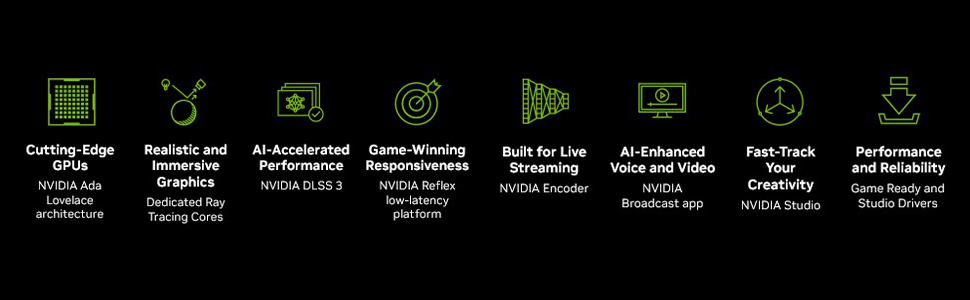
Sopraview of NVIDIA Ada Lovelace architecture features, including streaming multiprocessors, Tensor Cores, and RT Cores.
Caratteristiche principali:
- Multiprocessori di streaming NVIDIA Ada Lovelace: Up to 2x performance and power efficiency.
- Tensor Core di quarta generazione: Up to 2X AI performance.
- Core RT di terza generazione: Up to 2X ray tracing performance.
- Axial-tech fans: Scaled up for 23% more airflow.
- Cuscinetti a doppia sfera per ventole: Last up to twice as long as conventional designs.
- Military-grade Capacitors: Rated for 20K hours at 105C, enhancing GPU power rail durability.
- Metal Exoskeleton: Adds structural rigidity and vents to increase heat dissipation.
- GPU Tweak III software: Fornisce una regolazione intuitiva delle prestazioni, controlli termici e monitoraggio del sistema.

Posteriore view showing the display output interfaces, including DisplayPort and HDMI ports.
5. Installazione
Per installare la scheda grafica, segui questi passaggi:
- Prepara il tuo sistema: Spegni il computer e scollega il cavo di alimentazione. Apri il case del computer.
- Individuare lo slot PCIe: Trova uno slot PCI Express x16 disponibile sulla tua scheda madre.
- Rimuovere le coperture degli slot: Remove the necessary expansion slot covers from your computer case. Note that this card is large (13.7"L x 5.9"W) and may require multiple slots.
- Installa la scheda grafica: Carefully align the graphics card with the PCIe slot and press it down firmly until it is securely seated.
- Proteggi la Carta: Fissare la scheda grafica al case con le viti.
- Connetti alimentazione: Connect the appropriate power cables from your power supply to the graphics card. Ensure all connections are secure.
- Chiudi caso: Chiudere il case del computer e ricollegare il cavo di alimentazione.
- Connetti Display: Collega il/i tuo/i monitor alle uscite DisplayPort o HDMI della scheda grafica.
Video demonstrating the installation and features of the ASUS TUF Gaming RTX 4080 graphics card.
6. Software Installation & Configuration
After physical installation, install the necessary drivers and utility software:
- Installazione del driver: Download the latest NVIDIA GeForce drivers from the official NVIDIA webposto (www.nvidia.com/drivers). Seguire le istruzioni sullo schermo per l'installazione.
- ASUS GPU Tweak III: Install the ASUS GPU Tweak III software from the ASUS support webposto (www.asus.com/support/Download-Center/). This utility allows for performance tweaking, thermal control, and system monitoring.
7. Funzionamento della scheda grafica
Your ASUS TUF Gaming GeForce RTX 4080 OC Edition is designed for optimal performance and cooling. Here are some operational aspects:
Sistema di raffreddamento:
The card features advanced cooling technologies to maintain stable temperatures during heavy loads.

Close-up of the Axial-tech fan, designed for increased airflow and reduced noise.

Illustration of optimized fan rotation for enhanced cooling efficiency.

View of the large heatsink, contributing to efficient heat dissipation.
RGB Lighting (Aura Sync):
The card features customizable ARGB lighting via ASUS Aura Sync. You can synchronize lighting effects with other Aura Sync compatible components in your system.

Example of customizable ARGB lighting on the graphics card.
AI Features and Technologies:
The NVIDIA GeForce RTX 4080 leverages AI for enhanced performance and new capabilities.
Video mostraasing NVIDIA's AI technologies, including generative AI and DLSS, and their applications in gaming and creative workflows.
8. Manutenzione
Una manutenzione regolare aiuta a garantire la longevità e le prestazioni ottimali della scheda grafica:
- Rimozione della polvere: Periodically clean dust from the fans and heatsink using compressed air. Ensure the fans are not spinning during cleaning.
- Aggiornamenti driver: Mantieni aggiornati i driver grafici all'ultima versione per migliorare le prestazioni e correggere i bug.
- Monitoraggio della temperatura: Use GPU Tweak III or other monitoring software to keep an eye on GPU temperatures, especially during intensive tasks.
9. Risoluzione Dei Problemi
Se riscontri problemi con la scheda grafica, prova a seguire i seguenti passaggi per la risoluzione dei problemi:
- Nessuna uscita di visualizzazione:
- Assicurarsi che il cavo del monitor sia collegato saldamente sia alla scheda grafica sia al monitor.
- Verificare che la scheda grafica sia completamente inserita nello slot PCIe.
- Check that all power connectors are properly attached to the graphics card.
- Se possibile, effettuare una prova con un cavo di visualizzazione o un monitor diverso.
- Instabilità/arresti anomali del sistema:
- Assicurati che i driver della scheda grafica siano aggiornati.
- Monitorare le temperature della GPU. Il surriscaldamento può causare instabilità.
- Verify your power supply unit (PSU) is sufficient for the graphics card's power requirements.
- Scarsa prestazione:
- Assicurati che i driver della scheda grafica siano aggiornati.
- Controlla le impostazioni di gioco; se necessario, riduci la qualità grafica.
- Chiudere le applicazioni in background non necessarie.
10. Specifiche
| Caratteristica | Specificazione |
|---|---|
| Coprocessore grafico | Scheda grafica NVIDIA GeForce RTX 4080 |
| Marca | Asus |
| Dimensione RAM grafica | 16 GB |
| Velocità di clock della GPU | 4000 MHz |
| Interfaccia di uscita video | Porta Display, HDMI |
| Tipo di RAM grafica | Memoria GDDR6X |
| Dispositivi compatibili | PC |
| Risoluzione massima dello schermo | 7680x4320 |
| Interfaccia della scheda grafica | PCI-Espresso |
| Velocità di clock della memoria | 4000 MHz |
| Numero di fan | 3 |
| Dimensioni dell'articolo L x P | 13.7"L x 5.9"W |
| Processore video | NVIDIA |
| Nome del modello | Gaming GeForce RTX 4080 16GB GDDR6X OC Edition Graphic Card |
| Peso dell'articolo | 4.2 libbre |
11. Garanzia e supporto
Your ASUS TUF Gaming GeForce RTX 4080 OC Edition Graphics Card comes with a 3-year warranty. For warranty claims, technical support, or further assistance, please visit the official ASUS support websito o contattare il loro servizio clienti.
Supporto ASUS Websito: www.asus.com/support/