
1. Introduzione
Thank you for choosing the LOCOCO LC-U13A UHF Wireless Headset Microphone. This manual provides essential information for the proper setup, operation, and maintenance of your device. Please read it thoroughly before use to ensure optimal performance and longevity of the product.
2. Contenuto della confezione
Si prega di controllare attentamente il pacco per assicurarsi che siano presenti tutti gli articoli:
- 1 x cuffia con microfono wireless (trasmettitore)
- Ricevitore wireless 1 x
- 1 x 3.5mm Converter
- 1 cavo di ricarica USB 2 in 1
- 1 x Manuale utente

Image: All components included in the LOCOCO LC-U13A package.
3. Caratteristiche del prodotto
- Display LED digitale: The microphone features a digital LED screen that clearly shows microphone volume, frequency, and battery status.
- Tecnologia wireless UHF: Utilizes UHF frequency conversion technology for stable and interference-free wireless transmission. Multiple microphones can operate simultaneously without interference.
- Portata wireless estesa: Offers a stable wireless connection up to 50 meters (165 feet) in open areas.
- Batteria ricaricabile: Built-in rechargeable battery in both the transmitter and receiver. Provides 5-6 hours of operation on a full charge.
- Collega e usa: Automatic connection between transmitter and receiver upon power-on.
- Ampia compatibilità: Compatible with speakers, power amplifiers, audio equipment, and PA sound systems.

Image: Digital display indicating power, volume, and frequency.

Image: UHF wireless connection technology with a 50-meter range.
4. Configurazione e associazione
Follow these steps to set up and pair your LOCOCO LC-U13A microphone:
- Accensione: Manually turn on both the transmitter (headset microphone) and the receiver at the same time.
- Collegare il ricevitore: Plug the receiver into the 6.35mm microphone input jack of your audio device (e.g., speaker, amplifier). If your device has a 3.5mm input, use the provided 3.5mm converter.
- Associazione automatica: The devices will automatically start pairing. The blue indicator light on the receiver will flash during pairing. Once successfully connected, the blue light will stop flashing and remain solid.
- Adjust Volume/Frequency: Use the "+" and "-" buttons on the transmitter to adjust the microphone volume and change the frequency if needed. The digital screen will display the current settings and remaining power.
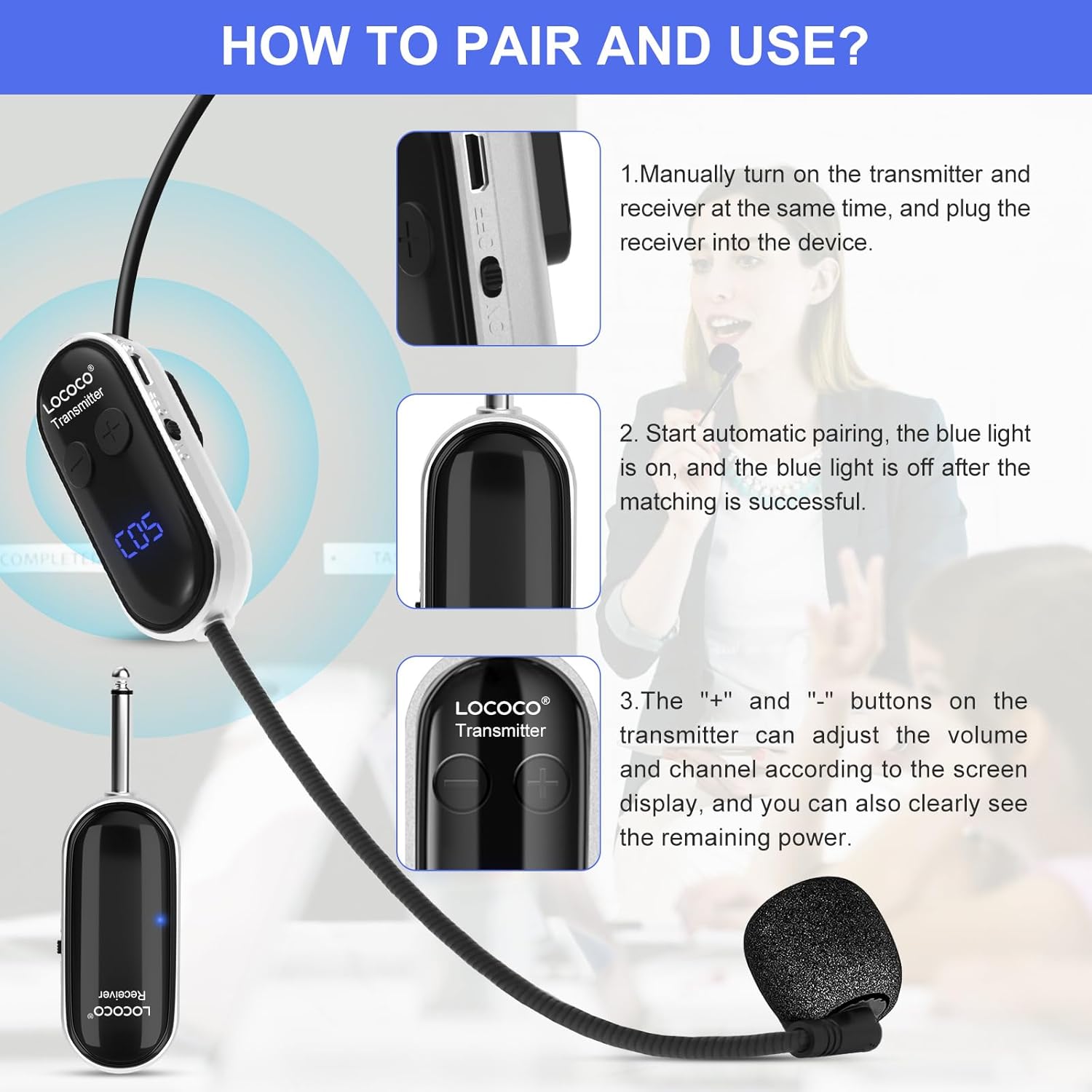
Image: Instructions for pairing and using the microphone system.

Image: The microphone can be worn as a headset or used handheld.
5. Istruzioni per l'uso
Once paired, the microphone is ready for use. Ensure the microphone is positioned correctly for clear audio capture.
- Regolazione del volume: Use the "+" and "-" buttons on the transmitter to increase or decrease the microphone's output volume. Monitor the digital display for the current volume level.
- Regolazione della frequenza: If you experience interference, you can change the operating frequency using the buttons on the transmitter. The digital display will show the current frequency channel.
- Posizionamento ottimale: For best sound quality, position the microphone close to your mouth.

Immagine: Examples of the microphone in use for teaching, conferences, and tour guiding.
6. Ricarica
The LOCOCO LC-U13A features built-in rechargeable batteries for both the transmitter and receiver.
- Processo di ricarica: Connect the 2-in-1 USB charging cable to both the transmitter and receiver, then plug the USB end into a standard USB power adapter (not included) or a computer USB port.
- Indicatore di carica: The digital display on the transmitter will show charging status.
- Tempo di ricarica: Una carica completa richiede in genere circa 2 ore.
- Tempo di funzionamento: Once fully charged, the microphone system can operate for 5-6 hours.

Image: Charging process and battery life information.
7. Note importanti e compatibilità
Please observe the following important information regarding compatibility and usage:
- Incompatibilità: This microphone system non può be used with computers or mobile phones.
- Nessun Bluetooth: The system does not support Bluetooth connections. It uses UHF wireless technology for direct pairing.
- Dispositivi compatibili: The LOCOCO LC-U13A is designed for use with audio equipment such as:
- Altoparlanti per carrelli
- Altoparlanti da esterno
- Voce amplificatori
- Altoparlanti per autobus
- Altoparlanti multimediali per aule
- Energia ampdispositivi lifier

Image: Compatible and incompatible devices for the microphone system.
8. Manutenzione
Proper maintenance ensures the longevity and performance of your microphone system.
- Pulizia: Utilizzare un panno morbido e asciutto per pulire il microfono e il ricevitore. Non utilizzare detergenti liquidi o materiali abrasivi.
- Magazzinaggio: Conservare il dispositivo in un luogo fresco e asciutto, lontano dalla luce solare diretta e da temperature estreme.
- Cura della batteria: If not used for an extended period, charge the batteries at least once every three months to maintain battery health.
- Evitare l'umidità: Tenere il dispositivo lontano dall'acqua e da umidità elevata per evitare danni.
9. Risoluzione Dei Problemi
In caso di problemi, fare riferimento ai seguenti problemi comuni e alle relative soluzioni:
| Problema | Possibile causa | Soluzione |
|---|---|---|
| Nessun suono dal microfono | Microphone or receiver not powered on; Not paired; Low battery; Incorrect input on audio device. | Ensure both devices are on; Re-pair the devices; Charge batteries; Check audio device input. |
| Interferenze o scarsa qualità del suono | Other wireless devices nearby; Operating too far from receiver; Low battery; Incorrect frequency. | Change frequency channel; Move closer to receiver; Charge batteries; Ensure no strong interference sources. |
| Receiver blue light flashing continuously | I dispositivi non sono accoppiati. | Ensure both transmitter and receiver are powered on simultaneously for automatic pairing. |
| Durata breve della batteria | Batteries not fully charged; Old batteries. | Ensure a full 2-hour charge; If issues persist, contact support for battery replacement options. |
10. Specifiche
| Caratteristica | Dettaglio |
|---|---|
| Numero di modello | LC-U13A (also referred to as LC-W3) |
| Fattore di forma del microfono | Cuffia |
| Tecnologia di connettività | Wireless UHF |
| wireless Range | Fino a 50 metri (165 piedi) in aree aperte |
| Numero di canali | 40 |
| Risposta in frequenza | 3000 MHz |
| Fonte di alimentazione | Batteria ricaricabile ai polimeri di litio |
| Capacità della batteria | 400 mAh (estimated from image) |
| Tempo di ricarica | Circa 2 ore |
| Tempo di funzionamento | 5-6 ore |
| Materiale | Plastica |
| Dimensioni del prodotto (L x P x A) | 17.7 x 14 x 3.9 cm (6.97 x 5.51 x 1.54 pollici) |
| Peso del prodotto | 150 g (0.33 libbre) |
| Modello polare | Omnidirezionale |
11. Garanzia e supporto
LOCOCO products are designed for reliability and performance. For warranty information or technical support, please refer to the contact details provided with your purchase or visit the official LOCOCO websito. Conservare la ricevuta d'acquisto come prova d'acquisto per eventuali reclami in garanzia.