
1. Introduzione
Thank you for choosing the UNITED LED40HS82A11 40-inch Full HD Smart Android TV. This television combines a vibrant Full HD display with the power of Android 11, offering a seamless entertainment experience. With built-in Chromecast and Airplay, Wi-Fi, Ethernet, and support for various digital broadcasting standards (DVB/T2/S2/C, MPEG-4, HEVC Main 10), your new TV is designed for versatile use, from watching movies and playing games to browsing the internet.
This manual provides essential information for setting up, operating, and maintaining your television. Please read it thoroughly before using the product and keep it for future reference.

Immagine 1.1: anteriore view of the UNITED LED40HS82A11 TV with Android TV interface.
2. Informazioni sulla sicurezza
Before operating your TV, please read all safety instructions carefully. Improper use can result in electric shock, fire, or damage to the appliance.
- Alimentazione elettrica: Assicurarsi che il televisore sia collegato a una presa di corrente CA da 100-240 V, 50/60 Hz. Non sovraccaricare le prese di corrente.
- Ventilazione: Non ostruire le aperture di ventilazione. Lasciare spazio sufficiente attorno al televisore per un corretto flusso d'aria.
- Acqua e umidità: Non esporre il televisore a pioggia o umidità. Non posizionare oggetti contenenti liquidi, come vasi, sul televisore.
- Fonti di calore: Tenere il televisore lontano da fonti di calore come termosifoni, bocchette di ventilazione, stufe o altri apparecchi che producono calore.
- Pulizia: Scollegare il televisore dalla presa a muro prima di pulirlo. Utilizzare un panno morbido e asciutto. Non utilizzare detergenti liquidi o spray.
- Manutenzione: Non tentare di riparare questo prodotto da soli. Affidare tutte le operazioni di manutenzione a personale di assistenza qualificato.
- Bambini: Sorvegliare i bambini per assicurarsi che non giochino con la TV.
3. Contenuto della confezione
Si prega di verificare che i seguenti elementi siano inclusi nella confezione del televisore:
- UNITED LED40HS82A11 40-inch Full HD Smart Android TV
- Telecomando (con 2 batterie AAA da 1.5 V)
- Cavo di alimentazione
- Supporto TV (2 pezzi) e viti
- MiniAV Adapter Cable
- Manuale dell'utente (questo documento)
Se qualche articolo risulta mancante o danneggiato, contattare il rivenditore.
4. Impostazione
4.1 Fissaggio del supporto
- Posizionare con cautela il televisore a faccia in giù su una superficie morbida e piana (ad esempio una coperta o della gommapiuma) per evitare di danneggiare lo schermo.
- Allineare le gambe del supporto con le fessure corrispondenti nella parte inferiore del televisore.
- Secure each stand leg with the provided screws. Ensure they are tightened firmly.
- Sollevare con cautela il televisore in posizione verticale e posizionarlo su una superficie stabile e piana.
4.2 Montaggio a parete (opzionale)
This TV is compatible with VESA standard wall mounts. The VESA mounting pattern for this model is typically 200x200mm. Please consult a professional for wall mounting to ensure proper installation and safety. Wall mount bracket and screws are not included.
4.3 Collegamento di dispositivi esterni
Il televisore offre diverse opzioni di connettività per dispositivi esterni.
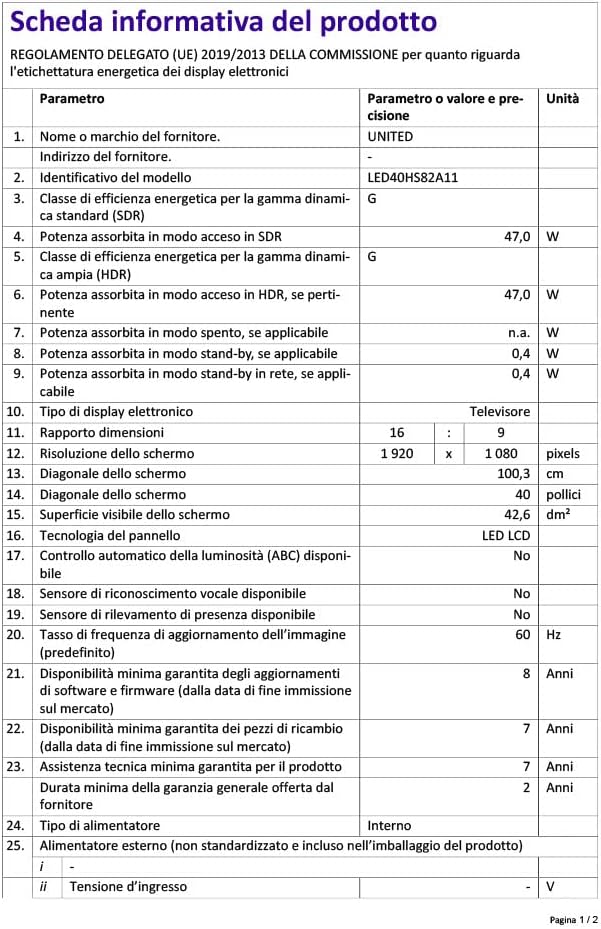
Immagine 4.1: posteriore view of the TV with port layout.
- HDMI: Connect Blu-ray players, game consoles, set-top boxes, or other HDMI-enabled devices. The TV supports multiple HDMI inputs.
- USB: Collegare dispositivi di archiviazione USB (ad esempio, unità flash) per riprodurre contenuti multimediali files. La TV ha 1 porta USB.
- MiniAV: Use the provided MiniAV adapter cable to connect older devices with composite video and stereo audio outputs.
- Uscita cuffie: Collega le cuffie per l'ascolto privato.
4.4 Collegamento antenna/cavo
Connect your terrestrial antenna (DVB-T/T2) or satellite dish (DVB-S/S2) cable to the appropriate input on the back of the TV. For cable TV (DVB-C), connect the cable to the antenna input.
4.5 Connessione di rete (Wi-Fi ed Ethernet)
Your TV can connect to the internet via Wi-Fi or an Ethernet cable.
- Wifi: During the initial setup or via the settings menu, select your Wi-Fi network and enter the password.
- Collegamento Ethernet: Connect an Ethernet cable from your router to the LAN port on the back of the TV.
5. Prima configurazione
- Accensione: After connecting all necessary cables, plug the power cord into an electrical outlet. Press the power button on the remote control or on the TV.
- Configurazione iniziale: La TV ti guiderà attraverso la procedura di configurazione iniziale.
- Selezione della lingua: Scegli la tua lingua preferita.
- Configurazione di rete: Connect to your Wi-Fi network or use an Ethernet connection.
- Account Google: Sign in with your Google account to access the Google Play Store, personalized recommendations, and other Android TV features.
- Scansione canali: The TV will prompt you to scan for available channels based on your antenna/cable connection.
- Impostazioni sulla privacy: Review e modificare le impostazioni sulla privacy come desiderato.
- Installazione completata: Once all steps are finished, your TV is ready for use.
6. Utilizzo della TV
6.1 Funzioni del telecomando
Il telecomando consente di navigare tra le funzioni del televisore. Familiarizza con i pulsanti:
- Energia: Accende/spegne la TV.
- Ingresso: Seleziona la sorgente di ingresso (HDMI, AV, TV).
- Pulsanti di navigazione (su/giù/sinistra/destra): Spostarsi tra i menu e le opzioni.
- OK/Inserisci: Conferma le selezioni.
- Indietro: Ritorna alla schermata precedente.
- Casa: Accede alla schermata iniziale di Android TV.
- Volume su/giù: Regola il volume.
- Canale su/giù: Cambia canale TV.
- Assistente Google: Attiva i comandi vocali.
- Pulsanti dell'app: Accesso diretto alle applicazioni di streaming più diffuse.
6.2 Navigating Android TV Interface
The Android TV home screen provides access to your installed apps, live TV, and recommended content. Use the navigation buttons on your remote to browse categories like Search, Home, Discover, and Apps.

Image 6.1: Android TV home screen with various applications.
6.3 Selezione della sorgente di input
Premere il tasto Ingresso button on your remote control to switch between connected devices (e.g., HDMI 1, HDMI 2, AV) and the built-in TV tuner.
Sintonizzazione a 6.4 canali
If you connected an antenna or cable, you can access live TV channels. Use the Canale su/giù buttons to change channels. To perform a new channel scan or adjust channel settings, go to the TV's settings menu.
6.5 Utilizzo delle funzioni intelligenti
- Applicazioni: Scarica e installa un'ampia gamma di applicazioni dal Google Play Store.
- Chromecast integrato: Cast content (videos, photos, music) from your compatible smartphone, tablet, or computer directly to your TV. Look for the Chromecast icon in supported apps.
- Trasmissione in onda: For Apple device users, Airplay allows you to stream content or mirror your screen to the TV.
- Navigazione su Internet: Utilizzare un web browser app to surf the internet.
7. Manutenzione
7.1 Pulizia del televisore
- Scollegare sempre la TV prima di pulirla.
- Per pulire lo schermo e il telaio, utilizzare un panno morbido, asciutto e privo di lanugine.
- Per i segni ostinati sullo schermo, strofinare leggermenteampInumidire il panno con acqua o con un detergente specifico per schermi (non spruzzare direttamente sullo schermo).
- Evitare l'uso di detergenti abrasivi, cere o solventi poiché potrebbero danneggiare la finitura del televisore.
7.2 Aggiornamenti software
Your Android TV may receive software updates to improve performance and add new features. It is recommended to keep your TV connected to the internet to receive these updates automatically. You can also check for updates manually in the TV's settings menu.
8. Risoluzione Dei Problemi
Se riscontri problemi con il tuo televisore, fai riferimento ai seguenti problemi comuni e alle relative soluzioni:
- Nessun potere:
- Controllare che il cavo di alimentazione sia collegato saldamente al televisore e alla presa a muro.
- Ensure the wall outlet is working by plugging in another device.
- Prova a premere il pulsante di accensione sul televisore stesso, non solo sul telecomando.
- Nessuna immagine, ma l'audio è presente:
- Assicurarsi che sia selezionata la sorgente di input corretta.
- Controllare i collegamenti dei cavi ai dispositivi esterni.
- Prova a riavviare la TV e il dispositivo collegato.
- Nessun suono, ma l'immagine è presente:
- Controllare il livello del volume e assicurarsi che l'audio della TV non sia disattivato.
- Verify audio settings in the TV menu and on the external device.
- Try a different HDMI cable or input.
- Il telecomando non funziona:
- Sostituire le batterie del telecomando.
- Assicurarsi che non vi siano ostacoli tra il telecomando e il sensore IR del televisore.
- Puntare il telecomando direttamente verso la TV.
- Problemi di connessione Wi-Fi:
- Riavvia il router e il modem.
- Controllare che la password Wi-Fi inserita sia corretta.
- Move the TV closer to the router or use an Ethernet cable for a stable connection.
Per problemi più complessi, contattare l'assistenza clienti.
9. Specifiche
Here are the technical specifications for the UNITED LED40HS82A11 TV:
| Caratteristica | Specificazione |
|---|---|
| Marca | UNITO |
| Nome del modello | LED40HS82A11 |
| Dimensioni dello schermo | 40 pollici |
| Risoluzione dello schermo | Risoluzione Full HD (1920 x 1080 pixel) |
| Sistema operativo | Androide 11 |
| Tecnologia di connettività | Wi-Fi, Ethernet, Bluetooth, HDMI, USB |
| Caratteristiche speciali | Smart TV, Flat Screen, Chromecast Built-in, Airplay, Pre-installed Apps |
| Sintonizzatori | DVB/T2/S2/C |
| Decodifica video | MPEG-4, HEVC Main 10 |
| Frequenza di aggiornamento | Frequenza 60 Hz |
| Proporzioni | 16:9 |
| Porte USB | 1 |
| Dispositivi compatibili | Cuffie |
| Colore | Nero |
| Produttore | CHANGHONG EUROPE ELECTRIC SRO |
Image 9.1: EU Energy Label for LED40HS82A11.
For detailed product information, including energy consumption data, please refer to the official EU EPREL database via the QR code on the energy label or by visiting https://eprel.ec.europa.eu/qr/1068369.
10. Garanzia e supporto
For warranty information, please refer to the warranty card included with your product or contact your retailer. The manufacturer, CHANGHONG EUROPE ELECTRIC S.R.O., provides general support for this product.
Please note that information regarding software update guarantees and spare parts availability is not explicitly provided for this model. For any technical assistance or service inquiries, please contact the customer support channels provided by your point of purchase.


