
1. Introduzione
Thank you for choosing the PhoneSuit Energy Core Ultra 10,000mAh LCD PD Battery Pack. This portable power bank is designed to provide reliable and fast charging for your mobile devices, featuring a high-capacity battery, Power Delivery (PD) technology, and a clear LCD display for battery status. Please read this manual carefully to ensure proper use and maintenance of your device.
2. Informazioni sulla sicurezza
Per evitare danni al dispositivo o lesioni a se stessi o ad altri, osservare le seguenti precauzioni di sicurezza:
- Do not expose the battery pack to extreme temperatures (above 60°C/140°F or below 0°C/32°F).
- Evitare di far cadere, smontare o tentare di riparare autonomamente il dispositivo.
- Tenere lontano da acqua, umidità e materiali infiammabili.
- Do not use if the device is visibly damaged, swollen, or leaking.
- Dispose of the battery pack responsibly according to local regulations.
- Tenere fuori dalla portata dei bambini.
3. Contenuto della confezione
Si prega di controllare la confezione per verificare la presenza dei seguenti elementi:
- PhoneSuit Energy Core Ultra 10,000mAh LCD PD Battery Pack
- USB Charging Cable (USB-A to USB-C or Micro-USB, depending on model)
- Manuale d'uso
4. Prodotto finitoview
The PhoneSuit Energy Core Ultra features multiple ports and an LCD display for convenient power management.
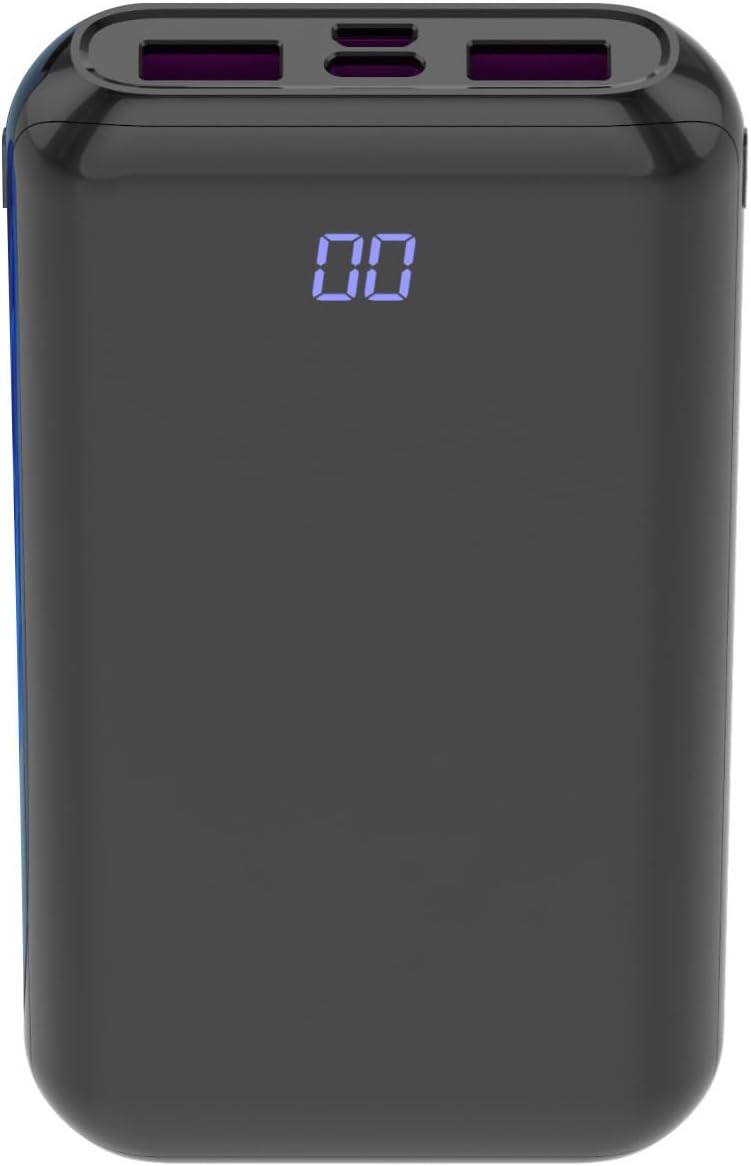
Immagine 1: Davanti view of the PhoneSuit Energy Core Ultra power bank. The central LCD screen displays '00', indicating a low or empty charge. The top edge shows various charging ports.

Immagine 2: Angolato view of the PhoneSuit Energy Core Ultra power bank. The LCD display shows '100', indicating a full charge. The top panel clearly shows the USB-C, Micro-USB, and dual USB-A output ports.
Caratteristiche principali:
- Capacità della batteria 10,000 mAh: Fornisce ricariche multiple per smartphone e altri dispositivi.
- Display digitale LCD: Shows the precise percentage of remaining battery charge.
- Ingresso e uscita USB-C: Supports Power Delivery (PD) 20W for fast charging compatible devices and recharging the power bank.
- Ingresso micro USB: Alternative port for recharging the power bank.
- Doppia uscita USB-A: Supports Quick Charge 3.0 for high-speed charging of various devices.
- Costruzione durevole: High-quality rubber composite shell for enhanced grip and protection.
5. Configurazione: ricarica iniziale del Power Bank
Before first use, it is recommended to fully charge your PhoneSuit Energy Core Ultra battery pack.
- Connect the provided USB charging cable to either the USB-C Input port or the Micro-USB Input port on the power bank.
- Collegare l'altra estremità del cavo a un adattatore USB da parete (non incluso) o a una porta USB alimentata.
- The LCD display will show the charging progress, with the percentage increasing until it reaches '100'.
- Once fully charged, disconnect the cable. The power bank is now ready for use.
6. Istruzioni per l'uso
6.1. Ricarica dei dispositivi
The Energy Core Ultra can charge a wide range of smartphones, tablets, Bluetooth devices, and more.
- Connect your device's charging cable to one of the output ports on the power bank (USB-C Output or Dual USB-A Output).
- Collega l'altra estremità del cavo al tuo dispositivo.
- Il power bank inizierà automaticamente a caricare il tuo dispositivo. Il display LCD mostrerà la percentuale di batteria rimanente.tage del power bank.
- Scollegare il dispositivo quando è completamente carico o quando si desidera interrompere la ricarica.

Immagine 3: The PhoneSuit Energy Core Ultra power bank positioned next to a smartphone. Both devices show '00' on their screens, illustrating a low battery state before charging begins.

Immagine 4: Un angolo view of the PhoneSuit Energy Core Ultra power bank alongside a smartphone. Both devices display '100' on their screens, indicating they are fully charged.
6.2. Controllo del livello della batteria
The LCD digital display provides an accurate indication of the power bank's remaining charge.
- When the power bank is active (charging a device or being charged), the display will automatically show the percentage.
- To check the battery level when idle, briefly press the power button (if available, otherwise connect a device to activate the display).
7. Manutenzione
- Pulizia: Utilizzare un panno morbido e asciutto per pulire l'esterno del power bank. Non utilizzare prodotti chimici aggressivi o materiali abrasivi.
- Magazzinaggio: Store the power bank in a cool, dry place away from direct sunlight and extreme temperatures. For long-term storage, it is recommended to keep the battery at approximately 50-70% charge.
- Cura della batteria: To prolong battery life, avoid fully discharging the power bank frequently. Recharge it when the capacity drops significantly.
8. Risoluzione Dei Problemi
- Il power bank non si carica: Ensure the charging cable is securely connected to both the power bank's input port and the power source. Try a different cable or wall adapter.
- Dispositivo non in carica tramite power bank: Ensure the power bank has sufficient charge. Check that the charging cable is securely connected to both the power bank's output port and your device. Try a different cable or output port.
- Ricarica lenta: Ensure you are using a compatible cable and that your device supports fast charging protocols (PD, QC 3.0) if expecting high-speed charging. Some cables may limit charging speed.
- Il display LCD non funziona: If the display is unresponsive, try fully charging the power bank. If the issue persists, contact customer support.
9. Specifiche
| Caratteristica | Dettaglio |
|---|---|
| Modello | Energy Core Ultra 10000mAh |
| Capacità della batteria | 10,000 milioneamp Ore (mAh) |
| Ingresso (USB-C) | Erogazione di potenza (PD) fino a 20 W |
| Ingresso (Micro-USB) | Standard 5V/2A (typical) |
| Uscita (USB-C) | Erogazione di potenza (PD) fino a 20 W |
| Uscita (USB-A) | Dual ports, Quick Charge 3.0 compatible |
| Display | Display digitale LCD |
| Dimensioni | 8.3 x 6.4 x 5 pollici |
| Peso dell'articolo | 13 once |
| Caratteristiche speciali | Digital Display, Fast Charging, Travel |
| Produttore | PhoneSuit Inc. |
10. Garanzia e supporto
PhoneSuit products are designed for reliability and performance. For warranty information, technical support, or any inquiries regarding your Energy Core Ultra battery pack, please visit the official PhoneSuit websito o contattare direttamente il servizio clienti. Si prega di conservare la prova d'acquisto per eventuali reclami in garanzia.