
1. Introduzione
The Rowenta X-Plorer Series 75 S is an advanced robotic vacuum cleaner designed to provide thorough and effortless cleaning for your home. Featuring precise laser navigation, customizable mapping, and a powerful 4-in-1 cleaning system, it vacuums and mops simultaneously. This manual provides detailed instructions for setting up, operating, maintaining, and troubleshooting your device to ensure optimal performance and longevity.

Figura 1: in alto view of the Rowenta X-Plorer Series 75 S Robot Vacuum Cleaner with its accompanying smartphone application interface.
2. Informazioni sulla sicurezza
Leggere attentamente tutte le istruzioni di sicurezza prima di utilizzare l'apparecchio. Conservare il presente manuale per riferimento futuro.
- Non utilizzare il robot vicino a fiamme libere o fonti di calore.
- Ensure the charging base is placed on a flat, stable surface and is connected to a power outlet.
- Tenere capelli, abiti larghi, dita e tutte le parti del corpo lontano dalle aperture e dalle parti mobili.
- Non utilizzare il robot per raccogliere oggetti di grandi dimensioni, oggetti appuntiti o liquidi.
- Sorvegliare i bambini e gli animali domestici quando il robot è in funzione.
- Only use accessories and replacement parts recommended by Rowenta.
3. Contenuto della confezione
Verificare che tutti i componenti siano presenti nella confezione:
- Rowenta X-Plorer Series 75 S Robot Vacuum Cleaner
- Base di ricarica
- Adattatore di alimentazione
- Spazzole laterali (2x)
- Spazzola motorizzata
- Aqua Force System (Water Tank and Mop Pad)
- Manuale d'uso
4. Prodotto finitoview
Familiarizza con i componenti principali del tuo robot aspirapolvere.

Figura 2: lato view of the robot vacuum cleaner, showing its compact design and side brush.
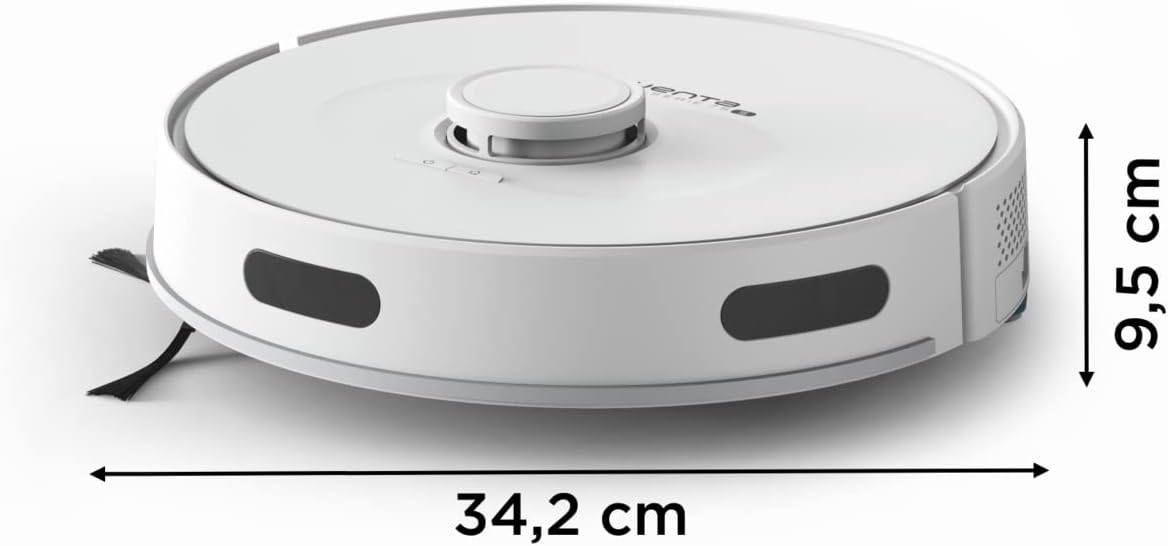
Figure 3: The robot vacuum cleaner measures 34.2 cm in length and width, with a height of 9.5 cm, allowing it to clean under most furniture.
5. Impostazione
5.1 Ricarica del robot
- Posizionare la base di ricarica contro una parete in un'area aperta, assicurandosi che non vi siano ostacoli entro 1 metro ai lati e 2 metri davanti.
- Collegare l'adattatore di alimentazione alla base di ricarica e inserirlo in una presa a muro.
- Posizionare il robot sulla base di ricarica. Assicurarsi che i contatti di ricarica siano allineati. La spia luminosa indicherà lo stato di carica.
- Lasciare che il robot si carichi completamente prima del primo utilizzo (circa 4-6 ore).
5.2 Installazione e connessione dell'app
- Download the official Rowenta X-Plorer app from your smartphone's app store (iOS or Android).
- Crea un account o accedi.
- Follow the in-app instructions to connect your robot to your home Wi-Fi network. Ensure your phone is connected to a 2.4 GHz Wi-Fi network during setup.
- Una volta connesso, puoi controllare il robot, programmare le pulizie e view maps from your smartphone.
5.3 Mappatura iniziale
The robot uses Smart Exploration 8.0 laser technology to map your home precisely.
- For the first cleaning cycle, allow the robot to clean your entire home without interruption to create an accurate map.
- Clear any obstacles like loose cables, small rugs, or fragile items that might hinder the robot's movement.
- The robot will automatically return to its charging base once the mapping and cleaning are complete.

Figure 4: The robot utilizes laser technology for precise navigation and mapping of your home environment.
6. Istruzioni per l'uso
6.1 modalità di pulizia
The Rowenta X-Plorer Series 75 S offers various cleaning modes:
- Modalità automatica: Il robot pulisce in modo intelligente l'intera area mappata.
- Modalità spot: Pulisce intensamente una piccola area specifica.
- Zone vietate: Definisci sulla mappa le aree che il robot deve evitare.

Figure 5: The robot performs a 4-in-1 cleaning action, combining side brushes, a motorized brush, powerful suction, and mopping for comprehensive cleaning.
6.2 Programmazione delle pulizie
Use the smartphone app to set up daily or weekly cleaning schedules. You can customize the time and cleaning mode for each scheduled session.
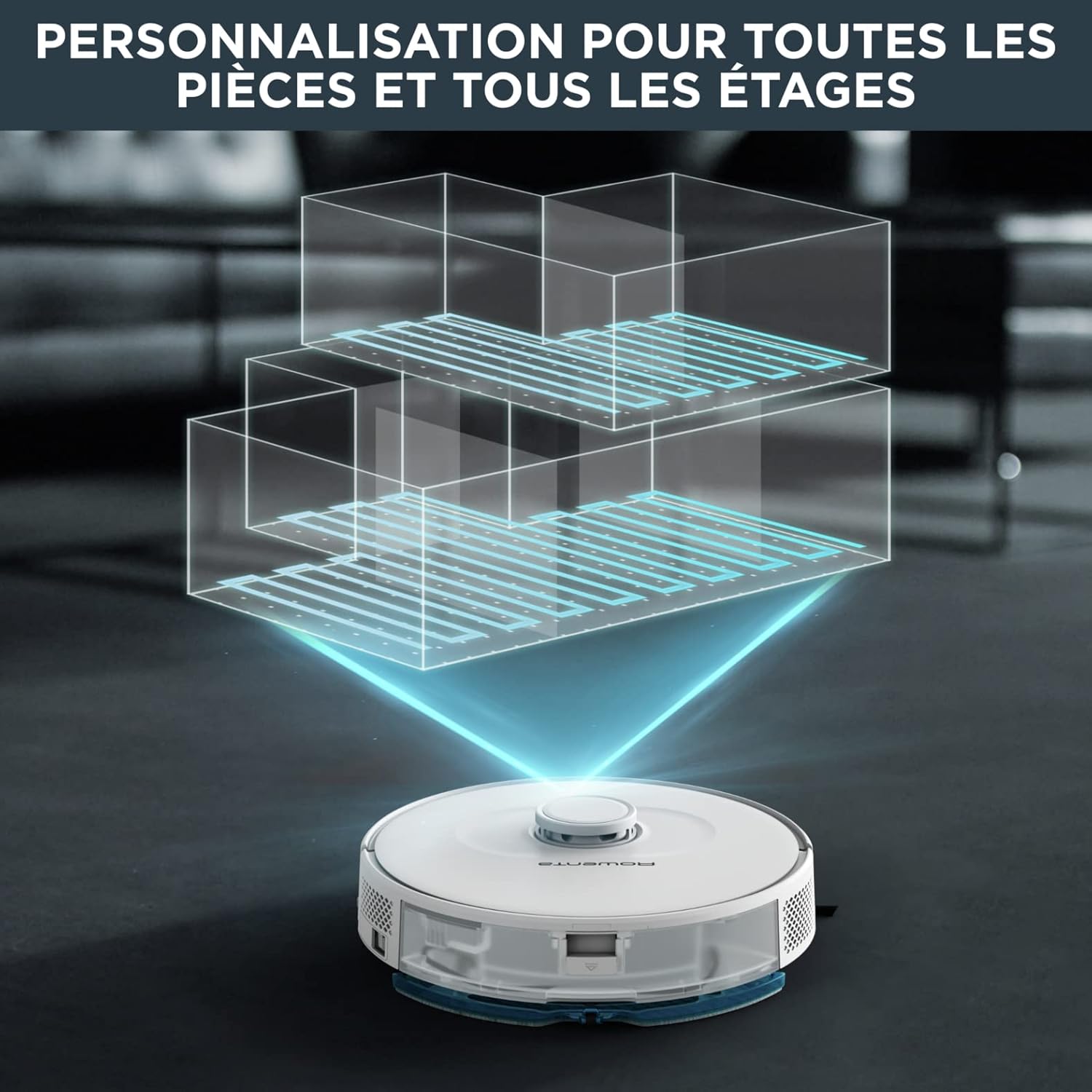
Figure 6: The robot supports customizable mapping for multiple rooms and even different floors, allowing for personalized cleaning routes.
6.3 Integrazione dell'assistente vocale
The robot is compatible with Amazon Alexa and Google Home. Link your Rowenta account in the respective voice assistant app to control your robot with voice commands, such as "Start cleaning" or "Return to base."
6.4 Aqua Force System (Vacuum and Mop)
The Aqua Force system allows the robot to vacuum and mop simultaneously.
- Fill the water tank with clean water. Do not use detergents or cleaning solutions not approved by Rowenta.
- Fissare saldamente il panno del mocio al serbatoio dell'acqua.
- Slide the Aqua Force system into the designated slot on the robot.
- The robot will automatically dispense water and mop while vacuuming.

Figure 7: The robot's Aqua Force system allows for simultaneous vacuuming and mopping, with adjustable water flow for different floor types.
6.5 Funzione Carpet Boost
The robot automatically detects carpets and increases suction power for deeper cleaning on these surfaces. This feature ensures optimal cleaning performance across different floor types.

Figure 8: The robot demonstrates a high climbing capacity, able to traverse obstacles and carpets up to 18mm in height.
7. Manutenzione
Regular maintenance ensures your robot vacuum cleaner operates efficiently.
7.1 Svuotamento del cestino
- Premere il pulsante di sgancio del contenitore della polvere ed estrarlo.
- Aprire il coperchio del bidone della spazzatura e svuotarne il contenuto nel cestino.
- Se necessario, sciacquare il contenitore della polvere con acqua, assicurandosi che sia completamente asciutto prima di reinserirlo.
7.2 Spazzole per la pulizia
- Rimuovere il coperchio della spazzola principale e sollevare la spazzola principale.
- Use the cleaning tool (if provided) or scissors to remove tangled hair and debris from the main brush.
- Sfilare le spazzole laterali e rimuovere eventuali peli o detriti. Riattaccarle saldamente.
7.3 Pulizia dei filtri
- Rimuovere il filtro dal contenitore della polvere.
- Picchiettare delicatamente il filtro per rimuovere la polvere. Non lavare il filtro HEPA con acqua.
- Sostituire il filtro ogni 3-6 mesi, a seconda dell'utilizzo.
7.4 Pulizia del serbatoio dell'acqua e del panno per il mocio
- Svuotare l'acqua rimanente dal serbatoio dopo ogni utilizzo.
- Rimuovere il panno del mocio e lavarlo a mano o in lavatrice. Lasciarlo asciugare completamente all'aria.
- Pulire accuratamente il serbatoio dell'acqua per evitare la formazione di muffa o cattivi odori.
8. Risoluzione Dei Problemi
Per i problemi più comuni e le relative soluzioni, fare riferimento alla tabella sottostante.
| Problema | Possibile causa | Soluzione |
|---|---|---|
| Il robot non si accende | Batteria scarica; interruttore di alimentazione spento | Caricare il robot; assicurarsi che l'interruttore di alimentazione sia su ON |
| Robot non in carica | Contatti di ricarica sporchi; Base di ricarica non alimentata | Clean charging contacts on robot and base; Check power connection to base |
| Scarse prestazioni di pulizia | Cestino pieno; Spazzole aggrovigliate; Filtro intasato | Empty dustbin; Clean brushes; Clean or replace filter |
| Il robot si blocca spesso | Obstacles in path; Uneven surfaces | Clear cables and small objects; Define no-go zones for problematic areas |
| Problemi di connessione dell'app | Password Wi-Fi errata; problemi con il router; robot troppo lontano dal router | Re-enter Wi-Fi password; Restart router; Move robot closer to router |
9. Specifiche tecniche
| Caratteristica | Specificazione |
|---|---|
| Numero di modello | RR8567WH |
| Dimensioni (L x P x A) | Dimensioni: 34.2 x 34.2 x 9.5 cm |
| Peso dell'articolo | 3.45 kg |
| Capacità del bidone della spazzatura | 0.3 litri |
| Livello di rumore | 70 dB (Quiet mode available) |
| Durata della batteria | Up to 120 minutes (for up to 120 m²) |
| Tecnologia di navigazione | Smart Exploration 8.0 Laser Technology |
| Connettività | Wi-Fi, Smartphone App, Amazon Alexa, Google Home |
| Caratteristiche speciali | Smart Mapping, Auto Mop Washing, Obstacle Avoidance, Pet Hair Pick Up, Carpet Boost |
10. Garanzia e supporto
Rowenta is committed to providing high-quality products and support. The company ensures the availability of spare parts for most of its products for up to 15 years after purchase, promoting repairability and sustainability.


Figures 9, 10, 11: Rowenta's commitment to 15-year repairability, its manufacturing origin in France, and its affiliation with Groupe SEB.
For warranty claims, technical assistance, or to purchase spare parts, please visit the official Rowenta webo contattare l'assistenza clienti. Conservare la prova d'acquisto per la convalida della garanzia.