
1. Introduzione
The Oral-B iO Series 6 Electric Toothbrush offers an advanced brushing experience with revolutionary magnetic iO technology. This manual provides essential information for the safe and effective use of your new toothbrush, ensuring optimal oral hygiene.

Image: Oral-B iO Series 6 electric toothbrush in black, with charging base and travel case.
2. Informazioni sulla sicurezza
Leggere attentamente tutte le istruzioni prima di utilizzare questo apparecchio. Conservare il manuale per riferimento futuro.
Linee guida generali sulla sicurezza:
- Regularly check the product, power cord, and accessories for any damage. Do not use a damaged or malfunctioning device.
- If the product, cord, or accessories are damaged, return them to an Oral-B service center. Do not modify or repair the product yourself, as this may cause fire, electric shock, or personal injury.
- Use of the device by children under 3 years of age is not recommended.
- Children and persons with reduced physical, sensory, or mental capabilities, or lack of experience and knowledge, may use the device only under supervision or after receiving training on safe and proper use, and provided they understand the associated hazards.
- Cleaning and maintenance should not be performed by children without supervision. Children should not play with this device.
- The product should only be used as intended and described in this manual. Do not use accessories not recommended by the manufacturer.

Image: Icons reminding users to conserve water by turning off the tap during brushing and to unplug the charger when not in use.
3. Contenuto della confezione
Your Oral-B iO Series 6 package typically includes:
- Oral-B iO Series 6 Electric Toothbrush Handle
- 1 testina Oral-B iO Ultimate Clean
- Stazione di ricarica
- Custodia da viaggio
- Manuale dell'utente (questo documento)

Image: Included accessories: Oral-B iO Series 6 toothbrush, Ultimate Clean brush head, charging station, and hard travel case.
4. Impostazione
4.1 Carica iniziale
- Place the toothbrush handle on the charging station.
- Collegare la stazione di ricarica a una presa di corrente.
- The interactive display will show the charging progress. For first use, charge the toothbrush for at least 3 hours to ensure a full battery. A full charge provides approximately 2 weeks of brushing.

Image: The Oral-B iO Series 6 charging on its base, illustrating its long operating time of up to 2 weeks.
4.2 Montaggio della testina della spazzola
Allineare la testina con il manico dello spazzolino e spingerla verso il basso finché non scatta in posizione. Per rimuoverla, tirare la testina verso l'esterno.
5. Istruzioni per l'uso
5.1 Turning On/Off and Brushing
- Bagnare la testina dello spazzolino e applicare una piccola quantità di dentifricio.
- Place the brush head in your mouth before turning on the toothbrush.
- Premere il pulsante On/Off per iniziare a spazzolare.
- Guide the brush head slowly from tooth to tooth, spending a few seconds on each tooth surface.
- The toothbrush will pause briefly every 30 seconds to signal you to move to the next quadrant of your mouth, and a longer pause after 2 minutes indicates the completion of the recommended brushing time.
- Premere nuovamente il pulsante On/Off per spegnere lo spazzolino.
5.2 Sensore di pressione intelligente
The iO Series 6 features a smart pressure sensor to protect your gums and ensure effective cleaning:
- Luce verde: Indica la pressione di spazzolatura ottimale.
- Luce rossa: Segnali che stai spazzolando troppo energicamente. Riduci immediatamente la pressione.
- Luce bianca: Indicates insufficient pressure. Apply slightly more pressure.
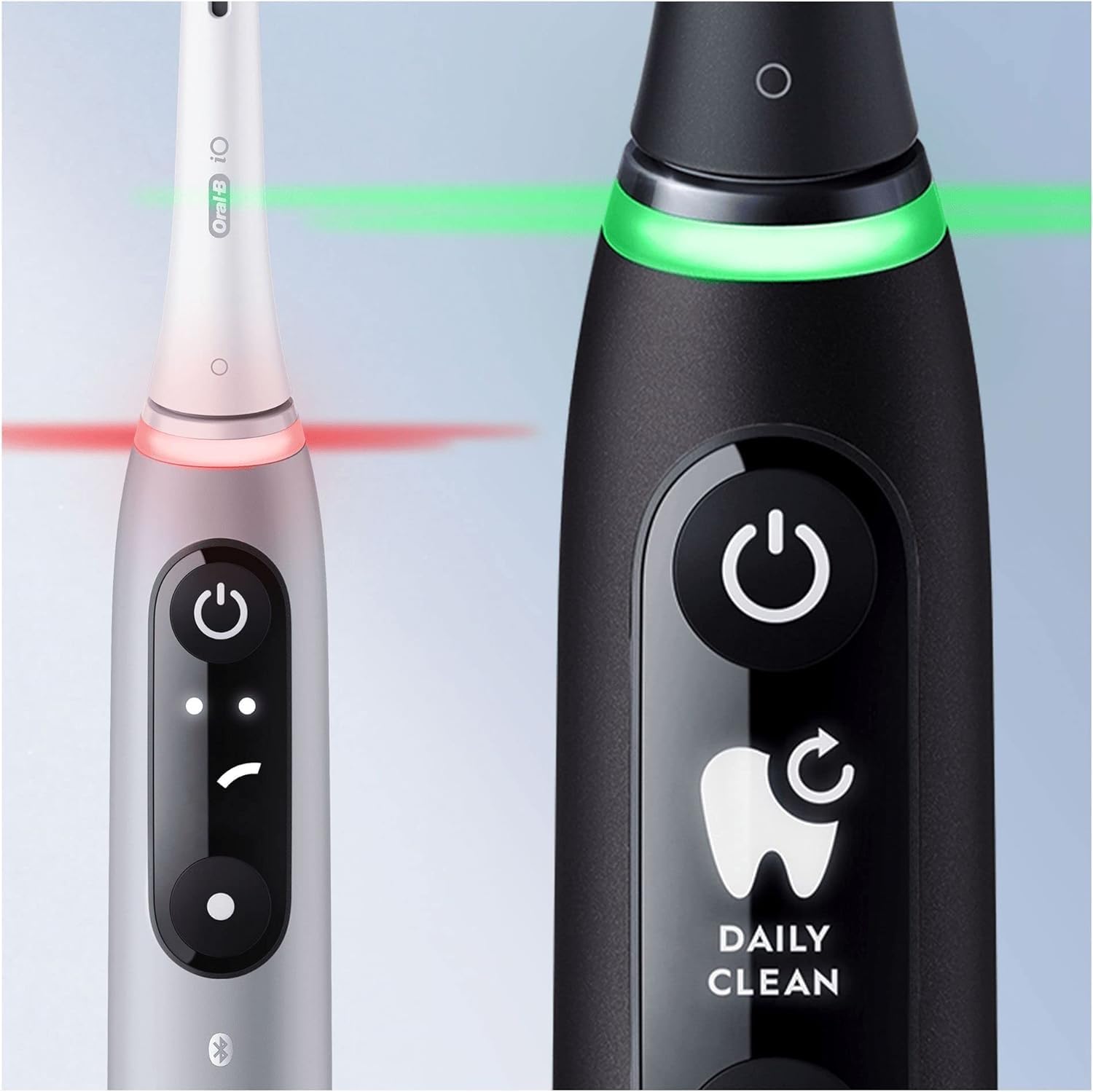
Image: The smart pressure sensor indicating correct (green) and excessive (red) brushing pressure.

Image: Illustration of the pressure sensor protecting gums by signaling correct brushing force.
5.3 Interactive Display and Brushing Modes
The interactive OLED display provides real-time feedback and allows you to customize your brushing experience. You can switch between 5 smart modes:
- Pulizia giornaliera: Per la pulizia quotidiana.
- Sensibile: Pulizia delicata ma accurata per le zone sensibili.
- Cura delle gengive: Massaggio delicato per le gengive.
- Pulizia intensa: For an extra thorough clean.
- Sbiancamento: Designed to polish teeth for stain removal.
Use the mode button on the handle to cycle through the available modes. The display will show the selected mode, battery level, and a brush head replacement reminder.

Image: Oral-B iO Series 6 toothbrushes showcasing various brushing modes on their interactive displays.

Image: Personalization options with 5 brushing modes for a tailored cleaning experience.
5.4 Oral-B App Connectivity
The Oral-B iO Series 6 can connect to the Oral-B app via Bluetooth for personalized brushing guidance and tracking. The app uses Artificial Intelligence to recognize 6 areas of your mouth, providing real-time feedback to ensure thorough cleaning.

Image: Interactive display, AI brushing tracking in the Oral-B App, and icons for 5 brushing modes.

Image: The Oral-B app displaying brushing score, coverage, and pressure feedback for improved brushing habits.
6. Manutenzione
6.1 Pulizia dello spazzolino da denti
- Dopo ogni utilizzo, sciacquare accuratamente la testina sotto l'acqua corrente con il manico acceso.
- Turn off the handle and remove the brush head. Rinse both the handle and the brush head separately under running water.
- Asciugare la maniglia con un panno morbido.
- Pulisci regolarmente la stazione di ricarica con un panno umido.amp panno. Assicurarsi che sia scollegato prima di pulirlo.
6.2 Sostituzione della testina della spazzola
Dentists recommend replacing your brush head every 3 months, or sooner if the bristles are splayed or worn. The interactive display will also provide a reminder when it's time to replace the brush head.

Image: The interactive display indicating a brush head replacement reminder.
7. Risoluzione Dei Problemi
If you encounter any issues with your Oral-B iO Series 6 toothbrush, please refer to the following common solutions:
- Lo spazzolino non si accende: Ensure the toothbrush is fully charged. Place it on the charging station for several hours.
- Weak brushing performance: Replace the brush head if it is old or worn. Ensure the brush head is securely attached.
- Pressure sensor always red: You might be applying too much pressure. Practice brushing gently, letting the micro-vibrations do the work.
- Problemi di connettività dell'app: Assicurati che il Bluetooth sia attivato sullo smartphone e che l'app Oral-B sia aggiornata. Prova a riavviare sia lo spazzolino che il telefono.
- Rumore insolito: If the noise is persistent and not related to normal operation, discontinue use and contact Oral-B customer service.
Per ulteriore assistenza, contattare l'assistenza clienti Oral-B.
8. Specifiche
| Caratteristica | Dettaglio |
|---|---|
| Nome del prodotto | Spazzolino elettrico |
| Marca | Orale B |
| Numero di modello | 4210201409199 |
| Fonte di alimentazione | Alimentato a batteria |
| Descrizione della fascia d'età | Adulto |
| Caratteristica speciale | Portable, Smart Pressure Sensor, Interactive Display, AI Brushing Recognition |
| Modalità di spazzolatura | 5 (Daily Clean, Sensitive, Gum Care, Intense Clean, Whitening) |
| Forma della testina dello spazzolino da denti | Girare |
| Durata della batteria | Up to 2 weeks (based on 2 minutes, twice daily brushing) |
| Connettività | Bluetooth (for Oral-B App) |
9. Garanzia e supporto
For warranty information, please refer to the warranty card included with your product or visit the official Oral-B website. If you require technical support or have questions about your Oral-B iO Series 6, please contact Oral-B customer service through their official websito o le informazioni di contatto fornite nella confezione del prodotto.
Puoi anche visitare il Negozio Oral-B su Amazon per maggiori informazioni sui prodotti e sugli accessori.


