
1. Introduzione
The Positive Grid Spark MINI is a portable 10W smart guitar amplifier and Bluetooth speaker designed for versatile sound experiences. It offers powerful, multi-dimensional sound and a rechargeable battery providing up to 8 hours of listening or playing time. This device integrates seamlessly with a free accompanying smart app, offering features like Auto Chords, video creation, and access to over 50,000 tones for endless musical inspiration.
Le caratteristiche principali includono:
- Portable guitar amp & Bluetooth speaker with powerful, multi-dimensional sound.
- Rechargeable battery delivers up to 8 hours of listening or play time.
- Free accompanying smart app (iOS or Android) with Auto Chords, video creation & access to 50,000+ tones.
- Smart Jam Live uses machine learning technology to build bass and drum backing tracks based on your playing style.
- Ready for electric guitar, acoustic, or bass – plug in anywhere for unbelievable sound.
- Create your own guitar tones with 30 amps and 40 effects, then record at home using Spark MINI as a USB audio interface.
2. Cosa c'è nella scatola
Upon unboxing your Positive Grid Spark MINI, you should find the following items:
- Spark MINI 10W Smart Guitar Amp e altoparlante Bluetooth
- Cavo di ricarica USB-C
- Removable Carrying Strap
- Guida rapida

Figura 1: Fronte view of the Spark MINI 10W Smart Guitar Amp.
3. Controlli e porte
The Spark MINI features intuitive controls and essential connectivity ports for ease of use.
Controlli del pannello superiore:
- Manopola preimpostata: Rotate to select between custom, solo, lead, and rhythm presets. LEDs indicate the active preset.
- Manopola del volume della chitarra: Adjusts the volume level for your connected guitar.
- Manopola del volume della musica: Controls the volume for Bluetooth audio playback.
- Ingresso Jack: Connect your electric, acoustic, or bass guitar here.
Porte del pannello posteriore:
- Linea in uscita (3.5 mm): Per collegare cuffie o altoparlanti esterni.
- Ingresso Aux (3.5 mm): Per collegare dispositivi audio esterni.
- USB-C Port (5V == 2A): Used for charging the device and for USB audio interface functionality.
- Pulsante di coppia: Avvia la modalità di associazione Bluetooth.
- Pulsante di accensione: Turns the device on/off. Hold for tuner function.
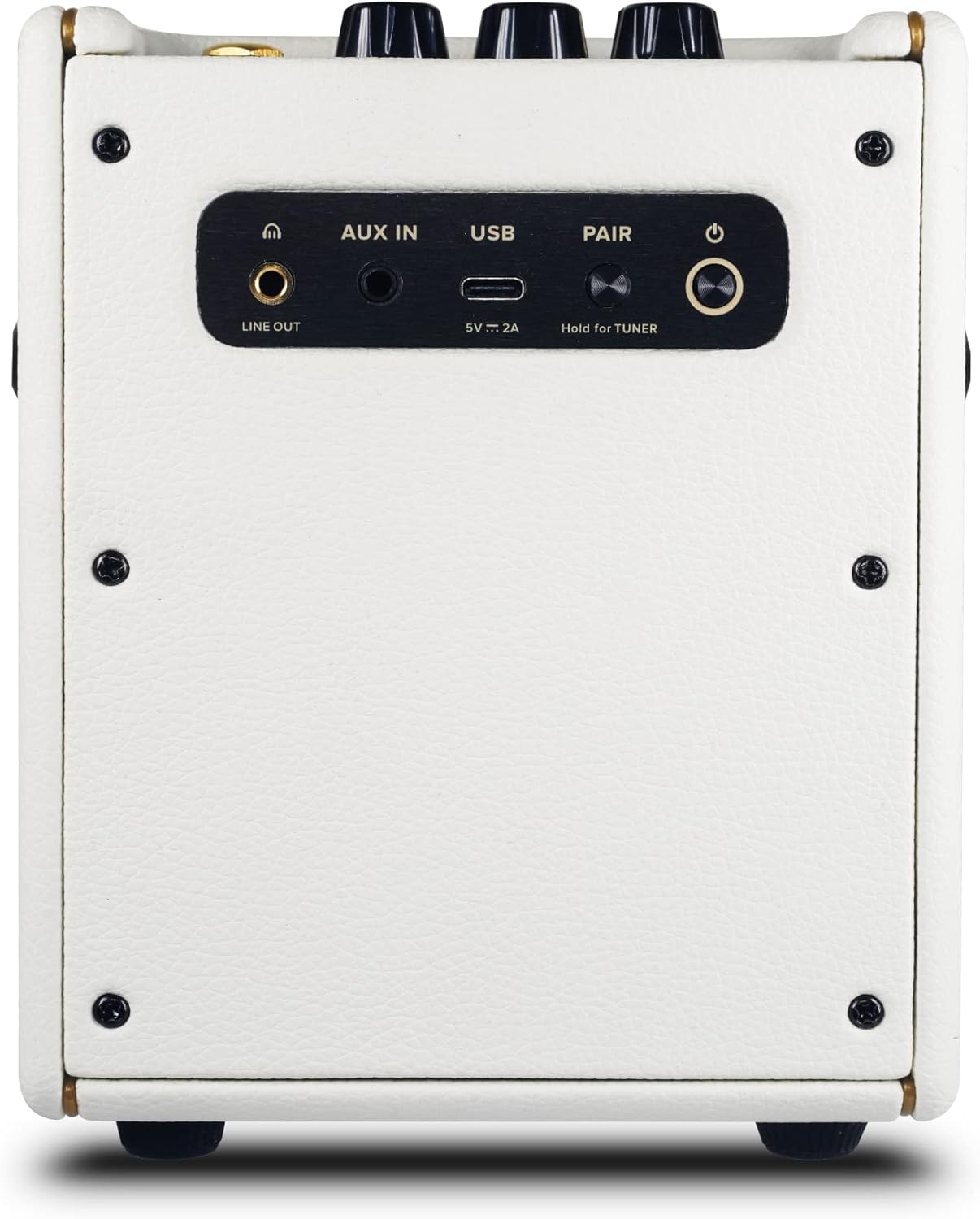
Figura 2: Posteriore view of the Spark MINI showing all ports and buttons.
4. Impostazione
4.1 Carica iniziale
Before first use, fully charge your Spark MINI using the provided USB-C cable and a compatible 5V/2A power adapter (not included). The power LED will indicate charging status.
4.2 Accensione/Spegnimento
Press and hold the Power button on the rear panel for a few seconds to turn the Spark MINI on or off.
4.3 Download e connessione dell'app
Download the free Spark app from the iOS App Store or Google Play Store. Open the app and follow the on-screen instructions to connect your Spark MINI via Bluetooth. This unlocks the full potential of the amplifier, including access to a vast tone library and smart features.

Figure 3: Spark MINI connected to the mobile app for enhanced control and features.
5. Modalità operative
5.1 Chitarra AmpModalità lifier
Connect your guitar to the Input jack. Use the Preset knob to select one of the four onboard tones (Custom, Solo, Lead, Rhythm). Adjust the Guitar Volume knob to your desired level. For advanced tone shaping, connect to the Spark app to access 30 amps, 40 effects, and thousands of user-created tones.
5.2 Modalità altoparlante Bluetooth
Pair your mobile device with the Spark MINI via Bluetooth. Once connected, you can stream music directly to the Spark MINI. Use the Music Volume knob to control the playback volume. This allows you to use the device as a high-quality portable Bluetooth speaker.
5.3 Smart Jam Live
Engage the Smart Jam Live feature through the Spark app. This innovative technology uses machine learning to analyze your playing style and automatically generate dynamic bass and drum backing tracks, providing a personalized jam session experience.
5.4 Interfaccia audio USB
Connect the Spark MINI to your computer via the USB-C port. It can function as a USB audio interface, allowing you to record your guitar playing directly into your preferred digital audio workstation (DAW) software.
Video 1: Spark MINI - Metal Tone Demo. This video demonstrates the metal tone capabilities of the Spark MINI amppiù vivace.
Video 2: Why This Spark Mini Guitar Amp - BT Speaker Is So Much FUN! This video provides an in-depth look at the features and enjoyment derived from the Spark MINI.
6. Specifiche
| Caratteristica | Dettaglio |
|---|---|
| Peso dell'articolo | 3.75 libbre |
| Dimensioni del prodotto | 5.76 x 4.84 x 6.49 pollici |
| Numero modello articolo | 855316004729 |
| Batterie | 1 batterie agli ioni di litio richieste. (incluse) |
| Uscita Wattage | 10 Watt |
| Tipo di batteria | Ioni di litio |
| Fonte di alimentazione | Alimentato a batteria |
| Nome del colore | Bianco perla |
| Dispositivi compatibili | Chitarra |
| Tipo di connettore | USB |
| Tipo di materiale | Black Textured Vinyl, Pearl Vinyl |

Figure 4: Dimensions of the Spark MINI 10W Smart Guitar Amp.
7. Manutenzione
7.1 Pulizia
To clean your Spark MINI, use a soft, dry cloth. Avoid using abrasive cleaners or solvents, as these may damage the finish. Ensure no liquids enter the ports or speaker grille.
7.2 Conservazione
Store the Spark MINI in a cool, dry place away from direct sunlight and extreme temperatures. If storing for an extended period, ensure the battery is partially charged (around 50%) to maintain battery health.
7.3 Cura della batteria
The Spark MINI uses a Lithium Ion battery. For optimal battery life, avoid fully discharging the battery frequently. Recharge the device when the battery indicator is low. Do not attempt to replace the battery yourself; contact customer support if battery issues arise.
8. Risoluzione Dei Problemi
8.1 Nessun suono dalla chitarra
- Ensure the guitar cable is securely connected to both the guitar and the Spark MINI Input jack.
- Check that the Spark MINI is powered on and the Guitar Volume knob is turned up.
- Verify that the correct preset is selected using the Preset knob.
- If using the app, ensure the guitar input is not muted within the app settings.
8.2 Problemi di connettività Bluetooth
- Ensure the Spark MINI is in pairing mode (indicated by a blinking Bluetooth LED).
- Check your mobile device's Bluetooth settings and ensure Spark MINI is visible and selected.
- Try restarting both the Spark MINI and your mobile device.
- If the app is crashing on high refresh rate phones (above 60fps), enable "power saving mode" on your phone to lock the refresh rate at 60fps.
8.3 Durata breve della batteria
- Assicurarsi che il dispositivo sia completamente carico prima dell'uso.
- High volume levels or continuous use of power-intensive app features can reduce battery life.
- Ensure the charging cable and adapter meet the 5V/2A requirement.
9. Garanzia e supporto
Per informazioni sulla garanzia, supporto tecnico o richieste di assistenza, fare riferimento al sito ufficiale Positive Grid webo contattare direttamente l'assistenza clienti. Conservare la prova d'acquisto per eventuali reclami in garanzia.
Online resources and FAQs are available on the Positive Grid support page to assist with common questions and issues.