
FreedConn KY Pro
Manuale utente dell'auricolare Bluetooth per moto FreedConn KY PRO
Modello: KY Pro
Introduzione
This manual provides comprehensive instructions for the FreedConn KY PRO Motorcycle Bluetooth Headset. It covers essential information regarding setup, operation, maintenance, and troubleshooting to ensure optimal performance and a seamless communication experience while riding. The KY PRO features Bluetooth 5.0, group intercom for up to 4 riders, high-fidelity audio, 8th-generation CVC intelligent noise reduction, FM radio, voice assistant support, and IP65 waterproofing.
Contenuto della confezione
Si prega di verificare che tutti gli articoli siano presenti nel pacco:
- Bluetooth Kit (Main Unit)
- Auricolari 2 in 1 con microfono morbido e rigido
- Clip a gancio e clip in velcro
- Cuffia in velcro
- Cavo USB
- Manuale dell'utente (questo documento)

Image: FreedConn KY PRO package contents, showing the main unit, microphone/earphone set, mounting clips, velcro pads, and USB cable.
Impostare
1. Carica del dispositivo
Before initial use, fully charge the FreedConn KY PRO headset. Connect the provided USB Type-C cable to the charging port on the device and to a suitable USB power source. A full charge takes approximately 2 hours. The device offers up to 12 hours of intercom talk time, 25 hours of call time, and 168 hours of standby time.

Image: Illustration showing the FreedConn KY PRO headset with battery life indicators and charging time details.
2. Montaggio sul casco
The FreedConn KY PRO is designed for easy installation on most full-face and half-face motorcycle helmets. Use either the hook clip or velcro clip to securely attach the main unit to the side of your helmet. Position the speakers inside the helmet's ear pockets and the microphone near your mouth for clear communication. Ensure all cables are neatly tucked away to avoid obstruction.

Image: A FreedConn KY PRO unit mounted on the side of a motorcycle helmet.
3. Accoppiamento con il telefono cellulare
To connect your FreedConn KY PRO to your mobile phone:
- Assicurati che le cuffie siano spente.
- Long press the "on/off" button for 8 seconds until the red and blue lights flash alternately. This indicates the product is in pairing mode.
- Sul tuo telefono cellulare, vai alle impostazioni Bluetooth e abilita il Bluetooth.
- Cercare available devices and select "KY Pro" to connect. Once connected, the blue light will flash slowly.
Video: Demonstrates how to pair the FreedConn KY PRO headset with a mobile phone, including activating pairing mode and connecting via Bluetooth settings. This video also covers music playback, call management, voice commands, and FM radio.
4. Intercom Pairing (Two Units)
To establish an intercom connection between two FreedConn KY PRO units:
- Ensure both devices are powered off.
- Long press the "on/off" button on both devices for 8 seconds until the red and blue lights flash alternately. Both devices are now in pairing state.
- Press the "on/off" button on one of the devices (Device A) once. It will search for the other device (Device B).
- When the red and blue flash on both devices turns to a blue flash, it means the two devices have been successfully paired, and intercom communication can begin.
Video: Instructions on how to pair two FreedConn KY PRO units for intercom communication, showing the button presses and light indicators.
Istruzioni per l'uso
1. Accensione/spegnimento
- Accensione: Long press the "on/off" button until you hear a power-on tone and the blue light flashes.
- Spegni: Long press the "on/off" button until you hear a power-off tone and the red light flashes before turning off.
2. Riproduzione di musica
Once paired with your mobile phone, you can control music playback:
- Riproduci/Pausa: Premere una volta il pulsante multifunzione.
- Regolazione del volume: Ruotare la manopola in senso orario per aumentare il volume, in senso antiorario per diminuirlo.
- Prossima canzone: Turn the knob clockwise and hold briefly.
- Canzone precedente: Turn the knob counter-clockwise and hold briefly.
3. Gestione delle chiamate
Gestisci le chiamate in entrata e in uscita con facilità:
- Answer Automatically: A call will be automatically answered if it is ringing for 15 seconds without any operation.
- Answer Manually: Premere una volta il pulsante multifunzione per rispondere a una chiamata in arrivo.
- Appendere: Press the multifunction button once during a call to hang up.
- Rifiuta chiamata: Press the multifunction button for 2 seconds to reject an incoming call.
4. Comunicazione interfonica
After pairing two units (refer to Setup section 4), you can initiate and manage intercom calls:
- Avvia Intercom: Press the "on/off" button on either paired device once.
- Fine citofono: Press the "on/off" button on either device once during an intercom call.
- Interfono di gruppo: The KY PRO supports group intercom for up to 4 riders simultaneously. Follow the specific instructions in the full manual for multi-unit pairing.
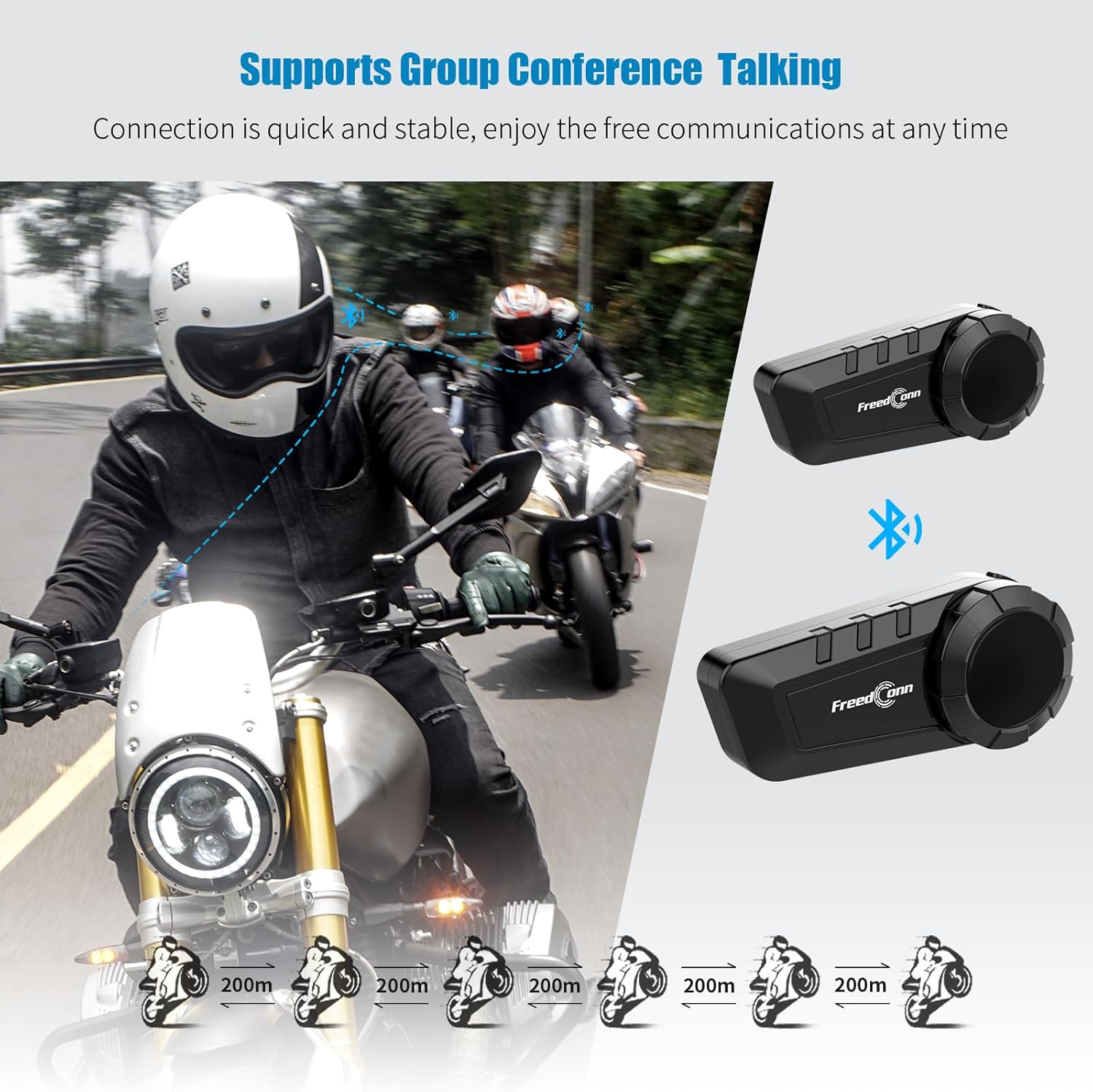
Image: Diagram illustrating the group intercom capability of the FreedConn KY PRO, showing multiple riders connected.
5. Radio FM
The device includes an FM radio function:
- Initiate FM Radio: In music mode or standby mode, double press the multifunction button to turn on the radio function.
- Adjust Channel: Turn the knob clockwise or counter-clockwise to change the radio channel.
- Regola volume: Ruotare la manopola in senso orario per aumentare il volume, in senso antiorario per diminuirlo.
- Pausa/Riprendi radio: Press the multifunction button once to pause, press again to resume.
- Exit FM Radio: Double press the multifunction button to switch back to music playing state or standby state.
6. Comandi vocali
Activate your mobile phone's voice assistant:
- When the product is connected to your mobile phone, long press the multifunction button for 2 seconds to activate the voice control function (e.g., Siri, Google Assistant).

Image: A smartphone displaying a voice assistant interface next to the FreedConn KY PRO headset, illustrating the voice command feature.
7. Condivisione di musica
Share your music with another FreedConn KY PRO user:
- Under the premise that the two devices have been paired, press the "on/off" button of one of them to exit the intercom state.
- If the headset is playing music, press the multifunction button to pause the music.
- Double press the "on/off" button on the device that needs to share music to start music sharing mode. After 1-2 seconds, you will hear the sound "Turn on Share". Now you have successfully entered the music sharing mode.
- In the music sharing mode, press the multifunction button to continue playing the music, and the other device starts playing the same song.
- To stop music sharing, press the multifunction button again to pause the music. Then press the "on/off" button twice. When you hear the prompt of "Turn off Share", it means that the music sharing mode has been closed successfully.
Video: Detailed steps on how to activate and deactivate the music sharing feature between two FreedConn KY PRO headsets.
Manutenzione
- Pulizia: Utilizzare un morbido, damp panno per pulire l'esterno del dispositivo. Evitare l'uso di prodotti chimici aggressivi o detergenti abrasivi.
- Resistenza all'acqua: The FreedConn KY PRO is IP65 waterproof, meaning it is protected against dust and low-pressure water jets. It is suitable for use in rain but should not be submerged in water.
- Magazzinaggio: Conservare il dispositivo in un luogo fresco e asciutto quando non in uso. Evitare temperature estreme.
Risoluzione dei problemi
| Problema | Possibile causa | Soluzione |
|---|---|---|
| Il dispositivo non si accende. | Batteria scarica. | Carica completamente il dispositivo. |
| Impossibile effettuare l'associazione con il telefono/un'altra unità. | Non in modalità di associazione; troppo distanti; interferenza. | Ensure device is in pairing mode (red/blue flashing). Move closer. Clear pairing records (see below) and try again. |
| Nessun suono o volume basso. | Volume troppo basso; altoparlanti non posizionati correttamente; collegamento allentato. | Adjust volume. Check speaker placement. Ensure all connections are secure. |
| Intercom disconnects frequently. | Fuori portata; interferenza. | Stay within the specified intercom range. Avoid areas with high electromagnetic interference. |
Cancellazione dei record di associazione
If you experience persistent pairing issues, clearing the device's pairing records may help:
- Assicurarsi che il dispositivo sia spento.
- Press and hold the "on/off" button for 8 seconds until you see the red light flash quickly 3 times.
- At this point, the pairing record is cleared successfully. You can now attempt to pair the device again.
Specifiche
- Nome modello: KY Pro
- Tecnologia di connettività: Senza fili (Bluetooth 5.0)
- Controllo del rumore: Active Noise Cancellation (8th-generation CVC)
- Livello di resistenza all'acqua: IP65 resistente all'acqua
- Capacità della batteria: 1100mAh
- Tempo di ricarica: Approximately 2 hours (Type-C fast charging)
- Intercom Talk Time: Fino a 12 ore
- Chiamami: Fino a 25 ore
- Tempo di standby: Fino a 168 ore
- Gamma Bluetooth: 10 Meters (for phone connection)
- Intervallo di interfono: Up to 400 meters (between units, line of sight)
- Dispositivi compatibili: Bluetooth-enabled devices (smartphones, tablets, other intercom brands)
- Tipo di controllo: Controllo multimediale, controllo vocale
- Peso dell'articolo: 10.8 once (0.31 chilogrammi)
- Materiale: Plastica
Garanzia e supporto
The FreedConn KY PRO Motorcycle Bluetooth Headset comes with a Garanzia di 1 anno dalla data di acquisto. La presente garanzia copre i difetti di fabbricazione e garantisce un funzionamento affidabile in normali condizioni d'uso.
For technical support, warranty claims, or any questions regarding your product, please contact FreedConn customer service. Our dedicated support team is available to assist you promptly.
Fare riferimento al sito ufficiale FreedConn websito o nella documentazione di acquisto per le informazioni di contatto più aggiornate.