
1. Introduzione
Grazie per l'acquistoasing the zelotes T80 Wired Gaming Mouse. This manual provides essential information for setting up, operating, and maintaining your new gaming mouse. Please read it thoroughly to ensure optimal performance and longevity of your device.
2. Impostazione
2.1 Cosa c'è nella scatola
- 1 x T80 Gaming Mouse
- 1 x Manuale di istruzioni
2.2 Collegamento del mouse
- Unpack the zelotes T80 Gaming Mouse and the instruction manual from the box.
- Individua una porta USB disponibile sul tuo computer (laptop, PC, Mac).
- Collegare il connettore USB del mouse alla porta USB.
- The mouse is plug-and-play and should be automatically recognized by your operating system (Windows 11/10/8/7, Mac OS). No additional drivers are typically required for basic functionality.
For advanced customization of buttons and lighting, please refer to the manufacturer's websito per scaricare tutti i software disponibili.
3. Istruzioni per l'uso
3.1 Funzioni dei pulsanti
The zelotes T80 Gaming Mouse features 7 programmable buttons designed for enhanced gaming and productivity.
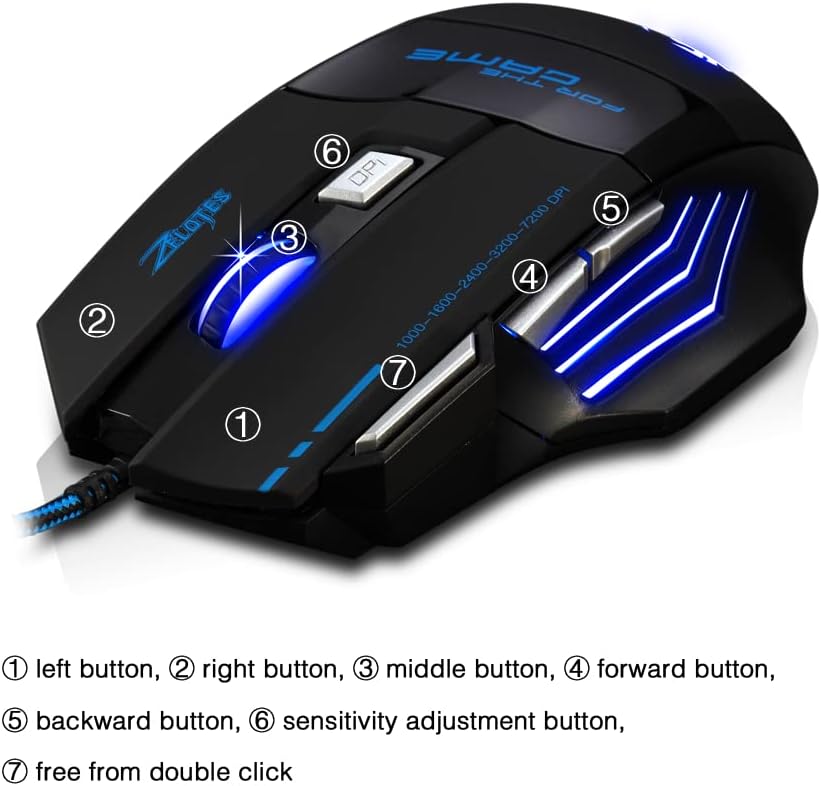
- Pulsante sinistro (1): Funzione standard del clic sinistro.
- Pulsante destro (2): Funzione standard del clic destro.
- Middle Button / Scroll Wheel (3): Scrolls up/down and acts as a middle-click button.
- Pulsante Avanti (4): Naviga in avanti in web browser o file esploratori.
- Pulsante Indietro (5): Naviga indietro in web browser o file esploratori.
- Sensitivity Adjustment (DPI) Button (6): Scorre le impostazioni DPI.
- Quick Fire Button (7): Equipped for rapid firing, allowing continuous shooting with a single press (functions as a double-click by default).
3.2 Regolazione DPI
The mouse offers 5 adjustable DPI settings to match your preference for gaming or office work. Use the Sensitivity Adjustment (DPI) Button (6) to cycle through the following settings:
- 1000 DPI
- 1600 DPI
- 2400 DPI
- 3200 DPI
- 7200 DPI
3.3 LED Backlight Illumination
The zelotes T80 features multi-mode LED backlighting that enhances your visual experience and gaming atmosphere. The LED lights cycle through various colors, providing dynamic illumination.

3.4 Design ergonomico
The mouse is designed with an ergonomic shape and skin-friendly material for a comfortable grip and soft touch. Its sweat-resistant and anti-slip features ensure comfort during prolonged use, reducing arm fatigue.

4. Manutenzione
- Mantenere il mouse pulito pulendolo con un panno morbido e asciutto.
- Avoid exposing the mouse to extreme temperatures, direct sunlight, or liquids.
- Do not attempt to disassemble the mouse, as this may void the warranty.
5. Risoluzione Dei Problemi
- Il mouse non risponde: Ensure the USB cable is securely plugged into the computer. Try a different USB port or restart your computer.
- Il movimento del cursore è irregolare: Pulisci il sensore ottico nella parte inferiore del mouse. Assicurati di utilizzare il mouse su una superficie adatta (ad esempio, un tappetino per mouse).
- Le luci LED non funzionano: Check if the mouse is properly connected. Some operating systems or software might interfere with lighting controls.
6. Specifiche
| Caratteristica | Descrizione |
|---|---|
| Dimensioni del prodotto | 5.12 x 4.09 x 1.77 pollici |
| Peso dell'articolo | 5.5 once |
| Numero di modello | T80 |
| Marca | zeloti |
| Colore | Nero |
| Tecnologia di connettività | USB (cablato) |
| Tecnologia di rilevamento del movimento | Ottico |
| Impostazioni DPI | 1000/1600/2400/3200/7200 DPI (5 adjustable levels) |
| Pulsanti | 7 (Programmable, including Quick Fire Button) |
| Caratteristica speciale | Ergonomic Design, LED Illumination, Sweat-resistant, Anti-slip |
| Compatibilità | Windows 11/10/8/7, Mac OS |
7. Video di prodotto
7.1 T80 7200DPI Gaming Mouse Overview
Questo video fornisce una breve panoramicaview of the zelotes T80 Gaming Mouse, highlighting its 7200 DPI capability and overall design. It demonstrates the mouse's appearance and some features in action.
8. Garanzia e supporto
For warranty information or technical support, please refer to the contact details provided on the product packaging or visit the official zelotes websito. Conservare la ricevuta d'acquisto come prova d'acquisto per eventuali reclami in garanzia.