Introduzione
This manual provides detailed instructions for the installation, operation, and maintenance of your Everycom EC-901 80mm Thermal POS Receipt Printer. Please read this manual thoroughly before using the printer to ensure proper functionality and to prevent damage.
Informazioni sulla sicurezza
- Assicurarsi che la stampante sia collegata a una fonte di alimentazione con il volume correttotage.
- Non esporre la stampante all'acqua o a umidità elevata.
- Evitare di posizionare la stampante alla luce diretta del sole o vicino a fonti di calore.
- Use only specified thermal paper for optimal performance and to prevent damage to the print head.
- Non tentare di smontare o riparare la stampante da soli. Contattare personale di assistenza qualificato.
Contenuto della confezione
Verificare che tutti gli articoli siano presenti nel pacco:
- Everycom EC-901 Thermal POS Receipt Printer
- Roll paper × 1 Roll (for initial testing)
- CD-ROM (containing Drivers, Utility Software, Manuals)
- Guida cartacea
- Paper Bearing
- Cavo USB
- Cavo adattatore di alimentazione
Prodotto finitoview
The Everycom EC-901 is a compact 80mm (3-inch) thermal POS receipt printer designed for efficient and reliable printing. It features a USB and LAN interface for versatile connectivity.

Figura 1: Fronte view of the Everycom EC-901 Thermal POS Receipt Printer.
Caratteristiche principali:
- Velocità di stampa veloce: Up to 160mm per second for quick receipt output.
- Caricamento della carta facile: Drop-in paper loading mechanism for quick and easy media changes.
- Design compatto: Low space requirement with an integrated power supply.
- Variable Paper Width: Supports 80mm paper width.
- Connettività: USB and LAN interface options.
- Alta risoluzione: 203 x 203 DPI for clear print quality.
- Bassi livelli di rumore: Operates quietly, suitable for various work environments.

Figure 2: Top-open design for easy paper roll installation.
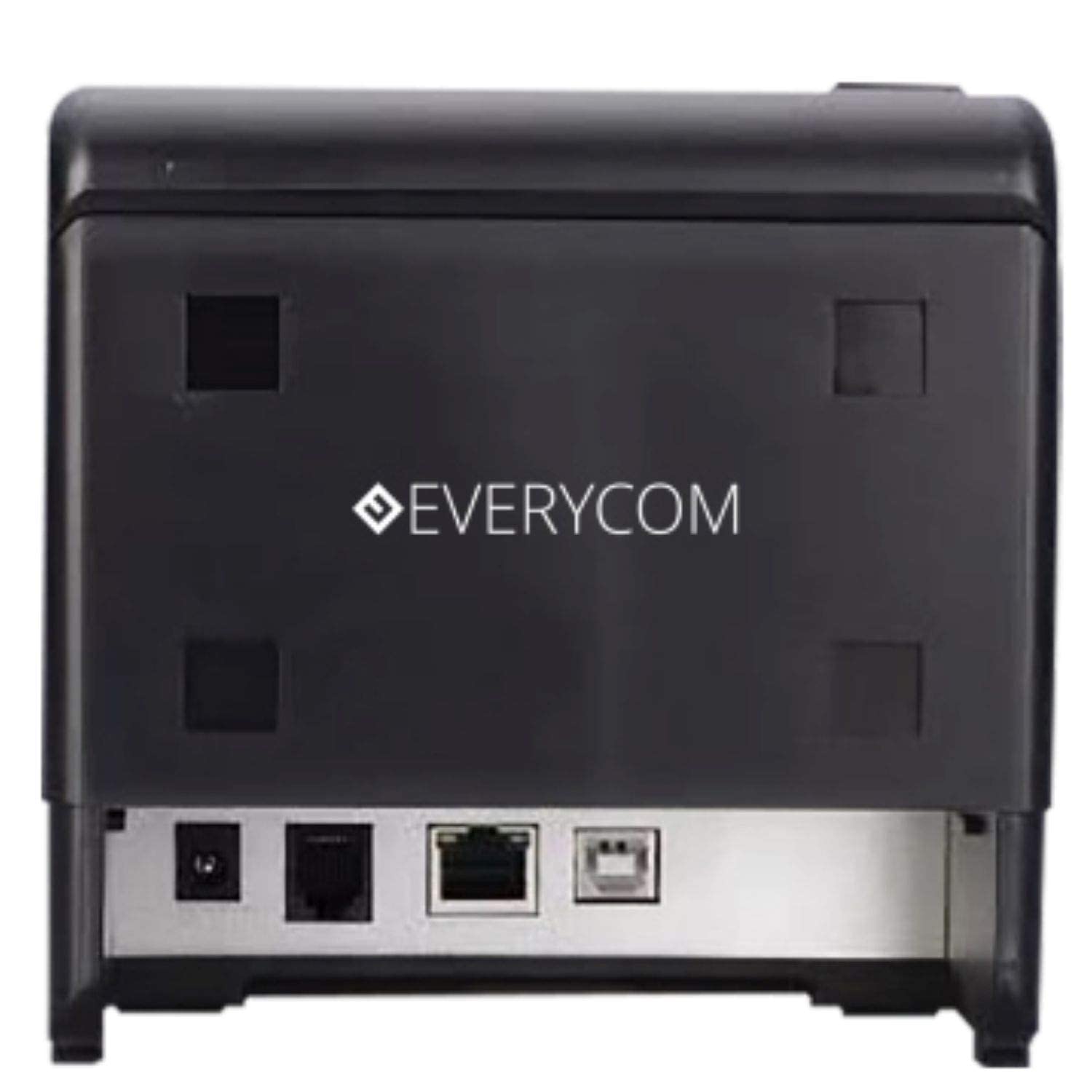
Figura 3: Posteriore view showing USB and LAN connectivity ports.

Figure 4: The EC-901 printer is designed for low noise operation.

Figure 5: The EC-901 printer features an easy-to-use design for paper installation.
Impostare
1. Collegamento della stampante
- Connect the power adapter cable to the printer's power port and then plug it into a suitable electrical outlet.
- Per la connessione USB: collegare un'estremità del cavo USB alla porta USB della stampante e l'altra estremità al computer.
- For LAN connection: Connect an Ethernet cable to the printer's LAN port and the other end to your network router or switch.
- Turn on the printer using the power switch located on the front or side of the device.
2. Installazione del rotolo di carta
- Open the printer cover by pressing the release button or lifting the cover.
- Insert the thermal paper roll into the compartment with the paper feeding from the bottom and exiting towards the front.
- Estrarre una piccola quantità di carta dalla taglierina.
- Chiudere saldamente il coperchio della stampante finché non scatta in posizione.
3. Installazione del driver
Insert the provided CD-ROM into your computer's CD/DVD drive. Follow the on-screen instructions to install the printer drivers and utility software. Drivers are typically compatible with Windows operating systems, including Windows 10.
Istruzioni per l'uso
Luci di segnalazione:
- ENERGIA: Indica che la stampante è accesa.
- ERRORE: Lights up or flashes to indicate an error (e.g., print head overheating, cover open).
- CARTA: Indicates low paper or no paper.
Stampa di base:
Once the printer is connected and drivers are installed, you can print receipts from your POS software or any application that supports printing. Ensure the Everycom EC-901 is selected as the default printer or the desired printer in your application's print settings.
Manutenzione
Pulizia della stampante:
- Prima di procedere alla pulizia, spegnere la stampante e scollegare il cavo di alimentazione.
- Utilizzare un panno morbido e privo di lanugine dampened with isopropyl alcohol to gently clean the thermal print head. Allow it to dry completely before use.
- Wipe the exterior of the printer with a soft, dry cloth. Do not use abrasive cleaners.
Sostituzione della carta:
When the PAPER indicator lights up or printing becomes faint, replace the paper roll following the steps outlined in the "Installing the Paper Roll" section.
Risoluzione dei problemi
| Problema | Possibile causa | Soluzione |
|---|---|---|
| La stampante non si accende. | Cavo di alimentazione scollegato o problema con la presa di corrente. | Controllare i collegamenti del cavo di alimentazione. Assicurarsi che la presa di corrente sia funzionante. |
| Nessuna stampa o output vuoto. | Carta esaurita, carta caricata in modo errato o problema con la testina di stampa. | Check paper roll and ensure it's loaded correctly. Clean the print head if necessary. Verify printer drivers are installed. |
| PAPER indicator is on. | Paper roll is empty or low. | Sostituire il rotolo di carta. |
| L'indicatore ERROR è acceso. | Printer cover open, print head overheating, or other internal error. | Ensure the printer cover is closed properly. Turn off the printer, wait a few minutes for it to cool down, then restart. If the issue persists, contact support. |
| Stampante non riconosciuta dal computer. | Driver not installed or USB/LAN cable issue. | Reinstall printer drivers. Check USB/LAN cable connections. Try a different port or cable. |
Specifiche
| Caratteristica | Dettaglio |
|---|---|
| Nome del modello | EC-901 |
| Tecnologia di stampa | Termico |
| Stampa Media | Carta (termica normale) |
| Dimensione massima del supporto | 3 pollici (80 mm) |
| Velocità massima di stampa | 160 mm/secondo |
| Risoluzione | 203 x 203 DPI |
| Tecnologia di connettività | USB, LAN Interface |
| Uscita della stampante | Monocromo |
| Sistema operativo | Windows 10 (e compatibile con altre versioni di Windows) |
| Dimensioni del prodotto (LxWxH) | Dimensioni: 19.8 x 14.8 x 14.8 cm |
| Peso dell'articolo | 1.8 kg |
| Caratteristica speciale | Without Auto cutter |
Garanzia e supporto
For technical assistance, warranty claims, or any product-related inquiries, please contact Everycom customer support.
- Numero verde: 1800 121 4480
- Orario di lavoro: Monday - Saturday, 10:00 AM - 6:30 PM (Except on Public Holidays)