
1. Introduzione
The Zelotes F17 Vertical Wireless Mouse is designed for enhanced comfort and productivity, featuring an ergonomic vertical design that promotes a natural hand posture. This manual provides comprehensive instructions for setting up, operating, maintaining, and troubleshooting your new mouse.

Image: The Zelotes F17 Vertical Wireless Mouse, showcasingrazie al suo design ergonomico e al ricevitore USB incluso.
2. Contenuto della confezione
Si prega di verificare che tutti gli articoli siano presenti nel pacco:
- 1 x Zelotes Wireless Vertical Mouse
- Ricevitore USB 1 x
- 1 x Manuale di istruzioni
3. Guida all'installazione
Follow these steps to set up your Zelotes F17 Vertical Wireless Mouse:
- Installa le batterie: The mouse requires two AA batteries (not included). Locate the battery compartment on the underside of the mouse. Open the cover, insert the batteries according to the polarity indicators, and close the cover.
- Recupera ricevitore USB: The USB receiver is conveniently stored next to the battery compartment. Gently pull it out.
- Collegare il ricevitore USB: Plug the USB receiver into an available USB port on your computer (Laptop, PC, Mac).
- Accensione: Locate the On/Off switch on the underside of the mouse and slide it to the 'On' position. The mouse is plug-and-play, requiring no driver installation.

Image: The underside of the Zelotes F17 mouse, illustrating the battery compartment and the integrated storage slot for the USB receiver.
Video: A demonstration of the Zelotes F17 Vertical Wireless Mouse in use, highlighting its ergonomic grip and functionality.
4. Istruzioni per l'uso
The Zelotes F17 mouse features 6 buttons and adjustable DPI settings for optimal control.
4.1 Impugnatura ergonomica
The vertical design allows your hand to rest in a natural handshake position, reducing wrist and forearm strain during prolonged use.
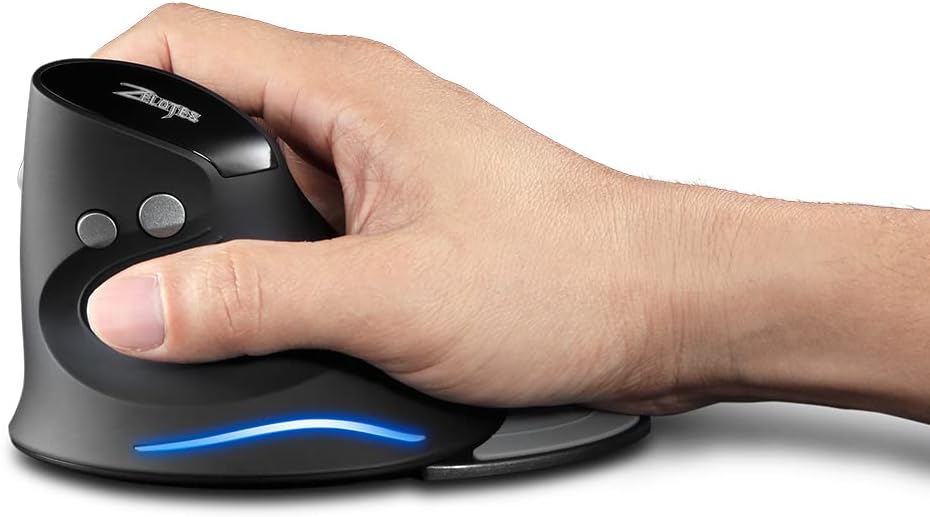
Image: A hand demonstrating the natural, ergonomic grip on the Zelotes F17 vertical mouse.
4.2 Funzioni dei pulsanti
- Clic sinistro: Funzione standard di clic primario.
- Clic destro: Funzione di clic secondario standard.
- Rotella di scorrimento: Scroll up or down, and click for middle-button functionality.
- Pulsante DPI: Cycles through DPI settings (1200/1600/2400 DPI).
- Pulsanti Avanti/Indietro: Located on the thumb side, these buttons allow for quick navigation in web browser o file esploratori.
4.3 DPI regolabili
Press the DPI button (located near the scroll wheel) to switch between 1200, 1600, and 2400 DPI settings. This allows you to adjust the mouse sensitivity to suit your task, whether it's precise graphic design or fast-paced gaming.
4.4 Detachable Palm Rest
The Zelotes F17 includes a detachable palm rest for additional wrist support. You can easily attach or remove it based on your preference and comfort needs.

Image: The Zelotes F17 mouse with its detachable palm rest separated, illustrating the modular design.
5. Manutenzione
To ensure the longevity and optimal performance of your Zelotes F17 mouse, follow these maintenance guidelines:
- Pulizia: Utilizzare un panno morbido e asciutto per pulire la superficie del mouse. Per lo sporco ostinato, leggermente dampPulire il panno con acqua o una soluzione detergente delicata. Evitare prodotti chimici aggressivi o materiali abrasivi.
- Sostituzione della batteria: When the mouse's performance degrades or the LED illumination dims, it's time to replace the AA batteries. Refer to Section 3.1 for battery installation instructions.
- Magazzinaggio: Quando non lo si utilizza per lunghi periodi, spegnere il mouse per preservare la batteria. Riporre il ricevitore USB nell'apposito slot sul lato inferiore del mouse per evitare di perderlo.
6. Risoluzione Dei Problemi
If you encounter issues with your Zelotes F17 mouse, try the following solutions:
| Problema | Possibile causa | Soluzione |
|---|---|---|
| Il mouse non risponde | Low battery; USB receiver disconnected; Mouse is off. | Replace batteries; Re-insert USB receiver; Turn mouse On. |
| Movimento irregolare del cursore | Sensore ottico sporco; Superficie non adatta; Batteria scarica. | Pulire il sensore ottico; utilizzare su una superficie liscia e non riflettente; sostituire le batterie. |
| L'illuminazione a LED non funziona | Low battery; Mouse is off. | Replace batteries; Turn mouse On. |
| L'impostazione DPI non cambia | Malfunzionamento del pulsante DPI. | Ensure the mouse is powered on and connected. If the issue persists, contact customer support. |
7. Specifiche
Key technical specifications for the Zelotes F17 Vertical Wireless Mouse:
| Caratteristica | Dettaglio |
|---|---|
| Dimensioni del prodotto | 4.33 x 3.39 x 3.15 pollici |
| Peso dell'articolo | 3.53 once |
| Numero modello articolo | F17 |
| Marca | zeloti |
| Colore | Nero |
| Tecnologia di connettività | USB (2.4 GHz Wireless) |
| Caratteristica speciale | Ergonomic Design, Removable Wrist Rest, LED Illumination |
| Tecnologia di rilevamento del movimento | Ottico |
| Impostazioni DPI | 1200/1600/2400 dpi |
| Numero di pulsanti | 6 |
| Fonte di alimentazione | 2 batterie AA (non incluse) |
| Compatibilità | Win11, Win10, Win8, Win7, Mac OS |

Image: A diagram illustrating the dimensions of the Zelotes F17 Vertical Wireless Mouse.
8. Garanzia e supporto
For warranty information or technical support, please refer to the contact details provided on the product packaging or the official Zelotes websito. Conserva la ricevuta d'acquisto come prova d'acquisto.