
1. Introduzione
This manual provides comprehensive instructions for the KROM K-WHEEL PRO professional racing wheel. It is designed to enhance your driving simulation experience across multiple platforms. Please read this manual thoroughly before use to ensure proper setup, operation, and maintenance.
The KROM K-WHEEL PRO features 3 adjustable sensitivity levels, integrated paddle shifters, and a gear lever for precise control. A responsive pedal set is included for a complete simulation experience. It is compatible with PC, PS3, PS4, Xbox One, and Nintendo Switch. The ergonomic design and stable base ensure comfort and performance during extended use.
2. Contenuto della confezione
Verifica che tutti gli articoli elencati di seguito siano presenti nella confezione. Se qualche componente risulta mancante o danneggiato, contatta l'assistenza clienti.
- KROM K-WHEEL PRO Racing Wheel
- Pedal Set (Accelerator, Brake, Clutch)
- Cambio di marcia
- Cavo di collegamento USB
- Manuale dell'utente (questo documento)

Image 1: KROM K-WHEEL PRO complete set, including the racing wheel, pedal set, and gear shifter.
3. Istruzioni per l'installazione
3.1 Attaching the Racing Wheel
- Place the racing wheel on a stable, flat surface such as a desk or racing cockpit.
- Secure the wheel using the integrated suction cups on the base. Press down firmly to ensure a strong grip.
- Alternatively, use the included clamp system (if applicable, not explicitly mentioned but common for racing wheels) to attach the wheel to a desk edge.

Immagine 2: anteriore view of the KROM K-WHEEL PRO Racing Wheel, showing the main controls and ergonomic design.
3.2 Collegamento della pedaliera
- Place the pedal set on the floor in front of your seating position.
- Connect the pedal set cable to the designated port on the back of the racing wheel. Ensure the connection is secure.
- The pedal set features a textured base for improved grip on various floor surfaces.
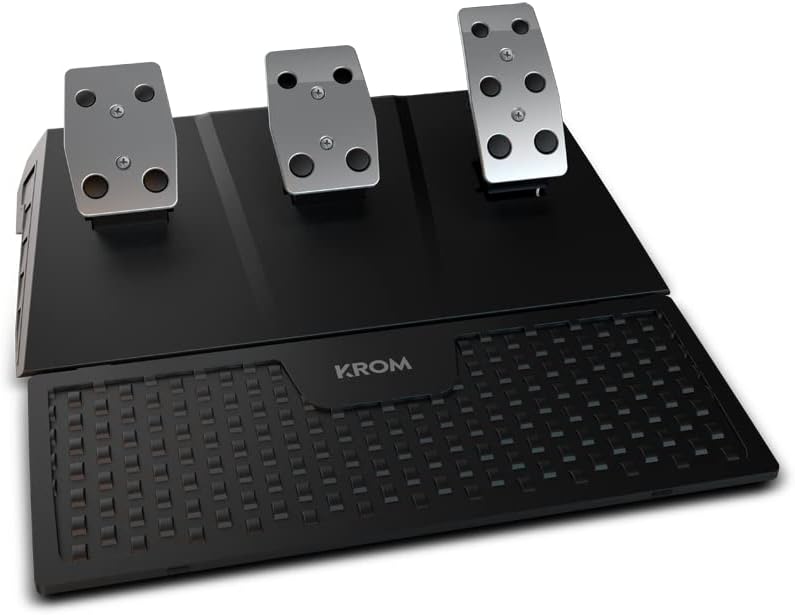
Image 3: The KROM K-WHEEL PRO pedal set, featuring accelerator, brake, and clutch pedals with a textured footrest.
3.3 Connecting the Gear Shifter
- Attach the gear shifter to your preferred side of the racing wheel setup, typically using a clamp or suction cups.
- Connect the gear shifter cable to the designated port on the racing wheel.
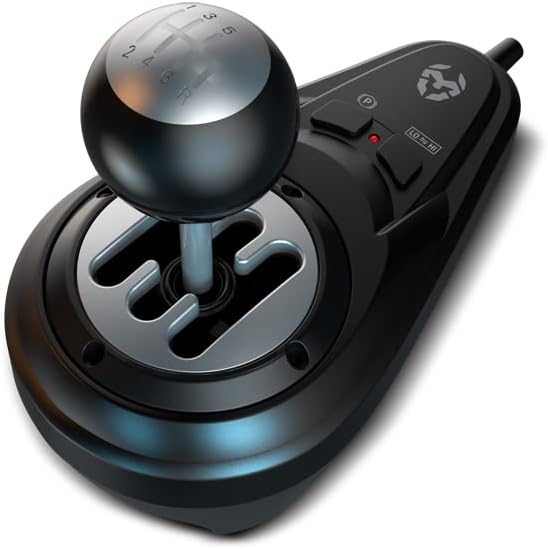
Image 4: The KROM K-WHEEL PRO gear shifter, showing the H-pattern shift gate and ergonomic knob.
3.4 Connecting to Your System (PC/Console)
- Ensure your PC or console is powered off.
- Connect the main USB cable from the racing wheel to an available USB port on your PC, PS3, PS4, Xbox One, or Nintendo Switch.
- Power on your system. The device should be automatically recognized.
- For PC, driver installation may be required. Refer to the KROM websito per i driver più recenti.

Image 5: A complete KROM K-WHEEL PRO setup on a desk, demonstrating the racing wheel, gear shifter, and pedal placement in a gaming environment.
4. Istruzioni per l'uso
4.1 Selezione della modalità
The K-WHEEL PRO supports multiple platforms. Ensure the correct mode is selected for your system. Refer to the device's indicator lights or the KROM website for specific mode switching instructions.
4.2 Regolazione della sensibilità
The racing wheel offers 3 adjustable sensitivity levels. This allows you to fine-tune the steering response to match your driving style and game requirements.
- Bassa sensibilità: Provides a less responsive steering, ideal for precise maneuvers or specific vehicle types.
- Sensibilità media: A balanced setting suitable for most racing games and driving styles.
- Alta sensibilità: Offers a highly responsive steering, beneficial for quick reactions in fast-paced racing.
To adjust sensitivity, press the designated sensitivity button on the wheel (refer to the button layout diagram in the quick start guide or KROM website). The indicator lights will show the current sensitivity level.
4.3 Button Mapping and Programming
The K-WHEEL PRO features programmable buttons, allowing for customization of controls.
- Refer to your game's control settings to map the wheel's buttons, pedals, and shifter functions.
- For advanced programming, consult the KROM website for any available software or detailed instructions.
4.4 Force Feedback and Vibration
The racing wheel includes a dual vibration motor for realistic force feedback, simulating road conditions, collisions, and other in-game effects. Ensure force feedback is enabled in your game settings for the full immersive experience.
5. Manutenzione
5.1 Pulizia
- Disconnect the racing wheel from all power sources before cleaning.
- Use a soft, dry cloth to wipe down the surfaces of the wheel, pedals, and shifter.
- Per lo sporco ostinato, una leggera damp è possibile utilizzare un panno imbevuto di sapone neutro, seguito da un panno asciutto.
- Avoid using abrasive cleaners, solvents, or harsh chemicals, as these can damage the product's finish.
5.2 Conservazione
- Store the KROM K-WHEEL PRO in a cool, dry place away from direct sunlight and extreme temperatures.
- Se si intende conservarlo per un periodo prolungato, si consiglia di riporlo nella confezione originale per proteggerlo dalla polvere e dai danni fisici.
6. Risoluzione Dei Problemi
| Problema | Possibile causa | Soluzione |
|---|---|---|
| Volante non riconosciuto da PC/Console |
|
|
| No force feedback/vibration |
|
|
| Pedals or shifter not responding |
|
|
7. Specifiche
| Caratteristica | Dettaglio |
|---|---|
| Nome del modello | K-Wheel Pro |
| Numero di modello | NXKROMKWHLPRO |
| Compatibilità | PC, PS3, PS4, Xbox One, Nintendo Switch |
| Connettività | USB |
| Angolo di sterzata | 900° / 270° (Adjustable) |
| Livelli di sensibilità | 3 (regolabile) |
| Feedback di forza | Dual Vibration Motor |
| Pedaliera | Acceleratore, freno, frizione |
| Cambio di marcia | H-pattern, Sequential Paddle Shifters |
| Dimensioni (L x P x A) | 35 x 33 x 33 cm (approximate for wheel unit) |
| Peso | 4200 Grams (approximate total) |
| Caratteristiche speciali | Programmable buttons, Anti-slip grip, Suction cup base for stability |
8. Garanzia e supporto
For warranty information, technical support, or to download the latest drivers and software, please visit the official KROM websito. Conservare la prova d'acquisto per eventuali reclami in garanzia.
KROM Official Websito: www.kromgaming.com
For further assistance, contact KROM customer service.