
1. Introduzione
Welcome to your iHome Compact Alarm Clock. This manual provides comprehensive instructions for setting up, operating, and maintaining your device. For optimal performance, please read this manual thoroughly.
Caratteristiche principali
- Large 1.4-inch backlit LCD display for clear visibility.
- Compact design, ideal for nightstands or desks.
- Built-in USB port for charging mobile devices.
- Displays temperature and humidity (Fahrenheit/Celsius).
- Loud and distinctive alarm sound.
2. Contenuto della confezione
Cosa c'è nella scatola
- iHome Compact Alarm Clock
- Adattatore di alimentazione CA.
- Manuale dell'utente (questo documento)
3. Prodotto finitoview
Controlli e display
Familiarize yourself with the buttons and display elements of your iHome Compact Alarm Clock.
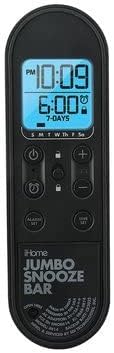
Descrizione dell'immagine: This image displays the control panel of the iHome Compact Alarm Clock. It features a large digital display showing the current time (e.g., 10:09 PM) and the alarm time (e.g., 6:00 AM, 7-DAYS). Below the display are various control buttons: a Power button (circle with vertical line), a Lock button (padlock icon), Plus (+) and Minus (-) buttons for adjustments, an Alarm Set button (bell icon), and a Time Set button (clock icon). The bottom part of the panel has 'iHome JUMBO SNOOZE BAR' printed on it, indicating a large area for the snooze function.
Elementi di visualizzazione
- Ora corrente: Displays the hour and minute.
- Indicatore PM: Si illumina quando sono le 12:00.
- Ora della sveglia: Shows the set alarm time.
- Indicatore di allarme: A bell icon indicates the alarm is active.
- Indicatori giornalieri: S M T W Th F Sa for active alarm days.
- Temperatura/Umidità: Displays current environmental readings.
Pulsanti di controllo
- ⏻ (Power Button): Accende o spegne l'unità.
- 🔒 (Lock Button): Locks/unlocks controls to prevent accidental changes.
- Pulsanti + / -: Adjusts time, alarm, or settings.
- ⏰ (Alarm Set Button): Entra nella modalità di impostazione dell'allarme.
- ⏱ (Time Set Button): Entra nella modalità di impostazione dell'ora.
- JUMBO SNOOZE BAR: Activates snooze function when alarm sounds.
4. Impostazione
Powering Your Clock
- Connect the AC power adapter to the DC jack on the back of the clock.
- Collegare l'adattatore a una presa a muro standard.
- Il display si illuminerà, indicando che l'orologio è acceso.
Impostazione dell'ora iniziale
- Premere e tenere premuto il tasto ⏱ (Time Set) finché il display dell'ora non lampeggia.
- Utilizzare il + or - pulsanti per regolare l'ora. Prestare attenzione all'indicatore PM.
- Premere il tasto ⏱ (Time Set) nuovamente il pulsante per confermare l'ora e passare ai minuti.
- Utilizzare il + or - pulsanti per regolare i minuti.
- Premere il tasto ⏱ (Time Set) button one last time to save the time and exit setting mode.
5. Istruzioni per l'uso
Impostazione della sveglia
- Premere e tenere premuto il tasto ⏰ (Alarm Set) finché il display dell'ora della sveglia non lampeggia.
- Utilizzare il + or - pulsanti per regolare l'ora della sveglia. Osservare l'indicatore PM.
- Premere il tasto ⏰ (Alarm Set) nuovamente il pulsante per confermare l'ora e passare ai minuti.
- Utilizzare il + or - pulsanti per regolare i minuti della sveglia.
- Premere il tasto ⏰ (Alarm Set) button again to select the alarm days (e.g., 7-DAYS, weekdays, weekends). Use + or - per scorrere le opzioni.
- Premere il tasto ⏰ (Alarm Set) button one last time to save the alarm settings and exit. The alarm icon will appear on the display.
Funzione snooze
Quando suona la sveglia, premere il tasto JUMBO SNOOZE BAR to temporarily silence the alarm. The alarm will sound again after a few minutes (default snooze duration).
Disattivazione dell'allarme
Per disattivare completamente l'allarme, premere il tasto ⏰ (Alarm Set) button once when the alarm is not sounding. The alarm icon will disappear from the display.
Utilizzo della porta di ricarica USB
Connect your USB charging cable (not included) to the USB port located on the back or side of the clock. Plug the other end into your device (e.g., smartphone, tablet) to begin charging. The clock must be powered on for the USB port to function.
Display temperatura e umidità
The clock automatically displays the current room temperature and humidity. The unit of temperature (Fahrenheit or Celsius) can typically be switched by a dedicated button or a combination of buttons (refer to specific model instructions if not immediately apparent).
6. Manutenzione
Pulizia
To clean your clock, use a soft, dry cloth. Do not use liquid cleaners or abrasive materials, as they may damage the finish or electronic components.
Batteria di backup
While the clock is primarily powered by AC, some models may include a battery compartment for backup power during outages. If your model supports this, insert the recommended batteries (e.g., 2 x AAA, not included) into the compartment, observing polarity. This will preserve time settings during a power interruption.
7. Risoluzione Dei Problemi
Problemi comuni e soluzioni
| Problema | Soluzione |
|---|---|
| Il display dell'orologio è vuoto. | Ensure the AC power adapter is securely connected to the clock and a working wall outlet. Check if the power button is pressed. |
| L'allarme non suona. | Verify the alarm is set and the alarm icon is visible on the display. Check the alarm volume setting if available. |
| La porta USB non carica i dispositivi. | Ensure the clock is powered on. Try a different USB cable or device to rule out cable/device issues. |
| I pulsanti non rispondono. | Check if the Lock button (padlock icon) is active. Press it to unlock the controls. |
8. Specifiche
Specifiche del prodotto
| Caratteristica | Dettaglio |
|---|---|
| Marca | ioCasa |
| Modello | Sveglia compatta |
| Tipo di visualizzazione | Digitale, LCD retroilluminato |
| Fonte di alimentazione | Corded Electric (Battery Powered for backup, if applicable) |
| Caratteristiche speciali | Alarm, USB Charging Port, Temperature/Humidity Display |
| Dimensioni del prodotto | 3.5"L x 3.5"A |
| Materiale | Acrilonitrile-butadiene-stirene |
| Codice UPC | 656942513698 |
| ASIN | B09MMFCP5R |
9. Garanzia e supporto
Informazioni sulla garanzia
This iHome Compact Alarm Clock comes with a 90-day limited warranty. Please retain your proof of purchase for warranty claims.
Assistenza clienti
For technical assistance or further inquiries, please visit the official iHome websito o contattare il servizio clienti.