
ELEFOCUS RC-815S, TX-8030, RC-816S, RC-903S, RC-904S, TX-8160, TX-8050, TX-8140
ELEFOCUS Replacement Remote Control User Manual
For Onkyo RC-815S, TX-8030, RC-816S, RC-903S, RC-904S, TX-8160, TX-8050, TX-8140 Network Audio/Video AV Stereo Receivers
Introduzione
This manual provides essential information for the proper use and maintenance of your ELEFOCUS replacement remote control. This remote is designed as a direct replacement for various Onkyo Network Audio/Video AV Stereo Receivers, including models RC-815S, TX-8030, RC-816S, RC-903S, RC-904S, TX-8160, TX-8050, and TX-8140.
Please note that this is a replacement item and while it functions out of the box with compatible models, some advanced or specific functions of your original remote may not be fully supported. No complex programming is required; simply insert batteries to begin use.
Impostare
1. Installazione della batteria
Il telecomando richiede due (2) batterie AAA (non incluse). Per installarle, seguire questi passaggi:
- Individuare il vano batterie sul retro del telecomando.
- Premere la linguetta e far scorrere il coperchio della batteria verso il basso per aprirlo.
- Inserire due batterie AAA, assicurandosi che i terminali positivo (+) e negativo (-) siano allineati correttamente con le marcature all'interno del vano.
- Far scorrere il coperchio della batteria in posizione finché non scatta in modo sicuro.
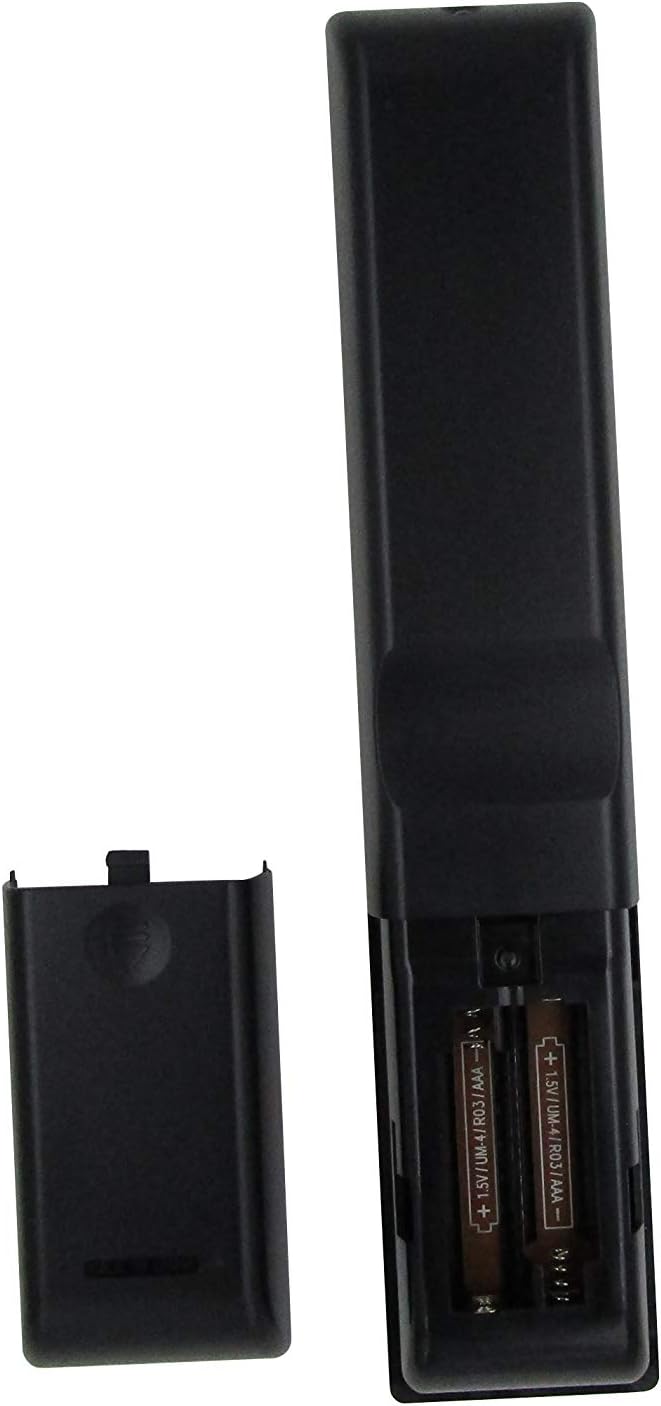
Figura 1: Battery compartment with AAA batteries. Ensure correct polarity when inserting batteries.
Once batteries are installed, the remote is ready for use. No additional programming or setup is typically required for compatible Onkyo receiver models.
Istruzioni per l'uso
This replacement remote control provides essential functions for your Onkyo receiver. Point the remote directly at the receiver's infrared (IR) sensor for optimal performance.

Figura 2: Sopraview della disposizione del telecomando.
Funzioni chiave:
- Pulsante di accensione (⏻): Accende o spegne il ricevitore.
- Input Selector Buttons (BD/DVD, CBL/SAT, PC, Game, TV/Tape, CD, Phono, Tuner, NET, Bluetooth): Seleziona la sorgente di ingresso audio/video desiderata.
- Volume su/giù (▲ / ▼): Regola il livello del volume principale.
- Silenziare: Disattiva o attiva l'audio in uscita.
- Tasti di navigazione (Su, Giù, Sinistra, Destra, Invio): Utilizzato per navigare nei menu e confermare le selezioni sul display del ricevitore.
- Menu: Accede al menu principale del ricevitore.
- Impostare: Enters the setup menu for configuration.
- Ritorno: Torna al menu o alla schermata precedente.
- Audio: Passa attraverso le modalità o le impostazioni audio.
- Playback Controls (Rewind, Play/Pause, Fast Forward, Stop, Previous Track, Play, Next Track): Controlla la riproduzione multimediale per i dispositivi connessi.
- Ripetere: Attiva/disattiva la modalità di riproduzione ripetuta.
- Casuale: Toggles random/shuffle playback mode.
- Relatore A/B: Selects speaker output groups.
- Tastierino numerico (0-9): For direct input of numbers, such as radio frequencies or track numbers.
- Magliette: Functionality may vary by receiver model.
- >10: For entering numbers greater than 9 on some systems.
- D.TUN: Direct tuning for radio.
- Display: Modifica le informazioni visualizzate sul ricevitore.
- dimmer: Regola la luminosità del display del ricevitore.
- Sonno: Imposta un timer di spegnimento per il ricevitore.
- CLR: Cancella l'input o la selezione corrente.
Nota importante:
As a replacement remote, some advanced or specific functions present on your original Onkyo remote may not be replicated or fully functional. This remote is designed to cover the primary and most commonly used features.
Manutenzione
1. Sostituzione della batteria
Sostituisci le batterie quando la risposta del telecomando diventa lenta o smette di funzionare. Sostituisci sempre entrambe le batterie contemporaneamente con batterie AAA nuove. Non mischiare batterie vecchie e nuove o tipi diversi di batterie.
2. Pulizia
Per pulire il telecomando, utilizzare un panno morbido e asciutto. Per lo sporco ostinato, utilizzare un panno leggermente dampPulisci il panno con acqua o un detergente delicato e non abrasivo. Non utilizzare prodotti chimici aggressivi, solventi o spugne abrasive, poiché potrebbero danneggiare la superficie del telecomando o i componenti interni.
3. Conservazione
Quando non si utilizza il telecomando per lunghi periodi, si consiglia di rimuovere le batterie per evitare perdite che potrebbero danneggiarlo. Conservare il telecomando in un luogo fresco e asciutto, lontano dalla luce solare diretta e da temperature estreme.
Risoluzione dei problemi
| Problema | Possibile causa | Soluzione |
|---|---|---|
| Il telecomando non funziona affatto. |
|
|
| Alcune funzioni non funzionano. |
|
|
| Il telecomando funziona a intermittenza. |
|
|
If your specific Onkyo receiver model is not listed in the product title (RC-815S, TX-8030, RC-816S, RC-903S, RC-904S, TX-8160, TX-8050, TX-8140), this remote may not be compatible. Please verify compatibility before purchase.
Specifiche
- Marca: ELEFOCUS
- Dispositivi compatibili: Onkyo Network Audio/Video AV Stereo Receivers (Models: RC-815S, TX-8030, RC-816S, RC-903S, RC-904S, TX-8160, TX-8050, TX-8140)
- Tecnologia di connettività: Infrarossi (IR)
- Fonte di energia: 2 x batterie AAA (non incluse)
- Caratteristica speciale: Design ergonomico
- Numero massimo di dispositivi supportati: 1 (specific Onkyo receiver)
Informazioni sulla garanzia
Specific warranty details for this ELEFOCUS replacement remote control are not provided in the product information. Please refer to the seller's return policy or contact the seller directly for information regarding warranty coverage and terms.
Assistenza clienti
For further assistance or inquiries regarding your ELEFOCUS replacement remote control, please contact the seller directly through the platform where the purchase was made. As this is a third-party replacement product, direct manufacturer support may not be available.
For general information about your Onkyo receiver, please refer to the original user manual provided with your receiver or visit the official Onkyo support websito.
Prodotto aggiuntivo Views

Figura 3: Angolato view del telecomando.

Figura 4: Close-up of the upper section of the remote, showing input and media controls.
Video ufficiali dei prodotti
Per questo articolo non sono stati forniti video ufficiali del venditore.