
Introduzione
Thank you for choosing the Galax Slider-04 Optical Wired Gaming Mouse. This manual provides essential information for setting up, operating, maintaining, and troubleshooting your new gaming mouse. Please read it carefully to ensure optimal performance and longevity of your device.
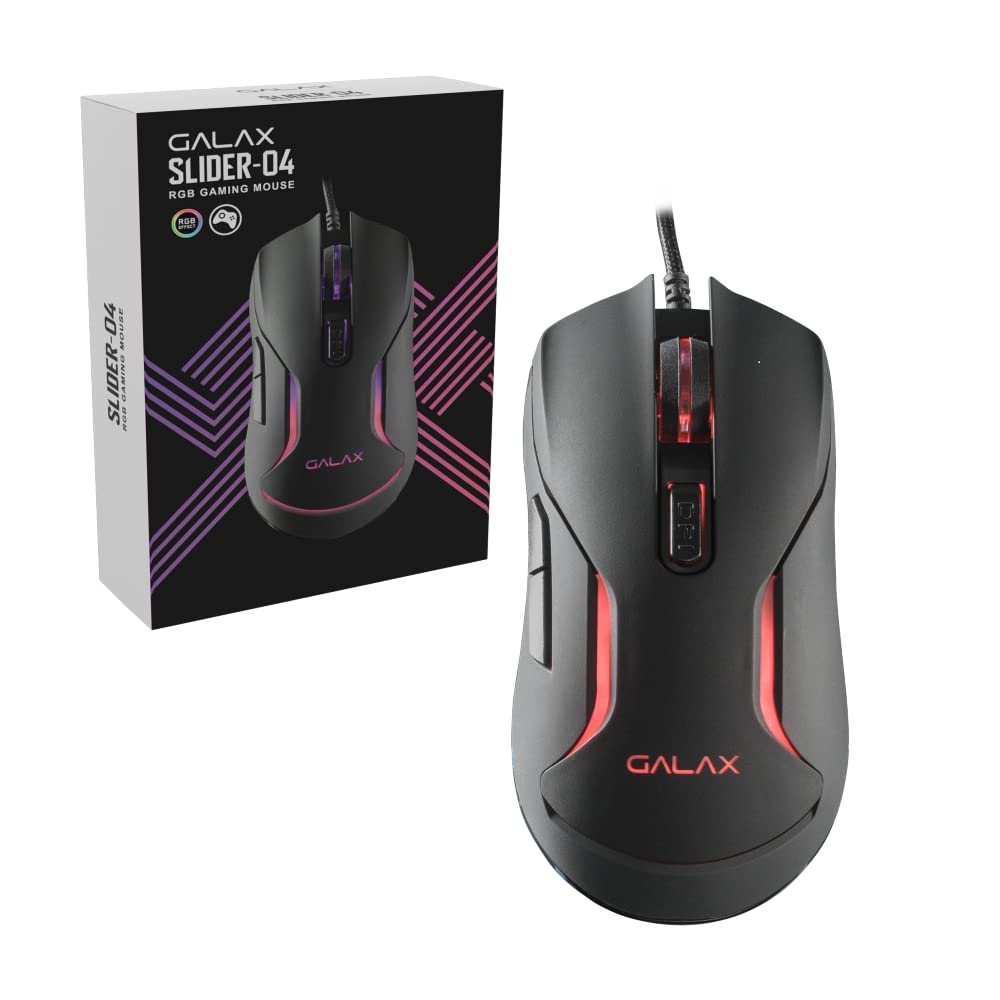
Immagine: in alto view of the Galax Slider-04 Optical Wired Gaming Mouse, showcasingrazie al suo design ergonomico e alla rotellina di scorrimento centrale.
Impostare
The Galax Slider-04 Gaming Mouse is designed for simple plug-and-play functionality, requiring no additional software installation for basic use.
- Disimballare il mouse: Estrarre con cautela il mouse dalla confezione.
- Connessione al computer: Plug the USB connector of the mouse into an available USB port on your desktop, laptop, or PC.
- Riconoscimento del sistema: Your operating system (Windows, macOS, Unix) will automatically detect and install the necessary drivers. This process usually takes a few seconds.
- Pronto per l'uso: Una volta installati i driver, il mouse è pronto per l'uso immediato.

Image: The Galax Slider-04 mouse with its braided USB cable, ready for connection to a computer.
Istruzioni per l'uso
The Galax Slider-04 features multiple buttons and customizable settings to enhance your gaming and productivity experience.
Funzioni dei pulsanti
The mouse is equipped with 6 function keys for versatile control:
- 1. Left Mouse Button: Funzione standard di clic primario.
- 2. Right Mouse Button: Funzione standard di clic secondario (menu contestuale).
- 3. Scroll Wheel: Scorre verso l'alto/verso il basso e funge da pulsante centrale.
- 4. Pulsante Avanti: Naviga in avanti in web browser o file esploratori.
- 5. Pulsante Indietro: Naviga indietro in web browser o file esploratori.
- 6. DPI Button: Scorre le impostazioni di sensibilità DPI.

Image: A detailed diagram illustrating the location and numbering of the 6 function keys on the Galax Slider-04 mouse.
Regolazione DPI
Adjust the mouse sensitivity (DPI) to match your preference and task requirements. The Slider-04 offers four preset DPI levels:
- 1000 DPI
- 1600 DPI
- 3200 DPI
- 6400 DPI
Premere il tasto Pulsante DPI (Button 6) located behind the scroll wheel to cycle through these settings. Each change will typically be indicated by a change in the mouse's RGB lighting color.

Image: Visual representation of the four selectable DPI settings available on the Galax Slider-04 mouse.
Illuminazione a LED RGB
The Galax Slider-04 features dynamic RGB LED lighting that enhances your gaming setup's aesthetics. The lighting effects cycle automatically, often changing color to indicate the current DPI setting.
Video: A short demonstration of the Galax Slider-04 mouse's RGB LED lighting effects, showcasing the dynamic color changes.

Image: The Galax Slider-04 mouse displayed with various RGB color presets, illustrating the range of lighting options.
Design ergonomico
The mouse is designed with ergonomics to provide comfort and reduce hand fatigue during prolonged use. Its shape supports both fingertip and claw grip styles, promoting a natural hand posture.

Image: A diagram demonstrating how the ergonomic design of the Galax Slider-04 mouse accommodates both fingertip and claw grip styles.
Manutenzione
Proper care will extend the life and performance of your Galax Slider-04 Gaming Mouse.
- Pulizia: Utilizzare un panno morbido e asciutto per pulire la superficie del mouse. Per lo sporco ostinato, leggermente dampLavare il panno con acqua. Evitare prodotti chimici aggressivi o detergenti abrasivi.
- Sensore ottico: Mantenere pulito e libero da polvere o detriti il sensore ottico sul lato inferiore del mouse per garantire un tracciamento accurato.
- Cura del cavo: Avoid sharply bending or twisting the braided USB cable. Store the cable neatly to prevent tangling and damage.
- Magazzinaggio: Quando non lo si utilizza, conservare il mouse in un ambiente pulito e asciutto, lontano da temperature estreme.
Risoluzione dei problemi
If you encounter issues with your Galax Slider-04 Gaming Mouse, refer to the following common solutions:
- Mouse Not Detected:
- Assicurarsi che il cavo USB sia collegato saldamente a una porta USB funzionante.
- Prova a collegare il mouse a una porta USB diversa del computer.
- Riavvia il computer.
- Check your computer's Device Manager (Windows) or System Information (macOS) to see if the mouse is listed.
- DPI non cambia:
- Ensure you are pressing the dedicated DPI button (Button 6).
- Verificare che il mouse sia collegato correttamente e riconosciuto dal sistema.
- Le luci RGB non funzionano:
- Assicurati che il mouse sia collegato correttamente al computer.
- The RGB lighting is typically automatic and cycles through colors. If no lights appear, try reconnecting the mouse or restarting your computer.
- Tracciamento impreciso:
- Pulisci il sensore ottico sul lato inferiore del mouse.
- Utilizzare il mouse su una superficie pulita e uniforme oppure su un tappetino per mouse di qualità.
- Adjust the DPI setting to a level suitable for your surface and preference.
Specifiche
Below are the technical specifications for the Galax Slider-04 Optical Wired Gaming Mouse:
| Caratteristica | Dettaglio |
|---|---|
| Marca | Galax |
| Nome del modello | CURSORE |
| Numero di modello | MGS04UX26RG2B0 |
| Colore | Nero |
| Tecnologia di connettività | USB (cablato) |
| Tecnologia di rilevamento del movimento | Ottico |
| Mouse Maximum Sensitivity | 6400 DPI |
| Impostazioni DPI | 1000 / 1600 / 3200 / 6400 |
| Quantità del pulsante | 6 |
| Durata della vita del pulsante | 3 milioni di clic |
| Tasso di sondaggio | 125 Hz |
| Caratteristiche speciali | Ergonomic Design, RGB LED Lights, Lightweight |
| Lunghezza del cavo | 1.5 meters (Braided) |
| Dispositivi compatibili | Personal computer |
| Supporto del sistema operativo | Unix, Windows 7/8/10, macOS 10.12 Sierra and above |
| Peso dell'articolo | 250 grammi |
| Dimensioni dell'articolo (L x P) | 12.9L x 4.1W centimetri |
| Fonte di alimentazione | Elettrico con cavo |
| Materiale di recinzione | Plastica |
| Product Finish Type | Opaco |

Image: A table summarizing the key specifications of the Galax Slider-04 gaming mouse.
Garanzia e supporto
The Galax Slider-04 Optical Wired Gaming Mouse comes with a Garanzia del produttore di 1 anni dalla data di acquisto.
Per reclami in garanzia o supporto tecnico, contattare:
- Produttore: Galax Technology, Galaxy Microsystems Ltd., Hong Kong, Kowloon Bay, Sheung Yuet Rd, 3號企業廣場二期
- Importatore (India): Technology And Gadgets, Gala no.142/143, 1st Floor, Building no.6, Mittal Industrial Estate, Marol, Andheri (East), Mumbai - 400059., Mumbai, India, Maharashtra
Si prega di conservare la ricevuta d'acquisto come prova d'acquisto ai fini della garanzia.