
Anova Culinary AN900-10
Manuale utente del forno intelligente Anova Precision
Modello: AN900-10
Introduzione
The Anova Precision Smart Oven is a versatile countertop appliance designed to bring professional-grade cooking capabilities to your home kitchen. It combines convection, steam, bake, broil, roast, and dehydrate functions, offering precise temperature control for a wide range of culinary tasks. This manual provides essential information for the safe and effective operation and maintenance of your Anova Precision Smart Oven.
For optimal performance and longevity, please read this manual thoroughly before first use and retain it for future reference.
Informazioni sulla sicurezza
Quando si utilizzano apparecchi elettrici, seguire sempre le precauzioni di sicurezza di base per ridurre il rischio di incendi, scosse elettriche e lesioni alle persone.
- Non toccare le superfici calde. Utilizzare maniglie o manopole.
- Per proteggersi da scosse elettriche, non immergere il cavo, le spine o l'apparecchio stesso in acqua o altri liquidi.
- È necessaria un'attenta supervisione quando un elettrodomestico viene utilizzato da bambini o nelle loro vicinanze.
- Scollegare dalla presa quando non in uso e prima di pulire. Lasciare raffreddare prima di mettere o togliere parti.
- Non utilizzare alcun apparecchio con un cavo o una spina danneggiati oppure dopo che l'apparecchio stesso non funziona correttamente o è stato danneggiato in qualsiasi modo.
- L'uso di accessori non consigliati dal produttore dell'apparecchio può causare lesioni.
- Non utilizzare all'aperto.
- Non lasciare che il cavo penda dal bordo del tavolo o del bancone o che tocchi superfici calde.
- Non posizionare sopra o vicino a un fornello a gas o elettrico caldo, oppure in un forno caldo.
- Prestare la massima attenzione quando si sposta un apparecchio contenente olio bollente o altri liquidi bollenti.
- Non utilizzare l'apparecchio per scopi diversi da quelli previsti.
Componenti finitiview
Familiarize yourself with the main components of your Anova Precision Smart Oven:
- Cavità del forno: La camera di cottura principale.
- Serbatoio dell'acqua: Removable tank for steam generation. Located on the side.
- Pannello di controllo: Digital display and knobs for setting temperature, time, and cooking modes.
- Sonda per alimenti: Detachable probe for precise internal temperature monitoring.
- Removable Racks: Multiple racks for various cooking needs.
- Teglia da forno: Included pan for general baking and roasting.

Figura 1: Fronte view of the Anova Precision Smart Oven, showing the main oven cavity, control panel, and side-mounted water tank.

Figura 2: Interno view of the Anova Precision Smart Oven, illustrating the two removable racks and the included baking pan.

Figure 3: A user demonstrating the removal of the clear water tank from the side of the Anova Precision Smart Oven for refilling or cleaning.
Impostare
Disimballaggio e posizionamento
- Estrarre con cautela il forno e tutti gli accessori dalla confezione.
- Remove any protective film or packaging materials from the oven.
- Place the oven on a stable, level, heat-resistant surface with adequate clearance from walls and other appliances for ventilation. Ensure at least 4 inches of space on all sides and above the oven.
- Assicurarsi che la presa di corrente sia facilmente accessibile.
Pulizia iniziale
- Prima del primo utilizzo, pulire l'interno e l'esterno del forno con un panno umido.amp stoffa.
- Wash the removable racks, baking pan, and water tank with warm, soapy water. Rinse thoroughly and dry completely.
Preparazione del serbatoio dell'acqua
- Remove the water tank from its housing on the side of the oven.
- Fill the water tank with distilled water. Do not use tap water as it can lead to mineral buildup.
- Securely reinsert the water tank into its housing until it clicks into place.
Collegamento di potenza
Plug the oven into a grounded electrical outlet. The display will illuminate, indicating the oven is ready for use.
Istruzioni per l'uso
Pannello di controllo Fineview
The Anova Precision Smart Oven features an intuitive control panel with a digital display and rotary knobs for setting cooking parameters. The display shows temperature, time, and current cooking mode.
Connecting to the Anova App
For enhanced control and access to a recipe library, download the Anova Oven app on your smartphone. Follow the in-app instructions to connect your oven via Wi-Fi.
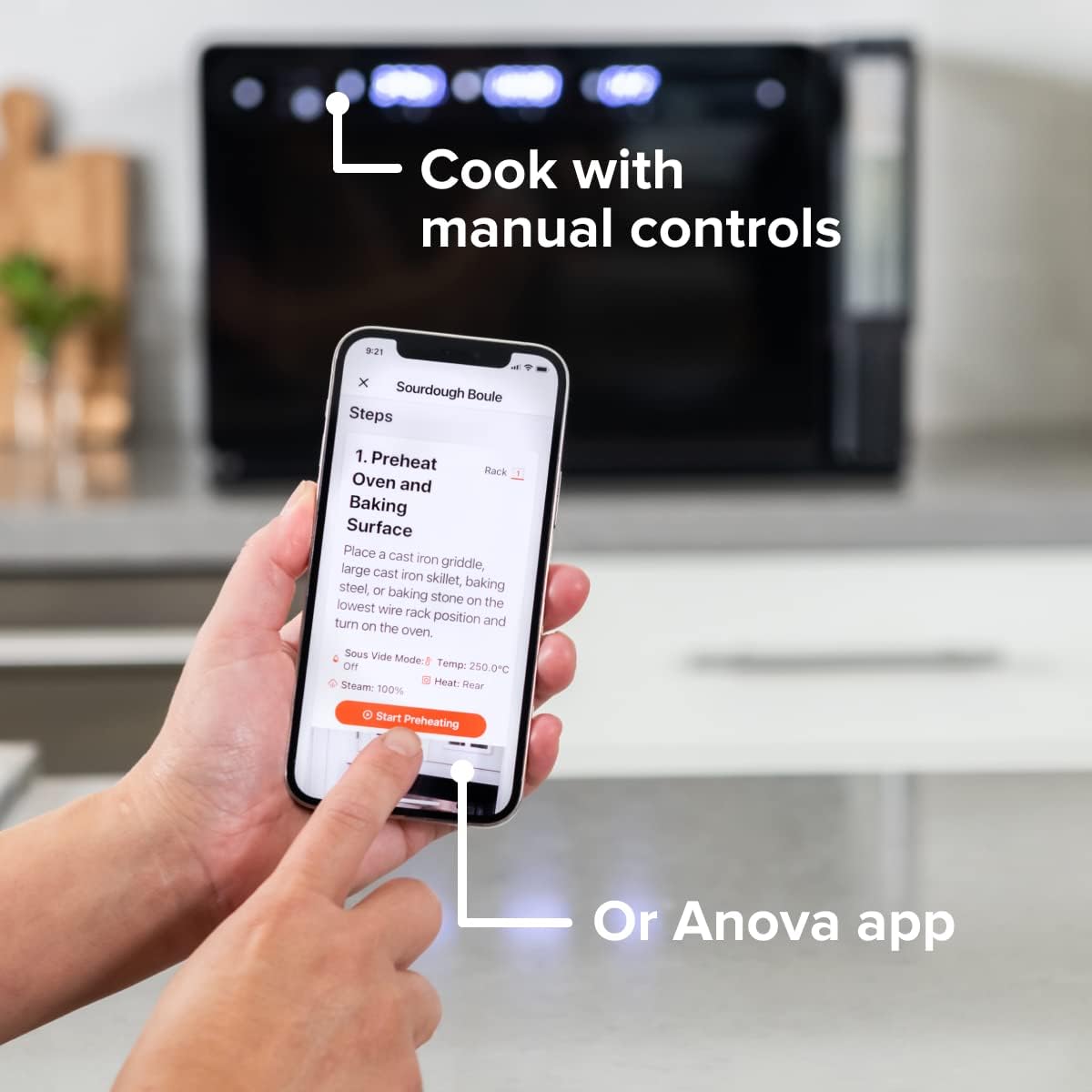
Figure 4: A user interacting with the Anova app on a smartphone, demonstrating remote control capabilities for the oven.
Modalità di cottura di base
The oven offers several cooking modes:
- Convezione: Uses a fan to circulate hot air for even cooking and browning.
- Vapore: Injects steam into the oven cavity, ideal for baking bread, steaming vegetables, or sous vide style cooking.
- Combi (Convection + Steam): Combines hot air and steam for moist interiors and crispy exteriors.
- Cuocere al forno/arrosto: Standard oven functions for baking and roasting.
- Grigliare: High heat from the top element for searing and browning.
- Disidratare: Low heat and fan circulation for drying foods.
Setting a Program (Manual Control)
- Turn the mode knob to select your desired cooking mode.
- Adjust the temperature using the temperature knob.
- Impostare il tempo di cottura utilizzando la manopola del tempo.
- Premere il pulsante Avvio/Pausa per iniziare la cottura.
- To use the food probe, insert it into the thickest part of your food before starting. The oven will cook until the target internal temperature is reached.
Modalità sottovuoto
The Anova Precision Oven can achieve sous vide style results without a water bath. Use the steam function and the food probe to cook food to a precise internal temperature, ensuring tenderness and juiciness.
Steam Injection for Baking
For perfect breads with crispy crusts and soft interiors, utilize the steam injection feature. Ensure the water tank is filled before starting a steam-assisted baking program.

Figure 5: Two loaves of freshly baked bread, showcasing the results of steam injection for a perfect crust and crumb. The Anova Precision Smart Oven is visible in the background.
Manutenzione e pulizia
Regular cleaning and maintenance will ensure the longevity and optimal performance of your Anova Precision Smart Oven.
Pulizia giornaliera
- After each use, allow the oven to cool completely.
- Pulisci le superfici interne ed esterne con l'adamp panno e detergente delicato. Evitare detergenti abrasivi o pagliette.
- Remove and clean the racks and baking pan with warm, soapy water.
- Empty and rinse the water tank after each use, especially if using steam functions. Allow it to air dry before reinserting.
Descaling (Steam Function Users)
If you frequently use the steam function, mineral buildup may occur. The oven may indicate when descaling is needed. Refer to the Anova app or online resources for detailed descaling instructions using a descaling solution.
Magazzinaggio
Quando non viene utilizzato per lunghi periodi, assicurarsi che il forno sia pulito e asciutto. Conservarlo in un luogo fresco e asciutto.
Risoluzione dei problemi
This section addresses common issues you might encounter with your Anova Precision Smart Oven.
| Problema | Possibile causa | Soluzione |
|---|---|---|
| Oven not turning on. | Non collegato; alimentazione spentatage; l'interruttore automatico è scattato. | Assicurarsi che il forno sia collegato saldamente a una presa di corrente funzionante. Controllare l'interruttore automatico dell'impianto elettrico domestico. |
| Non viene prodotto vapore. | Water tank empty or not properly seated; mineral buildup. | Fill water tank with distilled water and ensure it is correctly inserted. Perform descaling if necessary. |
| Il cibo non cuoce in modo uniforme. | Improper rack placement; overcrowding; fan obstruction. | Refer to recipe for recommended rack position. Avoid overcrowding the oven. Ensure nothing obstructs the convection fan. |
| Problemi di connessione Wi-Fi. | Password Wi-Fi errata; router troppo lontano; interferenza di rete. | Double-check Wi-Fi password. Move oven closer to router or use a Wi-Fi extender. Restart oven and router. |
If the problem persists after attempting these solutions, please contact Anova Customer Support.
Specifiche
- Marca: Anova culinario
- Nome modello: Forno di precisione
- Numero modello articolo: AN900-10
- Dimensioni del prodotto: 18"P x 22"L x 14"A
- Peso dell'articolo: 59 libbre
- Colore: Nero
- Tipo di controllo: Manopola
- Fonte di energia: Elettrico
- Componenti inclusi: Water tank, pan, temp probe
- Caratteristica speciale: Programmabile
Garanzia e supporto
The Anova Precision Smart Oven comes with a manufacturer's warranty. Please refer to the warranty card included with your product or visit the official Anova Culinary websito per termini e condizioni di garanzia dettagliati.
For technical support, troubleshooting assistance, or to inquire about replacement parts, please contact Anova Customer Support:
- Supporto online: Visitare il Anova Culinary Store su Amazon o il loro funzionario websito.
- Guida per l'utente (PDF): Una guida utente completa è disponibile per il download all'indirizzo questo collegamento.

Figure 6: The Anova Precision Smart Oven integrated with a smart home assistant (Alexa), demonstrating its connectivity features.
Ask a question about this manual
Ask about setup, troubleshooting, compatibility, parts, safety, or missing instructions. Manuals+ will review the question and use this page’s manual context to help answer it.