Introduzione
Welcome to the user manual for your BRONDI Amico Flip 4G+ mobile phone. This device combines the classic flip phone design with modern smartphone capabilities, featuring 4G+ LTE connectivity and the Android 8.1 operating system. It is equipped with a 3.5-inch HVGA display and a 2 MP autofocus camera. This manual provides essential information to help you set up, operate, maintain, and troubleshoot your new phone.
Please read this manual carefully to ensure proper use and to maximize the performance and lifespan of your device.
Contenuto della confezione
Prima di procedere con l'installazione, assicurarsi che tutti gli elementi siano presenti nella confezione.
- BRONDI Amico Flip 4G+ Mobile Phone
- Caricatore AC
- Cavo USB di tipo C.
- Batteria agli ioni di litio
- Stazione di ricarica
- Auricolari cablati

Image: All components included in the BRONDI Amico Flip 4G+ package.
Impostare
1. Installazione della batteria e della scheda SIM
- Aprire il coperchio posteriore: Rimuovere delicatamente la cover posteriore del telefono.
- Inserire la scheda SIM: Locate the SIM card slot(s). Insert your Nano-SIM card(s) into the designated slot(s) with the gold contacts facing down, ensuring it clicks into place.
- Inserire la batteria: Place the Lithium-ion battery into the battery compartment, aligning the contacts.
- Riposizionare la cover posteriore: Fissare saldamente la cover posteriore finché non scatta in posizione.
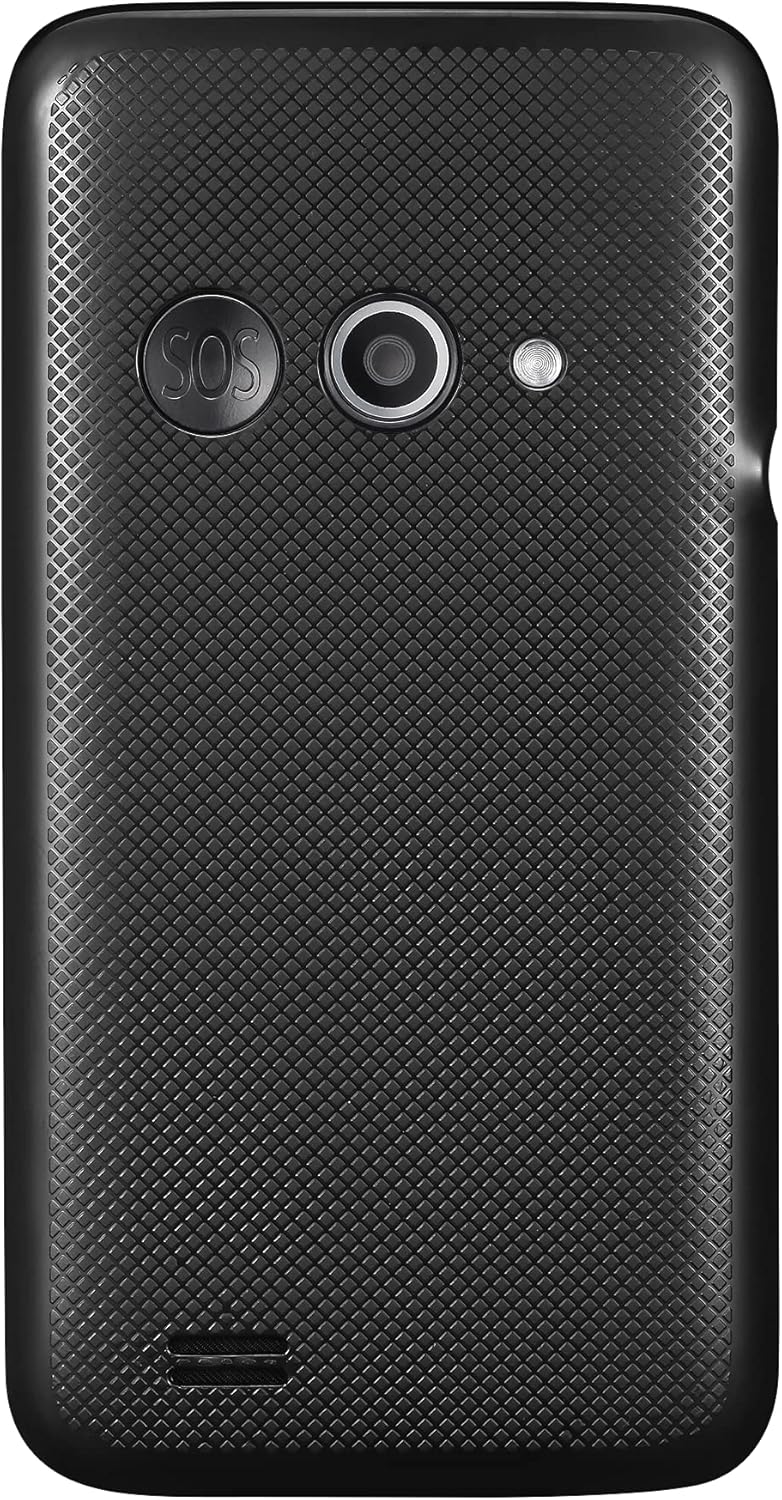
Immagine: Posteriore view of the phone, indicating the area where the back cover is removed for battery and SIM installation.
2. Ricarica iniziale
Prima del primo utilizzo, caricare completamente la batteria del telefono.
- Using the AC Charger: Connect the USB Type-C cable to the phone's charging port and the other end to the AC charger. Plug the charger into a wall outlet.
- Utilizzo della base di ricarica: Place the phone into the charging dock. Ensure the dock is connected to the AC charger and plugged into a wall outlet. The phone will indicate charging status.

Image: The BRONDI Amico Flip 4G+ phone charging in its dedicated dock.
3. Accensione/Spegnimento
- Per accendere: Tenere premuto il pulsante di accensione/fine chiamata (solitamente rosso) finché lo schermo non si illumina.
- Per spegnere: Tenere premuto il pulsante di accensione/fine chiamata, quindi selezionare "Spegnimento" dalle opzioni sullo schermo.
Istruzioni per l'uso
Navigazione di base
The BRONDI Amico Flip 4G+ features a main display and a physical keypad for navigation.

Image: The BRONDI Amico Flip 4G+ in open position, displaying the screen and keypad.
- Flip Open/Close: Open the phone to answer calls or use functions. Close it to end calls or put it in standby.
- Tasti di navigazione: Use the directional pad (up, down, left, right) and the central OK button to navigate menus and select options.
- tastiera: Dial numbers, type messages, and access shortcuts using the numeric and function keys.
- Pulsanti del volume: Located on the side of the phone, use these to adjust call volume, media volume, or ringer volume.

Immagine: Lato view of the phone highlighting the volume control buttons.
Effettuare e ricevere chiamate
- Per effettuare una chiamata: Aprire il telefono, comporre il numero utilizzando la tastiera e premere il pulsante verde di chiamata.
- Per rispondere a una chiamata: Open the phone or press the Green Call button when the phone rings.
- Per terminare una chiamata: Close the phone or press the Red End Call button.
Messaggistica
Access the messaging application from the main menu to send and receive SMS/MMS messages.
Utilizzo della fotocamera
The phone is equipped with a 2 MP autofocus camera.
- Open the phone and navigate to the Camera application.
- Inquadra il tuo scatto utilizzando il display.
- Press the designated camera button or the OK button to capture the image.
Connectivity (Wi-Fi, LTE)
Access network settings to connect to Wi-Fi networks or manage your 4G+ LTE mobile data connection.
- Wifi: Vai a Impostazioni > Rete e Internet > Wi-Fi to turn Wi-Fi on/off and connect to available networks.
- Dati mobili: Vai a Impostazioni > Rete e Internet > Rete mobile to enable/disable mobile data and configure data roaming.
Manutenzione
Pulizia del dispositivo
- Per pulire lo schermo e il corpo del telefono, utilizzare un panno morbido, asciutto e privo di lanugine.
- Evitare l'uso di prodotti chimici aggressivi, spray detergenti o materiali abrasivi.
- Mantenere la porta di ricarica e le griglie degli altoparlanti libere da polvere e detriti.
Cura della batteria
- Evitare di esporre la batteria a temperature estreme.
- Non forare o danneggiare la batteria.
- If the battery is removable, ensure it is correctly installed.
- For optimal battery life, avoid frequently discharging the battery completely or keeping it at 100% charge for extended periods.
Aggiornamenti software
Periodically check for software updates to ensure your phone has the latest features and security enhancements. Go to Impostazioni > Sistema > Avanzate > Aggiornamento di sistema.
Risoluzione dei problemi
| Problema | Possibile soluzione |
|---|---|
| Il telefono non si accende | Ensure the battery is charged. Connect the phone to the charger and try again. Verify the battery is correctly installed. |
| Nessun segnale di rete | Check if the SIM card is properly inserted. Ensure mobile data is enabled in settings. Try restarting the phone. Contact your service provider if the issue persists. |
| Non è possibile effettuare/ricevere chiamate | Controlla la potenza del segnale di rete. Assicurati che la tua scheda SIM sia attiva e abbia credito/piano. Verifica le impostazioni di blocco delle chiamate. |
| Problemi di ricarica | Ensure the charger and cable are securely connected. Try a different outlet or charger. Clean the charging port for any debris. |
| Il telefono è lento o non risponde | Close unnecessary applications. Clear cache. Restart the phone. If issues persist, consider a factory reset (back up data first). |
Ripristino delle impostazioni di fabbrica
Un ripristino delle impostazioni di fabbrica cancellerà tutti i dati dal telefono e ripristinerà le impostazioni di fabbrica originali. Eseguire il backup di tutti i dati importanti prima di procedere.
- Vai a Settings > System > Advanced > Reset options.
- Selezionare Cancella tutti i dati (ripristino delle impostazioni di fabbrica).
- Conferma la tua scelta e segui le istruzioni sullo schermo.
Specifiche
| Caratteristica | Dettaglio |
|---|---|
| Marca | BRONDY |
| Nome del modello | Amico Flip 4G+ |
| Sistema operativo | Androide 8.1 |
| Dimensioni dello schermo | 3.5 pollici |
| Risoluzione dello schermo | 480 x 320 (HVGA) |
| Memoria interna | 64 GB |
| Telecamera posteriore | 2 Megapixels, Autofocus |
| Tecnologia cellulare | LTE (4G+) |
| Connettività wireless | Wifi |
| Tipo di connettore | USB di tipo C |
| Composizione della batteria | Agli ioni di litio |
| Colore | Nero |
Garanzia e supporto
Informazioni sulla garanzia
For detailed warranty information, please refer to the warranty card included with your product or visit the official BRONDI websito. Conservare la prova d'acquisto per eventuali reclami in garanzia.
Assistenza clienti
If you encounter any issues not covered in this manual or require further assistance, please contact BRONDI customer support or the retailer from whom you purchased the device. Contact details can typically be found on the BRONDI websito o nella confezione del prodotto.