
Saooer BLUE 20A
Saooer 20A Solar Charge Controller User Manual
Model: BLUE 20A
Introduzione
This manual provides essential information for the safe and efficient operation of your Saooer 20A Solar Charge Controller. This intelligent regulator is designed to manage the working of solar panels and batteries in a solar system, featuring dual USB ports for mobile device charging. It is compatible with 12V and 24V systems and includes multiple protection functions to ensure system efficiency and prolong battery lifespan.

Figura 1: Fronte view of the Saooer 20A Solar Charge Controller.
Istruzioni di sicurezza
- Ensure all connections are correct before powering on the controller. Incorrect wiring can damage the device or connected components.
- The controller is designed for indoor use or in a protected environment. Avoid exposure to direct sunlight, high temperatures, or moisture.
- Non tentare di smontare o riparare il controller da soli. Per l'assistenza, rivolgersi a personale qualificato.
- Tenere fuori dalla portata dei bambini.
- This controller is only suitable for lead-acid batteries: OPEN, AGM, GEL. Do not use with other battery types like Lithium-ion or LiFePO4, as this may cause damage or safety hazards.
- Always connect the battery first, then the solar panel, and finally the load. When disconnecting, reverse the order: disconnect the load, then the solar panel, and finally the battery.
Caratteristiche del prodotto
- Volume del sistema automaticotage Identificazione: Automatically detects 12V/24V system voltage.
- Ricarica PWM: Efficient Pulse Width Modulation charging mode.
- Doppia porta USB: Provides 5V/2A output for charging mobile devices.
- Schermo LCD: Clear display of status and data, allowing for convenient mode switching and parameter configuration.
- Molteplici funzioni di protezione: Includes short-circuit protection, open-circuit protection, reverse protection, and over-load protection.
- Parametri regolabili: User-adjustable charge and discharge parameters.
- Compensazione della temperatura: Automatic temperature compensation for optimal charging.
Configurazione e installazione
Follow these steps carefully to install your solar charge controller. Incorrect installation can lead to damage or malfunction.
- Preparare il cablaggio: Ensure all wires are properly stripped and have appropriate connectors if necessary. Use wires of sufficient gauge for your system's current.
- Collegare la batteria: Connect the battery to the charge regulator first. Observe correct polarity (+ to + and - to -). The controller will automatically recognize the battery voltage (12V o 24V).
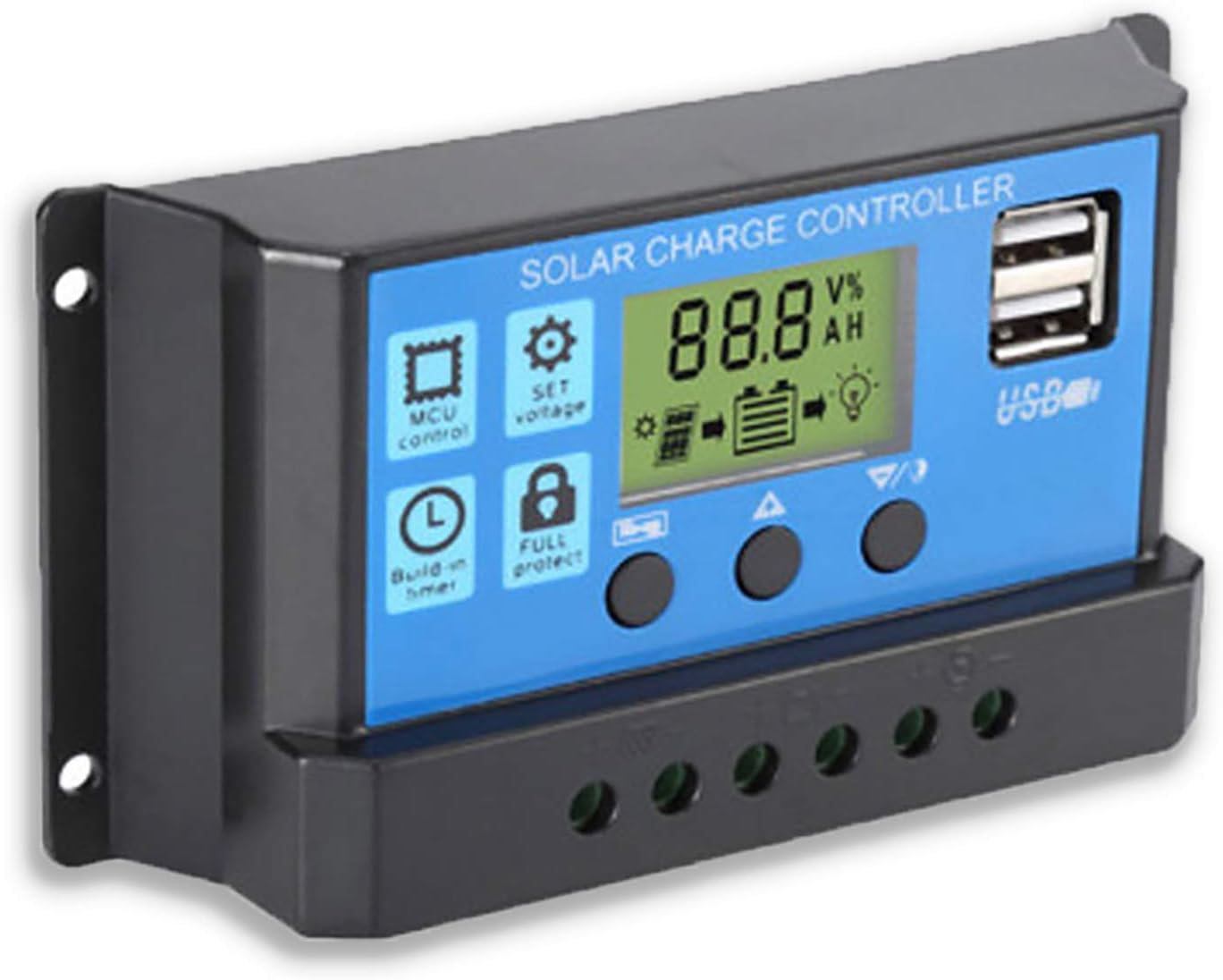
Figura 2: lato view showing the connection terminals for battery, solar panel, and load.
- Collegare il pannello solare: Connect the solar panel to the solar charge controller. Ensure correct polarity.
- Collegare il carico: Connect the consumer or load to the charge controller regulator. Ensure correct polarity.
Nota importante: Always connect the battery first, then the solar panel, and finally the load. When disconnecting the controller, please remove the solar panel, then the load, and finally the battery. This sequence helps the controller recognize the battery voltage correctly and prevents damage.
Istruzioni per l'uso
Display LCD e pulsanti

Figura 3: Angolato view showing the LCD display and control buttons.
Il controller è dotato di un display LCD e di tre pulsanti per il funzionamento:
- Pulsante Menu: Used to cycle through display modes and enter parameter setting mode.
- Pulsante su: Utilizzato per aumentare i valori o per spostarsi verso l'alto nei menu.
- Pulsante Giù: Utilizzato per diminuire i valori o per navigare verso il basso nei menu.
Modalità di visualizzazione
Press the Menu button to cycle through the following display modes:
- Volume batteriatage(V)
- Volume pannello solaretage(V)
- Corrente di carico (A)
- Battery Temperature (°C)
- Corrente di carica (A)
- Corrente di scarica (A)
- Load Working Mode (24H, 0-23H, 0H)
Impostazioni dei parametri
To enter parameter setting mode, press and hold the Menu button for 5 seconds. Use the Up and Down buttons to adjust values, and the Menu button to confirm and move to the next parameter. Press and hold Menu again to exit setting mode.
| Parametro | Descrizione | Default (12V) | Range (12V) |
|---|---|---|---|
| B01/B02/B03 | Battery Type Selection (B01=Lead-acid, B02=Lithium Ion, B03=LiFePO4) | B01 | N / A |
| Charge Off Voltage | Voltage at which charging stops | 14.4V | 13.0V - 15.0V |
| Scarica Ricollega Voltage | Voltage at which load reconnects after low voltage disconnettere | 12.6V | 11.0V - 13.5V |
| Volume di arresto dello scaricotage | Voltage at which load disconnects to protect battery | 10.7V | 9.0V - 11.5V |
| Load Working Time | Timer for load output (24H, 0-23H, 0H) | 24 ore | N / A |
Note: For 24V systems, multiply the 12V values by two.
Manutenzione
- Ispezione regolare: Controllare periodicamente tutti i collegamenti elettrici per verificarne la tenuta e la corrosione.
- Pulizia: Mantenere il controller pulito e privo di polvere. Utilizzare un panno asciutto per la pulizia.
- Ventilazione: Assicurare un'adeguata ventilazione attorno al controller per evitare il surriscaldamento.
- Stato della batteria: Monitorare il voltage and health regularly. Replace batteries as needed.
Risoluzione dei problemi
| Problema | Possibile causa | Soluzione |
|---|---|---|
| Il controller non si accende / LCD vuoto | Batteria non collegata o polarità invertita; Vol. batteriatage troppo basso. | Check battery connections and polarity. Ensure battery has sufficient charge. |
| Solar panel not charging battery | Solar panel not connected or reverse polarity; Insufficient sunlight; Damaged solar panel. | Check solar panel connections and polarity. Ensure panel is in direct sunlight. Test solar panel output. |
| Il carico non funziona | Load not connected or reverse polarity; Battery voltage too low (low voltage disconnect); Overload protection activated. | Check load connections and polarity. Charge battery. Reduce load or check for short circuit. |
| Le porte USB non si caricano | Volume della batteriatage too low; Device not compatible; Faulty USB cable. | Ensure battery is charged. Try a different device or cable. |
| Il controller si surriscalda | Sovraccarico; scarsa ventilazione. | Reduce load. Ensure controller has adequate airflow and is not in an enclosed space. |
Specifiche
| Caratteristica | Dettaglio |
|---|---|
| Modello | BLU 20A |
| Volume di sistematage | Auto 12V / 24V |
| Corrente massima di carica/scarica | 20A |
| Uscita USB | Dual USB, 5V/2A (Max) |
| Compatibilità del tipo di batteria | Lead-acid (OPEN, AGM, GEL) |
| Dimensioni del prodotto | 5.12 x 2.76 x 1.5 pollici (133 mm x 70 mm x 38 mm circa) |
| Peso dell'articolo | 5 once |
| Display | LCD |
| Temperatura di esercizio | da -35°C a +60°C |

Figure 4: Product dimensions of the solar charge controller.
Garanzia e supporto
For warranty information or technical support, please contact the manufacturer, Saooer, through their official channels. Refer to your purchase documentation for specific warranty terms and contact details.
Produttore: Saooer
ASIN: B095764VB7
Codice UPC: 605832982977
Puoi visitare il Saooer Store on Amazon per maggiori informazioni o per contattare il supporto.