
1. Introduzione
This manual provides detailed instructions for the setup, operation, and maintenance of your Coolife H953 940nm Trail Camera. Please read this manual thoroughly before using the camera to ensure optimal performance and longevity.

Image 1.1: The Coolife H953 Trail Camera is designed to capture wildlife moments.
2. Prodotto finitoview
2.1 Caratteristiche principali
- Immagini ad alta risoluzione: Captures 20-megapixel photos and 2.7K/1520P videos with clear audio.
- Velocità di attivazione rapida: 0.1-second trigger speed and up to 25-meter (82 feet) detection distance.
- Visione notturna migliorata: Equipped with 46 no-glow 940nm infrared LEDs for clear night recordings without disturbing wildlife.
- Extended Memory Support: Supporta schede Micro SD fino a 512 GB (è inclusa una scheda da 32 GB).
- Scatto continuo: Capable of capturing up to 10 continuous photos per trigger event.
- Design durevole: IP66 waterproof and dustproof rating ensures reliable operation in various outdoor conditions.
- Multifunzionale: Features include shot delay, target recording, timelapse, loop recording, audio recording, and password protection. Displays time, date, serial number, and temperature.
2.2 Contenuto della confezione
Verifica che tutti gli articoli siano presenti nel tuo pacco:
- Coolife H953 Trail Camera
- Cinghia di montaggio
- Guida rapida per l'utente
- Staffa di montaggio a parete
- Viti di montaggio (3 pezzi)
- Scheda Micro SD da 32 GB
- Cavo USB
- cavo AV

Image 2.1: Contents of the Coolife H953 Trail Camera package.
3. Impostazione
3.1 Installazione della batteria
- Aprire la fotocamera casing sganciando le clip laterali.
- Locate the battery compartment. The camera requires 6 Volts (typically 4 or 8 AA batteries).
- Inserire le batterie, rispettando la corretta polarità (+/-).
- Chiudere bene il vano batterie.
3.2 Installazione della scheda Micro SD
- Con la macchina fotografica casing open, locate the Micro SD card slot.
- Insert the provided 32GB Micro SD card (or another compatible card up to 512GB) into the slot until it clicks into place.
- Per rimuoverla, spingere delicatamente la scheda finché non scatta fuori.

Image 3.1: The H953 supports Micro SD cards up to 512GB.
3.3 Montaggio della telecamera
The camera can be mounted using the included strap or wall mount bracket.
Utilizzo della cinghia di montaggio:
- Thread the strap through the slots on the back of the camera.
- Fissare la telecamera a un albero o a un palo all'altezza e all'angolazione desiderate.
- Assicurarsi che la telecamera sia stabile e puntata verso l'area che si desidera monitorare.
Using the Wall Mount Bracket:
- Choose a suitable mounting surface.
- Use the included screws to attach the bracket to the surface.
- Fissare la telecamera alla staffa e regolare l'angolazione secondo necessità.

Image 3.2: Coolife H953 Trail Camera ready for mounting.
4. Istruzioni per l'uso
4.1 Accensione/Spegnimento
- To power on, slide the power switch to the "ON" position. The LCD screen will illuminate.
- Per spegnere, far scorrere l'interruttore di alimentazione in posizione "OFF".
4.2 Navigazione nel menu
Use the control buttons (usually located near the LCD screen) to navigate through the camera's menu options. Common buttons include:
- MENU: Accede al menu delle impostazioni principali.
- SOTTOSOPRA: Consente di navigare tra le opzioni del menu.
- SINISTRA DESTRA: Changes settings values or navigates sub-menus.
- OK/SHOT: Confirms selections or manually takes a photo/video.
4.3 Configurazione delle impostazioni di base
Access the menu to configure essential settings:
- Modalità: Selezionare tra la modalità Foto, Video o Foto+Video.
- Risoluzione foto: Set to 20MP for highest quality.
- Risoluzione video: Set to 2.7K/1520P for highest quality.
- Sensibilità PIR: Adjust for desired motion detection range (e.g., High for distant subjects, Low for close-up).
- Intervallo di attivazione: Imposta il ritardo tra acquisizioni consecutive dopo un evento di attivazione.
- Ora dell'appuntamento: Imposta l'ora e la data correnti per un orario precisoamps sulle registrazioni.
- Registrazione in loop: Enable or disable this feature. When enabled, the camera will overwrite the oldest files quando la scheda di memoria è piena.
- Protezione tramite password: Imposta una password per impedire l'accesso non autorizzato.

Immagine 4.1: Es.ample of photo and video quality from the camera.
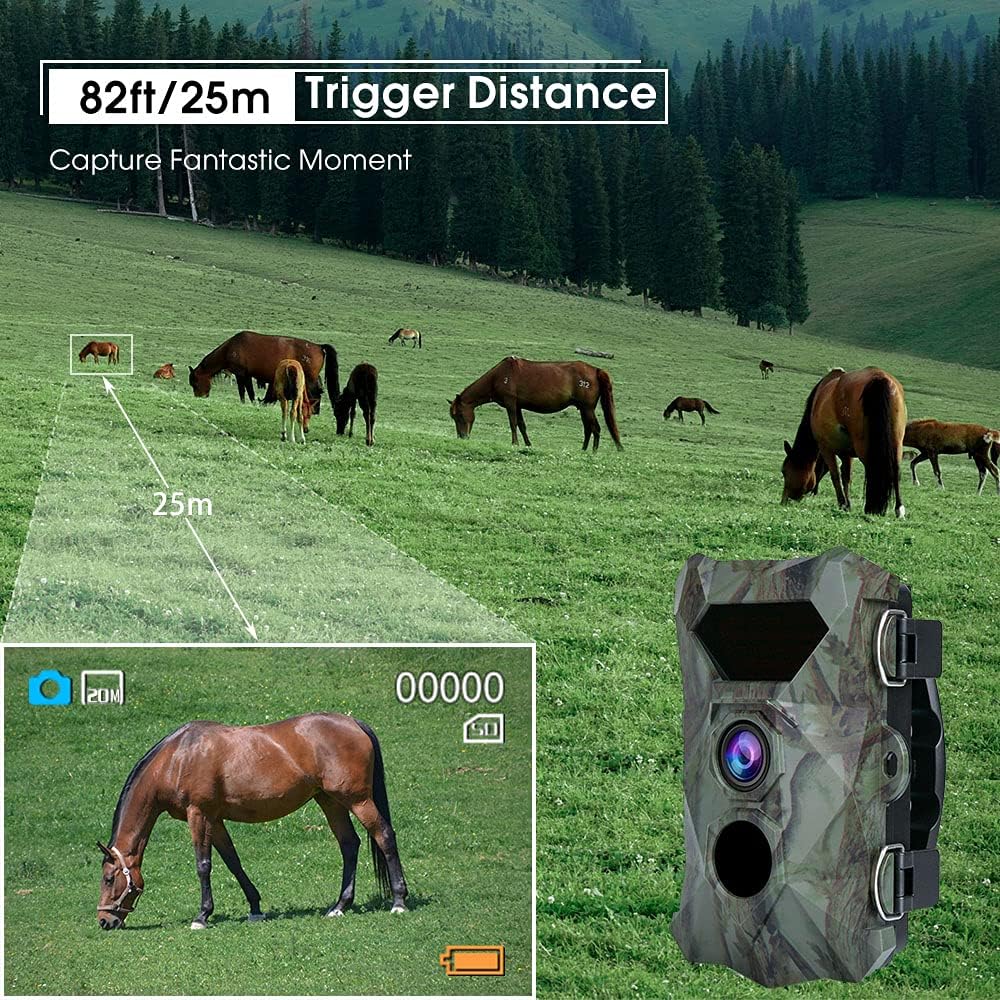
Image 4.2: The camera's 25-meter trigger distance.

Image 4.3: The camera's 0.1-second trigger speed for capturing fast-moving subjects.

Image 4.4: Advanced night vision capabilities with 940nm LEDs.

Immagine 4.5: Es.amples of wildlife captured by the H953 camera.

Image 4.6: The camera supports loop recording.
5. Manutenzione
5.1 Pulizia della fotocamera
- Pulisci l'esterno della fotocamera con un panno morbido eamp stoffa.
- Use a lens cleaning cloth to gently clean the camera lens and PIR sensors. Avoid abrasive materials.
- Ensure no dirt or debris obstructs the lens, sensors, or IR LEDs.
5.2 Cura della batteria
- Sostituire le batterie quando sullo schermo compare l'indicatore di batteria scarica.
- Se si prevede di non utilizzare la fotocamera per un periodo prolungato, rimuovere le batterie per evitare perdite.
- Use high-quality alkaline or rechargeable AA batteries for best performance.
5.3 Conservazione
- Conservare la fotocamera in un luogo fresco e asciutto, lontano dalla luce solare diretta.
- Ensure the camera is clean and dry before storage.

Image 5.1: The camera's IP66 rating ensures durability in harsh weather.
6. Risoluzione Dei Problemi
6.1 La fotocamera non si accende
- Controllare le batterie: Ensure batteries are inserted correctly with proper polarity and are not depleted. Replace if necessary.
- Tipo di batteria: Verify that you are using the recommended battery type (AA).
6.2 Scarsa qualità dell'immagine/video
- Lente pulita: Assicurarsi che l'obiettivo della fotocamera sia pulito e privo di sporco o macchie.
- Condizioni di illuminazione: Per la visione notturna, assicurarsi che non vi siano ostacoli che blocchino i LED IR.
- Impostazioni di risoluzione: Check that photo and video resolutions are set to their highest quality in the camera menu.
6.3 Camera Not Triggering
- Sensibilità PIR: Adjust PIR sensitivity settings. High sensitivity is suitable for open areas, while low sensitivity might be better for areas with dense foliage to avoid false triggers.
- Ostruzioni: Ensure no branches or tall grass are moving in front of the PIR sensor, causing false triggers or blocking detection.
- Livello della batteria: Low batteries can affect sensor performance.
6.4 Memory Card Errors
- Compatibilità della scheda: Ensure the Micro SD card is compatible and formatted correctly (FAT32 is common).
- Capacità della carta: While the camera supports up to 512GB, ensure the card is not full. Enable loop recording if continuous recording is desired.
- Reinserisci la carta: Remove and reinsert the Micro SD card to ensure proper contact.
7. Specifiche
| Caratteristica | Dettaglio |
|---|---|
| Nome del modello | H953 940nm |
| Risoluzione della foto | 20 Megapixel |
| Risoluzione video | 2.7K / 1520p |
| Trigger Speed | 0.1 secondi |
| Distanza di attivazione | Fino a 25 metri (82 piedi) |
| LED IR | 46 pcs 940nm No-Glow Infrared LEDs |
| Supporto per schede di memoria | Micro SD up to 512GB (32GB included) |
| Resistenza all'acqua | IP66 impermeabile |
| Fonte di alimentazione | Battery Powered (6 Volts, batteries not included) |
| Materiale | Plastica |
| Dimensioni (L x P x A) | 14 x 10 x 6.5 cm (5.5 x 3.9 x 2.6 pollici) |
| Peso | 320 grammi (0.7 libbre) |
| Uso consigliato | Motion detection, Night vision, Wildlife monitoring |
8. Garanzia e supporto
For any questions, technical assistance, or warranty claims, please contact Coolife customer support. Refer to the contact information provided with your product packaging or visit the official Coolife websito per i dettagli del supporto.
Si prega di conservare la prova d'acquisto ai fini della garanzia.