
1. Introduzione
The Energizer Connect Smart WiFi Plug allows you to control your electronic devices remotely using a mobile application or voice commands. This smart plug connects directly to your home's 2.4GHz Wi-Fi network, eliminating the need for a separate hub. It is compatible with Amazon Alexa, Google Assistant, and Siri for convenient voice control. This manual provides detailed instructions for setting up, operating, maintaining, and troubleshooting your smart plug.
2. Informazioni sulla sicurezza
Si prega di leggere attentamente tutte le istruzioni di sicurezza prima di utilizzare questo prodotto. Il mancato rispetto di queste istruzioni può causare scosse elettriche, incendi o danni materiali.
- Solo per uso interno.
- Non superare il carico massimo di 15 Amps (120 Volts).
- Do not immerse the plug in water or expose it to moisture.
- Non tentare di smontare o modificare il dispositivo.
- Tenere fuori dalla portata dei bambini.
- Assicurarsi che la spina sia completamente inserita nella presa a muro.
- Prima di pulire il dispositivo, scollegarlo dalla presa di corrente.
3. Contenuto della confezione
- 1 x Energizer Connect Smart WiFi Plug
- 1 x Manuale utente (questo documento)
4. Prodotto finitoview
The Energizer Connect Smart WiFi Plug features a compact design that allows access to the second outlet. It includes a power button and an LED indicator for status.

Immagine 4.1: The Energizer Connect Smart WiFi Plug shown with its retail packaging, highlighting key features like 15 Amps of power, grouping, voice control, and Wi-Fi connectivity. The plug itself is white and compact.

Immagine 4.2: Un primo piano frontale view of the Energizer Connect Smart WiFi Plug, showing the standard Type B electrical outlet configuration (two vertical slots and a round ground hole).

Immagine 4.3: This image displays the compact dimensions of the Energizer Connect Smart WiFi Plug. The side view shows a depth of 1.0625 inches, and the front view indicates a diameter of 1.125 inches, illustrating its mini size.
4.1. componenti
- Pulsante di accensione: Press to manually turn the connected device on or off. Press and hold for 5 seconds to initiate pairing mode (LED will blink rapidly).
- Indicatore LED:
- Blu fisso: Il dispositivo è acceso.
- Spento: Il dispositivo è spento.
- Lampeggiante rapidamente in blu: Modalità di associazione.
- Blu lampeggiante lentamente: Disconnesso dal Wi-Fi.
5. Istruzioni per l'installazione
Follow these steps to set up your Energizer Connect Smart WiFi Plug.
5.1. Requisiti di sistema
- Una rete Wi-Fi stabile a 2.4 GHz (le reti a 5 GHz non sono supportate).
- A smartphone or tablet running iOS 10.0 or higher, or Android 6.0 or higher.
- Access to the Apple App Store or Google Play Store.
5.2. Download e installazione dell'app
- Scarica il Energizer Connect App dall'Apple App Store o dal Google Play Store. Cercare "Energizer Connect".
- Apri l'app e segui le istruzioni sullo schermo per creare un account o accedere.

Immagine 5.1: A smartphone displaying the Energizer Connect App interface, showing the smart plug in an "ON" state. The image also includes the physical smart plug and icons for downloading the app from the App Store and Google Play.
5.3. Pairing the Smart Plug
- Plug the Energizer Connect Smart WiFi Plug into a standard 120V wall outlet.
- The LED indicator on the plug should begin blinking rapidly, indicating it is in pairing mode. If not, press and hold the power button on the side of the plug for 5 seconds until it blinks rapidly.
- Open the Energizer Connect App.
- Tap the "+" icon (or "Add Device") to add a new device.
- Selezionare "Presa elettrica" o "Spina intelligente" dall'elenco dei dispositivi.
- Verificare che la spia luminosa lampeggi rapidamente nell'app.
- Enter your 2.4GHz Wi-Fi network name and password. Ensure your phone is connected to the same 2.4GHz network.
- The app will attempt to connect to the smart plug. This may take a few moments.
- Once successfully paired, the LED indicator on the plug will turn solid blue, and the app will confirm the connection.
- You can then rename your smart plug within the app for easier identification (e.g., "Living Room Lamp, "Macchina per il caffè").

Immagine 5.2: A visual guide showing the three easy steps for setting up the Energizer Connect Smart WiFi Plug: download the app, install the device, and set up and control via the app or voice assistants. The image also features the Energizer bunny mascot.
6. Istruzioni per l'uso
Control your smart plug using the Energizer Connect App or compatible voice assistants.
6.1. Controllo manuale
Premere il pulsante di accensione sul lato della presa intelligente per accendere o spegnere manualmente il dispositivo collegato.
6.2. Controllo app
- Acceso/Spento: Open the Energizer Connect App, select your smart plug, and tap the power icon to toggle its state.
- Pianificazione: Set custom schedules for your plug to turn on or off automatically at specific times or days. This is useful for lights, coffee makers, or other appliances.
- Timer: Impostare un timer per il conto alla rovescia affinché la spina si spenga dopo un intervallo di tempo prestabilito.
- Accesso remoto: Control your smart plug from anywhere with an internet connection, even when you are away from home.
- Raggruppamento: Group multiple Energizer Connect smart plugs together to control them simultaneously with a single command.
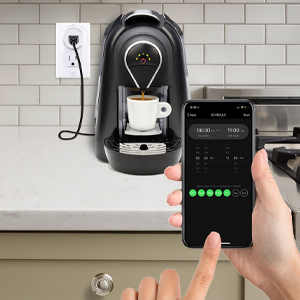
Immagine 6.1: A hand holding a smartphone displaying the Energizer Connect App's scheduling interface, set to turn on a coffee maker at a specific time. The smart plug is visible in the background, connected to the coffee machine.

Immagine 6.2: A person using a smartphone to remotely control a smart plug, demonstrating the ability to turn devices on or off from any location. The image shows a split view of the person and a living room with a lamp connected to a smart plug.
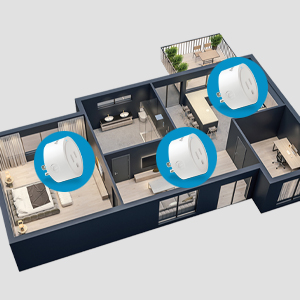
Immagine 6.3: An overhead diagram of a home showing multiple Energizer Connect Smart WiFi Plugs placed in different rooms, illustrating the concept of grouping and controlling several devices simultaneously.
6.3. Controllo vocale
The Energizer Connect Smart WiFi Plug is compatible with Amazon Alexa, Google Assistant, and Siri. To enable voice control:
- Ensure your smart plug is successfully paired with the Energizer Connect App.
- Open your Amazon Alexa, Google Home, or Apple Home app.
- Follow the app's instructions to link the "Energizer Connect" skill or service. You will need to log in with your Energizer Connect account credentials.
- Una volta effettuato il collegamento, è possibile utilizzare comandi vocali come:
- "Alexa, accendi [Nome della presa]."
- "Hey Google, turn off [Plug Name]."
- "Hey Siri, turn on [Plug Name]." (Requires setting up Siri Shortcuts in the Energizer Connect App)

Immagine 6.4: A living room scene demonstrating voice control capabilities. The image shows a smart plug connected to a fan, with icons for Google Assistant, Alexa, and Siri Shortcuts, indicating compatibility with these voice assistants.
7. Manutenzione
Per garantire prestazioni ottimali e longevità della tua presa intelligente:
- Pulizia: Scollegare la spina intelligente dalla presa di corrente prima di pulirla. Utilizzare un panno morbido e asciutto per pulire la superficie. Non utilizzare detergenti liquidi o spray.
- Magazzinaggio: When not in use, store the smart plug in a cool, dry place away from direct sunlight and moisture.
- Condizioni ambientali: Avoid exposing the plug to extreme temperatures or humidity.
8. Risoluzione Dei Problemi
If you encounter issues with your Energizer Connect Smart WiFi Plug, refer to the following solutions:
| Problema | Possibile causa | Soluzione |
|---|---|---|
| Plug not connecting to Wi-Fi / LED blinking slowly | Incorrect Wi-Fi password, 5GHz network selected, plug too far from router, network interference. |
|
| App cannot find the plug during pairing | Plug not in pairing mode, incorrect app used, network issues. |
|
| Il controllo vocale non funziona | Voice assistant not linked, incorrect device name, internet connectivity issues. |
|
| Plug unresponsive | Potenza fuoritage, malfunzionamento del dispositivo. |
|
9. Specifiche
| Caratteristica | Dettaglio |
|---|---|
| Numero di modello | B0929DFGZY |
| Codice UPC | 805106871352 |
| Ingresso volumetage | 120 Volt |
| Max. Corrente di carico | 15 Amps |
| Frequenza Wi-Fi | 2.4 GHz (IEEE 802.11 b/g/n) |
| Compatibilità | Amazon Alexa, Google Assistant, Siri (via Shortcuts) |
| Certificazioni | FCC Certified, ETL Certified |
| Materiale | Plastica, gomma |
| Colore | Bianco |
| Peso dell'articolo | 2.89 once |
| Dimensions (Approx. Plug Body) | 1.125" (Diameter) x 1.0625" (Depth from outlet face) |
10. Garanzia e supporto
For warranty information and technical support, please contact the manufacturer or seller directly. The manufacturer of this product is Jem Accessories, and the brand is Energizer Connect (distributed by XTREME DIGITAL LIFESTYLE ACCESSORIES).
Conservare la prova d'acquisto per eventuali richieste di garanzia.
For further assistance, visit the Energizer Connect websito o fare riferimento alle informazioni di contatto fornite sulla confezione del prodotto.