
SDRD
Manuale utente della macchina per karaoke portatile SDRD SD-306
Modello: SD-306
Introduzione
Grazie per l'acquistoasing the SDRD SD-306 Portable Karaoke Machine. This device combines a powerful Bluetooth speaker with two wireless microphones, offering a versatile solution for karaoke, music playback, and public speaking. Please read this manual carefully before use to ensure proper operation and to maximize your enjoyment of the product.
Informazioni sulla sicurezza
- Non esporre il dispositivo all'acqua o a umidità eccessiva.
- Evitare temperature estreme e luce solare diretta.
- Non smontare o tentare di riparare il dispositivo autonomamente. Per qualsiasi intervento di assistenza, rivolgersi a personale qualificato.
- Tenere fuori dalla portata dei bambini.
- Utilizzare solo il cavo di ricarica e l'adattatore forniti.
Contenuto della confezione
- SDRD SD-306 Karaoke Speaker Unit
- 2 x microfoni wireless
- Cavo di ricarica USB
- Manuale d'uso
Prodotto finitoview

Image: The SDRD SD-306 main speaker unit with two wireless microphones docked on top.

Immagine: in alto view of the karaoke machine, highlighting the slot for a smartphone or tablet and the microphone controls.
Main Unit Controls (Top Panel)
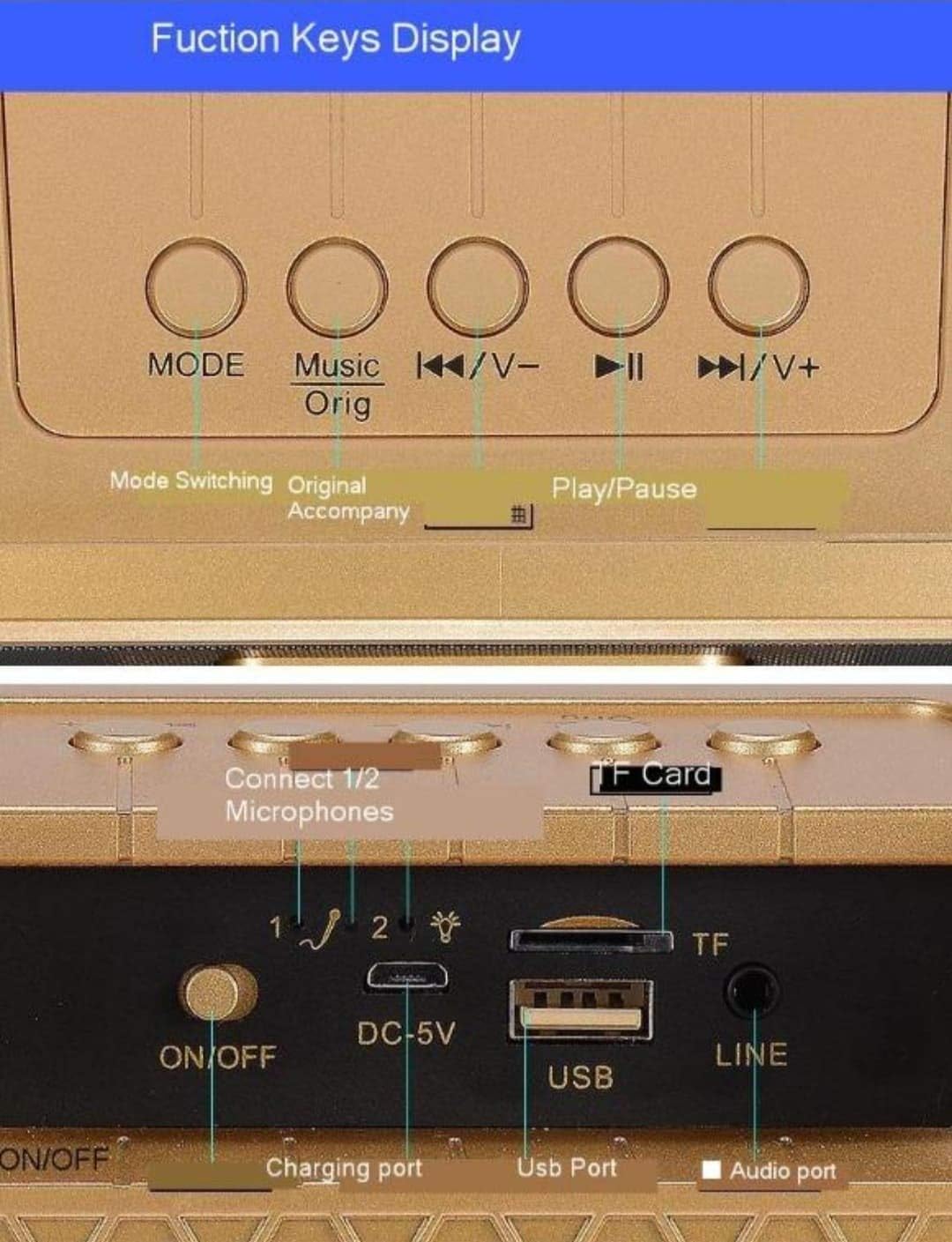
Immagine: dettagliata view of the main unit's top panel buttons, including Mode, Music Original, Previous/Volume Down, Play/Pause, and Next/Volume Up.
- DIREZIONI: Short press to switch between input modes (Bluetooth, USB, TF Card, AUX, FM Radio).
- Music Orig: Short press to cancel the original vocal track of a song (karaoke mode).
- ◀◀/V-: Pressione breve per la traccia precedente; pressione prolungata per diminuire il volume.
- ►►/V+: Premere brevemente per la traccia successiva; premere a lungo per aumentare il volume.
- ►██: Pulsante Riproduci/Pausa.
- Modalità equalizzatore: Short press to cycle through six different EQ effects.
Main Unit Ports (Rear Panel)

Immagine: dettagliata view of the main unit's rear panel, showing the ON/OFF switch, DC-5V charging port, USB port, TF Card slot, and LINE (AUX) input.
- ACCESO/SPENTO: Interruttore di alimentazione per l'unità principale.
- CC-5V: Charging port for the main unit.
- USB: Porta USB per riprodurre musica da una chiavetta USB.
- Carta TF: Slot for playing music from a TF (Micro SD) card.
- LINE (AUX): Ingresso audio da 3.5 mm per il collegamento di dispositivi audio esterni.
- Connect 1/2 Microphones: Indicators for microphone connection status.
Controlli del microfono
- Reverberation Intensity Regulation: Regola l'effetto eco.
- Human Voice Volume Regulation: Controls the microphone's vocal volume.
- Accensione/spegnimento: Attiva o disattiva il microfono.
- Funny: Attiva gli effetti di modifica della voce.
- Fischi: Activates a cheering sound effect.
- Applausi: Activates an applause sound effect.
- Risata: Activates a laughter sound effect.
Impostare
1. Carica del dispositivo
Before first use, fully charge the main unit and both microphones. Connect the USB charging cable to the DC-5V port on the main unit and to a standard 5V USB power adapter (not included). The microphones also have charging ports; use their respective cables if separate. An indicator light will show charging status and turn off when fully charged.
2. Accensione
Flip the ON/OFF switch on the rear of the main unit to the 'ON' position. The unit will power on and indicate its current mode.
For each microphone, slide its power switch to the 'ON' position. The microphones will automatically attempt to pair with the main unit.
3. Abbinamento del microfono
The wireless microphones are designed to automatically pair with the main unit upon power-on. If pairing fails, ensure both the main unit and microphones are charged and within range. Power cycle both devices if necessary.
Istruzioni per l'uso
1. Connessione Bluetooth

Image: Diagram illustrating the wireless Bluetooth connection process between a smartphone and the karaoke machine, showing a 10-meter transmission distance.
- Ensure the main unit is powered on and in Bluetooth mode (press MODE button until 'Bluetooth' is announced or indicated).
- Sul tuo smartphone o tablet, attiva il Bluetooth e cerca i dispositivi disponibili.
- Select "SDRD SD-306" from the list of devices.
- Una volta effettuato il collegamento, potrai riprodurre la musica dal tuo dispositivo tramite il karaoke.
2. Playing Music from Other Sources
- Scheda USB/TF: Insert a USB flash drive or TF card into the respective port. The unit will automatically switch to the corresponding mode and begin playing music. Use the ◀◀/V- and ►►/V+ buttons to navigate tracks.
- Ingresso AUX: Connect an external audio device (e.g., MP3 player, computer) to the LINE (AUX) port using a 3.5mm audio cable. Press the MODE button until AUX mode is selected.
- FM Radio: Press the MODE button to switch to FM Radio mode. The unit will automatically scan and tune into available radio stations.
3. Funzione Karaoke
- Cancellazione del suono originale: While playing a song, short press the "Music Orig" button on the main unit to reduce or cancel the original vocal track, allowing you to sing along. Press again to restore the original vocal.
- Effetti EQ: Short press the "EQ Mode" button on the main unit to cycle through various sound equalization effects, enhancing your listening or singing experience.
- Volume del microfono: Use the "Human Voice Volume Regulation" control on the microphone to adjust your vocal volume.
- Eco/Riverbero: Adjust the "Reverberation Intensity Regulation" control on the microphone to add or reduce echo effect to your voice.
- Effetti speciali: Use the "Funny", "Boos", "Applause", and "Laughter" buttons on the microphone to add sound effects during your performance.
Manutenzione
- Pulire il dispositivo con un panno morbido e asciutto. Non utilizzare detergenti abrasivi o solventi.
- Conservare il dispositivo in un luogo fresco e asciutto quando non viene utilizzato.
- Evitare di far cadere l'unità o i microfoni, poiché ciò potrebbe causare danni interni.
Risoluzione dei problemi
| Problema | Possibile causa | Soluzione |
|---|---|---|
| Nessun potere | Batteria scarica; Interruttore di alimentazione spento | Charge the unit/microphones; Turn on the power switch. |
| Nessun suono dall'altoparlante | Volume troppo basso; Modalità errata; Dispositivo non connesso | Increase volume; Select correct input mode (Bluetooth, USB, AUX); Ensure device is paired/connected. |
| Il microfono non funziona | Microphone off; Battery drained; Not paired | Turn on microphone; Charge microphone; Power cycle microphone and main unit to re-pair. |
| Connessione Bluetooth instabile | Too far from device; Interference | Move closer to the speaker (within 10m); Avoid obstacles or other wireless devices. |
| Sound cutting off (especially high notes) | Microphone signal interference; Low battery | Ensure microphones are fully charged; Reduce distance between microphones and speaker; Check for other wireless interference. |
Specifiche
| Caratteristica | Dettaglio |
|---|---|
| Marca | SDRD |
| Modello | SD-306 |
| Dimensioni del prodotto | Dimensioni: 10 x 10 x 10 cm |
| Peso dell'articolo | 450 grammi |
| Tecnologia di connettività | Bluetooth, USB, AUX, Micro SD (scheda TF) |
| Colore | Nero |
| Dispositivi compatibili | Radio, Smartphone |
| Microfoni inclusi | 2 microfoni wireless |
Garanzia e supporto
This product comes with a standard manufacturer's warranty. For specific warranty terms and conditions, please refer to the documentation provided with your purchase or contact your retailer. For technical support or service inquiries, please contact the SDRD customer service department through the contact information provided on the product packaging or the official SDRD websito.
Ask a question about this manual
Ask about setup, troubleshooting, compatibility, parts, safety, or missing instructions. Manuals+ will review the question and use this page’s manual context to help answer it.