
1. Introduzione
Thank you for choosing the Langsdom GT4 Dual Driver Earbuds. These wireless earbuds are designed to provide a superior audio experience with dual dynamic drivers, Bluetooth 5.0 connectivity, and convenient touch controls. This manual will guide you through the setup, operation, and maintenance of your new earbuds.
2. Contenuto della confezione
Si prega di controllare la confezione per verificare la presenza dei seguenti elementi:
- Langsdom GT4 Dual Driver Earbuds (Left and Right)
- Custodia di ricarica
- Cavo di ricarica USB-C
- Soft Ear Caps (S, M, L sizes)
- Manuale d'uso

Image: Contents of the Langsdom GT4 earbud package, including earbuds, charging case, USB-C cable, and various ear tip sizes.
3. Prodotto finitoview
The Langsdom GT4 earbuds feature advanced technology for an immersive audio experience.
3.1 Dual Dynamic Drivers
Each earbud is equipped with two 8mm dynamic drivers, providing enhanced bass and clear treble for a rich sound profile.

Image: Diagram illustrating the dual 8mm dynamic drivers within the Langsdom GT4 earbuds, highlighting superior audio sound with AAC and SBC support.
3.2 Tecnologia Bluetooth 5.0
Utilizing Bluetooth 5.0, the earbuds offer a stable and fast connection, ensuring high-quality audio transmission and compatibility with various devices.
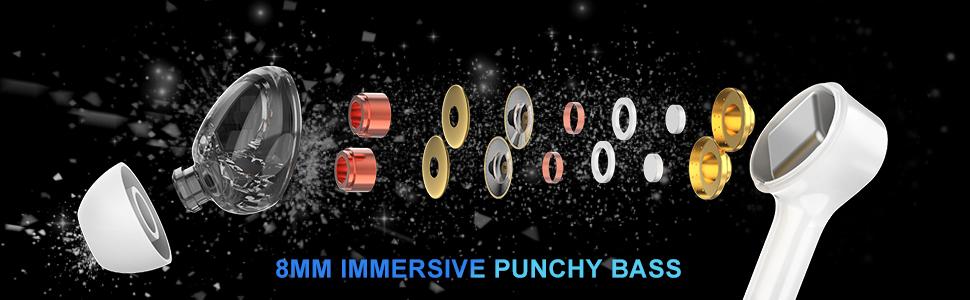
Image: Close-up of the Bluetooth 5.0 chip inside the earbud, emphasizing HD call quality, wide compatibility, and long battery life.
3.3 Lunga durata della batteria
The earbuds provide up to 5 hours of playtime on a single charge, with the charging case extending total playtime to approximately 30 hours.
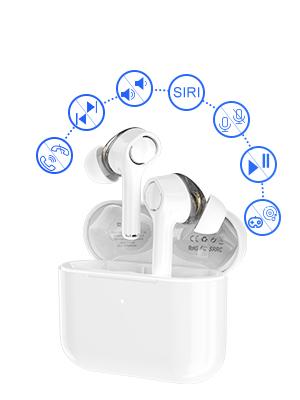
Image: Graphic showing the Langsdom GT4 earbuds and charging case, indicating 1.2 hours charging time, 5 hours play time, and 30 hours total endurance time.
3.4 Design ergonomico
Designed for comfort and stability, each earbud weighs only 4g and comes with three sizes of silicone ear tips to ensure a secure fit for extended wear.

Image: A person wearing the Langsdom GT4 earbuds, demonstrating their comfortable and secure fit.
4. Istruzioni per l'installazione
4.1 Ricarica degli auricolari e della custodia
- Inserire gli auricolari nella custodia di ricarica. Assicurarsi che siano posizionati correttamente.
- Collegare il cavo di ricarica USB-C alla porta di ricarica sulla custodia e a una fonte di alimentazione.
- The indicator light on the charging case will show charging status. A full charge takes approximately 1.2 hours for the earbuds and case.
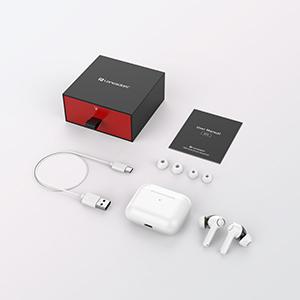
Image: Close-up of the USB-C charging port on the Langsdom GT4 charging case, with a charging cable connected.
4.2 Associazione con un dispositivo
- Apri il coperchio della custodia di ricarica. Gli auricolari si accenderanno automaticamente ed entreranno in modalità di associazione.
- Sul tuo dispositivo (smartphone, tablet, ecc.), attiva il Bluetooth.
- Cercare "GT4" in the list of available Bluetooth devices and select it to connect.
- Una volta effettuata la connessione, sentirai un tono di conferma e gli auricolari saranno pronti per l'uso.
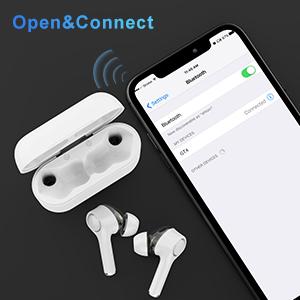
Image: A smartphone screen showing the Bluetooth settings with "GT4" selected for pairing, next to the open charging case with earbuds.
5. Istruzioni per l'uso
5.1 Comandi touch
The Langsdom GT4 earbuds feature intuitive touch controls. Gently tap the touch sensitive area on either earbud to perform the following actions:
| Azione | Auricolare sinistro (L) | Auricolare destro (R) |
|---|---|---|
| Riproduci/Pausa | 1 Toccare | 1 Toccare |
| Alza il volume | - | 2 tocchi |
| Abbassa il volume | 2 tocchi | - |
| Prossima canzone | Premere a lungo 3s | - |
| Canzone precedente | - | Premere a lungo 3s |
| Rispondi/Termina chiamata | 1 Toccare | 1 Toccare |
| Rifiuta chiamata | 2 tocchi | 2 tocchi |
| Attiva l'Assistente Vocale (Siri/Google) | 3 tocchi | 3 tocchi |
| Game Mode / Exit Game Mode | 3 tocchi | - |
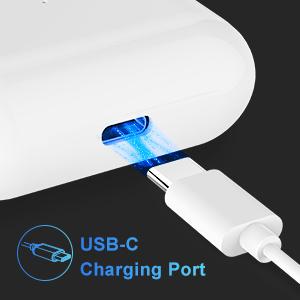
Image: Diagram illustrating the various touch control functions on the Langsdom GT4 earbuds, including play/pause, volume, call management, and voice assistant activation.
5.2 Modalità Musica e Gioco
The GT4 earbuds offer a dual-mode function for optimized audio performance based on your activity.
- Modalità Musica: Provides rich stereo bass and clear sound for an immersive listening experience.
- Modalità di gioco: Reduces latency for synchronized audio and video, enhancing your gaming experience.
To switch between modes, tap the left earbud 3 times.

Image: Graphic comparing Music Mode (low latency, stereo bass) and Gaming Mode (zero delay, synchronization) for the Langsdom GT4 earbuds.
6. Manutenzione
- Pulisci regolarmente gli auricolari e la custodia di ricarica con un panno morbido e asciutto.
- Evitare di esporre gli auricolari a temperature estreme, umidità o liquidi.
- Conserva gli auricolari nella custodia di ricarica quando non vengono utilizzati per proteggerli e preservare la durata della batteria.
- Do not attempt to disassemble or repair the earbuds yourself. Contact customer support for assistance.
7. Risoluzione Dei Problemi
| Problema | Soluzione |
|---|---|
| Gli auricolari non si accoppiano | Ensure earbuds are charged. Turn off and on Bluetooth on your device. Forget "GT4" from your device's Bluetooth list and re-pair. |
| Un solo auricolare funzionante | Riponi entrambi gli auricolari nella custodia di ricarica, chiudi il coperchio e riaprilo. Assicurati che entrambi gli auricolari siano carichi. |
| Volume basso o scarsa qualità del suono | Adjust volume on both earbuds and your device. Ensure ear tips are properly sealed in your ear. Clean any debris from the earbud speakers. |
| Gli auricolari non si caricano | Check the charging cable and power source. Ensure earbuds are correctly seated in the charging case. Clean charging contacts on earbuds and case. |
| Connectivity issues (disconnections) | Ensure your device is within the Bluetooth range (33-50 feet). Avoid obstacles between earbuds and device. Try resetting the earbuds (refer to manufacturer's specific reset instructions if available, otherwise re-pair). |
8. Specifiche
- Modello: La GT4
- Connettività: Senza fili (Bluetooth 5.0)
- Dimensioni del driver: Dual 8mm Dynamic Drivers per earbud
- Tempo di gioco: Fino a 5 ore (auricolari), fino a 30 ore (con custodia di ricarica)
- Tempo di ricarica: Circa 1.2 ore
- Porta di ricarica: USB-C
- Tipo di controllo: Controllo touch
- Peso dell'auricolare: 4 grammi (ciascuno)
- Materiale: Plastica
- Dimensioni: 1.97 x 0.71 x 1.57 pollici (Prodotto)
9. Video ufficiale del prodotto
Video: Un video ufficiale del prodotto mostraasing the Langsdom GT4 Dual Driver Earbuds, demonstrating features like auto-pairing, dual drivers, Bluetooth 5.0, secure fit, and long battery life.
10. Garanzia e supporto
Langsdom products come with a standard manufacturer's warranty. For detailed warranty information, product support, or service inquiries, please refer to the warranty card included in your package or visit the official Langsdom websito.
Informazioni sui contatti: Please refer to the contact details provided on the product packaging or the official Langsdom websito per il servizio clienti.