
BL B08TM6132G
BL Mini Wireless Keyboard Remote Control User Manual
Model: B08TM6132G
Introduzione
The BL Mini Wireless Keyboard with Touchpad Mouse Combo is a versatile input device designed for seamless control across various platforms. It combines a full QWERTY keyboard, a responsive multi-touch touchpad, and multimedia control keys into a compact, portable unit. This manual provides detailed instructions for setup, operation, maintenance, and troubleshooting to ensure optimal performance.

Image: The BL Mini Wireless Keyboard, showcasingrazie al suo design compatto e al touchpad integrato.
Cosa c'è nella scatola
Si prega di verificare che tutti gli articoli siano presenti nel pacco:
- Mini tastiera wireless
- Cavo USB (per la ricarica)
- USB dongle (2.4GHz receiver)
- Li-ion battery (rechargeable)
- Manuale d'uso (questo documento)

Image: A visual representation of the items included in the product packaging: the mini keyboard, USB dongle, USB cable, Li-ion battery, and user manual.
Impostare
Follow these steps to set up your BL Mini Wireless Keyboard:
- Locate the USB Dongle: The 2.4GHz USB dongle is typically stored in the battery compartment on the back of the keyboard. Open the battery cover and carefully remove the dongle.
- Carica la tastiera: Before first use, fully charge the keyboard using the provided USB cable. Connect the micro-USB end to the keyboard's charging port and the USB-A end to a power source (e.g., computer USB port, USB wall adapter). The charging indicator light will illuminate.
- Insert the USB Dongle: Plug the USB dongle into an available USB port on your target device (e.g., Smart TV, Android TV Box, PC, PS3).
- Accendi la tastiera: Locate the power switch on the keyboard and slide it to the "ON" position. The keyboard should automatically connect to the dongle.
- Abbinamento iniziale (se necessario): If the keyboard does not connect automatically, press and hold the "Fn" key and the "F1" key simultaneously until the blue indicator light flashes quickly. Release the buttons. When the blue light stops flashing, the USB dongle and keyboard are successfully paired. Turn off the keyboard and turn it on again to confirm functionality.
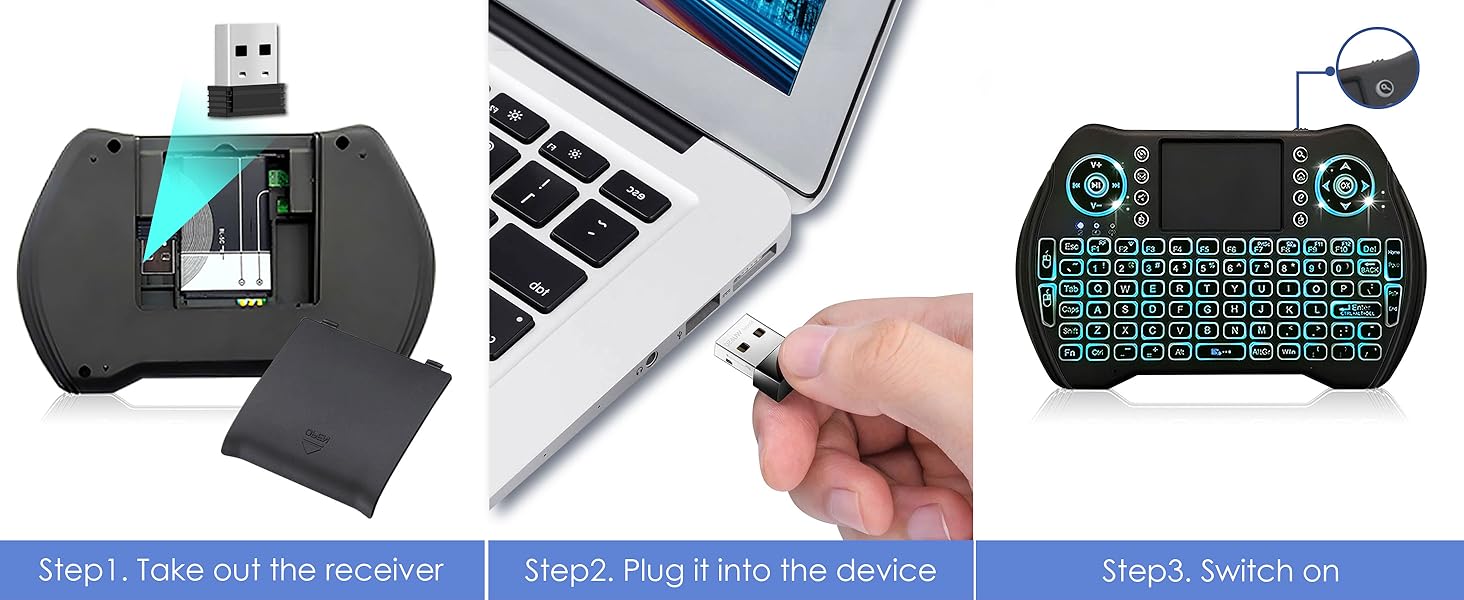
Image: Visual guide showing how to remove the USB dongle from the battery compartment, plug it into a device, and switch on the keyboard.
Istruzioni per l'uso
Funzionamento di base
The keyboard functions like a standard QWERTY keyboard. Use the keys for typing text, and the touchpad for mouse control.

Image: Diagram illustrating the various parts of the multifunctional keyboard, including the USB charging port, media controls, LED indicator, touchpad, power switch, direction keys, multimedia shortcuts, mouse left/right buttons, QWERTY keyboard, and page scrolling.
Funzionalità del touchpad
The integrated touchpad supports multi-finger gestures for enhanced navigation:
- Tocco con un solo dito: Clic sinistro del mouse.
- Tocco con due dita: Fare clic con il tasto destro del mouse.
- Trascinamento con due dita: Scorri verso l'alto/il basso o verso sinistra/destra.
- Trascinamento con un solo dito: Spostare il cursore del mouse.

Image: The keyboard's responsive touchpad in use, demonstrating multi-finger gestures for precise control, with a large screen displaying content.

Image: A detailed graphic showing the touchpad and its supported gestures for precise control, including single-finger tap, two-finger tap, and two-finger drag for scrolling.
Hotkeys and Multimedia Shortcuts
The keyboard features various hotkeys and multimedia shortcuts for quick access to functions. These are typically activated by holding the Fn key and pressing the corresponding function key.
| Combinazione di tasti | Funzione |
|---|---|
| Tasto F1 | Regola la sensibilità del mouse |
| Fn + Invio | [Task Manager] shortcut (Ctrl+Alt+Del) |
| Fn + Stamp | [Print Screen] shortcut |
| Tasto F7 | Turn off / on touchpad |
| Tasto F8 | Massimizza la pagina corrente |
| Tasto F9 | Strumenti di sviluppo aperti |
| Fn + Casa | Jump to start of a text |
| Fn + Fine | Jump to end of a text |
| Cappellini | Lock caps button |
| Vincita | [Start / Menu] bar |

Image: A detailed layout of the BL Mini Wireless Keyboard highlighting various hotkey combinations and their corresponding functions, such as adjusting mouse sensitivity, task manager shortcut, print screen, and multimedia controls.

Image: A graphic illustrating the multimedia shortcuts available on the keyboard, designed for quick control of browser, email, and media players.
Funzionalità di retroilluminazione
The keyboard features a multi-color backlight for improved visibility in low-light conditions.
- Attivazione della retroilluminazione: The backlight typically activates automatically when the keyboard is in use.
- Modifica dei colori della retroilluminazione: To cycle through the 7 available backlight colors, hold down the Fn key and scroll left or right on the touchpad.

Image: The BL Mini Wireless Keyboard displaying its multi-color backlight feature, making it easy to use in dark environments.

Image: A graphic demonstrating how to activate and change the 7 backlight colors by holding the 'Fn' key and scrolling on the touchpad.
Manutenzione
Per garantire la longevità e le prestazioni ottimali della tastiera, seguire queste linee guida per la manutenzione:
- Pulizia: Utilizzare un panno morbido e asciutto per pulire la tastiera e il touchpad. Per lo sporco ostinato, leggermente dampPulire il panno con acqua o con un detergente delicato e non abrasivo. Evitare l'eccessiva umidità.
- Magazzinaggio: Quando non la si utilizza per lunghi periodi, spegnere la tastiera per preservare la durata della batteria. Conservarla in un luogo fresco e asciutto, lontano dalla luce solare diretta e da temperature estreme.
- Cura della batteria: Avoid fully discharging the Li-ion battery frequently. Charge it regularly, even if not completely depleted, to maintain battery health.
- Evitare cadute e urti: The keyboard is lightweight and portable, but it is not designed to withstand significant physical impact. Handle with care.
Risoluzione dei problemi
If you encounter issues with your BL Mini Wireless Keyboard, refer to the following common problems and solutions:
- Keyboard is unresponsive or not connecting:
- Assicurarsi che la tastiera sia accesa e completamente carica.
- Verify the USB dongle is securely plugged into the device's USB port.
- Try plugging the dongle into a different USB port on your device.
- Re-pair the keyboard with the dongle: Press and hold "Fn" + "F1" simultaneously until the blue indicator light flashes quickly. Release the buttons. Once the blue light stops flashing, the pairing is successful. Turn the keyboard off and on again.
- Ensure there are no significant obstructions between the keyboard and the USB dongle, as the effective range is approximately 33 feet (10 meters).

Image: A troubleshooting guide for an unresponsive keyboard, detailing steps to pair with the USB dongle, including visual cues for the indicator lights.
- Touchpad is not working or is erratic:
- Ensure the touchpad is not accidentally turned off (Fn + F7).
- Clean the touchpad surface to remove any dirt or oils that might interfere with tracking.
- Adjust mouse sensitivity using Fn + F1.
- La retroilluminazione non funziona:
- Assicurarsi che la batteria della tastiera abbia una carica sufficiente.
- Try cycling through the backlight colors (Fn + scroll on touchpad).
- Breve durata della batteria:
- Assicurarsi che la tastiera sia completamente carica prima dell'uso.
- The auto-sleep function helps conserve battery. If the backlight is constantly on, it will drain the battery faster.
- Consider replacing the Li-ion battery if it no longer holds a charge effectively.
Specifiche
| Caratteristica | Dettaglio |
|---|---|
| Dimensioni del prodotto | 5.78 x 3.84 x 0.75 pollici |
| Peso dell'articolo | 3.88 once |
| Tecnologia di connettività | Chiavetta USB da 2.4 GHz |
| Tipo di batteria | 1 batteria agli ioni di litio (inclusa, ricaricabile) |
| Caratteristica speciale | Rechargeable, Backlit (7 colors), Touchpad |
| Colore | Multicolore |
| Produttore | Amaminibox |
| Paese di origine | Cina |
Dispositivi compatibili
The BL Mini Wireless Keyboard is widely compatible with devices that support a standard USB input:
- Scatola TV Android
- TV intelligente
- Personal Computer (PC)
- Sistema operativo Windows
- MacOS
- X-Box (specific models may vary)
- Sony PS3
- Desktop & Laptop Computers
- Smartphones (with OTG adapter, not included)

Image: The BL Mini Wireless Keyboard shown with various compatible devices, including Smart TV, Projector, Desktop Computer, Notebook, Android TV Box, and the included USB dongle.
Garanzia e supporto
Per informazioni sulla garanzia e supporto tecnico, fare riferimento al sito ufficiale del produttore webo contattare direttamente il servizio clienti. Conservare la ricevuta d'acquisto come prova d'acquisto per eventuali reclami in garanzia.
Puoi anche fare riferimento al sito ufficiale Manuale utente (PDF) per ulteriori dettagli.
Ask a question about this manual
Ask about setup, troubleshooting, compatibility, parts, safety, or missing instructions. Manuals+ will review the question and use this page’s manual context to help answer it.