
Introduzione
This manual provides detailed instructions for the installation, operation, and maintenance of your GETINLIGHT Under Cabinet Light. Designed to enhance your kitchen or workspace, this lighting solution offers versatile illumination with adjustable color temperatures and brightness settings. This bundle includes an extra 12-inch linking cord to extend your lighting setup as needed.
Caratteristiche del prodotto
- 3 Color Levels Dimmable LED: Features a temperature slide switch allowing selection among Warm White (2700K), Soft White (3000K), and Bright White (4000K).
- Installazione flessibile: Supports both hardwired and plugged-in installations. Hardware kit and cords are included for both methods.
- Design collegabile: Connect up to 20 units to a single power supply for extended lighting coverage.
- Compatibilità dimmerabile: Compatible with most wall/box dimmers. Includes a Hi/Low switch for non-dimming applications.
- Costruzione durevole: Aluminum housing with polycarbonate diffuser ensures longevity.
- Sicurezza certificata: ETL Listed, Energy Star, and Lighting Facts Labeled, Energy Star Certified for peace of mind.
Cosa c'è nella scatola
Verificare che tutti i componenti siano presenti prima di iniziare l'installazione.

Figure 1: Package Contents. Includes the under cabinet light fixture, power cord, linking cord, and mounting hardware.
- GETINLIGHT Under Cabinet Light Fixture (9-inch or 12-inch)
- 12-inch Linking Cord (JC1-12-BK)
- Power Cord for Plug-in Installation
- Mounting Hardware (screws, connectors)
Configurazione e installazione
The GETINLIGHT Under Cabinet Light offers flexible installation options: plug-in or hardwired. For plug-in installation, ensure an accessible power outlet is nearby. For hardwired installation, consult a qualified electrician if you are unfamiliar with electrical wiring.
1. Preparing the Light Fixture
Before mounting, you may need to remove the input/output covers on the sides of the fixture to access the connection ports. Use a Phillips head screwdriver to unscrew the small screws holding the covers in place.

Figura 2: lato view of the light fixture with input/output ports.
2. Montaggio delle luci
Position the light fixture under your cabinet. Mark the screw locations. Use the provided mounting hardware to secure the fixture to the underside of the cabinet. Ensure the fixture is firmly attached.
Video 1: Installation Guide for GETINLIGHT Under Cabinet Lighting. This video demonstrates the process of mounting the light fixtures and connecting them.
3. Collegamento dell'alimentazione
For plug-in installation, connect the provided power cord to the input port of the first light fixture and plug it into a standard wall outlet. For hardwired installation, connect the appropriate wiring to the fixture's hardwire input, following local electrical codes.

Figure 3: Power Cord for plug-in connection.
4. Collegamento di più unità (facoltativo)
If installing multiple units, use the provided linking cords to connect them. Plug one end of the linking cord into the output port of the first fixture and the other end into the input port of the next fixture. For adjacent fixtures, a direct connector can be used to create a seamless look.
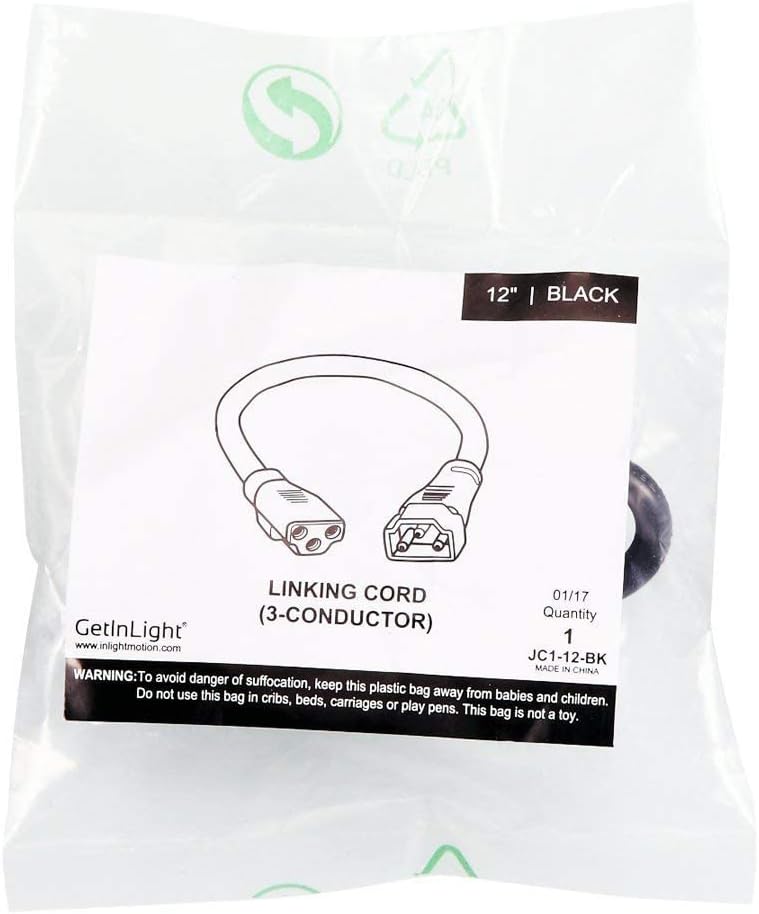
Figure 4: 12-inch Linking Cord for connecting multiple units.

Figure 5: Compatibility chart for linking various GetInLight fixtures.
Istruzioni per l'uso
Your GETINLIGHT Under Cabinet Light features a convenient slide switch for controlling brightness and color temperature.
1. Accensione/spegnimento
Locate the slide switch on the front of the light fixture. Slide the switch to the 'ON' position to turn on the light, and to the 'OFF' position to turn it off.
2. Regolazione della luminosità
The slide switch also controls brightness. Move the switch to one end for the brightest setting and to the other end for a lower setting. If using a compatible wall dimmer, adjust brightness via the dimmer switch.
3. Modifica della temperatura del colore
The light fixture allows you to select from three color temperatures: Warm White (2700K), Soft White (3000K), and Bright White (4000K). Slide the switch to cycle through these options until you find your preferred lighting ambiance.

Figure 6: Visual representation of the three selectable color temperatures.
Manutenzione
To ensure the longevity and optimal performance of your GETINLIGHT Under Cabinet Light, follow these simple maintenance guidelines:
- Pulizia: Disconnect power before cleaning. Use a soft, dry cloth to wipe the fixture. For stubborn spots, a slightly damp È possibile utilizzare un panno imbevuto di sapone neutro, seguito da un panno asciutto. Evitare detergenti abrasivi o solventi.
- Sostituzione della lampadina: The LED bulbs are integrated and not user-replaceable. If the LEDs fail, the entire fixture may need replacement.
- Ispezione: Periodically check the wiring and mounting screws to ensure they are secure.
Risoluzione dei problemi
If you encounter issues with your GETINLIGHT Under Cabinet Light, refer to the following common problems and solutions:
| Problema | Possibile causa | Soluzione |
|---|---|---|
| La luce non si accende. | Nessuna alimentazione al dispositivo. | Check if the power cord is securely plugged in. Verify the outlet has power. Check circuit breaker. |
| La luce tremola o si attenua inaspettatamente. | Incompatible dimmer or loose connection. | Ensure dimmer is compatible (refer to product features). Check all wiring connections for tightness. |
| Funzionano solo alcune luci collegate. | Loose linking cord connection. | Check the linking cords between the working and non-working fixtures. Ensure they are fully inserted. |
| Light color or brightness cannot be adjusted. | Slide switch malfunction or fixture issue. | Ensure the slide switch is clean and moves freely. If the issue persists, contact customer support. |
Specifiche
| Attributo | Valore |
|---|---|
| Marca | GETINLIGHT |
| Numero di modello | d7f366d8-15ec-41c8-bc4b-cc7a7639aea2 |
| Colore | White with Brown finish |
| Materiale | Metallo |
| Stile | Moderno |
| Tipo di sorgente luminosa | GUIDATO |
| Voltage | 120 Volt (CA) |
| Caratteristica speciale | Dimmerabile |
| Tipo di installazione | Montaggio in superficie |
| Fonte di alimentazione | Elettrico con cavo |
| Efficienza | Certificato Energy Star |
Garanzia e supporto
GETINLIGHT products are designed for durability and performance. For warranty information or technical support, please refer to the contact details provided on the product packaging or visit the official GETINLIGHT webluogo. Conserva la ricevuta di acquisto per eventuali richieste di garanzia.