
Amazfit A1823-Nero
Manuale utente dello smartwatch Amazfit Bip U Pro
Modello: A1823-Nero
1. Introduzione
The Amazfit Bip U Pro Smart Watch is a versatile fitness tracker designed for comprehensive health and activity monitoring. It features built-in Alexa, GPS, over 60 sport modes, and advanced sensors for blood oxygen, heart rate, and sleep tracking. This manual provides essential information for setting up, operating, and maintaining your device.

Figure 1: Amazfit Bip U Pro Smart Watch
2. Cosa c'è nella scatola
Si prega di controllare il contenuto della confezione:
- Orologio intelligente
- Manuale d'uso
3. Guida all'installazione
3.1 Carica iniziale
Before first use, fully charge your Amazfit Bip U Pro. Connect the charging cable to the watch's charging port and a USB power adapter. The watch display will indicate charging status.
3.2 Download e associazione dell'app
- Scarica il Applicazione Zepp dall'app store del tuo smartphone (iOS App Store o Google Play Store).
- Apri l'app Zepp e crea un account o accedi.
- Follow the in-app instructions to pair your Amazfit Bip U Pro. Ensure Bluetooth is enabled on your smartphone.
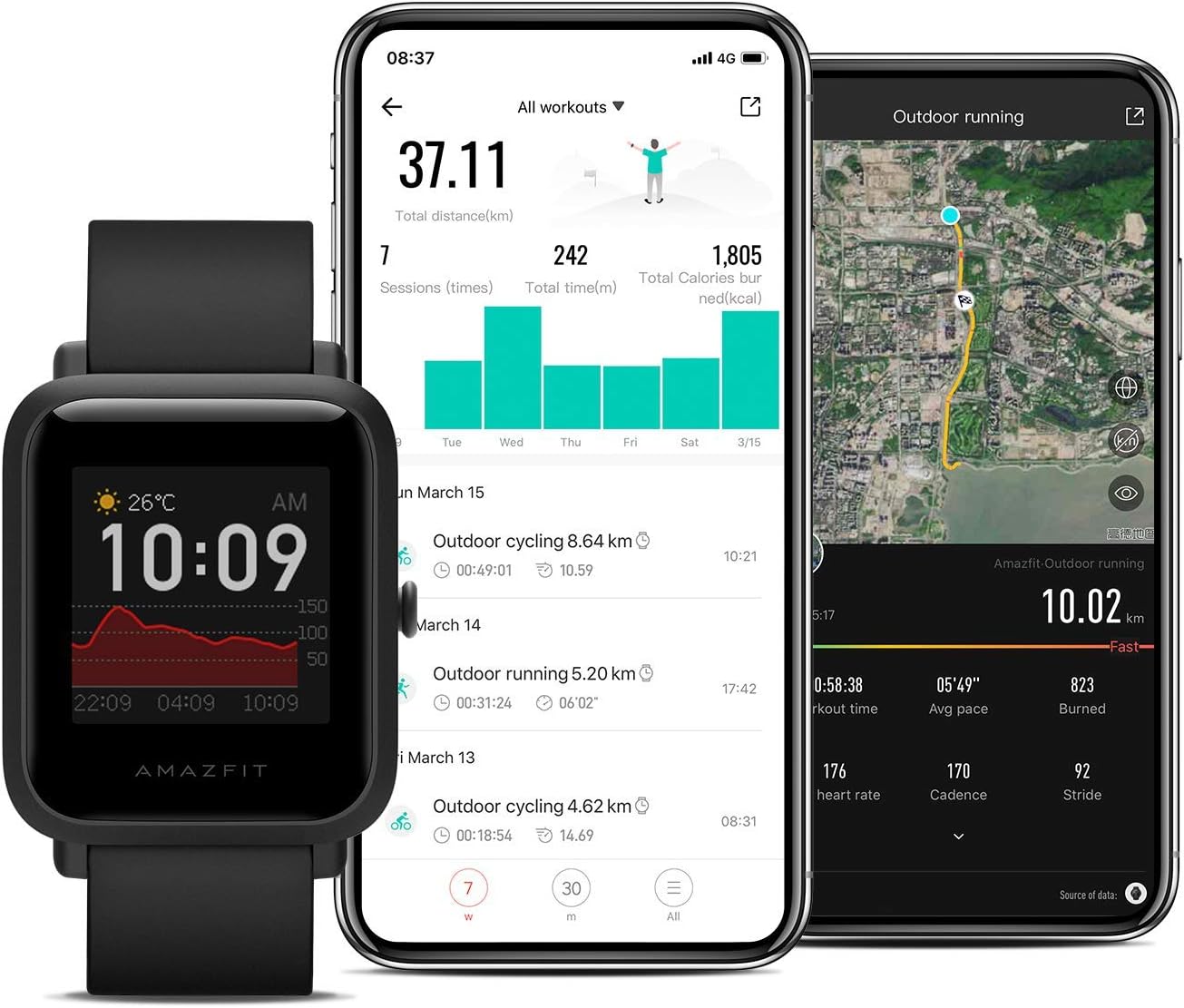
Figure 2: Zepp App Interface for data synchronization
4. Istruzioni per l'uso
4.1 Navigazione di base
- Schermo tattile: Scorri verso l'alto, verso il basso, verso sinistra o verso destra per navigare nei menu e accedere alle funzioni. Tocca per selezionare.
- Pulsante laterale: Press to return to the watch face or to access the app list.
4.2 Display e quadranti dell'orologio
The transflective color display is always-on, providing clear visibility even in bright sunlight. You can customize your watch face through the Zepp app, with over 40 watch faces available at launch and more via OTA updates.

Figura 3: Esamples of customizable watch faces
4.3 Monitoraggio sanitario
The Amazfit Bip U Pro offers comprehensive health tracking features:
- Monitoraggio della frequenza cardiaca: Monitors your heart rate throughout the day, including resting heart rate and intervals. Provides warnings for excessively high heart rates.
- Monitoraggio del sonno: Tracks total sleep, light sleep, deep sleep, awake time, fall asleep time, and wake-up time to analyze your sleep patterns.
- Monitoraggio dell'ossigeno nel sangue: Measures blood oxygen saturation (SpO2) levels.

Figure 4: BioTracker™ PPG Optical Sensor for 24H Heart Rate Monitoring

Figure 5: Sleep monitoring interface on the watch and app
4.4 Sport Modes and Water Resistance
The smartwatch supports over 60 sport modes, providing data such as track display, speed, heart rate, and distance. It is water-resistant to 5 ATM (50 meters), making it suitable for swimming in pools and open water.

Figura 6: Esamples of supported sport modes

Figure 7: The watch is water resistant up to 5 ATM
4.5 Funzionalità intelligenti
The Amazfit Bip U Pro integrates various smart features for daily convenience:
- Alexa integrata: Use voice commands for quick information, setting alarms, and controlling smart home devices.
- Notifiche intelligenti: Receive incoming calls, messages, and app notifications directly on your wrist.
- Controllo della musica: Controlla la riproduzione musicale sullo smartphone associato.
- Previsioni del tempo: Ricevi aggiornamenti meteo in tempo reale.
- World Clock & Timer: Useful tools for time management.
5. Manutenzione
5.1 Pulizia dell'orologio
Regularly clean your watch and strap to prevent skin irritation and maintain device functionality. Use a soft, lint-free cloth. For water-resistant cleaning, use clean water and dry thoroughly.
5.2 Cura della batteria
The Amazfit Bip U Pro boasts an outstanding 30-day battery life. To maximize battery longevity, avoid exposing the watch to extreme temperatures and use only the provided charging cable.
5.3 Resistenza all'acqua
While water-resistant to 5 ATM, avoid using the watch in hot showers, saunas, or steam rooms, as steam can compromise the seals. Do not operate buttons underwater.
6. Specifiche
| Caratteristica | Dettaglio |
|---|---|
| Nome del modello | Bip S Lite |
| Marca | Amazfit |
| Dimensioni dello schermo | 1.28 pollici |
| Dimensioni del prodotto | 1.65 x 1.39 x 0.45 pollici |
| Peso dell'articolo | 1.1 once |
| Resistenza all'acqua | 5 ATM (50 metri) |
| Durata della batteria | Fino a 30 giorni (utilizzo tipico) |
| Connettività | Bluetooth, GPS |
| Sistema operativo | Android (compatible with iOS 10.0 & Android 5.0 or higher) |
| Sensori | BioTracker™ PPG Optical Sensor |
7. Risoluzione Dei Problemi
If you encounter issues with your Amazfit Bip U Pro, consider the following common solutions:
- Problemi di accoppiamento: Ensure Bluetooth is on, the watch is charged, and you are within range. Try restarting both the watch and your phone.
- Letture imprecise: Assicurati che l'orologio sia ben aderente al polso, né troppo stretto né troppo largo. Pulisci regolarmente il sensore.
- Batteria scarica: Reduce the frequency of heart rate monitoring, turn off unnecessary notifications, or lower screen brightness to extend battery life.
- Aggiornamenti software: Check the Zepp app for available firmware updates, which often resolve bugs and improve performance.
For more detailed troubleshooting, refer to the official Amazfit support resources or the troubleshooting guide available on the product page.
8. Garanzia e supporto
Your Amazfit Bip U Pro Smart Watch is covered by a manufacturer's warranty. Please refer to the warranty card included in your product packaging for specific terms and conditions.
For technical support, service, or further inquiries, please visit the official Amazfit webo contattare il servizio clienti. Conservare la ricevuta d'acquisto come prova d'acquisto per eventuali reclami in garanzia.
Puoi anche trovare risorse aggiuntive e FAQ su Negozio Amazfit su Amazon.
Ask a question about this manual
Ask about setup, troubleshooting, compatibility, parts, safety, or missing instructions. Manuals+ will review the question and use this page’s manual context to help answer it.