
ROIDMI S2
Manuale utente dell'aspirapolvere senza fili ROIDMI S2
Model: S2 | Brand: ROIDMI
Introduzione
This manual provides detailed instructions for the safe and efficient use of your ROIDMI S2 Cordless Vacuum Cleaner. Please read this manual thoroughly before operating the appliance and retain it for future reference.
Istruzioni di sicurezza
- Assicurati che l'adattatore di alimentazione sia compatibile con la tua tensione localetage.
- Do not use the vacuum cleaner to pick up liquids, burning objects, or sharp objects.
- Tenere capelli, abiti larghi, dita e tutte le parti del corpo lontano dalle aperture e dalle parti mobili.
- Non utilizzare l'aspirapolvere se è danneggiato o non funziona correttamente.
- Questo apparecchio non è destinato all'uso da parte di persone con capacità fisiche, sensoriali o mentali ridotte, o prive di esperienza e conoscenza, a meno che non siano supervisionate o abbiano ricevuto istruzioni riguardanti l'uso dell'apparecchio da una persona responsabile della loro sicurezza.
- I bambini devono essere sorvegliati per assicurarsi che non giochino con l'apparecchio.
Contenuto della confezione
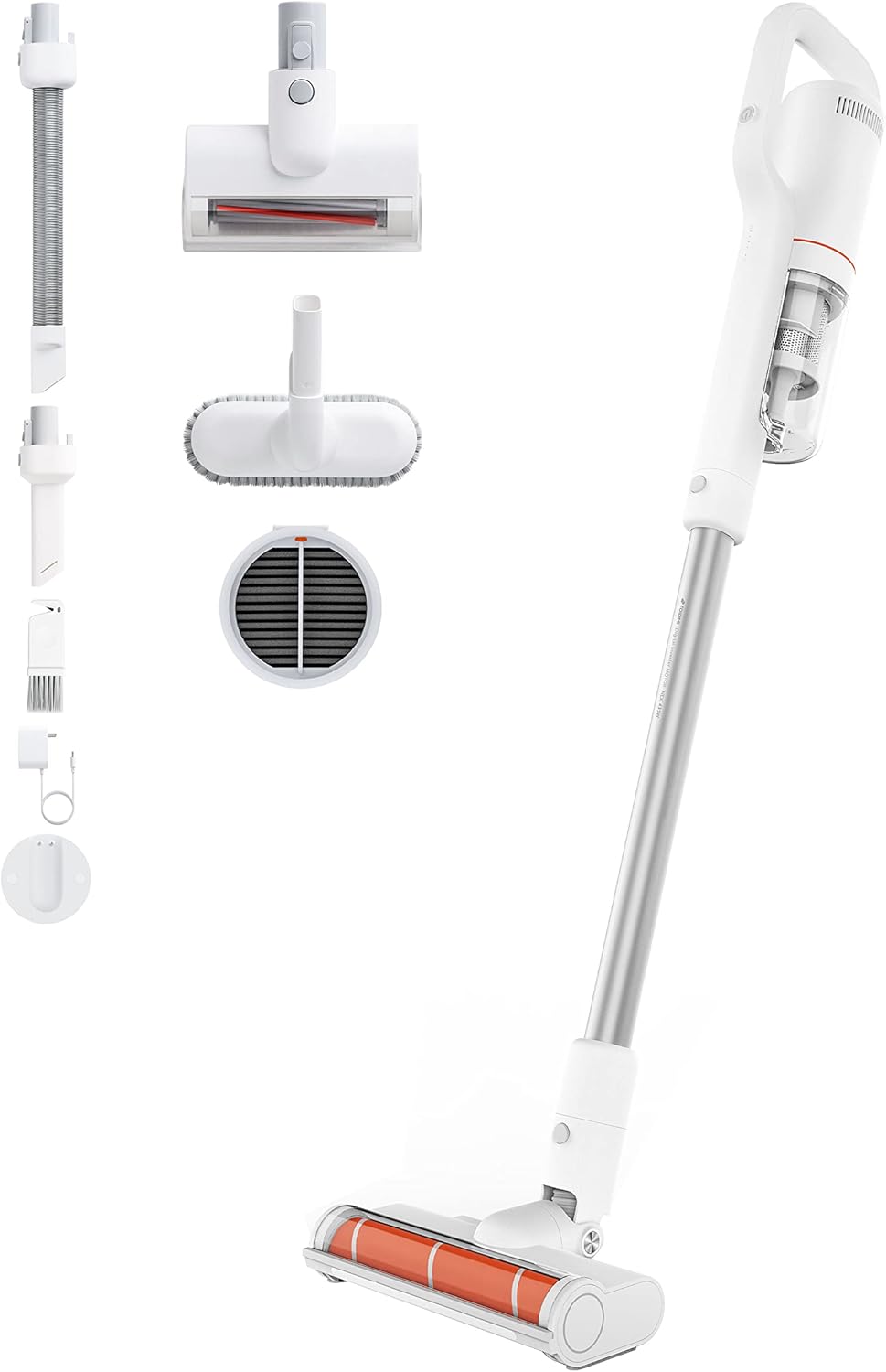
Image: All components included with the ROIDMI S2 Cordless Vacuum Cleaner, laid out on a white background. This includes the main vacuum unit, extension wand, floor brush, various nozzles, and the magnetic wall mount.
Verificare che tutti gli articoli siano presenti e in buone condizioni:
- ROIDMI S2 Cordless Vacuum Cleaner (Main Unit)
- Spazzola elettrica per pavimenti
- Metal Connecting Tube (Extension Wand)
- Spazzola per materassi
- Spazzola multifunzione
- Ugello piatto
- Dust Filter (pre-installed or spare)
- Adattatore di alimentazione
- Stazione di ricarica magnetica da parete
- Viti di montaggio
- Manuale d'uso
Impostare
1. Assemblaggio
- Collegare la prolunga: Insert the metal connecting tube into the main vacuum unit until it clicks securely.
- Fissare la spazzola per pavimenti: Connect the electric floor brush to the other end of the extension wand. Ensure it clicks into place.
- Allegati alternativi: For handheld use, attach the mattress brush, multi-function brush, or flat nozzle directly to the main unit.
2. Carica della batteria
Prima del primo utilizzo, caricare completamente l'aspirapolvere. La batteria impiega circa 2.5 ore per caricarsi completamente.

Image: Close-up of the ROIDMI S2 main unit magnetically attaching to its wall-mounted charging station. Blue indicator lights are visible, signifying charging status.
- Install Wall Charging Station: Choose a suitable location on a wall near a power outlet. Use the provided screws to securely mount the magnetic charging station.
- Connetti alimentazione: Collegare l'adattatore di alimentazione alla stazione di ricarica e poi a una presa a muro.
- Charge Vacuum: Place the vacuum cleaner onto the magnetic charging station. The indicator lights on the vacuum will show the charging status.
Istruzioni per l'uso
1. Accensione/spegnimento e selezione della modalità
Press the power button to turn the vacuum cleaner on. Press it again to cycle through different suction modes (Standard, Max). Press and hold to turn off.
2. Using the Floor Brush

Image: The ROIDMI S2 cordless vacuum in use, showing the motorized floor brush with its automatic LED sensor light illuminating the area in front of it. The brush is designed for various floor types.
- The electric floor brush is suitable for hard floors, laminate, parquet, and carpets.
- The automatic LED sensor light illuminates dark areas, improving visibility during cleaning.
- The 270° flexible design allows for easy maneuverability around furniture and into tight spaces.
3. Utilizzo degli allegati

Image: A collage of four images demonstrating the versatility of the ROIDMI S2. Top left shows the vacuum standing upright against a wall. Top right shows the flat nozzle cleaning between sofa cushions. Bottom left shows the multi-function brush cleaning a laptop keyboard. Bottom right shows the main unit with the mattress brush cleaning a bed.
- Spazzola per materassi: Ideal for cleaning upholstery, mattresses, and pet hair.
- Spazzola multifunzione: Use for delicate surfaces, keyboards, and car interiors.
- Ugello piatto: Perfetto per fessure strette, angoli e zone difficili da raggiungere.
4. Durata della batteria
- Standard Mode: Up to 60 minutes.
- Max Mode: Up to 10 minutes.
5. ROIDMI Cleaner App

Image: A smartphone screen displaying the ROIDMI Cleaner App interface. The app shows information such as current electricity percentage, battery starting time, and filter remaining life, providing smart control and monitoring of the vacuum cleaner.
The ROIDMI Cleaner App provides additional features such as battery status, filter condition, and cleaning statistics. Download the app from your device's app store and follow the in-app instructions to connect your S2 vacuum cleaner.
Manutenzione
1. Svuotamento del contenitore della polvere
Empty the dust bin regularly to maintain optimal suction performance. Press the release button to detach the dust bin from the main unit, then open the lid and empty the contents.
2. Pulizia dei filtri

Immagine: Un esploso view of the ROIDMI S2's multi-stage filtration system, showing individual components like the HEPA filter, dust filter, and isolation filter. This illustrates the layers of filtration for effective dust capture.
- The multi-filter system (HEPA, dust filter, isolation) should be cleaned periodically.
- Remove the filters from the dust bin. Tap them gently to remove loose dust.
- Rinse washable filters under cold running water. Ensure they are completely dry before reassembling.
- Sostituire i filtri se sono molto sporchi o danneggiati.
3. Pulizia del rullo spazzola
Regularly check the brush roll for tangled hair or debris. Remove the brush roll from the floor head (refer to the diagram in the full manual for specific instructions) and use scissors or a cleaning tool to remove any obstructions. Reinsert the brush roll securely.
4. Pulizia generale
Pulisci l'esterno dell'aspirapolvere con un panno morbido eamp panno. Non utilizzare detergenti aggressivi o solventi.
Risoluzione dei problemi
| Problema | Possibile causa | Soluzione |
|---|---|---|
| L'aspirapolvere non si accende. | La batteria è scarica. | Caricare completamente la batteria. |
| Potenza di aspirazione ridotta. | Dust bin is full; Filters are clogged; Brush roll is obstructed. | Empty dust bin; Clean or replace filters; Remove obstructions from brush roll. |
| Il rullo della spazzola non gira. | Ostruzione nel rullo spazzola; rullo spazzola non installato correttamente. | Remove obstructions; Ensure brush roll is securely installed. |
| Il vuoto si interrompe inaspettatamente. | Batteria scarica; protezione da surriscaldamento attivata. | Charge the battery; Allow the vacuum to cool down for at least 30 minutes. |
Specifiche
| Marca | ROIDMI |
| Numero di modello | S2 (XCQ12RM) |
| Energia | 425 Watt |
| Potenza di aspirazione | 23,500 Pa (135 AW) |
| Voltage | 100 Volt |
| Tipo di batteria | Ioni di litio (2500 mAh) |
| Durata | Fino a 60 minuti (modalità standard) |
| Tempo di ricarica | Circa 2.5 ore |
| Livello di rumore | 72 decibel |
| Peso (unità principale) | 1.5 chilogrammi |
| Dimensioni (L x P x A) | Dimensioni: 119.1 x 25.9 x 15.8 cm |
| Tipo di filtro | Multi-filter (HEPA, Dust, Isolation) |
| Caratteristiche speciali | Automatic LED Sensor Light, Magnetic Wireless Charging, ROIDMI Cleaner App Connectivity |
Garanzia e supporto
Per informazioni sulla garanzia e sull'assistenza clienti, fare riferimento alla scheda di garanzia inclusa nella confezione del prodotto o visitare il sito ufficiale ROIDMI websito. Conserva la ricevuta d'acquisto come prova d'acquisto.
Risorse online: For further assistance, FAQs, and product registration, please visit: www.roidmi.com
Ask a question about this manual
Ask about setup, troubleshooting, compatibility, parts, safety, or missing instructions. Manuals+ will review the question and use this page’s manual context to help answer it.