
SONGMICS ULGS131K101S
SONGMICS BELLAH Collection TV Stand
Model: ULGS131K101S
Introduzione
Thank you for choosing the SONGMICS BELLAH Collection TV Stand. This manual provides essential information for the safe assembly, operation, and maintenance of your new media console. Please read these instructions carefully before beginning assembly and retain them for future reference.
Informazioni sulla sicurezza
- Always follow assembly instructions precisely. Do not skip steps or use unauthorized parts.
- Prima di posizionare gli oggetti sul supporto, assicurarsi che tutti i collegamenti siano saldi.
- Do not overload the stand. Refer to the "Specifications" section for weight capacities.
- Install the anti-tip kit to prevent accidental tipping, especially in households with children or pets.
- Keep electrical components (LED strip, charging ports) away from water and moisture.
- Non permettere ai bambini di arrampicarsi sul supporto TV o di giocare con esso.
Componenti inclusi
Prima del montaggio, verificare che tutti i componenti elencati di seguito siano presenti e integri. Se alcuni componenti risultano mancanti o danneggiati, contattare l'assistenza clienti.
- 1 x TV Stand (main structure)
- 1 x kit di accessori (viti, connettori, ecc.)
- 1 x kit antiribaltamento
- 1 x Manuale di istruzioni (questo documento)
- Required assembly tool (usually an Allen wrench)
Installazione e assemblaggio
Assembly is designed to be straightforward. Follow the numbered steps in the provided accessory kit instructions. An Allen wrench is typically included for assembly.
Fase 1: Disimballare e identificare le parti
Carefully unpack all components and lay them out on a clean, soft surface to prevent scratches. Identify each part using the labels or diagrams in the separate assembly guide.
Fase 2: assemblare il telaio
Begin by connecting the steel frame components as instructed. Ensure all screws are tightened securely but do not overtighten.
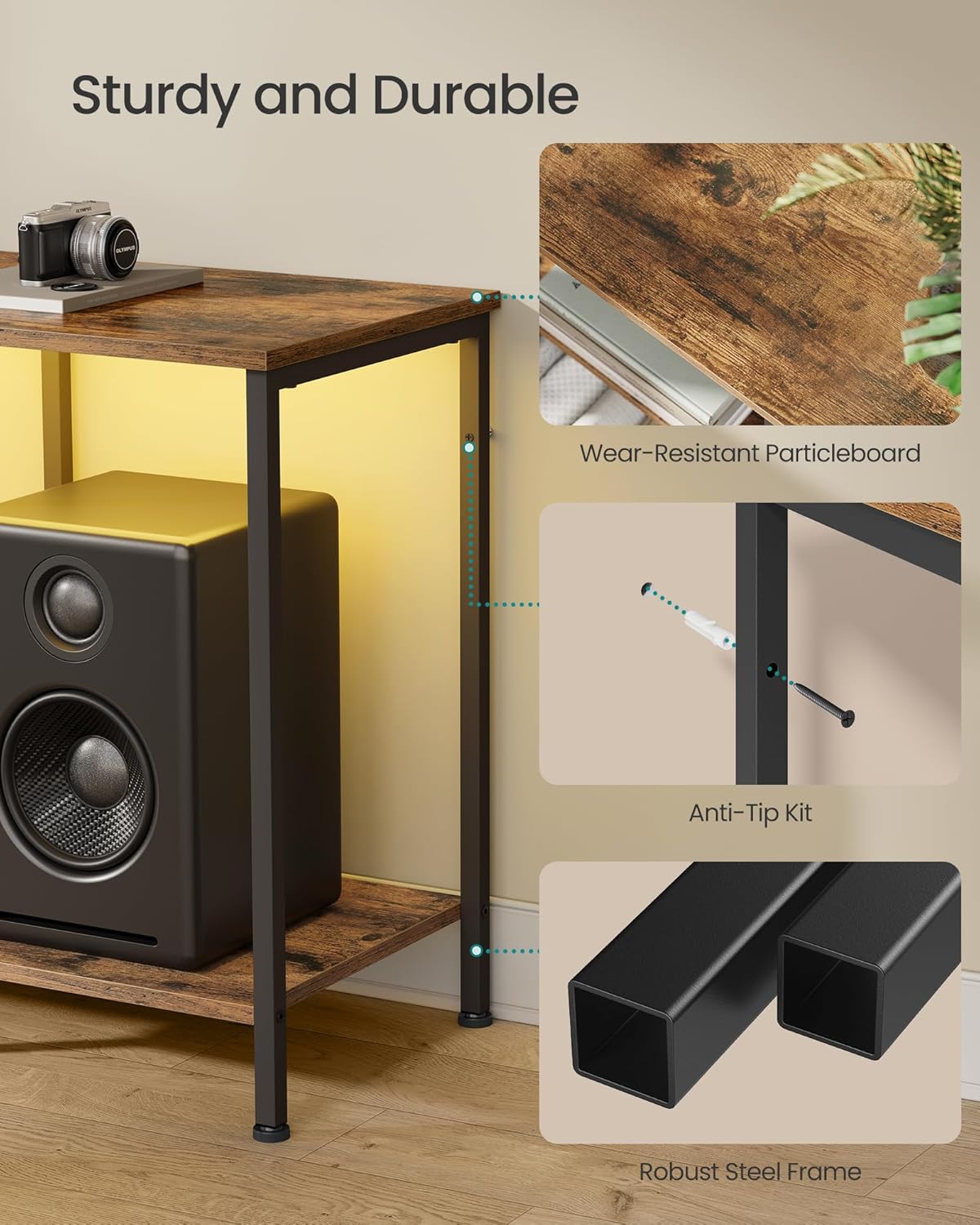
Image: Detail of the robust steel frame construction and anti-tip kit attachment point.
Step 3: Attach Shelves and Drawer Components
Install the particleboard top and lower shelves. Assemble the drawer using the MDF-reinforced components and polyester gabardine fabric. Ensure the drawer slides smoothly.

Image: Detail of the drawer construction, featuring a rustic brown front and fabric sides.
Fase 4: installare il kit antiribaltamento
For safety, attach the anti-tip kit to the back of the TV stand and secure it to a wall stud. This prevents the stand from tipping over, especially important for stability with a television mounted on top.

Image: Illustration of the anti-tip kit installation process.
Fase 5: Regolare i piedini di livellamento
The TV stand is equipped with adjustable feet. Turn the feet clockwise or counter-clockwise to level the stand on uneven floors, ensuring maximum stability.

Image: Adjustable feet for leveling the TV stand on uneven surfaces.
Istruzioni per l'uso
Illuminazione ambientale a LED
The TV console features an integrated LED strip for ambient lighting. This can be controlled via a physical button on the unit or through a dedicated smartphone application.
- Controllo pulsante: Use the button to cycle through preset colors and modes.
- Controllo app: Download the companion app (refer to the separate LED instruction sheet for QR code or app name). The app allows access to over 60,000 colors, brightness adjustment, setting timers, and syncing lights with music or microphone input.

Image: The TV stand with its LED ambient lighting, illustrating both app and manual control options.

Immagine: dettagliata view of the smartphone application interface for controlling the LED lighting features.
Porte di ricarica integrate
The entertainment center includes built-in charging capabilities to keep your devices powered.
- 2 prese CA (250 V/15 A)
- 1 porta USB-A (5 V/2 A)
- 1 porta USB-C (5 V/2 A)
Connect your TV, game consoles, phones, and other devices directly to these ports for convenient power access.

Image: Integrated charging panel with AC outlets, USB-A, and USB-C ports for convenient device charging.
Utilizzo dello spazio di archiviazione
The TV stand offers versatile storage options:
- Scaffali aperti: Ideal for organizing and displaying streaming players, game consoles, DVD players, and decorative items.
- Cassetto: Provides enclosed space for remotes, accessories, cables, and other small items to maintain a tidy appearance. The drawer is MDF-reinforced for rigidity.

Image: Comparison showing the effectiveness of the TV stand's storage in organizing media components.
Manutenzione
Per garantire la longevità e l'aspetto del tuo supporto TV, segui queste semplici linee guida per la manutenzione:
- Pulizia: Pulire le superfici con un panno asciutto e morbido. Per macchie ostinate, un panno leggermenteamp cloth followed by a dry one can be used. Avoid harsh chemicals or abrasive cleaners.
- Fuoriuscite: Immediately wipe up any liquid spills to prevent damage to the particleboard and MDF surfaces.
- Cura dei cassetti: The fabric drawer can be spot cleaned with a mild detergent and damp panno. Lasciare asciugare completamente all'aria.
- Ispezioni: Controllare periodicamente tutte le viti e i collegamenti per assicurarsi che siano ben serrati. Serrare nuovamente se necessario.

Image: Demonstrating how to clean the TV stand surface with a dry cloth.
Risoluzione dei problemi
Se riscontri problemi con il tuo supporto TV, fai riferimento alle seguenti soluzioni comuni:
- Il supporto è traballante: Ensure all assembly screws are tightened. Adjust the leveling feet on the bottom of the stand to compensate for uneven flooring.
- Luci LED non funzionanti: Check if the power adapter is securely plugged into both the stand and a working wall outlet. If using app control, ensure Bluetooth is enabled on your device and the app is correctly paired.
- Porte di ricarica non funzionanti: Verify the main power cord for the stand is plugged into a live outlet. Test with different devices and cables to rule out device-specific issues.
- Drawer Sticks or Doesn't Close: Check for any obstructions within the drawer compartment. Ensure the drawer is assembled correctly and not overloaded.
For issues not covered here, please contact SONGMICS customer support.
Specifiche
| Caratteristica | Dettaglio |
|---|---|
| Numero di modello | ULGS131K101S |
| Colore | Marrone rustico |
| Dimensioni (P x L x A) | 13.8" x 61.8" x 23.6" (35 cm x 157 cm x 60 cm) |
| Peso dell'articolo | 28.6 libbre (13 kg) |
| Materiale | MDF (Medium Density Fiberboard), Particleboard, Steel, Polyester Gabardine |
| Capacità di carico massima (superficie superiore) | 88 libbre (40 kg) |
| Capacità di carico massima (ogni ripiano) | 66 libbre (30 kg) |
| Capacità di carico massima (cassetto) | 17.6 libbre (8 kg) |
| Compatibilità con le dimensioni della TV | Fino a 70 pollici |
| Porte di ricarica | 2 x AC Outlets (250V/15A), 1 x USB-A (5V/2A), 1 x USB-C (5V/2A) |
| Assemblaggio richiesto | SÌ |

Image: Detailed dimensions and weight capacity diagram for the TV stand.

Image: The TV stand accommodating a television, highlighting its compatibility with TVs up to 70 inches.
Garanzia e supporto
SONGMICS products are designed for quality and durability. For specific warranty details, please refer to the documentation included with your purchase or visit the official SONGMICS websito.
If you require assistance with assembly, have questions about product features, or need to report a missing/damaged part, please contact SONGMICS customer support. Have your model number (ULGS131K101S) and purchase information ready when contacting support.
Informazioni sui contatti: Please refer to the contact details provided on the packaging or the official SONGMICS websito per i canali di supporto più aggiornati.
Ask a question about this manual
Ask about setup, troubleshooting, compatibility, parts, safety, or missing instructions. Manuals+ will review the question and use this page’s manual context to help answer it.