
1. Introduzione
The Oral-B iO Series 9n Electric Toothbrush represents a significant advancement in oral care technology. It combines Oral-B's unique round brush head with revolutionary iO magnetic technology and gentle micro-vibrations to deliver a professional clean feeling and healthier gums within one week. This toothbrush features 3D teeth tracking with Artificial Intelligence (AI) to monitor brushing across all surfaces of your teeth, guiding you for the most comprehensive cleaning possible. An interactive color display provides essential information, including brushing modes and brush head replacement reminders. This manual provides detailed instructions for the safe and effective use of your Oral-B iO Series 9n toothbrush.
2. Informazioni sulla sicurezza
Leggere attentamente tutte le istruzioni prima di utilizzare questo prodotto. Conservare il manuale per riferimento futuro.
- Avvertimento: Tenere fuori dalla portata dei bambini di età inferiore a 3 anni.
- Replace the toothbrush head every 3 months, or sooner if the bristles are splayed or worn, to maintain optimal oral hygiene and cleaning performance.
- Do not use this product if it appears damaged. Contact Oral-B customer service for assistance.
- Consult your dentist before use if you have severe gum disease or have undergone oral surgery.
3. Componenti del prodotto
Your Oral-B iO Series 9n Electric Toothbrush typically includes the following components:
- Oral-B iO Series 9n Handle
- iO Ultimate Clean Brush Head
- Caricatore magnetico
- Custodia da viaggio
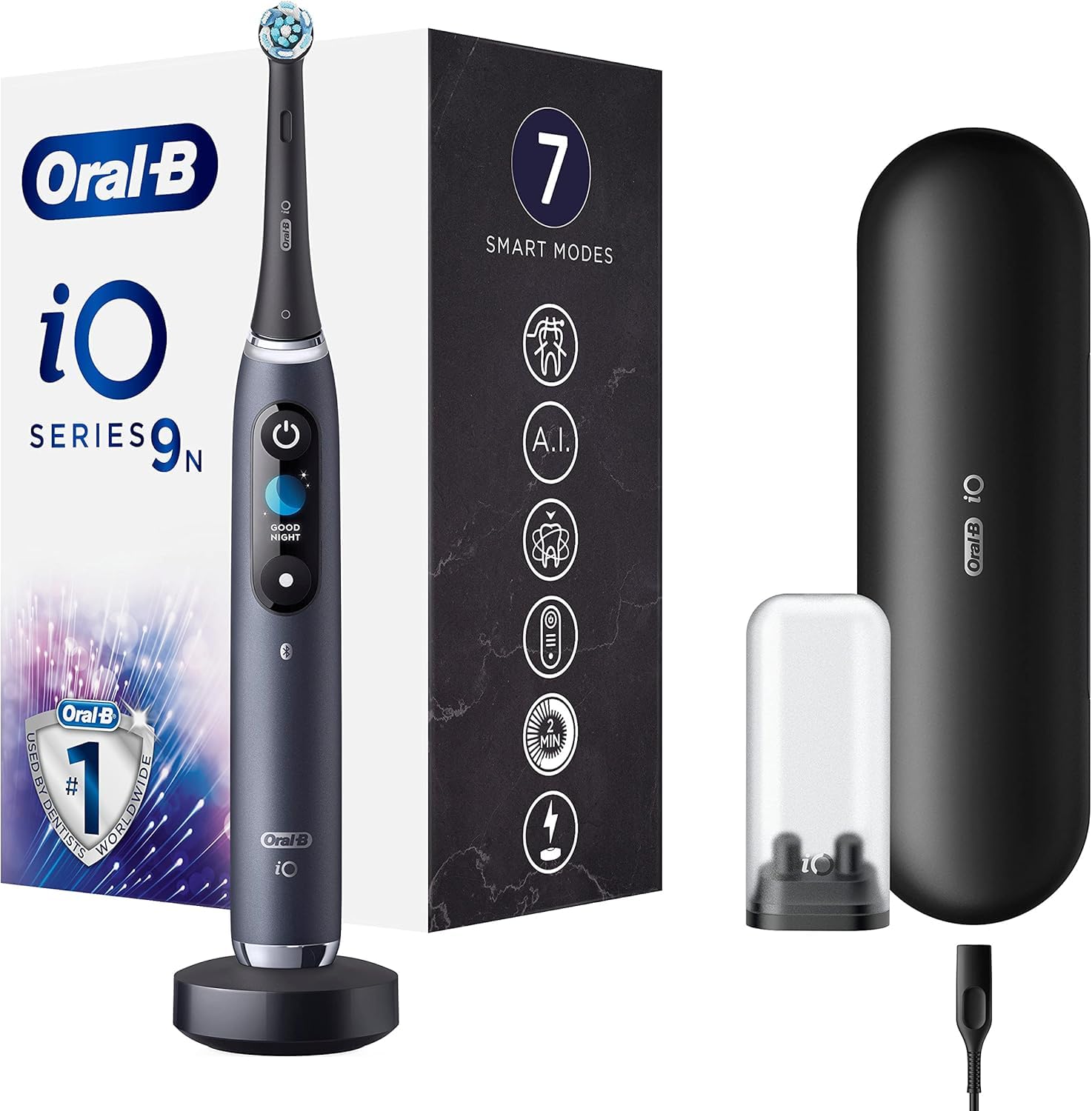
Figura 1: Oral-B iO Series 9n Electric Toothbrush with its magnetic charger and travel case. The toothbrush handle is black with an illuminated display, and the travel case is also black.
4. Configurazione e primo utilizzo
- Carica iniziale: Before first use, fully recharge the toothbrush. Place the handle on the magnetic charger. The interactive display will show the charging progress. A full charge can take several hours.
- Collegare la testina dello spazzolino: Firmly push an Oral-B iO brush head onto the handle. You will hear a click when it is securely attached.
- Accensione: Press the power button to turn on the toothbrush. The display will greet you.
- Connessione all'app (facoltativa): For enhanced features and real-time brushing guidance, download the Oral-B app on your smartphone. Follow the in-app instructions to pair your toothbrush via Bluetooth.

Figura 2: The Oral-B iO Series 9n toothbrush handle placed on its compact magnetic charging base. The base is black and the toothbrush handle is dark gray/black.
5. Istruzioni per l'uso
5.1 Lavarsi i denti
- Moisten the brush head and apply a small amount of toothpaste.
- Place the brush head against your teeth at a 45-degree angle to the gumline.
- Premere il pulsante di accensione per iniziare a spazzolare.
- Move the brush head gently from tooth to tooth, allowing the brush to do the work. Do not scrub.
- Brush each quadrant of your mouth (upper right, upper left, lower right, lower left) for 30 seconds, for a total of two minutes. The toothbrush will provide feedback to guide you.
- The interactive display will show a smiley face for a job well done.
5.2 Sensore di pressione intelligente
The iO Series 9n features an intelligent pressure sensor that provides real-time feedback:
- Luce rossa: You are brushing too hard. Reduce pressure.
- Luce bianca: You are brushing with too little pressure. Apply slightly more pressure.
- Luce verde: You are brushing with optimal pressure. Maintain this pressure for effective cleaning.

Figura 3: Un primo piano view of the Oral-B iO Series 9n handle, illustrating the pressure sensor light. The left image shows a red light indicating too much pressure, while the right image shows a green light indicating optimal pressure.
Modalità di spazzolatura 5.3
Your iO Series 9n toothbrush offers 7 intelligent modes to customize your brushing experience. Use the mode button on the handle to cycle through the available modes:
- Pulizia giornaliera: Per la pulizia quotidiana.
- Sensibile: Pulizia delicata ma accurata per le zone sensibili.
- Cura delle gengive: Massaggio delicato per le gengive.
- Pulizia intensa: For an extra thorough clean.
- Super Sensitive: Extra gentle cleaning.
- Sbiancamento: For polishing and stain removal.
- Puliscilingua: For tongue cleaning.
5.4 AI Brushing Recognition and App Integration
When connected to the Oral-B app, the toothbrush uses AI to track your brushing in 3D, identifying areas you've brushed and areas you might have missed. This provides personalized guidance to ensure complete coverage.

Figura 4: A user holding the Oral-B iO Series 9n electric toothbrush alongside a smartphone displaying the Oral-B app interface, which provides real-time brushing feedback and a 'Brush Score'.
6. Manutenzione
6.1 Pulizia dello spazzolino da denti
- Dopo ogni utilizzo, sciacquare accuratamente la testina sotto l'acqua corrente con il manico acceso.
- Rimuovere la testina dello spazzolino e pulire separatamente sia il manico che la testina sotto l'acqua corrente.
- Asciugare la maniglia con un panno morbido.
- Ensure the charger is unplugged before cleaning. Clean the charger with a damp solo tessuto.
6.2 Sostituzione della testina della spazzola
For optimal performance and hygiene, replace your Oral-B iO brush head every three months, or sooner if the indicator bristles fade or the brush head appears worn. The interactive display will also provide a reminder.
7. Risoluzione Dei Problemi
If you encounter issues with your Oral-B iO Series 9n toothbrush, refer to the following common problems and solutions:
| Problema | Possibile causa | Soluzione |
|---|---|---|
| Lo spazzolino non si accende. | Batteria scarica o scarica. | Place the toothbrush on the charger for several hours to ensure a full charge. |
| Potenza di spazzolatura ridotta. | Batteria scarica. | Ricaricare lo spazzolino da denti. |
| Pressure sensor always red. | Applicare troppa pressione. | Reduce the pressure applied during brushing. |
| L'app non si connette. | Bluetooth disattivato, app non aperta o problema di associazione. | Ensure Bluetooth is enabled on your phone, the app is open, and try re-pairing the device. |
If the problem persists, please refer to the Oral-B official websito o contattare l'assistenza clienti per ulteriore assistenza.
8. Specifiche
| Caratteristica | Dettaglio |
|---|---|
| Numero di modello | 80336681 |
| Dimensioni (L x P x A) | Dimensioni: 17.8 x 10 x 25.3 cm |
| Peso | 63.3 grammi |
| Fonte di alimentazione | Electric Cable (Rechargeable) |
| Tipo di batteria | 1 agli ioni di litio (inclusa) |
| Caratteristiche speciali | Pressure Sensor, Customizable Modes, AI Tracking |
| Tipo di testina della spazzola | Girare |
| Fascia di età | Adulto |
| Colore | Nero |
9. Garanzia e supporto
For detailed warranty information and customer support, please refer to the official Oral-B website or the warranty card included with your product. You can also find contact information for customer service on the Oral-B packaging.