
1. Introduzione
Thank you for choosing the HANMATEK S1 DM20 Digital Multimeter. This intelligent multimeter is designed for safe and accurate measurements of various electrical parameters. Please read this manual thoroughly before use to ensure proper operation and to prevent potential hazards.
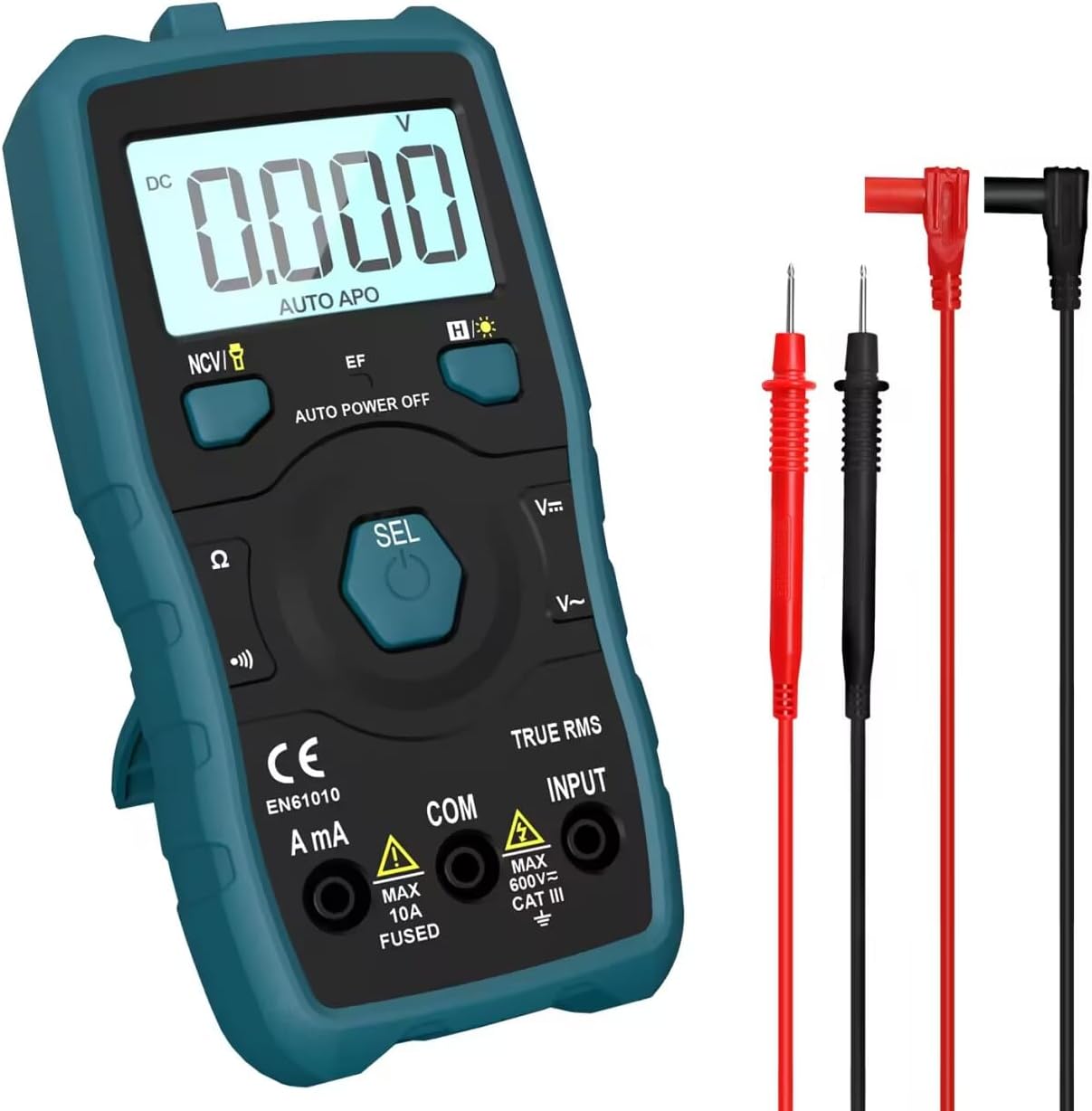
Image 1.1: HANMATEK S1 DM20 Digital Multimeter with included test leads.
2. Informazioni sulla sicurezza
ATTENZIONE: la mancata osservanza di queste istruzioni di sicurezza può causare scosse elettriche, incendi o lesioni personali.
- To prevent erroneous readings and avoid electric shock or personal injury, replace the battery as soon as the low battery voltagappare il simbolo e.
- To prevent electric shock or personal injury, turn off the device and ensure test leads are disconnected from the circuit under test before opening the battery cover to replace the battery.
- Do not measure any AC or DC voltage exceeding 600V to prevent electric shock or damage to the instrument.
- Prima dell'uso, ispezionare sempre il multimetro e i puntali per verificare la presenza di eventuali danni. Non utilizzarli se danneggiati.
- Ensure your hands are dry when operating the multimeter.
- Non utilizzare il multimetro in ambienti con presenza di gas esplosivi, vapori o polvere.
3. Caratteristiche e componenti del prodotto
The HANMATEK S1 DM20 Digital Multimeter is equipped with several features for versatile measurements. Familiarize yourself with the components shown below.
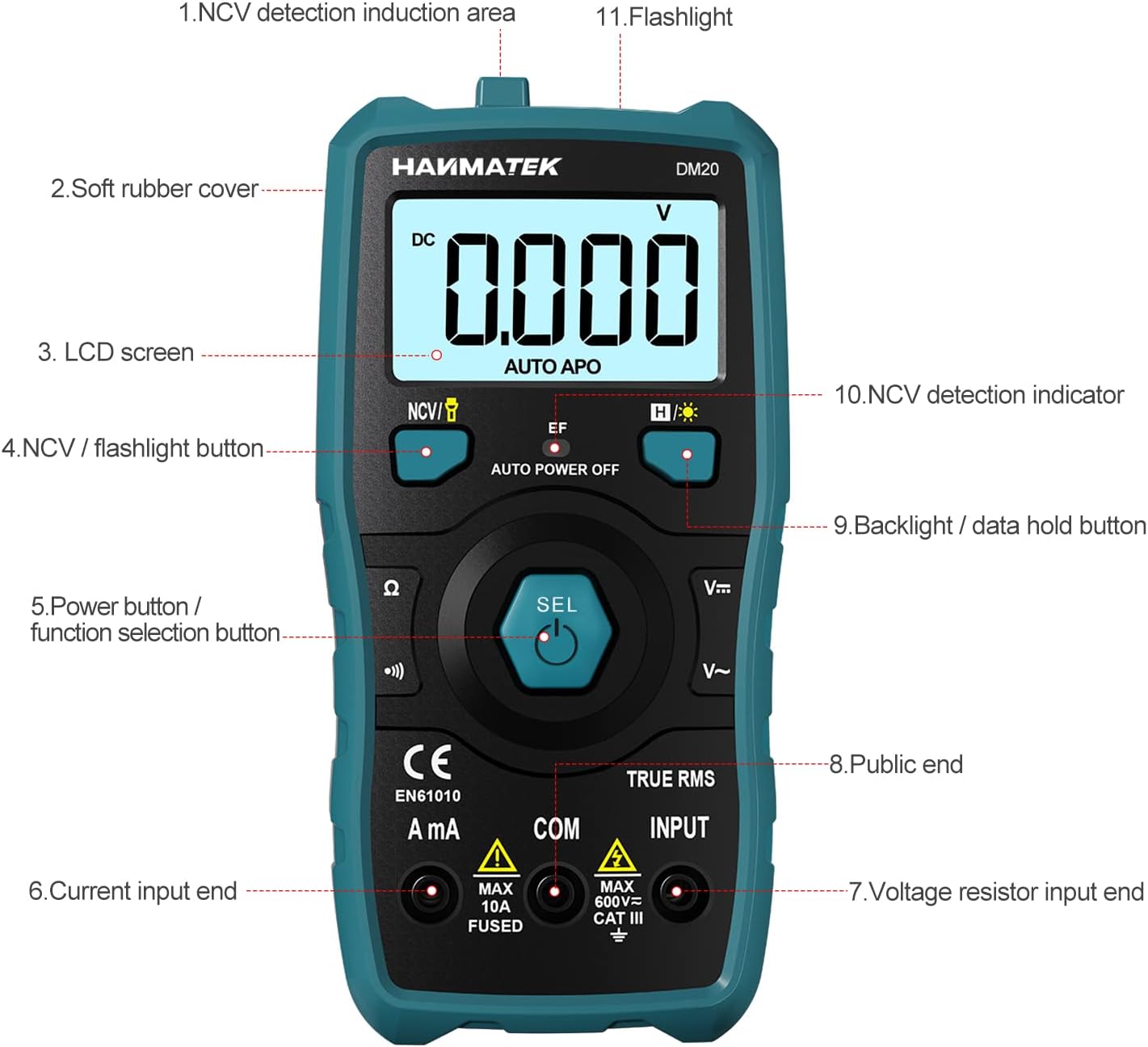
Immagine 3.1: anteriore view of the multimeter with labeled components.
- NCV Detection Induction Area
- Soft Rubber Cover
- Schermo LCD
- NCV / Flashlight Button
- Power Button / Function Selection Button (SEL)
- Current Input End (A mA)
- Voltage Resistor Input End (INPUT)
- Public End (COM)
- Backlight / Data Hold Button
- NCV Detection Indicator
- Torcia elettrica

Immagine 3.2: Passoview of multimeter functions including AC/DC Voltage, AC/DC Current, Resistance, Continuity, Backlight, Data Hold, NCV, Flashlight, and 6000 Count display.
4. Impostazione
4.1 Contenuto della confezione
Prima di iniziare, assicurati che tutti gli articoli siano presenti nella confezione:
- HANMATEK S1 DM20 Digital Multimeter
- 3 batterie AAA da 1.5 V
- Cavi di prova (rosso e nero)
- Manuale d'uso

Image 4.1: Package contents including the multimeter, batteries, test leads, and manual.
4.2 Installazione della batteria
The multimeter requires 3 x 1.5V AAA batteries. Follow these steps to install them:
- Assicurarsi che il multimetro sia spento e che i puntali di prova siano scollegati.
- Individuare il vano batteria sul retro del multimetro.
- Utilizzare un cacciavite per aprire il coperchio della batteria.
- Inserire le 3 batterie AAA, rispettando la polarità corretta (+/-).
- Riposizionare il coperchio della batteria e fissarlo con la vite.

Immagine 4.2: Dettagliata view of the multimeter's rear, showing the battery bay and stable holder.
5. Istruzioni per l'uso
The HANMATEK S1 DM20 features auto-ranging for most measurements, simplifying operation.
5.1 Accensione/spegnimento
- Premere il tasto SEL button to power on the multimeter.
- Il multimetro si spegnerà automaticamente dopo un periodo di inattività per preservare la durata della batteria.
- Per spegnere manualmente, tenere premuto il tasto SEL pulsante.
5.2 Selezione della funzione
The multimeter automatically detects the measurement type (voltage, resistance, continuity) when test leads are connected. For specific functions or to switch between AC/DC, press the SEL brevemente il pulsante.
5.3 Misurazioni di base
Collegare il puntale rosso al INGRESSO terminale e il puntale nero per il COM terminal for most measurements.
- Voltage (CA/CC): Connect test leads in parallel to the circuit or component. The multimeter will automatically detect AC or DC voltage.
- Corrente (CA/CC): Connect test leads in series with the circuit. Use the UN mA terminal for current measurements. Ensure the circuit is de-energized before connecting.
- Resistenza: Connect test leads across the component. Ensure the component is isolated from power.
- Continuità: Connect test leads across the circuit. A buzzer will sound if continuity is detected.
- Diodo: Connect test leads across the diode.
- Frequenza: Connect test leads to the signal source.

Image 5.1: Demonstrations of NCV testing, resistance test, current measuring, voltage measuring, and on-off test.
5.4 Senza contatto voltage (NCV) Rilevamento
La funzione NCV consente il rilevamento della tensione alternatatage senza contatto diretto.
- Premere il tasto NCV / Flashlight pulsante per attivare la modalità NCV.
- Place the NCV detection area (top of the multimeter) near the conductor.
- Se AC voltage is detected, the NCV LED will flash, and the buzzer will sound. The LCD screen will display segments ('-' to '----') indicating signal strength.

Image 5.2: NCV function detecting voltage in a live line versus a null line.
5.5 Retroilluminazione e blocco dati
- Retroilluminazione: Premere il tasto Backlight / Data Hold button briefly to turn the LCD backlight on/off.
- Conservazione dei dati: Premere e tenere premuto il tasto Backlight / Data Hold pulsante per congelare la lettura corrente sul display. Premere di nuovo per rilasciare.
5.6 Torcia elettrica
- Premere e tenere premuto il tasto NCV / Flashlight button to turn the built-in flashlight on/off.
6. Manutenzione
- Pulizia: Wipe the multimeter with a damp panno e detersivo delicato. Non utilizzare abrasivi o solventi.
- Magazzinaggio: Store the multimeter in a dry, cool place away from direct sunlight. If storing for extended periods, remove the batteries to prevent leakage.
- Sostituzione della batteria: Replace batteries promptly when the low battery indicator appears to ensure accurate readings. Refer to Section 4.2 for instructions.
7. Risoluzione Dei Problemi
- Nessun display/accensione: Controllare l'installazione delle batterie e assicurarsi che non siano scariche. Sostituirle se necessario.
- Letture imprecise: Ensure test leads are properly connected and not damaged. Verify the correct measurement function is selected (though auto-ranging handles most). Check battery level.
- No NCV Detection: Ensure NCV mode is activated. The detection area must be close to the AC voltage fonte.
- Auto Power Off Too Soon: This is a power-saving feature. The device will power off after a period of inactivity.
8. Specifiche
| Caratteristica | Specificazione |
|---|---|
| Numero di modello | Modello DM20 |
| Visualizza i conteggi | 4000 |
| Valutazione di sicurezza | 600V CAT II, Pollution Degree 2, IEC61010 |
| Fonte di alimentazione | 3 batterie AAA da 1.5 V |
| Dimensioni | 147 mm x 71 mm x 45 mm (7.1 x 4.5 x 14.7 cm) |
| Peso | 220 grammi |
| Caratteristiche speciali | NCV, Auto-Ranging, Data Hold, Auto Power-Off, Backlight, Flashlight |
9. Garanzia e supporto
The HANMATEK S1 DM20 Digital Multimeter comes with a Garanzia di 24 mesi dalla data di acquisto. La presente garanzia copre i difetti di fabbricazione in condizioni di normale utilizzo.
For technical support, warranty claims, or any inquiries, please contact HANMATEK customer service through their official channels or the retailer where the product was purchased. You can find more information on the HANMATEK Brand Store.