Introduction to the Hubsan Zino 2+ Drone
The Hubsan Zino 2+ is a high-performance GPS RC drone equipped with a 4K 60fps camera and a 3-axis gimbal, designed for both aerial photography and recreational flight. It offers advanced features such as 10KM FPV transmission, extended flight time, and intelligent flight modes to enhance your flying experience.
This manual provides essential information for the safe and effective operation, maintenance, and troubleshooting of your Hubsan Zino 2+ drone. Please read it thoroughly before your first flight.

Figure 1: The Hubsan Zino 2+ drone package contents, including the drone, remote control, two batteries, a carrying bag, and a set of lens filters.
Guida all'installazione
1. Disimballaggio e identificazione dei componenti
Rimuovere con attenzione tutti i componenti dall'imballaggio. Verificare che siano presenti tutti gli elementi elencati di seguito:
- ZINO 2 RC Drone
- Telecomando
- 2 x Blade sets (total 8 blades)
- 2 viti per lame
- Caricabatterie
- Cacciavite
- Remote Control USB Charging Cable
- Battery (3800mAh 4s)
- Manuale in inglese
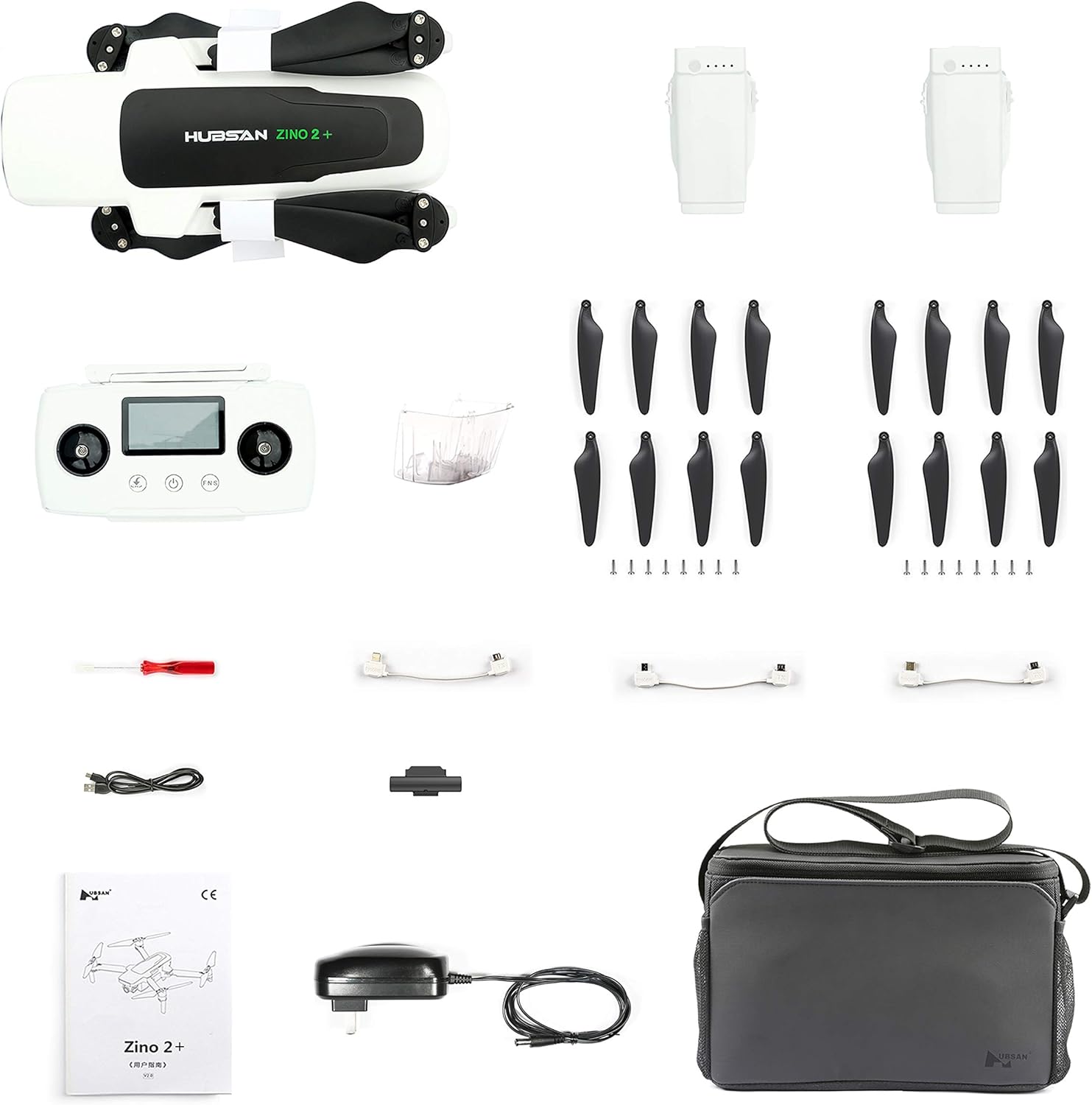
Figure 2: All included components of the Hubsan Zino 2+ drone, neatly arranged for inspection.
2. Batteria in carica
Before initial use, fully charge the drone battery and the remote control. The intelligent charger supports charging up to three batteries simultaneously. The drone battery can also function as a power bank for external power supply.
- Collegare il caricabatterie a una presa di corrente.
- Connect the drone battery(ies) to the charger.
- Connect the remote control to the charger using the USB charging cable.
- Monitor the charging indicators until all batteries are fully charged.
3. Installazione dell'elica
Attach the propellers to the drone arms using the provided screws and screwdriver. Ensure propellers are securely fastened and correctly oriented according to the markings on the drone and propellers.

Figure 3: The Hubsan Zino 2+ drone with its arms and propellers unfolded, ready for flight.
The drone features a foldable design for portability. When preparing for flight, gently unfold the arms until they lock into place. For storage, fold the arms back into the compact position.

Figure 4: The Hubsan Zino 2+ drone in its folded, compact state, ideal for transport.
Istruzioni per l'uso
1. Lista di controllo pre-volo
- Assicurarsi che le batterie del drone e del telecomando siano completamente cariche.
- Verificare che le eliche siano fissate saldamente e non danneggiate.
- Check that the 3-axis gimbal is free from obstructions and moves smoothly.
- Selezionare un'area aperta e sgombra per il volo, lontana da ostacoli, persone e spazio aereo limitato.
- Accendere il telecomando, poi il drone.
- Connect your mobile device to the remote control and launch the companion app for real-time FPV and flight data.

Figure 5: The remote control for the Hubsan Zino 2+ drone, showing its integrated display and control sticks.
2. Calibration and GPS Lock
Perform compass and IMU calibration as instructed by the app before each flight, especially when flying in a new location. Wait for a strong GPS signal lock (GPS+GLONASS+OPTICAL positioning) before takeoff to ensure stable flight and accurate return-to-home functionality.
3. Decollo e atterraggio
- Decollo automatico: Use the one-key takeoff function in the app or on the remote control. The drone will ascend to a safe hovering altitude.
- Decollo manuale: Push both control sticks down and outwards to start the motors, then slowly push the left stick up to ascend.
- Atterraggio automatico: Use the one-key landing or Return Home (RTH) function. The drone will return to its takeoff point and land automatically.
- Atterraggio manuale: Slowly pull the left stick down to descend. Ensure the landing area is clear.
4. Flight Modes and Intelligent Functions
The Hubsan Zino 2+ offers various intelligent flight modes:
- Modalità senza testa: Simplifies flight by eliminating the need to orient the drone relative to the pilot.
- Monitoraggio delle immagini: The drone will automatically follow a selected subject.
- Orbiting: The drone will circle a point of interest.
- Panorama: Captures multiple images to stitch into a wide panoramic shot.
- Iperlasso: Creates dynamic time-lapse videos.
- Acquisizione in condizioni di scarsa luminosità: Optimized settings for improved performance in low light conditions.
- Vision Auxiliary Landing: Assists with precise landings.
Video 1: A sample video demonstrating the 4K 60fps camera capabilities of the Hubsan Zino 2+ drone, showcasing aerial footage in various environments.
Manutenzione
1. Ispezione post-volo
- Inspect propellers for any cracks, bends, or debris. Replace damaged propellers immediately.
- Check the drone body and landing gear for any signs of damage.
- Ensure the gimbal and camera are clean and free from dust or dirt.
- Verify battery contacts are clean and free of corrosion.
2. Cura e conservazione della batteria
- Conservare le batterie in un luogo fresco e asciutto, lontano dalla luce solare diretta e da temperature estreme.
- Do not fully discharge batteries for long-term storage; maintain a charge level of approximately 50-60%.
- Avoid overcharging or over-discharging batteries.
3. Aggiornamenti del firmware
Regularly check for and install firmware updates via the companion app. Updates often include performance improvements, bug fixes, and new features.
Risoluzione dei problemi
Problemi comuni e soluzioni:
- Il drone non si accende: Ensure battery is fully charged and correctly inserted. Check for any physical damage to the battery or drone.
- Perdita di segnale/connessione: Ensure remote control is fully charged. Fly within the specified 10KM FPV range. Avoid areas with strong electromagnetic interference. Re-pair the drone and remote control if necessary.
- Volo instabile/deriva: Perform compass and IMU calibration. Ensure GPS lock is acquired before takeoff. Check propellers for damage or incorrect installation.
- Scarsa qualità della fotocamera: Ensure the camera lens is clean. Check camera settings in the app (resolution, bitrate). Verify sufficient lighting conditions.
- Problemi di connettività dell'app: Ensure your mobile device's operating system is up to date. Reinstall the app if problems persist. Check USB cable connection between mobile device and remote control.
For persistent issues, contact Hubsan customer support or refer to the official Hubsan websito per guide dettagliate alla risoluzione dei problemi.
Specifiche
| Caratteristica | Dettaglio |
|---|---|
| Marca | HUBSAN |
| Nome del modello | HUBSAN ZINO 2 PLUS |
| Fascia d'età (descrizione) | Adult (Manufacturer recommended age: 14 - 14 years) |
| Colore | Bianco |
| Risoluzione di acquisizione video | 3840*2160 4K (Max Bitrate: 60Mbps) |
| Tecnologia di connettività | USB, Wi-Fi |
| Livello di abilità | Intermedio |
| Peso dell'articolo | 910 grammi (2.01 libbre) |
| Capacità della batteria | 3800 milioneamp Hours (4s battery) |
| Formato di acquisizione video | MP4 |
| Tipo di controllo | Telecomando |
| Tipo di supporto | SD |
| Materiale | Plastica |
| Composizione delle celle della batteria | Ioni di litio |
| Risoluzione dell'uscita video | 1280x720 Pixels (FPV) |
| Tecnologia dei sensori ottici | CMOS (Sony 1/2.3 inch) |
| Max FPV Distance | 10 KM (Remote Control), 8 KM (Image Transmission) |
| Tempo di volo | Up to 33 minutes (cruising), 31 minutes (hovering) |
Garanzia e supporto
For warranty information, technical support, or service inquiries, please refer to the official HUBSAN webo contattare direttamente il servizio clienti. Conservare la prova d'acquisto per eventuali reclami in garanzia.
Componenti inclusi: 2 x Blade, 2 x Blade Screw, Battery, Charger, English Manual, Remote Control, Remote Control USB Charging Cable, Screwdriver, ZINO 2 RC Drone.