
1. Introduzione
Thank you for choosing the MOTOSPEED K23 Mechanical Numeric Keypad. This compact and durable keypad is designed to enhance productivity for various tasks, including data entry, accounting, and gaming. Featuring mechanical red switches and a wired USB Type-C connection, it offers reliable performance and an ergonomic design for comfortable use. This manual provides essential information for setup, operation, and maintenance to ensure optimal performance of your keypad.

Image 1.1: The MOTOSPEED K23 Mechanical Numeric Keypad, showcasing its compact design and blue LED backlighting.
2. Caratteristiche del prodotto
- Interruttori meccanici rossi: Professional mechanical red switches provide tactile feedback and quiet operation, ensuring fast and precise key functions.
- Collega e usa: No drivers required for installation. Features a convenient Type-C USB interface. Supports dedicated keys like NumLock, ESC, Tab, and Delete.
- Estrema durata: Engineered for longevity with 50 million keystrokes lifespan. Key characters are designed to never fade. The ABS construction ensures resilience under tough conditions.
- Design ergonomico: Stepped keycaps and a spring-type ergonomic design reduce wrist strain, providing comfort during extended use. Compatible with PC and desktop computers running Windows 2000 / XP / Vista / 7 / 8 / 10, Android, Linux, and iOS.
- Expand Your Desktop: This 21-key mechanical numeric keypad is ideal for laptop users, professionals in banking, financial securities, business, or anyone using keyboards without a dedicated numeric section. Its small and light form factor makes it highly portable.
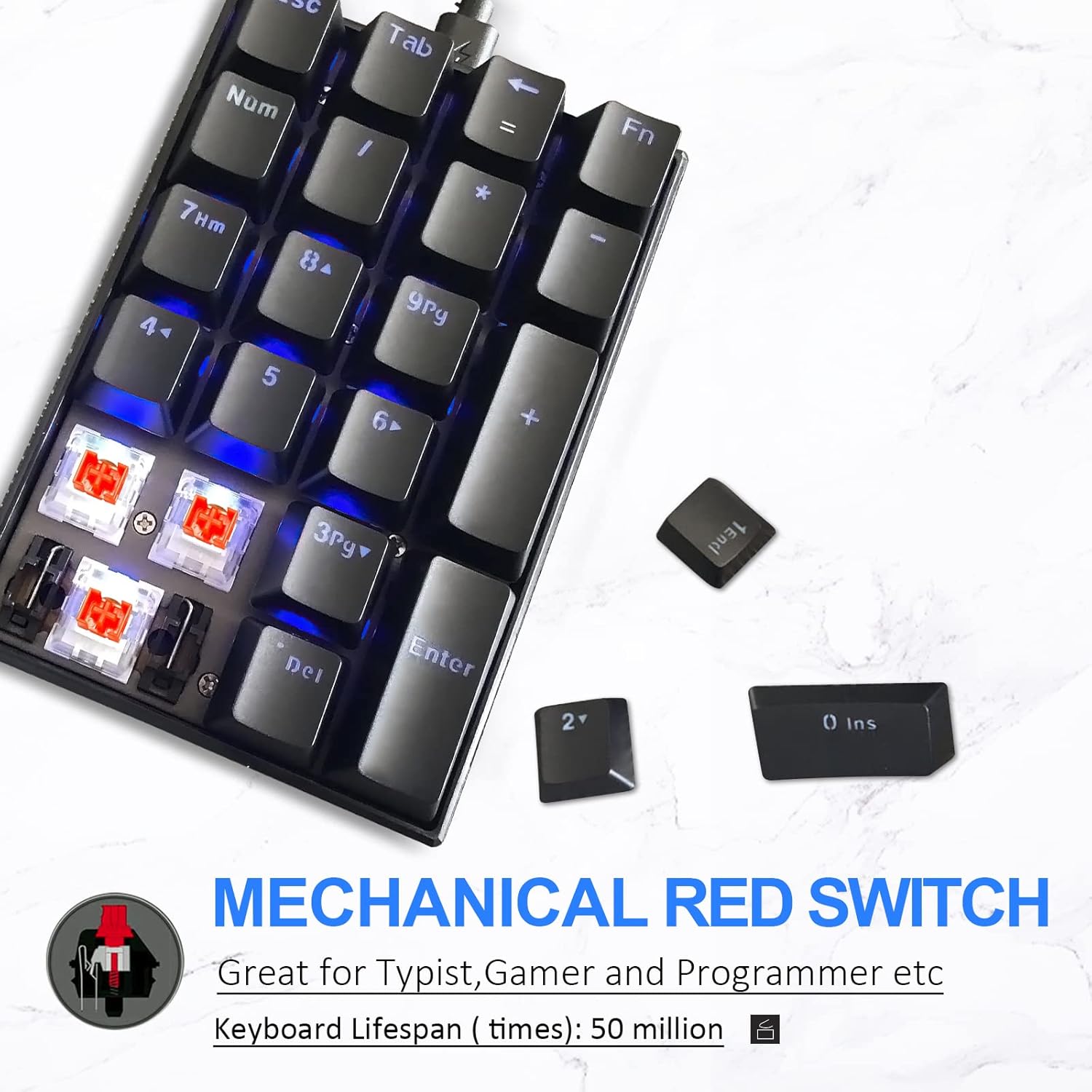
Immagine 2.1: Un dettaglio view of the mechanical red switches, highlighting their design and durability.
3. Contenuto della confezione
The MOTOSPEED K23 Mechanical Numeric Keypad package includes:
- 1 x MOTOSPEED K23 Mechanical Numeric Keypad
- 1 cavo USB di tipo C
4. Istruzioni per l'installazione
The MOTOSPEED K23 Mechanical Numeric Keypad is designed for simple plug-and-play operation. Follow these steps to set up your device:
- Individua una porta USB disponibile sul tuo computer (PC, laptop, ecc.).
- Connect the USB Type-C end of the provided cable to the port on the keypad.
- Collegare l'estremità USB-A standard del cavo alla porta USB del computer.
- The keypad will be automatically recognized by your operating system (Windows, Android, Linux, iOS) without the need for additional drivers.
- The blue LED backlighting will illuminate, indicating the keypad is powered on and ready for use.

Image 4.1: The keypad connected to a laptop, demonstrating its USB Type-C interface for easy setup.
5. Istruzioni per l'uso
5.1 Funzioni chiave
The K23 keypad features 21 keys, including standard numeric keys and extended function keys:
- Tasti numerici (0-9): Inserimento numerico standard.
- Operators (+, -, *, /): Operazioni aritmetiche standard.
- Inserisci: Confirms input or action.
- NumLock: Toggles the numeric keypad function on/off.
- ESC: Escape key, often used to cancel operations or close menus.
- Scheda: Tab key, used for navigation or indentation.
- Backspace (←): Deletes the character to the left of the cursor.
- Fn (Function Key): When pressed in combination with the Backspace key, it changes the Backspace key's function to an equals sign (=).

Image 5.1: Illustration of the FN key combined with the Backspace key to produce an equals sign (=).
5.2 Ergonomics and Usage
The keypad's ergonomic design, with its stepped keycaps and slight incline, is intended to reduce wrist fatigue during prolonged use. This makes it suitable for intensive data entry tasks in various professional environments.

Image 5.2: A user's hand demonstrating the comfortable ergonomic tilt of the keypad.
5.3 Retroilluminazione
The MOTOSPEED K23 features blue LED backlighting to enhance visibility in low-light conditions. The backlighting is static and provides a consistent glow across all keys.
5.4 Prodotto finitoview Video
Guarda questo video per una panoramica visivaview of the MOTOSPEED K23 Mechanical Numeric Keypad, demonstrating its features and design.
Video 5.1: Video ufficiale del prodotto mostratoasing the MOTOSPEED K23 Mechanical Numeric Keypad.
6. Manutenzione
To ensure the longevity and optimal performance of your MOTOSPEED K23 Mechanical Numeric Keypad, follow these maintenance guidelines:
- Pulizia: Regularly clean the keypad with a soft, dry cloth. For stubborn dirt or dust between keys, use compressed air. Avoid using harsh chemicals or abrasive materials.
- Fuoriuscite: In case of liquid spills, immediately disconnect the keypad from your computer. Turn it upside down to drain any liquid and allow it to dry completely before reconnecting. Do not attempt to use the keypad while it is wet.
- Magazzinaggio: Conservare la tastiera in un luogo fresco e asciutto, lontano dalla luce solare diretta e da temperature estreme.
- Cura del cavo: Evitare di piegare o torcere eccessivamente il cavo USB, poiché ciò potrebbe danneggiare i fili interni.
7. Risoluzione Dei Problemi
If you encounter issues with your MOTOSPEED K23 Mechanical Numeric Keypad, refer to the following common troubleshooting steps:
| Problema | Possibile causa | Soluzione |
|---|---|---|
| Tastiera non riconosciuta dal computer. | Loose connection, faulty USB port, or damaged cable. | Ensure the USB cable is securely connected to both the keypad and the computer. Try a different USB port on your computer. Test with a different USB Type-C cable if available. Restart your computer. |
| Keys are not responding or respond intermittently. | Dust/debris under keys, software conflict, or hardware issue. | Clean the keypad thoroughly, especially around the affected keys, using compressed air. Ensure NumLock is enabled if you intend to use the numeric functions. Test the keypad on another computer to rule out software conflicts. |
| Backlighting is not working. | Problema di alimentazione o guasto interno. | Ensure the keypad is properly connected and receiving power. If the issue persists, contact customer support. |
Se il problema persiste dopo aver provato queste soluzioni, consultare la sezione Garanzia e supporto per ulteriore assistenza.
8. Specifiche
| Caratteristica | Dettaglio |
|---|---|
| Dimensioni del prodotto | 3.39 x 1.65 x 0.51 pollici |
| Peso dell'articolo | 4.8 once |
| Produttore | MOTOSPEED |
| ASIN | B08516SBKL |
| Paese di origine | Cina |
| Numero modello articolo | MSK23-red |
| Dispositivi compatibili | PC |
| Tecnologia di connettività | USB |
| Descrizione della tastiera | Ergonomic |
| Usi consigliati | Gaming, Data Entry |
| Caratteristica speciale | Ergonomico, retroilluminato |
| Colore | Nero |
| Numero di chiavi | 21 |
| Supporto del colore della retroilluminazione della tastiera | Single Color (Blue LED) |
| Stile | Compatto |
9. Garanzia e supporto
The MOTOSPEED K23 Mechanical Numeric Keypad is covered by a standard manufacturer's warranty. For specific warranty terms and conditions, please refer to the documentation included with your purchase or visit the official MOTOSPEED websito.
For technical support, troubleshooting assistance beyond what is provided in this manual, or warranty claims, please contact MOTOSPEED customer service through their official channels. Keep your purchase receipt or order details handy as proof of purchase may be required.
Puoi trovare maggiori informazioni e risorse di supporto visitando il MOTOSPEED Store on Amazon.


