
1. Introduzione
This manual provides comprehensive instructions for the IMILAB CMSXJ16A Smart Home Security Camera, a product of XIAOMI. It covers setup, operation, maintenance, and troubleshooting to ensure optimal performance and security monitoring. Please read this manual carefully before using the product and retain it for future reference.
2. Prodotto finitoview
2.1 Contenuto della confezione
Verificare che tutti gli articoli siano presenti nel pacco:
- IMILAB Home Security Camera Basic x 1
- Manuale di istruzioni x 1
- Cavo di alimentazione x 1
- Power Adapter (UK/EU/US) x 1
- Wall Mounting Package x 1 (includes screws and wall plugs)
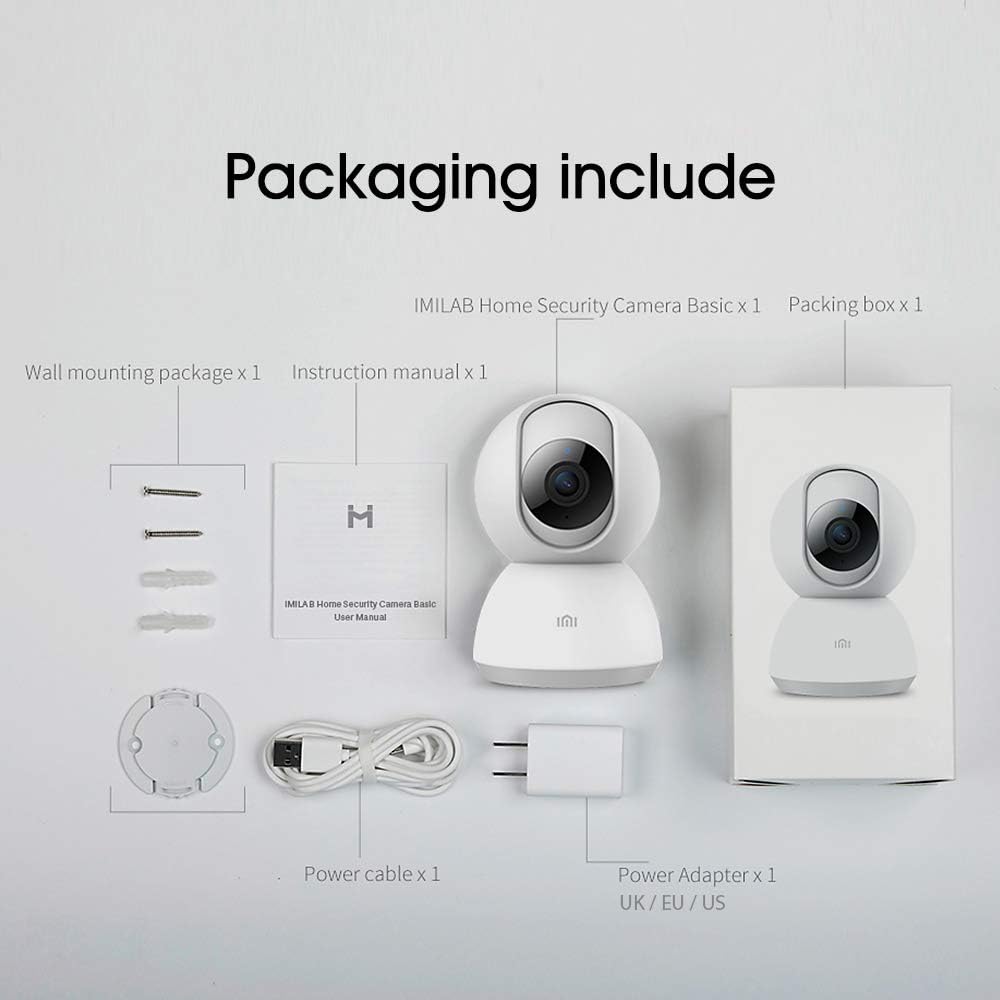
Image: Contents of the IMILAB CMSXJ16A camera package.
2.2 Componenti della fotocamera
The IMILAB CMSXJ16A camera features a compact, spherical design with a rotating base for 360-degree coverage. Key components include the lens, microphone, speaker, status indicator light, and power port.

Immagine: Frontale view of the IMILAB CMSXJ16A camera.
2.3 Caratteristiche principali
- FHD (1080P) Resolution: Provides clear and detailed image quality.
- Rotazione 360°: Offre panoramiche viewing for comprehensive area coverage.
- Glare-Free Night Vision: Equipped with F2.1 aperture and 8x 940mm infrared LEDs for a visible distance of 10m.
- Visione notturna a colori reali: Maintains full color in low light conditions, even at 100 lumens.
- Rilevamento umano AI: Advanced AI reduces unnecessary alerts by 70% for more accurate notifications.
- Crying Baby Notification: Alerts you to the sound of a crying baby.
- Molteplici opzioni di archiviazione: Supports cloud storage, up to 64GB Micro TF card, and NAS storage.
- Codifica video H.265: Efficiently compresses video, saving storage space while maintaining quality.
3. Impostazione
3.1 Accensione
- Collegare il cavo di alimentazione alla porta di alimentazione della fotocamera.
- Collega l'alimentatore a una presa elettrica standard.
- The camera will power on, and the status indicator light will begin to flash, indicating it is ready for connection.
3.2 Installazione dell'app
Download the official IMILAB Home Security app from your smartphone's app store. The app is compatible with Android 4.4 and above, and iOS 8.0 and above.
- Cercare "IMILAB Home Security" in the Google Play Store (for Android) or Apple App Store (for iOS).
- Scarica e installa l'app.
- Apri l'app e segui le istruzioni sullo schermo per creare un account o accedere.
3.3 Connessione al Wi-Fi
Follow the in-app instructions to connect your camera to your home Wi-Fi network. This typically involves scanning a QR code generated by the app with the camera's lens.
3.4 Montaggio della telecamera
The camera supports wall mounting. Use the provided wall mounting package for secure installation.
- Scegliere una posizione adatta per il montaggio, assicurando un campo libero di view e accesso a una presa di corrente.
- Use the mounting base as a template to mark drill holes on the wall.
- Praticare i fori e inserire i tasselli.
- Secure the mounting base to the wall with screws.
- Fissare la telecamera alla base di montaggio.
4. Istruzioni per l'uso
4.1 Vivere View e controllo remoto
Once connected, open the IMILAB Home Security app to access the live video feed from your camera. You can remotely control the camera's 360-degree rotation to view different areas of your space.

Immagine: Live view of the camera feed on mobile devices, demonstrating H.265 encoding efficiency.
4.2 Visione notturna
The camera automatically switches to night vision mode in low light conditions. It features glare-free infrared night vision and true color night vision for clear visibility even in very dim environments.

Image: Demonstration of glare-free and true color night vision capabilities.
4.3 AI Human Detection and Notifications
The camera utilizes AI to detect human movement, significantly reducing false alarms from pets or other non-human movements. You will receive precise notifications on your smartphone when human activity is detected.

Image: AI movement notification interface in the mobile application.
4.4 Crying Baby Detection
Enable the crying baby detection feature in the app to receive alerts if the camera detects the sound of a baby crying, providing an additional layer of monitoring for nurseries.
4.5 Registrazione e archiviazione video
The camera supports real-time video recording with multiple storage options:
- Archiviazione cloud: Subscribe to cloud services for secure off-site storage of your recordings.
- Scheda Micro TF: Insert a Micro TF card (up to 64GB, not included) into the camera for local storage.
- Archiviazione NAS: Connect the camera to a Network Attached Storage (NAS) device for expanded local storage capabilities.
4.6 Codifica video H.265
The camera uses H.265 video encoding, which allows for more efficient compression of video files. This means you can save the same quality video with approximately 50% less file size compared to H.264, optimizing storage and bandwidth usage.
5. Manutenzione
Per garantire la longevità e le prestazioni ottimali della tua fotocamera, segui queste linee guida per la manutenzione:
- Pulizia: Pulisci delicatamente l'obiettivo e il corpo della fotocamera con un panno morbido e asciutto. Non utilizzare prodotti chimici aggressivi o detergenti abrasivi.
- Posizionamento: Assicurarsi che la telecamera sia posizionata in un ambiente stabile, lontano dalla luce solare diretta, da temperature estreme e da elevata umidità.
- Aggiornamenti del firmware: Controlla regolarmente l'app per verificare la disponibilità di aggiornamenti del firmware, per assicurarti che la tua fotocamera disponga delle funzionalità più recenti e dei miglioramenti di sicurezza.
6. Risoluzione Dei Problemi
If you encounter issues with your IMILAB CMSXJ16A camera, refer to the following common solutions:
- La fotocamera non si connette: Ensure your Wi-Fi network is 2.4GHz (5GHz is not supported). Check Wi-Fi signal strength. Restart the camera and your router.
- Scarsa qualità dell'immagine: Clean the camera lens. Ensure adequate lighting in the environment. Check your internet connection speed.
- Nessuna notifica: Verify that notifications are enabled in both the camera app settings and your smartphone's system settings. Check network connectivity.
- Fotocamera non in linea: Check the power connection. Ensure your Wi-Fi network is active and the camera is within range. Restart the camera.
- Micro TF Card Not Detected: Ensure the card is inserted correctly. Format the card through the app if it's new or has issues. Use a compatible Micro TF card (up to 64GB).
7. Specifiche
| Caratteristica | Specificazione |
|---|---|
| Numero di modello | Modello CMSXJ16A |
| Dimensioni (L x P x A) | Dimensioni: 10.8 x 7.6 x 7.6 cm |
| Peso | 211 grammi |
| Risoluzione video | 1080p (FHD) |
| Campo di View / Angle of View | 360 gradi |
| Distanza di visione notturna | 10 metri |
| LED a infrarossi | 8 x 940 mm |
| Apertura | F2.1 |
| Tecnologia di connettività | Wired, Wireless (Wi-Fi 2.4GHz) |
| Fonte di alimentazione | Mains Powered (via 5V, 5W adapter) |
| Dispositivi compatibili | Smartphone (Android 4.4+, iOS 8.0+) |
| Opzioni di archiviazione | Cloud, Micro TF Card (max 64GB), NAS |
| Formato di acquisizione video | MP4 (H.265 encoding) |
| Uso interno/esterno | Al chiuso |
| Tipo di montaggio | Montaggio a parete |
8. Garanzia e supporto
Per informazioni sulla garanzia e supporto tecnico, fare riferimento al sito ufficiale IMILAB webo contattare il servizio clienti. Conservare la ricevuta d'acquisto come prova d'acquisto per eventuali reclami in garanzia.