
1. Introduzione
This manual provides detailed instructions for the installation, operation, and maintenance of the EPEVER 100A MPPT Solar Charge Controller, Tracer-AN Series. This high-power charge controller is designed for solar systems and is compatible with 12V, 24V, 36V, and 48V lead-acid and lithium batteries. It features advanced MPPT control algorithms and multiphase synchronous rectification technology (MSRT) for high efficiency and reliability.

Figura 1.1: Fronte view of the EPEVER Tracer-AN Series MPPT Solar Charge Controller. This image shows the compact design with an LCD display and control buttons.
1.1 Caratteristiche principali
- Advanced MPPT technology with ultra-fast tracking speed (no less than 99.5% tracking efficiency).
- Elevata efficienza di trasferimento CC/CC (fino al 98.6%) ed efficienza a pieno carico (fino al 98%).
- Identificazione automatica del volume del sistema 12V/24V/36V/48V DCtage.
- Compatibility with various battery types: Sealed, Gel, Flooded, and Lithium.
- Maximum input current of 100A.
- Maximum PV input power: 1250W/12V, 2500W/24V, 3750W/36V, 5000W/48V.
- Ingresso massimo voltage (circuito aperto voltage): 150V.
- Progettazione comune di messa a terra negativa.
- Funzione di compensazione della temperatura della batteria.
- Real-time energy recording and statistical function.
- Isolated RS485 interface with standard MODBUS communication protocol, supporting up to 8 units in parallel.
2. Informazioni sulla sicurezza
Please read all instructions carefully before installation and operation to ensure safe and optimal performance of the solar charge controller. Failure to follow these instructions may result in damage to the unit, personal injury, or property damage.
- During wiring, ensure the circuit breaker or fuse is open and that the leads of the positive (+) and negative (-) poles are connected correctly.
- A fuse, with a current rating 1.25 to 2 times the rated current of the controller, must be installed on the battery side. The distance from the battery should not exceed 150 mm.
- If the controller is to be used in an area with frequent lightning strikes or an unattended area, an external surge arrester must be installed.
- Se è necessario collegare un inverter al sistema, collegare l'inverter direttamente alla batteria, non al lato carico del controller.
- Assicurare una ventilazione adeguata attorno al controller per evitare il surriscaldamento.
- Non smontare o tentare di riparare il controller da soli. Contattare personale qualificato per l'assistenza.
3. Contenuto della confezione
Dopo aver aperto la confezione, verificare che tutti gli articoli elencati di seguito siano presenti e integri:
- 1 x EPEVER MPPT Solar Charge Controller (Tracer-AN Series)
- 1 x Manuale utente (questo documento)
4. Prodotto finitoview
4.1 Dimensioni
The physical dimensions of the Tracer-AN Series controller are important for planning installation space.

Figure 4.1: Dimensions of the EPEVER Tracer-AN Series controller. The controller measures approximately 119mm (H) x 261mm (L) x 216mm (W).
4.2 Identificazione dei componenti
Familiarizzare con i vari componenti e punti di collegamento del regolatore di carica solare.

Figura 4.2: dettagliata view of the controller with labeled components. Key components include:
- 1 - Charging LED indicator
- 2 - SELECT button
- 3 - Fusibile
- 4 - Grounding Terminal
- 5 - Fault LED indicator
- 6 - Schermo LCD
- 7 - ENTER button
- 8 - RBVS Port
- 9 - Utility/Generator relay ON
- 10 - RS485 port (5VDC/200mA)
- 11 - RTS Port
- 12 - Generator and load relay enable
- 13 - PV reverse polarity alarm indicator
- 14 - Load control relay
- 15 - Utility/Generator relay OFF
- 16 - PV Terminals
- 17 - Battery Terminals
4.3 Caratteristiche
The Tracer-AN series is designed with key characteristics for optimal performance and durability.

Figure 4.3: Visual representation of key characteristics. The controller features an intuitive LCD display for monitoring and settings, and a high-efficiency heat dissipation aluminum alloy casing per mantenere temperature di esercizio ottimali.
5. Installazione
Proper installation is crucial for the safe and efficient operation of your solar power system. Follow these steps carefully.
5.1 Schema elettrico
The following diagram illustrates a typical wiring setup for the EPEVER Tracer-AN Series controller in a solar power system. Ensure all connections are secure and correctly polarized.

Figura 5.1: Esample wiring diagram showing connections between solar panels (PV), the MPPT controller, batteries, and various loads (e.g., fan, TV, washing machine, computer, speakers) via an inverter. Note that the inverter connects directly to the battery bank.
5.2 Sequenza di connessione
- Collegare la batteria: Connect the battery to the controller's battery terminals (17). Ensure correct polarity (+ to + and - to -). The controller will detect the battery voltage.
- Install Battery Fuse: Install a fuse (1.25 to 2 times the rated current of the controller) on the battery positive line, within 150mm of the battery.
- Connect the Solar Panel (PV Array): Connect the solar panel array to the controller's PV terminals (16). Ensure correct polarity. The controller will begin charging the battery.
- Collegare il carico (facoltativo): If using the load output, connect your DC loads to the load terminals. For AC loads, connect an inverter directly to the battery bank, not the controller's load terminals.
- Messa a terra: Connect the grounding terminal (4) to earth ground.
- Connessioni opzionali: Connect any optional accessories such as the RS485 communication cable (10) or Remote Temperature Sensor (RTS) cable (11) as needed.
Importante: Collegare sempre prima la batteria, poi il pannello solare e infine il carico. Scollegare in ordine inverso: carico, poi pannello solare, poi batteria.
6. Istruzioni per l'uso
Once installed, the controller will automatically begin operation. The LCD display (6) provides real-time system information, and parameters can be adjusted using the SELECT (2) and ENTER (7) buttons.
6.1 Funzioni del display e dei pulsanti
The LCD displays various parameters such as battery voltage, corrente di carica, PV voltage, and more. Use the SELECT button to cycle through display screens and the ENTER button to confirm settings or enter menus.
6.2 Impostazioni dei parametri
The Tracer-AN series allows for customization of charging parameters to suit different battery types and system requirements. Refer to the detailed manual section on parameter settings for specific instructions on adjusting battery type, charging voltages, load control modes, and other advanced features. The controller supports PC software, mobile APP, and the MT-50 remote meter for monitoring and setting parameters.
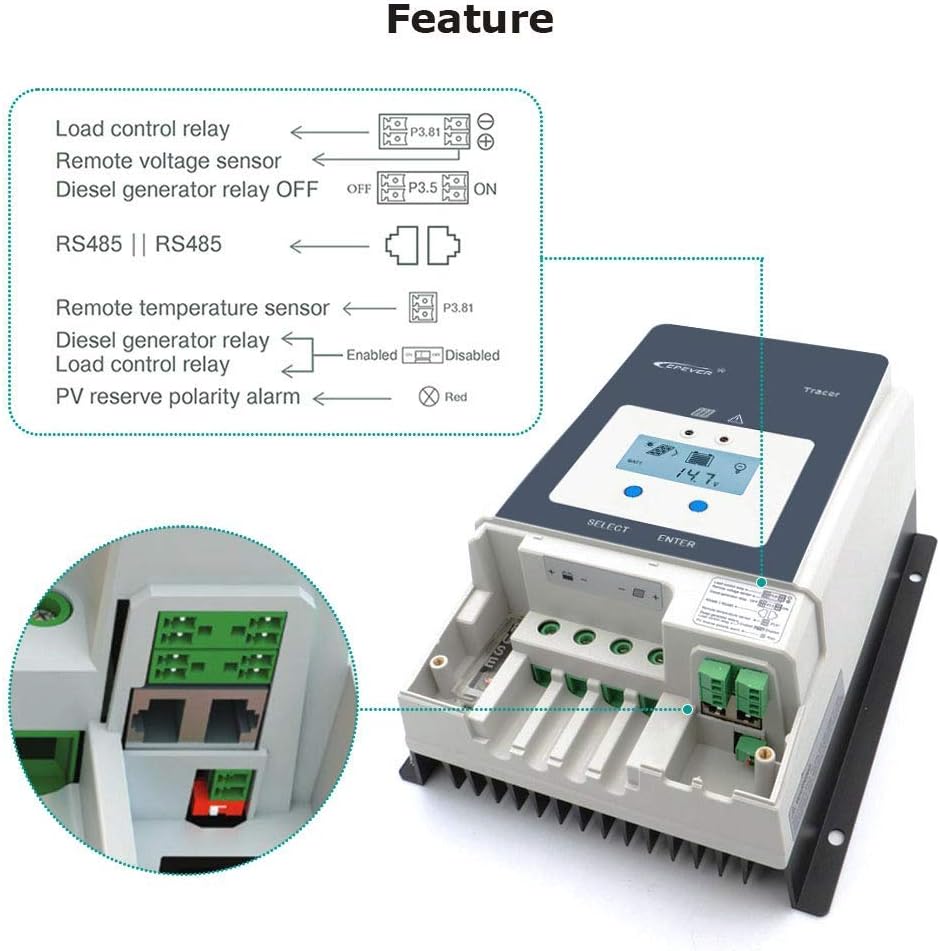
Figure 6.1: Diagram illustrating various features and connections, including Load control relay, Remote voltage sensor, Diesel generator relay control, RS485 communication, Remote temperature sensor, and PV reverse polarity alarm indication.
6.3 Es. applicazioneamples
The EPEVER Tracer-AN series is versatile and can be used in a variety of solar power applications.

Figura 6.2: Esamples of typical applications for the solar charge controller, including residential rooftop solar installations, off-grid cabins, and solar street lighting systems.
7. Specifiche
Detailed technical specifications for the EPEVER Tracer-AN Series MPPT Solar Charge Controller (Tracer10415AN model) are provided below. This table includes parameters for various models in the series for comparison.
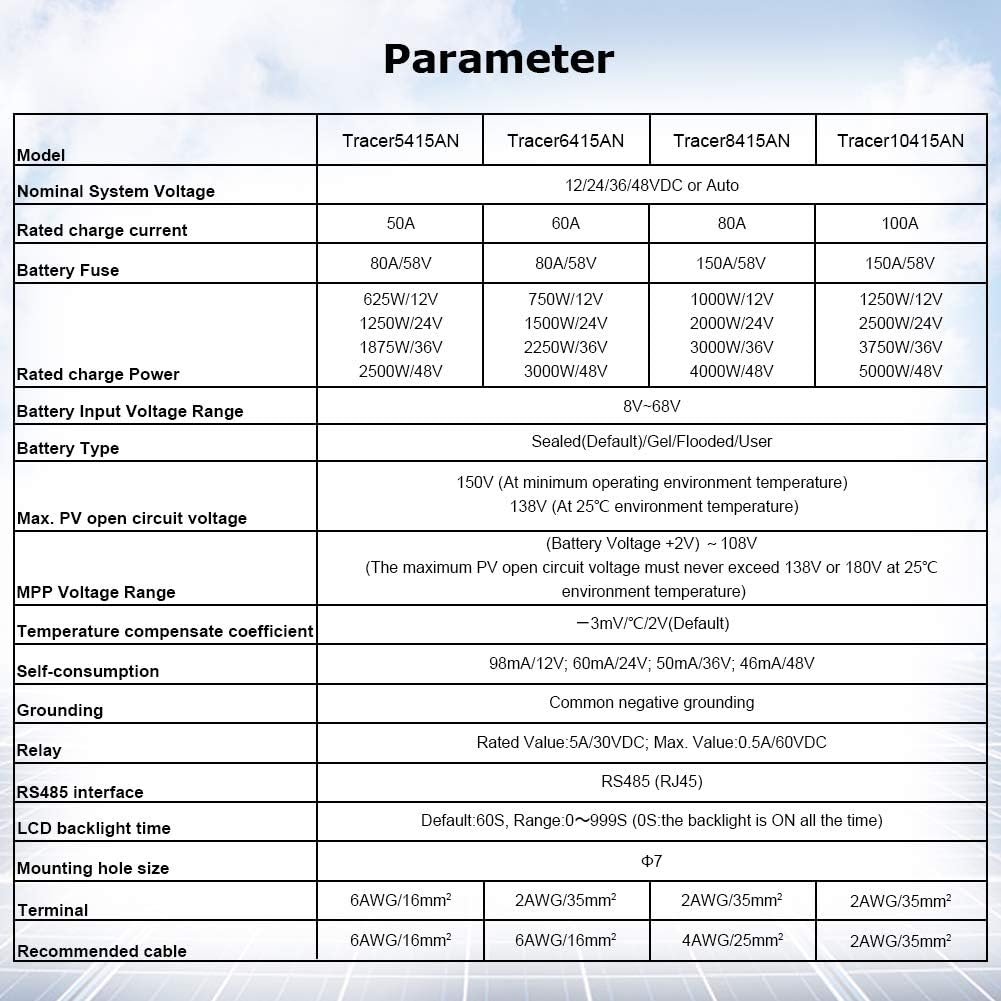
Figure 7.1: Comprehensive parameter table for Tracer-AN Series models, including Tracer5415AN, Tracer6415AN, Tracer8415AN, and Tracer10415AN. Key specifications include:
| Parametro | Tracer5415AN | Tracer6415AN | Tracer8415AN | Tracer10415AN |
|---|---|---|---|---|
| Sistema nominale Voltage | 12/24/36/48VDC o Auto | |||
| Corrente di carica nominale | 50A | 60A | 80A | 100A |
| Fusibile della batteria | 80A/58V | 80A/58V | 150A/58V | 150A/58V |
| Rated charge Power | 625W/12V, 1250W/24V, 1875W/36V, 2500W/48V | 750W/12V, 1500W/24V, 2250W/36V, 3000W/48V | 1000W/12V, 2000W/24V, 3000W/36V, 4000W/48V | 1250W/12V, 2500W/24V, 3750W/36V, 5000W/48V |
| Vol. ingresso batteriatage Gamma | 8V-68V | |||
| Tipo di batteria | Sigillato (predefinito)/Gel/Allegato/Utente | |||
| massimo FV circuito aperto voltage | 150 V (alla temperatura minima dell'ambiente operativo), 138 V (alla temperatura ambiente di 25 °C) | |||
| Volume MPPtage Gamma | (Volume batteriatage+2V) ~ 108V | |||
| Coefficiente di compensazione della temperatura | -3mV / ° C / 2V (impostazione predefinita) | |||
| Autoconsumo | 98mA/12V, 60mA/24V, 50mA/36V, 46mA/48V | |||
| Messa a terra | Messa a terra negativa comune | |||
| Staffetta | Rated Value 5A/30VDC; Max. Value: 0.5A/60VDC | |||
| Interfaccia RS485 | RS485 (RJ45) | |||
| Tempo di retroilluminazione LCD | Default: 60S, Range 0~999S (0S: the backlight is ON all the time) | |||
| Dimensioni del foro di montaggio | Φ7 | |||
| terminale | 6 AWG/16 mm² | 6 AWG/16 mm² | 2 AWG/35 mm² | 2 AWG/35 mm² |
| Cavo consigliato | 6 AWG/16 mm² | 6 AWG/16 mm² | 4 AWG/25 mm² | 2 AWG/35 mm² |
8. Manutenzione
Una manutenzione regolare garantisce la longevità e le prestazioni ottimali del tuo regolatore di carica solare EPEVER.
- Pulizia: Mantenere il controller pulito e privo di polvere e detriti. Utilizzare un panno asciutto per pulire l'esterno.
- Connessioni: Controllare periodicamente tutti i collegamenti elettrici per verificarne la tenuta e la corrosione. Collegamenti allentati possono causare surriscaldamento e prestazioni scadenti.
- Ventilazione: Ensure that the heat sink fins are not obstructed and that there is adequate airflow around the controller for proper heat dissipation.
- Indicatori: Monitor the LED indicators and LCD display for any fault codes or unusual readings. Refer to the troubleshooting section if any issues arise.
- Stato della batteria: Regularly check the health and voltage of your batteries, as their condition directly impacts the system's performance.
9. Risoluzione Dei Problemi
This section addresses common issues you might encounter with your solar charge controller. For more complex problems, contact customer support.
9.1 Problemi comuni e soluzioni
- Il controller non si carica:
- Check PV array connections and ensure solar panels are receiving sufficient sunlight.
- Verificare i collegamenti della batteria e il volumetage. Il controller richiede una carica minima della batteriatage per iniziare.
- Inspect fuses on the battery line for continuity.
- Bassa corrente di carica:
- Ensure PV array is not shaded and is clean.
- Check for loose or corroded connections in the PV or battery wiring.
- Verify that the battery type setting in the controller matches your actual battery type.
- Surriscaldamento del controller:
- Ensure adequate ventilation around the controller. Do not install in an enclosed space without airflow.
- Check if the ambient temperature exceeds the controller's operating range.
- Verify that the PV input power does not exceed the controller's maximum rated power.
- Battery Not Holding Charge / BMS Tripping:
- As noted by a user, ensure all batteries in a bank are balanced and at similar voltage levels, especially for multi-battery systems. Imbalanced batteries can cause issues with the Battery Management System (BMS) and affect charging.
- Verify battery health and age.
9.2 Domande frequenti (FAQ)
- Q: How to choose a solar controller with the appropriate specifications?
- A: The controller you purchase must meet two conditions:
- The rated current of the controller must be greater than (the power of the solar panel divided by the voltage of the battery).
- Il circuito aperto voltage of the controller must be greater than the open circuit voltage of your solar panel, and both must be greater than the voltage della tua batteria.
10. Garanzia e supporto
I prodotti EPEVER sono progettati per garantire affidabilità e prestazioni. Per i termini e le condizioni di garanzia specifici, consultare la scheda di garanzia inclusa con il prodotto o visitare il sito ufficiale EPEVER. websito.
For technical support, troubleshooting assistance, or service inquiries, please contact EPEVER customer support through their official channels. You can also visit the Negozio EPEVER su Amazon per ulteriori risorse e informazioni di contatto.