
Shelly 3800235262009
Manuale utente dell'interruttore relè WiFi wireless Shelly 1
Modello: 3800235262009
Marca: Shelly
Introduzione
The Shelly 1 is a compact, UL-certified Wi-Fi smart relay switch designed for home automation. It features a single channel with a maximum current capacity of 15A, enabling you to control and manage a wide range of home appliances, electric circuits, and office equipment. Its small size allows for installation behind most wall switches or sockets, making it a versatile solution for integrating smart control into your existing electrical infrastructure.
Informazioni sulla sicurezza
Importante: Before beginning any installation, ensure the main power supply is turned off at the circuit breaker to prevent electrical shock. All electrical work should be performed by a qualified electrician or in accordance with local electrical codes and regulations. Do not exceed the maximum load ratings specified for the device. Keep the device away from water and extreme temperatures. This device is intended for indoor use only unless otherwise specified for a particular enclosure.
Cosa c'è nella scatola
- 1 x Shelly 1 UL (2 pack)
- Manuale d'uso
Prodotto finitoview

The Shelly 1 UL smart relay switch, shown here as a two-pack. These compact devices enable smart control over your electrical circuits.

The Shelly 1 is designed to be compact, measuring approximately 42mm in diameter and 36mm in height, allowing it to fit in tight spaces.
Caratteristiche principali:
- Certificato UL: Garantisce il rispetto degli standard di sicurezza.
- Single Channel Relay: Controls one electrical circuit.
- Alta capacità di corrente: Supports up to 15A.
- Funziona tramite Wi-Fi: Connects directly to your home Wi-Fi network (2.4GHz only), no separate hub required.
- Design compatto: Si adatta alla maggior parte degli interruttori e delle prese a muro.
- Contatti asciutti: Allows control of both AC and DC circuits, including low-voltage applicazioni.
- Alimentazione flessibile: Supports 110-240V AC and 24-60V DC / 12V DC.
- Pianificazione: Set custom weekly or daily schedules for automated operation.
- Ampia compatibilità: Works with popular smart home platforms like Google Assistant, SmartThings, Amazon Alexa, and Home Assistant.
- Apri API: Supports MQTT, CoAP, HTTP, and REST API for advanced integration.
Configurazione e installazione
The Shelly 1 is designed for easy integration into your existing electrical system. Always ensure power is disconnected before installation.
Schemi elettrici:
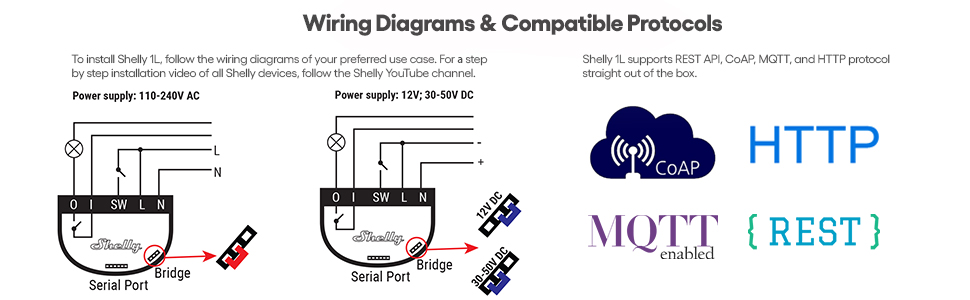
This image illustrates typical wiring configurations for the Shelly 1, showing connections for both 110-240V AC and 12V/30-50V DC power supplies. Ensure correct L, N, SW, I, and O connections based on your specific setup.

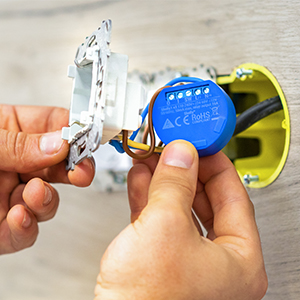
The compact design allows the Shelly 1 to be installed directly behind an electrical socket or light switch, integrating seamlessly into your wall box.
Configurazione dell'app:
- Scarica il Controllo intelligente Shelly app from your device's app store (available on App Store, Google Play, AppGallery).
- Ensure your phone's Location and Local Network permissions are enabled for the Shelly app.
- Apri l'app e segui le istruzioni visualizzate sullo schermo per aggiungere un nuovo dispositivo.
- The Shelly 1 supports only a 2.4GHz Wi-Fi network. Ensure your phone is connected to a 2.4GHz network during setup.
- You can scan the barcode on the device packaging or manually include the device in your Wi-Fi network.
- Once connected, the app will guide you through naming the device and assigning it to a room or group.

Installation is designed to be straightforward, fitting easily into standard electrical boxes.

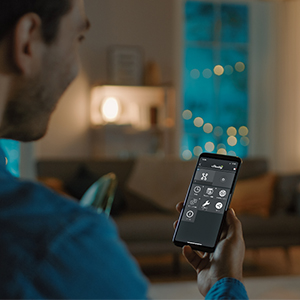
The Shelly Smart Control app provides an intuitive interface for managing your devices without needing a separate hub.
Istruzioni per l'uso
Once installed and connected to your Wi-Fi network, the Shelly 1 can be controlled via the Shelly Smart Control app or integrated with other smart home systems.
Utilizzo dell'app Shelly Smart Control:
The Shelly Smart Control app offers comprehensive control and monitoring capabilities for your Shelly devices. It allows you to:
- Telecomando: Turn devices on/off from anywhere.
- Orari personalizzati: Set specific times for devices to activate or deactivate.
- Timer intelligenti: Implement countdown or recurring timers.
- Notifiche in tempo reale: Receive alerts for automated events.
- Personalized Scenes: Combine multiple Shelly devices to trigger actions based on specific conditions (e.g., 'Good Morning' scene).
- Monitoraggio energetico: (Note: Shelly 1 does not have built-in power metering, but other Shelly devices do. This feature applies to compatible Shelly devices.)
Control your home lighting remotely through the Shelly app.
Automate and control your garage door from your smartphone.

Manage your irrigation system with smart schedules and timers.
Manutenzione
The Shelly 1 is designed for long-term, maintenance-free operation. However, to ensure optimal performance and longevity:
- Mantenere il dispositivo libero da polvere e detriti.
- Ensure proper ventilation if installed in an enclosed space, though its low heat generation typically prevents overheating.
- Periodically check electrical connections for tightness, especially after initial installation.
- Keep the device's firmware updated through the Shelly Smart Control app to benefit from the latest features and security improvements.
Risoluzione dei problemi
Problemi comuni e soluzioni:
- Dispositivo non trovato durante l'installazione:
Ensure your phone's Location and Local Network permissions are enabled for the Shelly app. Verify that your phone is connected to a 2.4GHz Wi-Fi network, as Shelly 1 devices only support this frequency. If issues persist, try power cycling the Shelly device by turning off and on the circuit breaker it's connected to. - Connectivity Issues (Offline/Unavailable):
Poor Wi-Fi signal strength can cause intermittent connectivity. Try repositioning your Wi-Fi router or the Shelly device if possible to improve signal. Ensure there are no physical obstructions or interference sources. Firmware updates can sometimes resolve connectivity stability issues. If the device remains offline, a factory reset might be necessary (consult the Shelly support resources for specific reset procedures). - Difficulty Fitting Wires:
The terminals are designed for standard wire gauges. If using 12 AWG solid wire, which can be thick, ensure the wire ends are straight and not frayed. Some users have found lightly flattening the wire end into an oval shape can help it fit more securely into the terminal. Always ensure a secure connection to prevent overheating and potential hazards. If unsure, consult a qualified electrician. - Il dispositivo non risponde:
Check the power supply to the device. Verify that the physical switch connected to the Shelly 1 (if any) is functioning correctly. If the device is accessible via its local IP address in a web browser, check its status and settings there.
Specifiche
| Attributo | Valore |
|---|---|
| Numero di modello | 3800235262009 |
| Dimensioni del pacco | 2.52 x 2.48 x 1.73 pollici; 2.4 once |
| ASIN | B07YLRX7P2 |
| Produttore | Allterco Robotica EOOD |
| Data prima disponibilità | 1 ottobre 2019 |
| Tipo di connettore | Vite |
| Materiale di contatto | Acciaio |
| Tipo di contatto | Normalmente aperto |
| Valutazione attuale | 15 Amps |
| Tipo di montaggio | Flush Mount |
Garanzia e supporto
Shelly fornisce un Garanzia del dispositivo di 2 anni for the Shelly 1. For professional support and assistance with your Shelly devices, you can reach out to Shelly Customer Service.
Additionally, Shelly fosters a large and active community where users can share knowledge and help each other. You can join their Facebook support group for community-driven assistance: Shelly Official Community Group.
For a more detailed user guide, you can refer to the official PDF document: Shelly 1 User Guide (PDF).