
1. Introduzione
Thank you for choosing the Wendry 9601G Car Stereo. This multimedia player is designed to enhance your in-car entertainment and connectivity. It features a 7-inch high-definition touchscreen, Bluetooth for hands-free calls and music streaming, and support for various media formats via USB and TF card. This manual provides essential information for installation, operation, maintenance, and troubleshooting to ensure optimal performance and user satisfaction.
2. Informazioni sulla sicurezza
- Leggere attentamente tutte le istruzioni prima dell'installazione e del funzionamento.
- Installation should be performed by a qualified technician to prevent damage to the unit or vehicle.
- Non utilizzare l'unità in modo da distrarti dalla guida. Dare sempre priorità alla sicurezza stradale.
- Evitare di esporre l'unità a temperature estreme, alla luce solare diretta per periodi prolungati o all'umidità.
- Use only specified power supply (DC12V). For 24V systems, a transformer is required.
- Non tentare di smontare o modificare l'unità. Ciò potrebbe invalidare la garanzia e causare danni.
3. Contenuto della confezione
Verificare che tutti gli articoli siano presenti nel pacco:
- 1 x Main Unit (Wendry 9601G Car Stereo)
- 1 x telecomando a infrarossi
- 1 x Manuale di istruzioni (questo documento)
- 1 x cavo di alimentazione
- 1 x Disassembly Tool
- 1 x Reversing Camera Kit
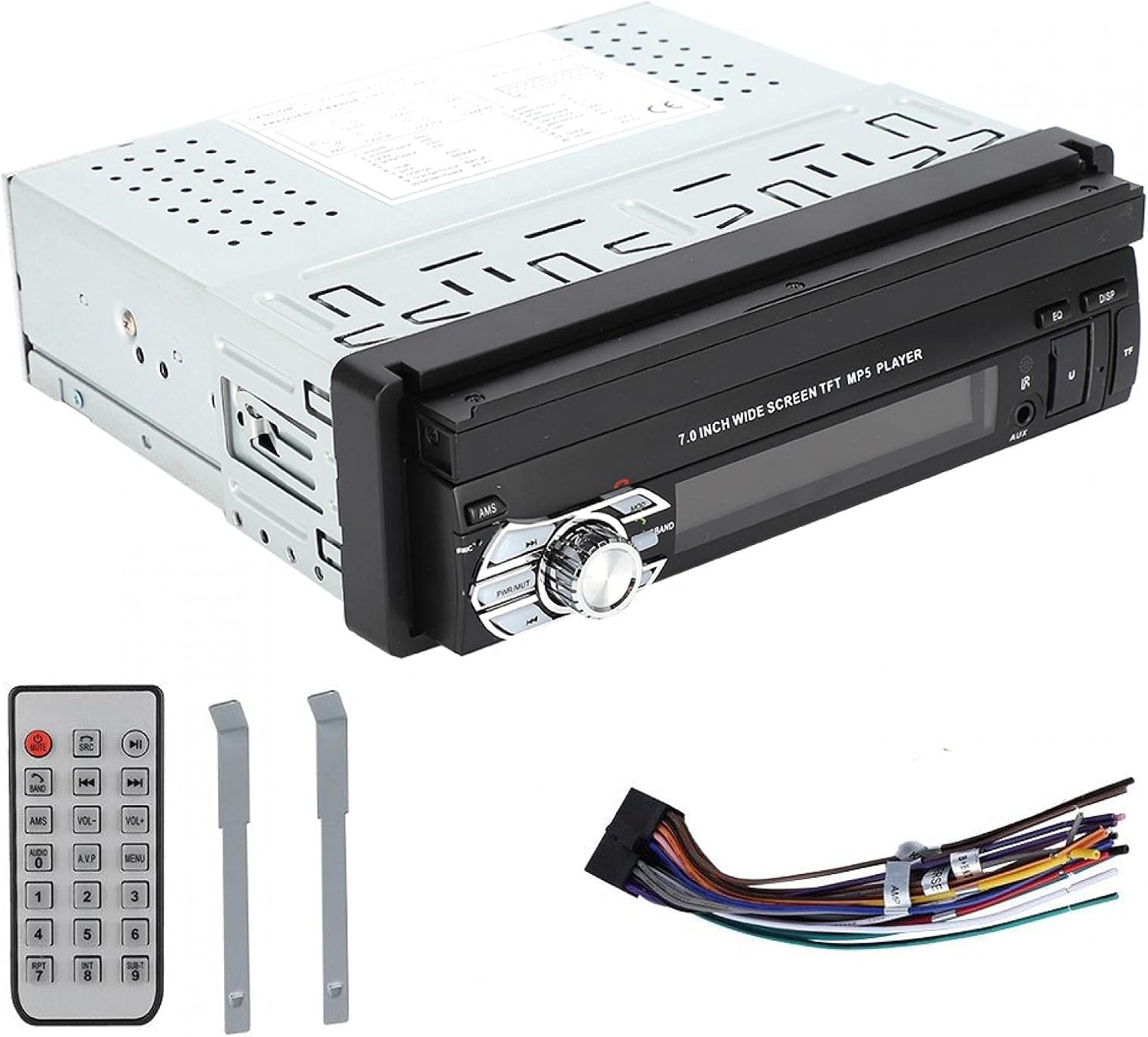
Image: Included accessories: remote control, wiring harness, and disassembly tools.
4. Prodotto finitoview
The Wendry 9601G is a single DIN car multimedia player featuring a retractable 7-inch touchscreen. It supports various audio and video formats, Bluetooth connectivity, and includes inputs for USB, TF card, and a reverse camera.
Caratteristiche principali:
- 7-inch High-Definition Retractable Touchscreen
- Bluetooth per chiamate in vivavoce e streaming musicale
- Supports 24-bit 96kHz WAV audio format for high-fidelity sound
- USB 2.0 Interface for U disks and mobile hard drives
- Slot per scheda TF per la riproduzione multimediale
- Reverse Video Input with reversing priority (requires compatible camera)
- Dynamic Menu Interface

Image: The Wendry 9601G car stereo with its 7-inch screen extended, showing multimedia playback.

Immagine: Frontale view of the car stereo with the screen retracted, showing the 'BT AUDIO' display.
5. Configurazione e installazione
5.1 Schema elettrico
Refer to the wiring diagram provided on the unit's casing or in the separate wiring guide for correct connections. Incorrect wiring can cause damage to the unit or your vehicle's electrical system.

Immagine: Posteriore view of the car stereo, illustrating the connection ports for power, audio, video, and reverse camera input.
5.2 Passaggi generali di installazione
- Scollegare la batteria: Prima di iniziare, scollegare il terminale negativo della batteria del veicolo per evitare cortocircuiti.
- Rimuovere la vecchia unità: Rimuovere con cautela l'autoradio esistente utilizzando gli strumenti appropriati.
- Collegare il cablaggio: Connect the power cable, speaker wires, antenna, and any other necessary cables (e.g., reverse camera, external amplifier) to the new unit according to the wiring diagram. Ensure all connections are secure.
- Funzionalità di prova: Before fully mounting, reconnect the battery and briefly test the unit's basic functions (power on/off, audio, screen operation).
- Unità di montaggio: Slide the stereo into the single DIN slot and secure it using the provided mounting brackets or screws.
- Ricollegare la batteria: Ricollegare il terminale negativo della batteria.
6. Istruzioni per l'uso
6.1 Accensione/spegnimento e funzionamento dello schermo
- Energia: Press the power button (usually labeled PWR/MUTE) to turn the unit on or off.
- Retrazione dello schermo: The 7-inch screen is retractable. Use the dedicated button or menu option to extend or retract the screen.
- Schermo tattile: Navigate through menus and control functions by touching the icons on the screen.

Image: The car stereo's screen extended, showing video playback.
6.2 Connettività Bluetooth
- Abilita Bluetooth: On the stereo, navigate to the Bluetooth menu. Ensure Bluetooth is enabled on your mobile device.
- Abbinamento: Cercare available devices on your mobile phone. Select "9601G" (or similar device name) from the list. Enter the default PIN (usually "0000" or "1234") if prompted.
- Chiamate in vivavoce: Una volta effettuato l'abbinamento, è possibile effettuare e ricevere chiamate direttamente tramite lo stereo.
- Streaming di musica: Play music from your paired device, and control playback (play/pause, skip) via the stereo's touchscreen or remote control.
6.3 Riproduzione multimediale (scheda USB/TF)
- Inserisci supporto: Insert a USB drive into the USB 2.0 port or a TF card into the TF card slot.
- Seleziona fonte: On the stereo, select the USB or TF card source from the main menu.
- Sfogliare Files: Use the touchscreen to browse and select audio or video files per la riproduzione.
- Ricarica USB: The USB port supports high current output, allowing you to charge most mobile phones.

Image: The car stereo's USB port can charge mobile phones.
6.4 Ingresso telecamera posteriore
If a compatible reverse camera is connected, the stereo will automatically switch to the camera view when the vehicle is put into reverse gear. This feature provides reversing priority for enhanced safety.
7. Manutenzione
- Pulizia dello schermo: Utilizzare un panno morbido e privo di lanugine per pulire delicatamente il touchscreen. Non utilizzare detergenti abrasivi o solventi.
- Pulizia generale: Mantenere l'unità libera da polvere e detriti. Utilizzare un panno morbido e asciutto per pulire il corpo principale.
- Evitare i liquidi: Non versare liquidi sull'unità.
- Temperatura: Evitare di lasciare l'unità in condizioni di caldo o freddo estremi per periodi prolungati.
8. Risoluzione Dei Problemi
| Problema | Possibile causa | Soluzione |
|---|---|---|
| L'unità non si accende. | Cablaggio errato; fusibile bruciato; problema alla batteria del veicolo. | Controllare i collegamenti di alimentazione; ispezionare la scatola dei fusibili del veicolo; verificare la carica della batteria. |
| Nessun suono. | Volume troppo basso; Disattivazione audio attivata; Cablaggio degli altoparlanti non corretto. | Aumentare il volume; Disattivare l'audio; Controllare i collegamenti degli altoparlanti. |
| Il Bluetooth non si connette. | Bluetooth not enabled; Device out of range; Pairing issue. | Ensure Bluetooth is on for both devices; Bring devices closer; Re-attempt pairing. |
| Scheda USB/TF non riconosciuta. | Formato non supportato; danneggiato files; Loose connection. | Controllo file formats; Try a different USB/TF card; Ensure secure connection. |
| La telecamera posteriore non viene visualizzata. | Telecamera non collegata; Cablaggio errato; Telecamera difettosa. | Verify camera connection; Check reverse trigger wire; Test camera functionality. |
Se i problemi persistono dopo aver provato queste soluzioni, contattare l'assistenza clienti.
9. Specifiche
| Marca | Wendry |
| Modello | 9601G |
| Volume di alimentazionetage | DC12V (24V requires transformer) |
| Dimensioni dello schermo | 7 pollici |
| Tecnologia di connettività | Bluetooth, USB |
| Dispositivi compatibili | Smartphone, Tablet, Computer personale |
| Caratteristiche speciali | Schermo tattile |
| Modalità di uscita audio | Stereo |
| Dimensioni del prodotto | 18.4 x 17.8 x 6.2 cm (7.2 x 7.0 x 2.4 pollici) |
| Peso del prodotto | 1.42 kg (59.3 once) |

Image: Dimensions of the Wendry 9601G car stereo.
10. Garanzia e supporto
For warranty information, please refer to the documentation provided at the time of purchase or contact your retailer. If you encounter any issues or require technical assistance, please reach out to Wendry customer support through the official channels provided by your seller.